In the previous two articles, the ball performed free fall and parabolic motion. Today, we will control the ball to complete a jumping adventure game using the space key.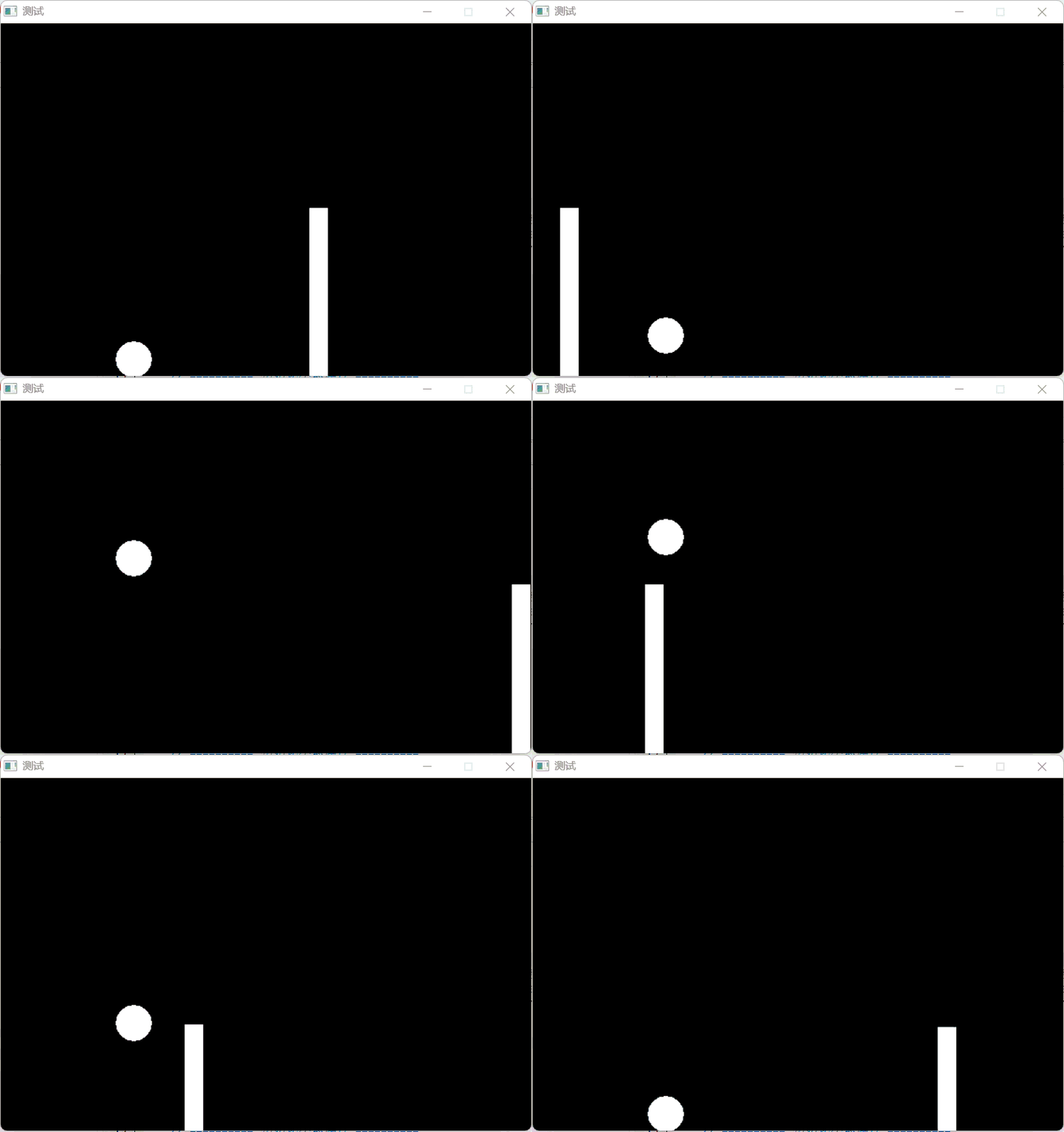 In this game, players need to control a jumping ball to avoid moving obstacles. As the game progresses, the obstacles will continuously reset, and players need to score as high as possible.1. Include Header Files
#include <graphics.h>  // EasyX graphics library
#include <conio.h>     // Console input/output
#include <windows.h>   // Handle keyboard input
2. Variable Initialization
float width, height, gravity;           // Window width, height, gravity coefficient
float ball_x, ball_y, ball_vy, radius;  // Ball x-coordinate, y-coordinate, y-axis speed, radius
float rect_left_x, rect_top_y, rect_width, rect_height, rect_vx; // Obstacle parameters
Defines variables for the game window size, gravity coefficient, ball position and speed, and obstacle properties.3. Game InitializationInitialize the window, ball properties, and obstacle properties respectively.
// ========== Initialize Game Window ==========
width = 600;    // Set window width to 600 pixels
height = 400;   // Set window height to 400 pixels
gravity = 0.6;  // Set gravity acceleration to 0.6 pixels/frame²
initgraph(width, height);  // Create a graphics window of specified size
// ========== Initialize Ball Properties ==========
radius = 20;                 // Ball radius 20 pixels
ball_x = width / 4;          // Ball initial x position: 1/4 from the left of the window
ball_y = height - radius;    // Ball initial y position: bottom of the window (touching the ground)
ball_vy = 0;                 // Ball initial vertical speed is 0
// ========== Initialize Obstacle Properties ==========
rect_height = 100;                  // Obstacle height 100 pixels
rect_width = 20;                    // Obstacle width 20 pixels
rect_left_x = width * 3 / 4;        // Obstacle initial x position: 3/4 from the right of the window
rect_top_y = height - rect_height;  // Obstacle top y-coordinate (from the ground upwards)
rect_vx = -3;                       // Obstacle moving speed to the left: 3 pixels/frame
4. Mark Ball State
bool onGround = true; Marks whether the ball is on the ground; the ball can only jump when it is on the ground.5. Keyboard Input Handling
if (GetAsyncKeyState(VK_SPACE) & 0x8000)  // Check space key state
{    spacePressed = true;  // If the space key is pressed, set the flag to true}
The GetAsyncKeyState function is a Windows API function. Calling the GetAsyncKeyState function queries the immediate state of the space key. If the space key is pressed, the result of (GetAsyncKeyState(VK_SPACE) & 0x8000) is a non-zero value; if the space key is not pressed, the result is 0.In C++, the condition of the if statement is “non-zero is true”. Therefore, only when the result is non-zero will the if condition be satisfied, and spacePressed will be set to true.6. Jump Logic Processing
if (spacePressed && onGround)  // If the space key is pressed and the ball is on the ground
{    ball_vy = -17;   // Give the ball an upward speed (negative value indicates upward)
    onGround = false; // Mark the ball as leaving the ground}
When the player presses the space key and the ball is on the ground, give the ball an upward speed (-17) and mark the ball as not on the ground.7. Physics System
ball_vy = ball_vy + gravity;  // Apply gravity: speed increases by gravity value
ball_y = ball_y + ball_vy;    // Update ball position: position increases by speed
Every frame, the ball’s speed is affected by gravity and increases, and the position is updated based on speed, achieving the physical effect of jumping and falling.8. Ground Collision Detection
if (ball_y >= height - radius)  // If the ball reaches or is below the ground position
{    ball_vy = 0;                    // Reset vertical speed to 0
    ball_y = height - radius;       // Lock the ball position at the ground
    onGround = true;                // Mark the ball as on the ground
} else  // If the ball is in the air
{    onGround = false;  // Mark the ball as not on the ground}
When the ball reaches or is below the ground position, reset its speed and lock its position at the ground.9. Obstacle Update
rect_left_x = rect_left_x + rect_vx;  // Update obstacle position
// If the obstacle completely leaves the left side of the screen
if (rect_left_x <= 0)
{    rect_left_x = width;  // Reset the obstacle to the right side of the screen
    score = score + 1;   // Increase player score
    // Randomly generate new obstacle height: between 1/4 to 1/2 of window height
    rect_height = rand() % int(height / 4) + height / 4;
    // Randomly generate new obstacle speed: between -7 to -3 (moving left)
    rect_vx = rand() / float(RAND_MAX) * 4 - 7;
}
Obstacles move to the left, and when they completely leave the screen, they reset to the right side, increase the score, and randomly generate new height and speed.10. Ball and Obstacle Collision Detection
if ((rect_left_x <= ball_x + radius) &&
    (rect_left_x + rect_width >= ball_x - radius) &&
    (height - rect_height <= ball_y + radius))
{    Sleep(100);  // Pause for 100 milliseconds after collision to enhance game feedback
    score = 0;   // Reset score to 0 (game restarts)
}
When the ball overlaps with the obstacle, pause for 100 milliseconds and reset the score. The three overlapping conditions are: 1. Obstacle left edge <= ball right edge; 2. Obstacle right edge >= ball left edge; 3. Obstacle top >= ball bottom.Finally, each frame should first clear the screen, then draw the ball and obstacles.Complete Code Display:
#include <graphics.h>  // EasyX graphics library, provides graphics drawing functions
#include <conio.h>     // Console input/output, used for keyboard detection
#include <windows.h>   // Windows API, used for Sleep and other functions
int main()
{    // ========== Game Parameter Definition ==========    float width, height, gravity;           // Window width, height, gravity coefficient    float ball_x, ball_y, ball_vy, radius;  // Ball x-coordinate, y-coordinate, y-axis speed, radius    float rect_left_x, rect_top_y, rect_width, rect_height, rect_vx; // Obstacle parameters    int score = 0;                          // Player score
    // ========== Initialize Game Window ==========    width = 600;    // Set window width to 600 pixels    height = 400;   // Set window height to 400 pixels    gravity = 0.6;  // Set gravity acceleration to 0.6 pixels/frame²    initgraph(width, height);  // Create a graphics window of specified size
    // ========== Initialize Ball Properties ==========    radius = 20;                           // Ball radius 20 pixels    ball_x = width / 4;                    // Ball initial x position: 1/4 from the left of the window    ball_y = height - radius;              // Ball initial y position: bottom of the window (touching the ground)    ball_vy = 0;                           // Ball initial vertical speed is 0
    // ========== Initialize Obstacle Properties ==========    rect_height = 100;                     // Obstacle height 100 pixels    rect_width = 20;                       // Obstacle width 20 pixels    rect_left_x = width * 3 / 4;           // Obstacle initial x position: 3/4 from the right of the window    rect_top_y = height - rect_height;     // Obstacle top y-coordinate (from the ground upwards)    rect_vx = -3;                          // Obstacle moving speed to the left: 3 pixels/frame
    // ========== Game State Variables ==========    bool onGround = true;  // Mark whether the ball is on the ground, used to limit jumping in the air
    // ========== Game Main Loop ==========    while (1)  // Infinite loop until the player closes the window    {        // ========== Keyboard Input Detection ==========        bool spacePressed = false;  // Mark whether the space key is pressed
        // Method 1: Use GetAsyncKeyState to detect keys (more reliable)
        if (GetAsyncKeyState(VK_SPACE) & 0x8000)  // Check space key state        {            spacePressed = true;  // If the space key is pressed, set the flag to true        }
        // Method 2: Use kbhit as a backup detection method        if (_kbhit())  // Check if there are keys in the keyboard buffer        {            char input = _getch();  // Get the pressed character            if (input == ' ')       // If it is the space key            {                spacePressed = true;  // Set the flag to true            }        }
        // ========== Jump Logic Processing ==========        if (spacePressed && onGround)  // If the space key is pressed and the ball is on the ground        {            ball_vy = -17;   // Give the ball an upward speed (negative value indicates upward)            onGround = false; // Mark the ball as leaving the ground        }
        // ========== Physics Engine Update ==========        ball_vy = ball_vy + gravity;  // Apply gravity: speed increases by gravity value        ball_y = ball_y + ball_vy;    // Update ball position: position increases by speed
        // ========== Ground Collision Detection ==========        if (ball_y >= height - radius)  // If the ball reaches or is below the ground position        {            ball_vy = 0;                    // Reset vertical speed to 0            ball_y = height - radius;       // Lock the ball position at the ground            onGround = true;                // Mark the ball as on the ground        } else  // If the ball is in the air        {            onGround = false;  // Mark the ball as not on the ground        }
        // ========== Obstacle Logic Update ==========        rect_left_x = rect_left_x + rect_vx;  // Update obstacle position
// If the obstacle completely leaves the left side of the screen
if (rect_left_x <= 0)        {            rect_left_x = width;  // Reset the obstacle to the right side of the screen            score = score + 1;   // Increase player score
            // Randomly generate new obstacle height: between 1/4 to 1/2 of window height
            rect_height = rand() % int(height / 4) + height / 4;
            // Randomly generate new obstacle speed: between -7 to -3 (moving left)
            rect_vx = rand() / float(RAND_MAX) * 4 - 7;        }
        // ========== Collision Detection Logic ==========        // Detect collision between the ball and the obstacle:        // 1. Obstacle left edge <= ball right edge        // 2. Obstacle right edge >= ball left edge          // 3. Obstacle top >= ball bottom
if ((rect_left_x <= ball_x + radius) &&            (rect_left_x + rect_width >= ball_x - radius) &&            (height - rect_height <= ball_y + radius))        {            Sleep(100);  // Pause for 100 milliseconds after collision to enhance game feedback            score = 0;   // Reset score to 0 (game restarts)        }
        // ========== Graphics Rendering Part ==========        cleardevice();  // Clear the screen, prepare to draw a new frame
        // Draw the ball: using a solid circle, position at (ball_x, ball_y), radius is radius        fillcircle(ball_x, ball_y, radius);
        // Draw the obstacle: solid rectangle, from (rect_left_x, height - rect_height) to the bottom right corner        fillrectangle(rect_left_x, height - rect_height,                      rect_left_x + rect_width, height);
        // ========== Game Speed Control ==========        Sleep(10);  // Pause for 10 milliseconds, control game frame rate (about 100FPS)    }
    // ========== Game End Cleanup ==========    closegraph();  // Close the graphics window (actually won't execute here because of the infinite loop)    return 0;      // Program exits normally}