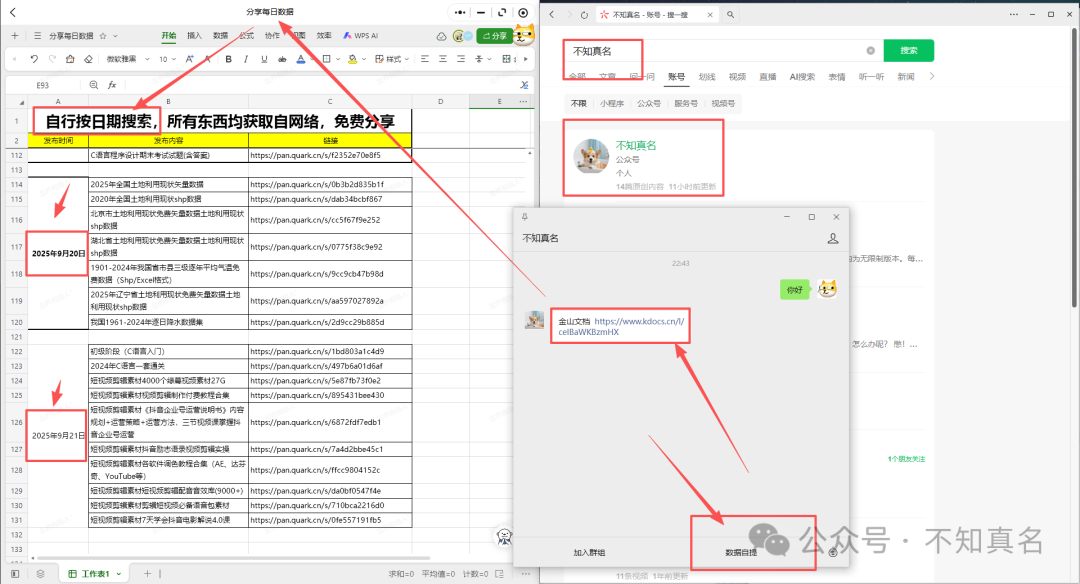
 Access method as above
C Language Programming Tutorial: C Language Question Bank and Practice
The C language is considered the mother tongue of all modern programming languages, as most compilers, JVMs, kernels, etc., are written in C, and most programming languages follow C syntax, such as C++, Java, C#, etc.
It provides core concepts such as arrays, strings, functions, and file handling, which are utilized by many languages (like C++, Java, C#, etc.).
How to Learn C Language?
The C language is the “cornerstone of programming” (many advanced languages like C++ and Java are based on its concepts) and is a core language in fields such as operating systems, embedded development, and low-level drivers. The key to learning C is to “first understand the syntax logic, then internalize it through extensive practice, and finally tackle difficult points like pointers,” rather than rote memorization.
Clarify Goals and Tools (1-2 days)
First, determine “what to learn” and “what tools to use” to avoid detours:
1. Clarify learning objectives (decide on focus)
If you are a beginner in programming, focus on mastering core logic such as “variables, loops, functions, arrays,” etc., without delving too early into embedded systems;
If learning operating systems/embedded systems: pay extra attention to “memory management, pointer operations, structures, and hardware interaction” later;
If preparing for exams (like Computer Level 2): practice real questions specifically and master syntax details (like operator precedence, control flow traps).
2. Choose tools: start with “simple and easy to use”
Beginners do not need complex IDEs (Integrated Development Environments); lightweight tools are recommended to focus on syntax rather than configuration:
Windows: Dev-C++ (small size, no configuration, directly compiles and runs, suitable for pure syntax practice);
Mac/Linux: Xcode (comes with Mac, need to create a “CommandLineTool” project) or terminal + GCC (use gcc filename.c -o executable to compile, ./executable to run);
After advancing (when learning projects): switch to VSCode (need to install C/C++ plugin), which supports code completion and debugging, closer to actual development.
————————————————————————
After mastering syntax, it is essential to consolidate through projects; otherwise, it is easy to “forget what you learned.” It is recommended to start with “small and specific” projects and gradually increase complexity.
1. Basic Projects (Consolidate Syntax)
Project 1: Student Grade Management System Function: Input the names, student IDs, and grades of n students, calculate the average score, sort by average score, and output the ranking. Knowledge points used: structure arrays, loops, sorting (bubble/selection sort), input/output.
Project 2: Simple Calculator (supports multiple operators) Function: Input expressions in the format “a+b”, supporting +, -, *, /, % (modulus), and handle errors when the divisor is 0. Knowledge points used: switch branches, scanf format control, error handling.
2. Advanced Projects (Combining Pointers/Memory)
Project 3: Dynamic Linked List Implementation of “Address Book” Function: Add contacts (name, phone), delete contacts, find contacts, display all contacts, support dynamic addition and deletion (no fixed length required). Knowledge points used: pointers, structures, dynamic memory allocation (malloc/free), linked list logic (node connections).
Project 4: File Operations (Data Persistence) Function: Save the data of the “Student Grade Management System” to a local file (like score.txt), read data from the file during the next run to avoid data loss. Knowledge points used: file operation functions (fopen/fprintf/fscanf/fclose), file open modes (r read, w write, a append).
Updated on September 21, 2025.
Beginner Stage (C Language Introduction)
2024 C Language Complete Set for Mastery
Complete C Language Course
C Language Tutorial from Beginner to Proficiency