Today, we will explore how to upgrade a simple bouncing ball to a parabolic motion ball that conforms more closely to the laws of physics. This not only makes our animation more realistic but also helps us better understand the principles of physical motion.In the original bouncing ballC++ Drawing a Bouncing Ball – Free Fall Motion, the ball could only move vertically, like a bouncy ball tied to a string. Now, we will give the ball true freedom!Actually, this process is similar to throwing a small paper ball:
Horizontal direction: The initial speed you give it makes it fly forward (uniform motion)
Vertical direction: Gravity pulls it down (accelerated fall)
These two motions combined create the familiar parabolic trajectory!
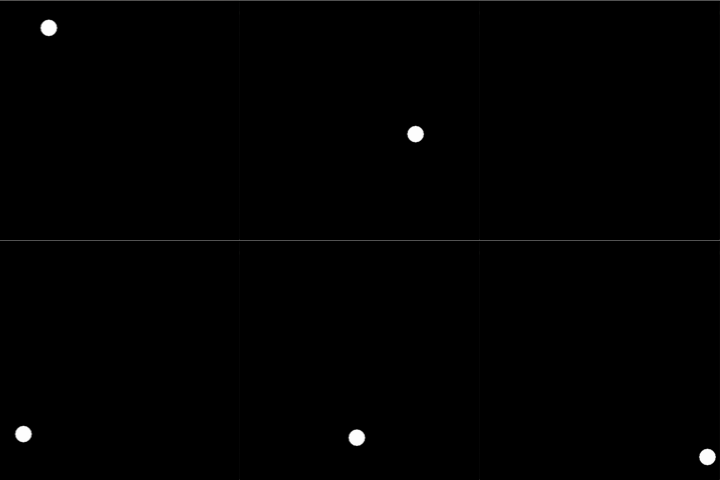 1. Add variables and initialize
float x = 100;     // Initial x-coordinate of the ball
float vx = 3; // Horizontal speed of the ball in the x direction- Position (x): Represents the ball’s position in the horizontal direction
- Speed (vx): Represents the speed at which the ball moves horizontally
2. Update the ball’s horizontal position
x = x + vxIn an ideal situation, there are no external forces in the horizontal direction (ignoring air resistance), so the speed vx remains constant, which reflects the law of inertia.3. Add realistic bouncing effectsOn top of the original ball only bouncing when it hits the ground and not falling below the ground, we will also add bouncing off the left and right walls.
// ========== Boundary collision detection and handling ==========
// 1. Left and right boundary collision (vertical bounce)
if (x <= 20 || x >= 580)  // Ball radius 20, consider radius during boundary detection
    vx = -vx;  // Reverse horizontal speed to achieve bouncing effect
// 2. Bottom boundary collision (ground bounce)
if (y >= 580)  // Hit the ground (consider ball radius) {
    vy = -vy * 0.9;  // Reverse vertical speed and attenuate, simulating energy loss
    // Coefficient 0.9 indicates a 10% energy loss with each bounce, causing the bounce height to gradually decrease
}
4. Add barriers for the ballEnsure the ball can only bounce within the screen range to prevent it from flying away:
if (x < 20) x = 20;        // Ensure it does not exceed the left boundary
if (x > 580) x = 580;      // Ensure it does not exceed the right boundary
if (y > 580) y = 580;      // Ensure it does not exceed the bottom boundary
Complete code display:
#include <graphics.h>
#include <conio.h>
int main() {
    // Initialize ball physics properties
    float x = 100;     // Ball's x-coordinate (horizontal position)
    float y = 50;      // Ball's y-coordinate (vertical position)
    float vx = 3;      // Ball's speed in the x direction (horizontal speed)
    float vy = 0;      // Ball's speed in the y direction (vertical speed)
    float g = 0.5;     // Gravitational acceleration (only affects y direction)

    // Initialize graphics window
    initgraph(600, 600);  // Create a 600x600 pixel graphics window

    // Main animation loop
    while (1) {
        // ========== Physics motion calculation ==========
        // Horizontal motion: uniform linear motion
        x = x + vx;
        // Vertical motion: uniformly accelerated linear motion (affected by gravity)
        vy = vy + g;      // Speed increases due to gravity
        y = y + vy;       // Update vertical position based on speed

        // ========== Boundary collision detection and handling ==========
        // 1. Left and right boundary collision (vertical bounce)
        if (x <= 20 || x >= 580)  // Ball radius 20, consider radius during boundary detection
            vx = -vx;  // Reverse horizontal speed to achieve bouncing effect
        // 2. Bottom boundary collision (ground bounce)
        if (y >= 580)  // Hit the ground (consider ball radius) {
            vy = -vy * 0.9;  // Reverse vertical speed and attenuate, simulating energy loss
            // Coefficient 0.9 indicates a 10% energy loss with each bounce, causing the bounce height to gradually decrease
        }
        // ========== Position correction ==========
        // Prevent the ball from exceeding the window boundaries due to calculation errors
        if (x < 20) x = 20;        // Ensure it does not exceed the left boundary
        if (x > 580) x = 580;      // Ensure it does not exceed the right boundary
        if (y > 580) y = 580;      // Ensure it does not exceed the bottom boundary

        // ========== Graphics drawing ==========
        cleardevice();          // Clear the previous frame's drawing
        fillcircle(x, y, 20);   // Draw a solid circle (ball) with a radius of 20 at the new position

        // ========== Animation control ==========
        Sleep(10);  // Pause for 10 milliseconds to control animation frame rate (about 100FPS)
        // The loop will continue running until the user closes the window or interrupts with a key
    }
    // Program end handling
    _getch();       // Wait for user key press (actually, this line will not be executed due to the infinite loop)
    closegraph();   // Close the graphics window
    return 0;       // Program exits normally
}
When we upgrade the ball from simple bouncing to elegant parabolic motion, we also reproduce the core principles of classical physics in the code, transforming abstract physical formulas into intuitive visual experiences!