Bluetooth Modbus Communication Application
A cross-platform industrial device communication solution based on uni-app
 Scan to experience:
📋 Project Overview
In today’s rapidly developing industrial Internet of Things, the combination of Bluetooth communication and the Modbus protocol provides a new solution for device interconnection. This article will delve into an application of Bluetooth Modbus communication developed based on the uni-app framework, which cleverly combines Bluetooth Low Energy communication with the Modbus protocol to achieve a cross-platform industrial device communication solution.
📂 Source Code Address:https://gitee.com/gitwdd/blc_-blu
🛠️ Technology Stack Overview
·Frontend Framework: uni-app + Vue.js
·Bluetooth Communication: Native.js native Bluetooth API
·Protocol Support: Modbus RTU/ASCII
·Style Management: SCSS modular management
·Platform Support: H5, Android/iOS App, WeChat Mini Program
🏗️ Core Architecture Design
1. Layered Architecture Pattern
The application adopts a clear layered architecture, completely separating the Bluetooth communication layer from the Modbus protocol layer:
┌─────────────────────────────────────┐│ User Interface Layer (UI Layer) │├─────────────────────────────────────┤│ Business Logic Layer (Logic Layer) │├─────────────────────────────────────┤│ Modbus Protocol Layer (Protocol Layer) │├─────────────────────────────────────┤│ Bluetooth Communication Layer (Transport Layer) │├─────────────────────────────────────┤│ Hardware Abstraction Layer (HAL Layer) │└─────────────────────────────────────┘ 2. Core Class Design
BluetoothModbus Core Class
<span>BluetoothModbus</span> class is the core of the entire application, encapsulating all functionalities of Bluetooth communication and the Modbus protocol:
JavaScript – Core Class Constructor
class BluetoothModbus { constructor() { // Bluetooth connection state management this.state = BLUETOOTH_STATE.DISCONNECTED; // Device information this.deviceId = ""; this.deviceName = ""; // UUID configuration this.serviceId = ""; this.writeId = ""; this.notifyId = ""; // Module type support this.moduleType = BLUETOOTH_MODULE_TYPE.NORMAL; // Heartbeat keep-alive mechanism this.heartbeatInterval = null; this.heartbeatPeriod = 30000; this.autoReconnect = true; }}⚡ Technical Feature Analysis
🔧 Multi-Module Type Support
The application supports multiple types of Bluetooth modules, achieving rapid adaptation through predefined UUID configurations
🔍 Intelligent State Check
Before executing Bluetooth scanning, the application intelligently checks the Bluetooth adapter state
📦 Large Data Fragment Transmission
To address Bluetooth MTU limitations, the application implements intelligent data fragment transmission
💓 Heartbeat Keep-Alive Mechanism
The application implements an intelligent heartbeat keep-alive mechanism to ensure connection stability
1. Multi-Module Type Support
JavaScript – UUID Configuration
// Normal Module UUIDconst NORMAL_MODULE_UUID = { serviceId: "0000FFE0-0000-1000-8000-00805F9B34FB", writeId: "0000FFE1-0000-1000-8000-00805F9B34FB", notifyId: "0000FFE1-0000-1000-8000-00805F9B34FB",};// BT16 Module UUIDconst BT16_MODULE_UUID = { serviceId: "0000FFE0-0000-1000-8000-00805F9B34FB", writeId: "0000FFE2-0000-1000-8000-00805F9B34FB", notifyId: "0000FFE1-0000-1000-8000-00805F9B34FB",};// Generic BLE UUIDconst BLE_MODULE_UUID = { serviceId: "6E400001-B5A3-F393-E0A9-E50E24DCCA9E", writeId: "6E400002-B5A3-F393-E0A9-E50E24DCCA9E", notifyId: "6E400003-B5A3-F393-E0A9-E50E24DCCA9E",};2. Intelligent Bluetooth State Check Mechanism
JavaScript – State Check Function
async checkBluetoothState() { return new Promise((resolve, reject) => { uni.getBluetoothAdapterState({ success: (res) => { if (res.available) { resolve(true); } else { // Attempt to initialize Bluetooth adapter uni.openBluetoothAdapter({ success: () => resolve(true), fail: (error) => { this.addLog('Error', `Bluetooth initialization failed: ${error.errMsg}`); reject(new Error('Bluetooth functionality is not enabled or unavailable')); } }); } }, fail: (error) => { reject(new Error(`Failed to get Bluetooth state: ${error.errMsg}`)); } }); });}🎨 User Interface Design Highlights
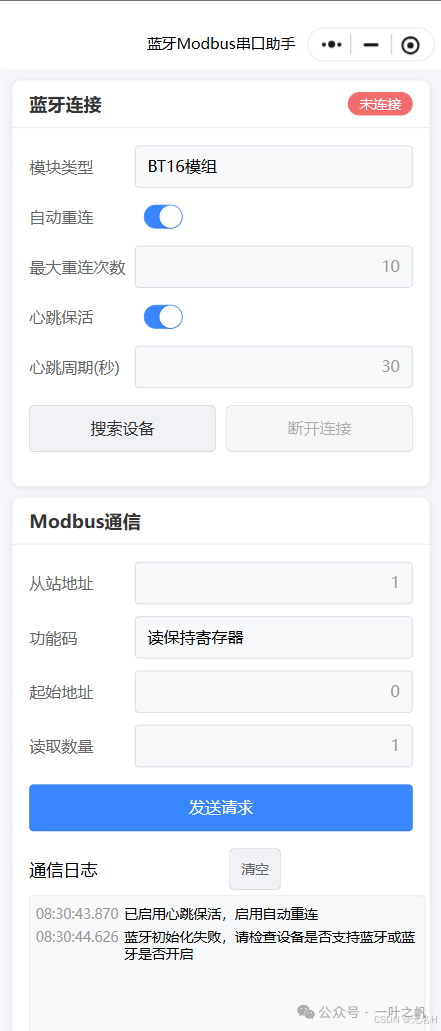
1. Responsive Card Layout
The application adopts a modern card layout, clearly separating the two main functional areas of Bluetooth connection and Modbus communication:
Vue Template – Card Layout
2. Real-Time Status Indication
JavaScript – Status Computed Property
computed: { bluetoothStateText() { switch (this.bluetoothState) { case BLUETOOTH_STATE.DISCONNECTED: return 'Disconnected'; case BLUETOOTH_STATE.CONNECTING: return 'Connecting'; case BLUETOOTH_STATE.CONNECTED: return 'Connected'; case BLUETOOTH_STATE.SERVICES_DISCOVERING: return 'Reading services'; case BLUETOOTH_STATE.RECONNECTING: return 'Reconnecting'; default: return 'Unknown state'; } }}🛡️ Error Handling and Logging System
📊 Hierarchical Logging System
The application implements a complete hierarchical logging system, supporting different types of logs such as system, sending, receiving, and error logs
⚠️ Exception Handling Mechanism
Comprehensive exception handling ensures the stability of the application
🚀 Performance Optimization Strategies
Memory Management
·Log Limitation: Limit the number of log entries to prevent memory leaks
·Device List Optimization: Use shallow copy to update the device list, reducing memory usage
·Timer Management: Timely cleanup of timers to avoid memory leaks
Network Optimization
·Data Fragmentation: Automatically handle large data fragmentation to adapt to Bluetooth MTU limitations
·Retry Mechanism: Intelligent retry mechanism to improve communication success rate
·Connection Pool Management: Reasonable management of Bluetooth connections to avoid resource waste
🌐 Cross-Platform Compatibility
Advantages of the uni-app Framework
Through the uni-app framework, the application achieves true “one development, multi-end operation”:
·H5 End: Supports the Web Bluetooth API for modern browsers
·App End: Uses Native.js to call native Bluetooth functions
·Mini Program End: Adapts to WeChat Mini Program Bluetooth API
🔒 Security Considerations
🔐 Permission Management
The application declares the necessary Bluetooth permissions in manifest.json
✅ Data Validation
·CRC Validation: Implements a complete CRC16 validation algorithm
·Data Format Validation: Strictly validates Modbus data formats
·Exception Response Handling: Correctly handles Modbus exception responses
📈 Summary and Outlook
This Bluetooth Modbus communication application showcases multiple best practices in modern mobile application development:
🎯 Technical Highlights
·Clear Architecture: Layered design with separated responsibilities
·Complete Functionality: Supports a full Modbus protocol stack
·User-Friendly: Intuitive interface design and real-time status feedback
·Cross-Platform: True one development, multi-end operation
·Performance Optimization: Balancing memory management and network optimization
🏭 Application Scenarios
·Industrial Automation: Device monitoring and control
·Smart Home: Communication between home appliances
·Internet of Things: Sensor data collection
·Device Debugging: On-site debugging tools for engineers
🔮 Future Development Directions
·Protocol Expansion: Support for more industrial protocols
·AI Integration: Intelligent fault diagnosis
·Cloud Synchronization: Cloud storage and analysis of data
·Security Enhancement: Encrypted communication and identity authentication