0x00 Background
As a blank binary slate, there are times when we need to check various information about certain addresses. For example:
- Which segment does this address belong to?
<span>.bss</span>or<span>.data</span>? - Is a certain value on the heap or the stack?
- What is the corresponding address in IDA/Ghidra?
- Which mapping file does this address belong to?
- ……
Every time, we have to repeatedly execute commands and then stare at a long list of addresses on the screen to see where the target falls within that range.
I searched online but couldn’t find a suitable plugin, so I decided to create a simple one myself.
0x01 Overview
To answer the above questions, we actually only need to obtain the following three types of information.
- 1. Base + Offset
- 2. Segment Name
- 3. Associated Mapping File
I looked through the documentationPython API (Debugging with GDB)[1] and found that there is no suitable API to directly obtain this information; it seems we can only retrieve it through built-in commands (which is a bit inelegant).
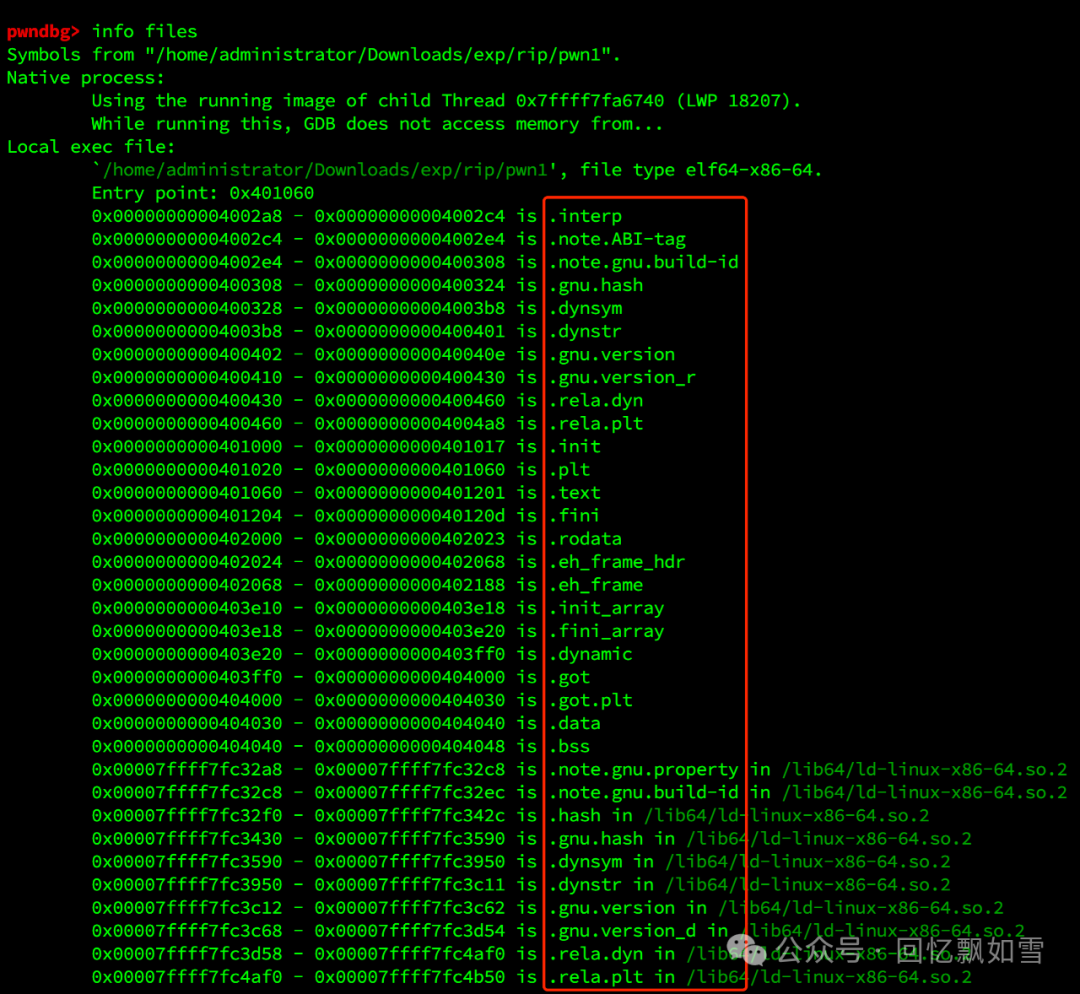
info files
info proc mappings
0x02 Implementation
After obtaining the result of the <span>info proc mappings</span> command, we can iterate through the address ranges to find the target address. The objfile column indicates the mapping file to which the target address belongs, and the Base Address + Offset can be calculated using the following formula.
Base Address = Start Addr
Offset = Target Address - Base Address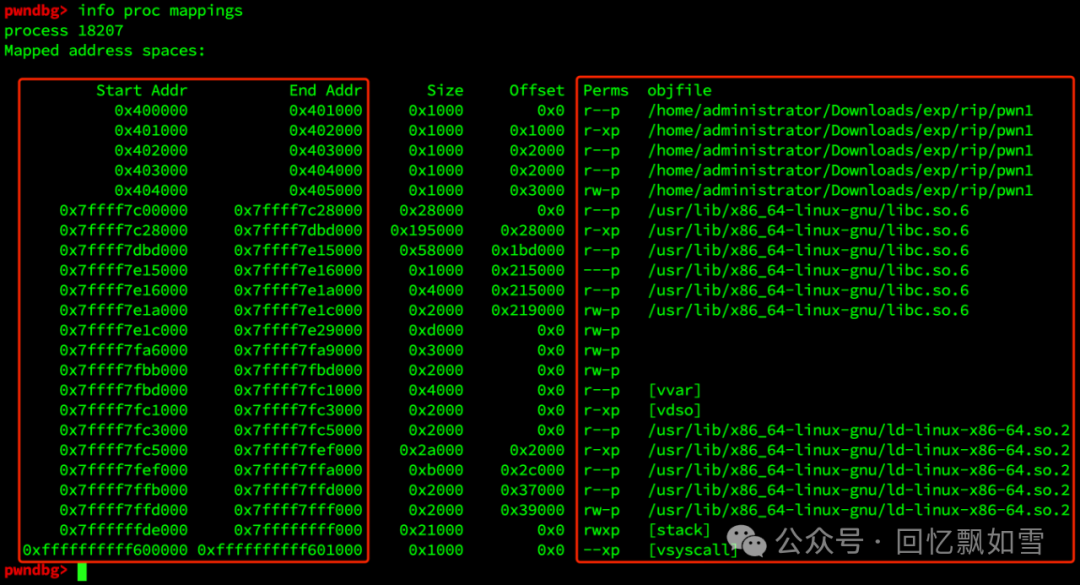
Segment information can be extracted from the <span>info files</span> information. Based on the address range, we can extract the corresponding segment name.
The complete code is as follows
import re
import gdb

class AddrInfo(gdb.Command):
    PLUGIN_NAME = "AddrInfo"
    VERSION = "1.0"

    def __init__(self):
        super(AddrInfo, self).__init__("addrinfo", gdb.COMMAND_USER)

    def invoke(self, arg, from_tty):
        arg = arg.strip()
        if not arg:
            print("Usage: addrinfo <address>")
            print("Example: addrinfo 0x7ffff7dd18c0")
            return

        try:
            address = int(gdb.parse_and_eval(arg))
        except Exception:
            print(f"Error: Invalid address format: '{arg}'")
            print("Usage: addrinfo <address>")
            print("Make sure the address is valid in the current debug context.")
            return

        try:
            base_addr, start, end, offset, perms, objfile = self.find_mapping(address)
            seg_name, seg_start, seg_end = self.find_section(address)
            if base_addr is not None:
                print(
f'''{{self.PLUGIN_NAME}} {{self.VERSION}}
Address:  {{hex(address)}} [{{hex(start)}} - {{hex(end)}}]
Base:     {{hex(base_addr)}}
Offset:   {{hex(offset)}}
Section:  {{seg_name}} [{{hex(seg_start)}} - {{hex(seg_end)}}]
Perms:    {{perms}}
ObjFile:  {{objfile}}
''')
            else:
                print(f"Address {{hex(address)}} does not belong to any known mapped region.")
        except Exception as e:
            print(f"Error during processing: {{e}}")

    # Iterate through segment names
    def find_section(self, addr):
        output = gdb.execute("info files", to_string=True)
        pattern = re.compile(r"0x([0-9a-f]+)\s*-\s*0x([0-9a-f]+)\s+is\s+(\S+)")
        matches = pattern.findall(output)
        # Regex match, the 3rd column is the segment name
        for start, end, name in matches:
            start = int(start, 16)
            end = int(end, 16)
            if start <= addr < end:
                return name, start, end
        return None, None, None

    def find_mapping(self, addr):
        mappings = gdb.execute("info proc mappings", to_string=True).splitlines()
        for line in mappings:
            parts = line.strip().split()
            if len(parts) < 2:
                continue
            try:
                start = int(parts[0], 16)
                end = int(parts[1], 16)
            except ValueError:
                continue
            if start <= addr < end:
                base_addr = start
                offset = addr - start
                perms = parts[4] if len(parts) > 4 else "?"
                objfile = parts[5] if len(parts) > 5 else "?"
                return base_addr, start, end, offset, perms, objfile
        return None, None, None, None, None, None

AddrInfo()</address></address>
If there are new features or to adapt to more versions of GDB in the future, updates will be made at the following address. It mainly depends on whether it has practical value, as it is currently just for experimentation.
https://github.com/c0ny1/gdb-addrinfo
0x03 Usage
Temporary installation
(gdb) source AddrInfo.pyFor permanent installation, add the following command to the end of the file <span>~/.gdbinit</span>.
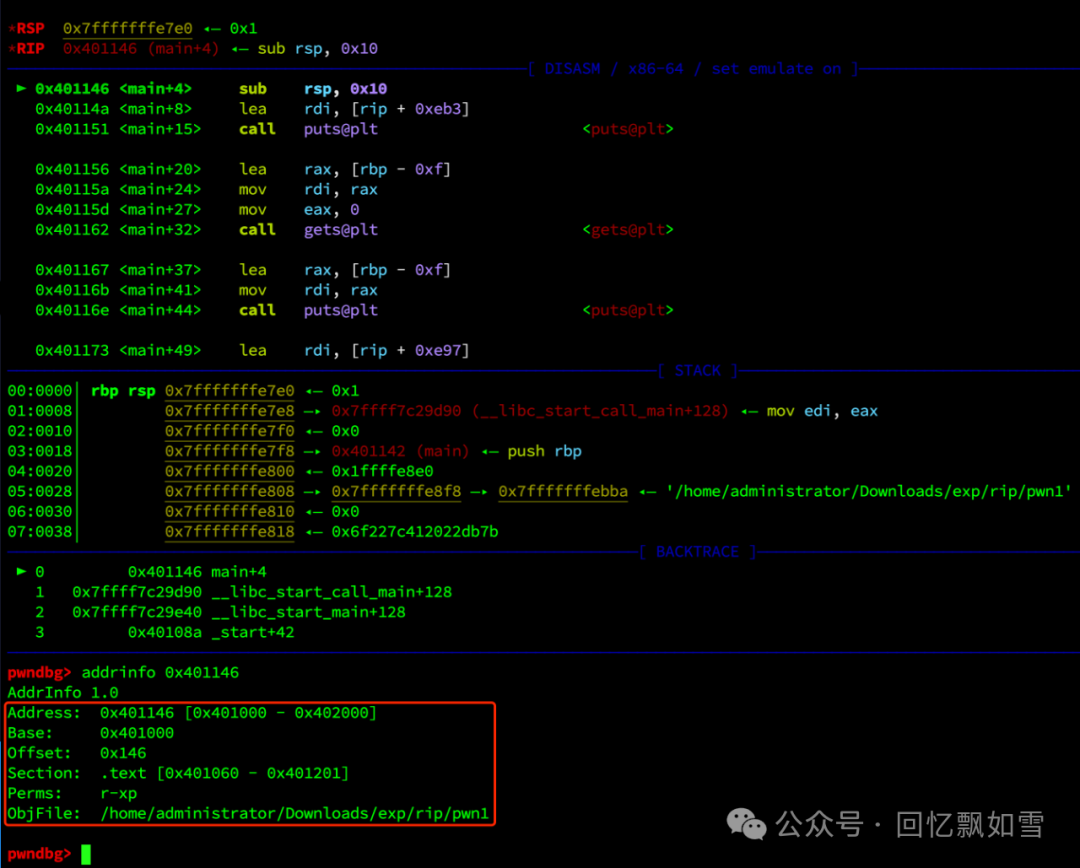
source /yourpath/AddrInfo.pyThen you can have fun!
Reference Link
<span>[1]</span> Python API (Debugging with GDB): https://sourceware.org/gdb/current/onlinedocs/gdb.html/Python-API.html