This article is included in the collection: “Adapting FreeRTOS from Scratch Based on GD32F4xx”;01 | IntroductionIn the previous note, the process of creating tasks was documented. Once a task is created, ideally, it should run in a continuous loop. However, in most cases, tasks need to be managed according to business requirements, such as deleting tasks that only need to run once, releasing resources, or suspending tasks that are not allowed to run for a long time.Therefore, the content of this note describes the task scheduler of FreeRTOS and task management.Previous review: “Adapting FreeRTOS from Scratch Based on GD32F450 (5) – Task Creation“; 02 | Environment DescriptionAdaptation environment, tools, versions:· System version: Win 11;· Keil version: V5.36;· FreeRTOS kernel version: V11.1.0;03 | What is a Task Scheduler?In bare-metal programming, a common framework is to use state machines + interrupt-driven programming. The running state of the state machine is often predetermined, for example, after receiving data via UART, it needs to switch to the data processing state. This state-switching logic is akin to a simplified task scheduler.In simple terms, the task scheduler determines which task to execute and when to execute it.In FreeRTOS, the implementation of the task scheduler is relatively complex. To simplify, just know that the FreeRTOS task scheduler is based on priority and is fully preemptive. When a higher-priority task becomes ready in the task list, a task switch occurs immediately. After the high-priority task finishes executing, the interrupted task resumes running.In the previous note, we called an API interface, as shown in the code below:
/* Start the task scheduler */vTaskStartScheduler(); This is the task scheduler start interface, which only needs to be called once. Once the task scheduler starts, it officially enters FreeRTOS.04 | What States Do Tasks Have?Similar to the bare-metal state machine, tasks in FreeRTOS also have their own states, as follows:· Ready: Indicates that the task is ready to execute and only needs to wait for the task scheduler to schedule it. Newly created tasks start in the ready state.· Running: Indicates that the task is currently executing.· Blocked: If a task is waiting for a certain condition to be triggered, it is in a blocked state.· Suspended: Indicates that the task is in an invisible state to the entire system, but the task’s information is still preserved; it just does not participate in execution. Only when the task is resumed can it be scheduled for execution again.Once FreeRTOS is running, all tasks switch between the above four states, meaning a task must be in one of these four states at all times.The task state transition logic is as follows, with arrows indicating the direction of state transitions.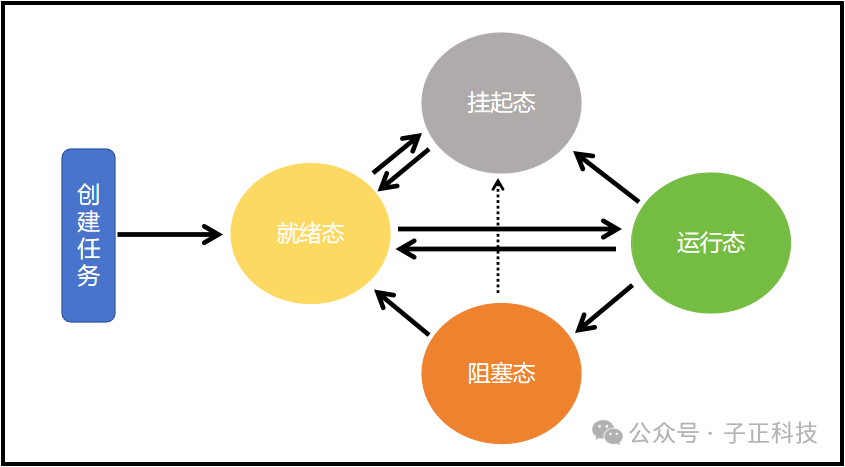 05 | How to Manage Tasks?The above content is conceptual; the ultimate goal is practical use. So how do we manage tasks in actual business scenarios?Since the ready and running states of tasks are managed by the FreeRTOS task scheduler, we only need to know how to delete, suspend, resume tasks, and how to enter the blocked state.Task deletion interface:
// Task deletion interface prototypevoid vTaskDelete(TaskHandle_t xTaskToDelete) To use the deletion function, the corresponding macro in FreeRTOSConfig must be enabled;
// This macro enables the task deletion interface#define INCLUDE_vTaskDelete 1The usage of this interface is as follows;
// When a task wants to delete itselfvoid LED_Task( void ){ /* Business logic code*/ /* ............ */ /* Delete the task itself */ vTaskDelete( NULL );}// When wanting to delete another taskvoid delete(void){ /* Other business logic code*/ /* ............ */ // Pass the handle of the task to be deleted to the interface vTaskDelete(LED_Task_Handle);}Task suspension interface:
// Task suspension interface function prototypevoid vTaskSuspend(TaskHandle_t xTaskToSuspend)To use the suspend task function, the corresponding macro in FreeRTOSConfig must also be enabled;
// This macro enables the task suspension functionality#define INCLUDE_vTaskSuspend 1The usage of this interface is as follows;
// Suppose we want to suspend the LED blinking task when button 1 is pressed, we just need to call the API interface, // and pass the handle of the LED blinking task to the interface function.static void KEY_Task(void* parameter){ while(1){ /* K1 is pressed */ if(Key_Scan(KEY1_GPIO_PORT,KEY1_GPIO_PIN) == KEY_ON){ vTaskSuspend(LED_Task_Handle); /* Suspend LED task */ } vTaskDelay(20); /* Block delay */ }}Task resume interface:
// Task resume interface function prototypevoid vTaskResume(TaskHandle_t xTaskToResume)Similarly, to use the resume task function, the corresponding macro in FreeRTOSConfig must also be enabled. The macro for resuming tasks is the same as that for suspending tasks; a task must be resumed only if it has been suspended;
// This macro enables the task suspension functionality#define INCLUDE_vTaskSuspend 1The usage of this interface is as follows;
// Suppose we want to resume the LED blinking task when button 2 is pressed, we just need to call the API interface, // and pass the handle of the LED blinking task to the interface function.static void KEY_Task(void* parameter){ while(1){ /* K2 is pressed */ if(Key_Scan(KEY2_GPIO_PORT,KEY2_GPIO_PIN) == KEY_ON){ vTaskResume(LED_Task_Handle); /* Resume LED task! */ } vTaskDelay(20); /* Block delay */ }}Task blocking interface:Unlike the above task management interfaces, the blocked state cannot be switched directly. As previously described, a task waits for a certain condition to be triggered, such as an interrupt or a timeout, during which it is in a blocked state. Therefore, to make a task enter the blocked state, it can only be done indirectly, and the simplest way is to call FreeRTOS’s delay function.There are two types of delay functions: one is relative delay and the other is absolute delay. As the names suggest, relative delay is not as precise, as it depends on the number of tasks and priority settings, while absolute delay has a more precise time period.Relative delay interface function:
// Relative delay interface function prototype, commonly used for ordinary tasks that do not require precise running cyclesvoid vTaskDelay(const TickType_t xTicksToDelay)It is necessary to configure the macro in FreeRTOSConfig.h to use it:
// This macro controls whether the relative delay interface function is enabled#define INCLUDE_vTaskDelay 1Absolute delay interface function:
// Absolute interface function prototype, commonly used for tasks that require precise running cyclesvoid vTaskDelayUntil(TickType_t* const pxPreviousWakeTime, const TickType_t xTimeIncrement);It is necessary to configure the macro in FreeRTOSConfig.h to use it:
// This macro controls whether the absolute delay interface function is enabled#define INCLUDE_vTaskDelayUntil 1The usage of the relative delay interface will not be introduced here, as it is used in the above task suspension and resumption. Here, we will mainly introduce the usage of the absolute delay:
void Task1( void *pvParameters){ /* Used to save the last time */ static portTickType PreviousWakeTime; /* Set the delay time, converting it to tick count */ const portTickType TimeIncrement = pdMS_TO_TICKS(1000); /* Get the current system time */ PreviousWakeTime = xTaskGetTickCount(); while (1) { /* Call the absolute delay function, the task running interval is 1000 ticks */ vTaskDelayUntil(&PreviousWakeTime, TimeIncrement); // ... // Task body code // ... }}Of course, there are many ways to make a task enter the blocked state, including waiting for message queues, semaphores, etc. These will be introduced later.06 | ConclusionThus, the content regarding task management has been documented. There is much to learn about FreeRTOS task management, and one note is not enough. My philosophy is to use it first, then improve it; All notes can provide source project files, including FreeRTOS source code, GD standard library source code, and experimental source code. Please message me in the background for the download link of 【FreeRTOS examples】.I hope the above content can help friends. If there are any errors, please feel free to correct me.