Overview
This article will answer the following related questions, covering basic C++ concepts:
- 1. What is the purpose of the const keyword?
- 2. What is the purpose of the static keyword?
- 3. What is the difference between new and malloc?
- 4. What is the purpose of volatile?
- 5. How is C++ memory partitioned?
- 6. What are smart pointers?
- 7. What are the differences between public, protected, and private?
- 8. What are virtual functions?
- 9. What is the order of object creation and destruction when a subclass inherits from a superclass?
- 10. What is a pure virtual function?
- 11. What are rvalue references?
- 12. What containers does STL include, and what are their underlying implementations?
- 13. How to use two threads to print odd and even numbers alternately?
- 14. How is sort implemented at a low level?
- 15. What are the advantages of nullptr over NULL?

1. What is the purpose of the const keyword?
<span>const</span> is a very commonly used keyword in C++, meaning “constant, unmodifiable”. Its main purpose is to restrict the read-only property of variables, pointers, function parameters, and function return values, preventing modifications in places where they should not be changed.
1. Modifying ordinary variables
const int x = 10;
x = 20; // ❌ Error, x cannot be modified
👉 This indicates that <span>x</span> is a constant and cannot be changed after initialization.
2. Modifying pointers
int a = 10;
int b = 20;

const int* p1 = &a;   // The value pointed to cannot be changed
*p1 = 30;             // ❌ Error
p1 = &b;              // ✅ Can change the pointer

int* const p2 = &a;   // The pointer itself cannot be changed
*p2 = 30;             // ✅ Can change the value
p2 = &b;              // ❌ Error

const int* const p3 = &a; // Both value and pointer cannot be changed
3. Modifying function parameters
void printValue(const int x) {
    // x is read-only, cannot be modified inside the function
    std::cout << x << std::endl;
}

void printArray(const int arr[], int n) {
    // arr elements cannot be modified
    for (int i = 0; i < n; i++) {
        std::cout << arr[i] << std::endl;
    }
}
👉 Commonly used to ensure that input parameters are not mistakenly modified within the function.
2. What is the purpose of the static keyword?
<span>static</span> has several completely different purposes in C++, which need to be understood in context.
1. Modifying local variables
void counter() {
    static int count = 0; // Initialized only once
    count++;
    std::cout << count << std::endl;
}

int main() {
    counter(); // Outputs 1
    counter(); // Outputs 2
    counter(); // Outputs 3
}
👉 Ordinary local variables: destroyed when the function exits
👉 <span>static</span> local variables: are not destroyed when the function exits, but remain until the program ends (initialized only once)
📌 Purpose: Commonly used to record the number of function calls, cache data.
2. Modifying global variables / global functions
static int g_var = 100;   // Can only be accessed in this file

static void helper() {    // Can only be called in this file
    std::cout << "helper" << std::endl;
}
👉 Ordinary global variables/functions: can be accessed in other files of the entire project (extern).
👉 <span>static</span> modified: only visible in the current file (internal linkage).
📌 Purpose: Avoid global naming conflicts.
3. Modifying local static objects (Singleton pattern)
class Singleton {
public:
    static Singleton& getInstance() {
        static Singleton instance; // Created only once, thread-safe (after C++11)
        return instance;
    }
};
👉 <span>static</span> local objects: initialized only once, destroyed only when the program ends. 📌 Purpose: Implement Singleton pattern.
3. What is the difference between new and malloc?
In C++, <span>new</span> and in C, <span>malloc</span> can both “allocate heap memory”, but they have essential differences.
1. Syntax and return type
int* p1 = (int*)malloc(sizeof(int)); // malloc requires explicit type casting
int* p2 = new int;                   // new does not require casting, returns the correct type
<span>malloc</span>: returns<span>void*</span>, must manually cast the type<span>new</span>: directly returns a pointer of the corresponding type
2. Whether to call constructors / destructors
class Test {
public:
    Test()  { std::cout << "Constructor\n"; }
    ~Test() { std::cout << "Destructor\n"; }
};

int main() {
    Test* t1 = (Test*)malloc(sizeof(Test)); // Only allocates memory, does not call constructor
    free(t1);                               // Will not call destructor either

    Test* t2 = new Test(); // ✅ Calls constructor
    delete t2;             // ✅ Calls destructor
}
👉 Core difference:
<span>malloc/free</span>only “barely allocates/releases memory”, does not call constructors/destructors<span>new/delete</span>will call constructors/destructors, suitable for C++ objects
3. Initialization behavior
int* a = (int*)malloc(sizeof(int)); // Value is undefined
int* b = new int;                   // Value is also undefined
int* c = new int(10);               // ✅ Initialized to 10
👉 <span>new</span> can directly specify the initialization method (even supports batch initialization of arrays), while <span>malloc</span> cannot.
4. Handling allocation failures
int* p1 = (int*)malloc(100000000000); // Returns NULL on failure
if (!p1) std::cout << "malloc failed\n";

try {
    int* p2 = new int[100000000000]; // Throws exception bad_alloc on failure
} catch (std::bad_alloc& e) {
    std::cout << "new failed: " << e.what() << std::endl;
}
👉 <span>malloc</span>: returns <span>NULL</span> 👉 <span>new</span>: throws exception <span>std::bad_alloc</span>
5. Memory release methods
int* p1 = (int*)malloc(sizeof(int));
free(p1);  // Matches malloc

int* p2 = new int;
delete p2; // Matches new
👉 Must be used in pairs:
<span>malloc</span>→<span>free</span><span>new</span>→<span>delete</span>(mixing will lead to undefined behavior ❌)
🔑 Summary Table
| Feature | malloc/free | new/delete |
|---|---|---|
| Belongs to | C language function | C++ operator |
| Return type | <span>void*</span>, needs casting |
Type-safe |
| Constructor/Destructor | ❌ Will not call | ✅ Will call |
| Initialization | Only allocates, does not initialize | Can specify initialization value |
| Failure handling | Returns <span>NULL</span> |
Throws exception |
| Matching release | <span>free</span> |
<span>delete</span>/<span>delete[]</span> |
4. What is the purpose of volatile?
<span>volatile</span> serves to inform the compiler: the value of this variable may be changed by external factors, do not optimize it, and always read it from memory.
1. Basic semantics
volatile int flag = 0;

while (flag == 0) {
    // ... wait for some external event
}
If there is no <span>volatile</span>, the compiler might optimize it to:
if (flag == 0) {
    while(true) {} // Infinite loop, because it thinks flag will never change
}
👉 But if <span>flag</span> is a hardware register or modified by other threads, it will cause bugs. Adding <span>volatile</span> ensures the compiler reads <span>flag</span> from memory each time, rather than using the cached value in the register.
5. How is C++ memory partitioned?
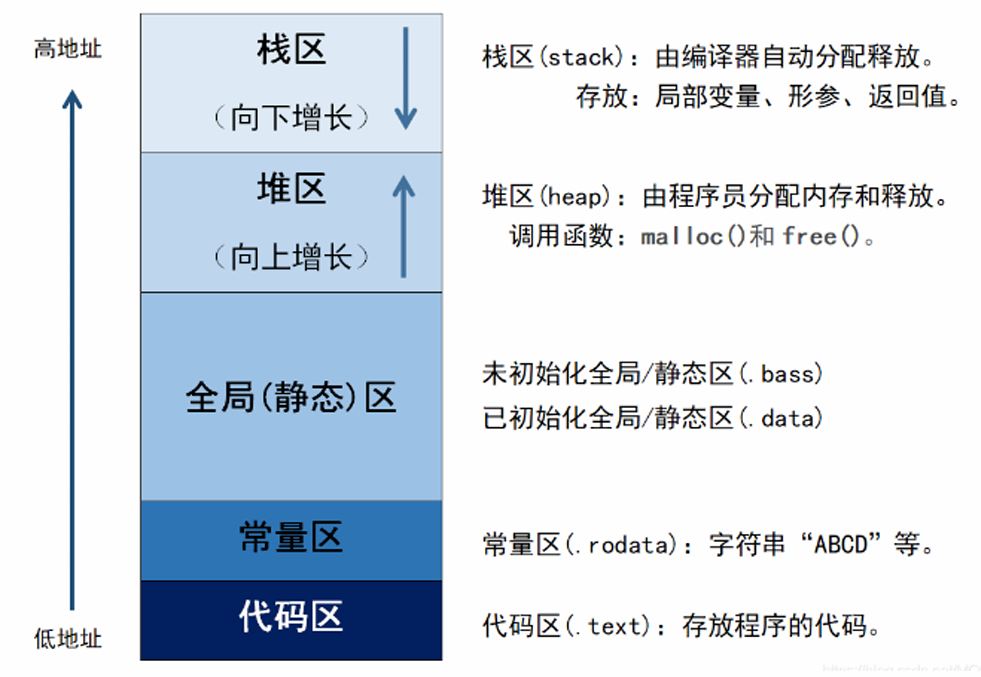
C++ memory is generally divided into stack, heap, global, constant, and code areas, with specific contents stored as shown in the figure below:
6. What are smart pointers?
Smart pointers are a type of class template in C++ used to automatically manage the lifecycle of heap memory objects, avoiding memory leaks and dangling pointers caused by forgetting to <span>delete</span> or multiple <span>delete</span>.
1. Why are smart pointers needed?
Issues with ordinary pointers
void foo() {
    int* p = new int(10);
    // Forgot to delete
} // ❌ Memory leak
👉 If the function exits abnormally, <span>delete</span> will not be executed.
👉 Manually using <span>delete</span> can easily lead to multiple releases, causing crashes.
The emergence of smart pointers is to solve these problems.
2. Smart pointers in the C++ standard library
(1) <span>std::unique_ptr</span> — Exclusive ownership
#include <memory>
#include <iostream>
using namespace std;

int main() {
    unique_ptr<int> p1(new int(10));
    cout << *p1 << endl;

    // unique_ptr cannot be copied, ownership can only be transferred
    unique_ptr<int> p2 = move(p1);
    // p1 is now empty
}
Characteristics:
- Only one
<span>unique_ptr</span>can manage an object - Cannot be copied, can only be
<span>moved</span> - Suitable for representing resources with “unique ownership”
(2) <span>std::shared_ptr</span> — Shared ownership
#include <memory>
#include <iostream>
using namespace std;

int main() {
    shared_ptr<int> p1 = make_shared<int>(20);
    shared_ptr<int> p2 = p1; // Reference count +1

    cout << *p1 << " " << *p2 << endl;
    cout << p1.use_count() << endl; // Outputs 2
} // Reference count becomes 0, automatically deletes
Characteristics:
- Multiple
<span>shared_ptr</span>can share the same object - Internally has reference counting, the object is released only when the last
<span>shared_ptr</span>is destroyed - Suitable for situations where resources need to be shared in multiple places
(3) <span>std::weak_ptr</span> — Weak reference, solves circular references
#include <memory>
#include <iostream>
using namespace std;

struct Node {
    shared_ptr<Node> next;
    weak_ptr<Node>   prev; // Prevents circular references
    ~Node() { cout << "Node destroyed\n"; }
};

int main() {
    auto a = make_shared<Node>();
    auto b = make_shared<Node>();
    a->next = b;
    b->prev = a; // Does not increase reference count
} // a, b are destroyed normally
Characteristics:
<span>weak_ptr</span>does not increase reference count- Must use
<span>lock()</span>to convert to<span>shared_ptr</span>to access the object - Commonly used to solve the circular reference problem of
<span>shared_ptr</span>
3. Comparison Summary
| Smart Pointer | Characteristics | Usage Scenarios |
|---|---|---|
<span>unique_ptr</span> |
Exclusive ownership, cannot be copied, can only be transferred | Single object owner |
<span>shared_ptr</span> |
Reference counting, shared ownership | Multiple places need to share resources |
<span>weak_ptr</span> |
Weak reference, does not affect reference count | Solving circular references, observing object state |
7. What are the differences between public, protected, and private?
These three are access control modifiers that determine the visibility of class members.
The specific differences are shown in the table below:
| Modifier | Visible within the class | Visible in subclasses | Visible outside the class |
|---|---|---|---|
<span>public</span> |
✅ | ✅ | ✅ |
<span>protected</span> |
✅ | ✅ | ❌ |
<span>private</span> |
✅ | ❌ | ❌ |
Understanding through code:
#include <iostream>
using namespace std;

class Base {
public:
    int pub = 1;          // Public member
protected:
    int prot = 2;         // Protected member
private:
    int priv = 3;         // Private member
};

class Derived : public Base {
public:
    void show() {
        cout << pub << endl;   // ✅ Subclass can access
        cout << prot << endl;  // ✅ Subclass can access
        // cout << priv << endl; // ❌ Subclass cannot access private
    }
};

int main() {
    Base b;
    cout << b.pub << endl;   // ✅ External can access public
    // cout << b.prot << endl; // ❌ External cannot access protected
    // cout << b.priv << endl; // ❌ External cannot access private

    Derived d;
    d.show(); // ✅ Indirectly access protected
}
8. What are virtual functions?
Virtual functions (keyword <span>virtual</span>) are the core mechanism of C++ polymorphism, allowing the function to be determined at runtime based on the actual object type.
Here is a scenario involving inheritance:
#include <iostream>
using namespace std;

class Base {
public:
    void show() { cout << "Base::show()" << endl; }
};

class Derived : public Base {
public:
    void show() { cout << "Derived::show()" << endl; }
};

int main() {
    Base* b = new Derived();
    b->show();
    delete b;
}
Using a normal function without virtual, the output is <span>Base::show()</span>, meaning that even after inheritance, the editor still calls the base class method.
If using a virtual function:
#include <iostream>
using namespace std;

class Base {
public:
    virtual void show() { cout << "Base::show()" << endl; }
};

class Derived : public Base {
public:
    void show() override { cout << "Derived::show()" << endl; }
};

int main() {
    Base* b = new Derived();
    b->show();
    delete b;
}
The output is <span>Derived::show()</span>, and whether or not to add <span>override</span> has the same effect, but adding it allows the compiler to check if it is really overridden successfully.
9. What is the order of object creation and destruction when a subclass inherits from a superclass?
Just do an experiment to get the answer.
#include <iostream>
using namespace std;

// Base class
class Base {
public:
    Base() {
        cout << "Base constructor called" << endl;
    }

    virtual ~Base() {
        cout << "Base destructor called" << endl;
    }
};

// Derived class
class Derived : public Base {
public:
    Derived() {
        cout << "Derived constructor called" << endl;
    }

    ~Derived() override {
        cout << "Derived destructor called" << endl;
    }
};

int main() {
    Base* obj = new Derived();
    delete obj;
    return 0;
}
Output:
Base constructor called
Derived constructor called
Derived destructor called
Base destructor called
Conclusion:
- When creating a derived class object:
- The base class constructor is called first
- Then the derived class constructor is called
- When destroying a derived class object, the order is reversed:
- The derived class destructor is called first (to clean up its own resources)
- Then the base class destructor is called (to clean up the base class resources)
10. What is a pure virtual function?
<span>= 0</span> indicates a pure virtual function, and a class with pure virtual functions is an abstract class that cannot instantiate objects; only derived classes must override these pure virtual functions to instantiate objects.
Example:
class Base {
public:
    virtual void foo() = 0;  // Pure virtual function
};
11. What are rvalue references?
Rvalue references are a feature introduced in C++11.
Through rvalue references, efficient resource transfer (move) can be achieved, avoiding unnecessary copies.
int&& r = 10; // r is an rvalue reference, bound to the literal 10 (rvalue)
12. What containers does STL include, and what are their underlying implementations?
STL (Standard Template Library) includes the following containers:
1. Sequence Containers
Store elements in the order of data insertion.
| Container | Characteristics | Underlying Implementation |
|---|---|---|
<span>vector</span> |
Dynamic array, supports random access, fast insertion/deletion at the end, slow operations in the middle | Dynamic array (contiguous memory) |
<span>deque</span> |
Double-ended queue, fast insertion/deletion at both ends, fast random access | Segmented contiguous array + central map |
<span>list</span> |
Doubly linked list, fast insertion/deletion at any position, but slow random access | Doubly linked list |
<span>forward_list</span> |
Singly linked list, saves memory, but can only traverse in one direction | Singly linked list |
<span>array</span> |
Fixed-size array, size determined at compile time | Static array |
2. Associative Containers
Based on balanced binary trees (red-black trees), elements are ordered.
| Container | Characteristics | Underlying Implementation |
|---|---|---|
<span>set</span> |
Elements are automatically sorted, unique | Red-black tree |
<span>multiset</span> |
Automatically sorted, allows duplicate elements | Red-black tree |
<span>map</span> |
Key-value mapping, key is unique | Red-black tree |
<span>multimap</span> |
Key-value mapping, key can be duplicated | Red-black tree |
3. Unordered Containers (C++11)
Based on hash tables, high lookup efficiency, but unordered.
| Container | Characteristics | Underlying Implementation |
|---|---|---|
<span>unordered_set</span> |
Unordered set, key is unique | Hash table (buckets + linked list/red-black tree to resolve conflicts) |
<span>unordered_multiset</span> |
Unordered set, allows duplicates | Hash table |
<span>unordered_map</span> |
Unordered dictionary, key is unique | Hash table |
<span>unordered_multimap</span> |
Unordered dictionary, key can be duplicated | Hash table |
4. Container Adapters
Essentially not new containers, but wrappers around existing containers.
| Container | Characteristics | Default Underlying Implementation |
|---|---|---|
<span>stack</span> |
Stack (Last In First Out, LIFO) | deque (default) |
<span>queue</span> |
Queue (First In First Out, FIFO) | deque (default) |
<span>priority_queue</span> |
Priority queue (max heap/min heap) | vector + heap algorithm |
13. How to use two threads to print odd and even numbers alternately?
This question helps understand thread control in C++, typically using mutex + condition_variable.
#include <iostream>
#include <thread>
#include <mutex>
#include <condition_variable>
using namespace std;

// Global variables
mutex mtx;                 // Mutex to protect shared variables
condition_variable cv;     // Condition variable for thread synchronization
bool turnOdd = true;       // Flag: whether it is the odd thread's turn
int num = 1;               // Current number to print

// Odd thread
void printOdd() {
    while (num <= 100) {
        unique_lock<mutex> lock(mtx);
        // Wait condition: can only print when turnOdd == true
        cv.wait(lock, [] { return turnOdd || num > 100; });

        if (num > 100) break;  // Prevent infinite loop on exit
        cout << num << " ";    // Print odd
        num++;                 // Increment number
        turnOdd = false;       // It's the even thread's turn
        cv.notify_all();       // Wake up waiting threads (here wakes the even thread)
    }
}

// Even thread
void printEven() {
    while (num <= 100) {
        unique_lock<mutex> lock(mtx);
        // Wait condition: can only print when turnOdd == false
        cv.wait(lock, [] { return !turnOdd || num > 100; });

        if (num > 100) break;
        cout << num << " ";    // Print even
        num++;
        turnOdd = true;        // It's the odd thread's turn
        cv.notify_all();       // Wake up waiting threads (here wakes the odd thread)
    }
}

int main() {
    thread t1(printOdd);   // Create thread to print odd
    thread t2(printEven);  // Create thread to print even

    t1.join();  // Wait for t1 to finish
    t2.join();  // Wait for t2 to finish

    cout << endl;
    return 0;
}
14. How is sort implemented at a low level?
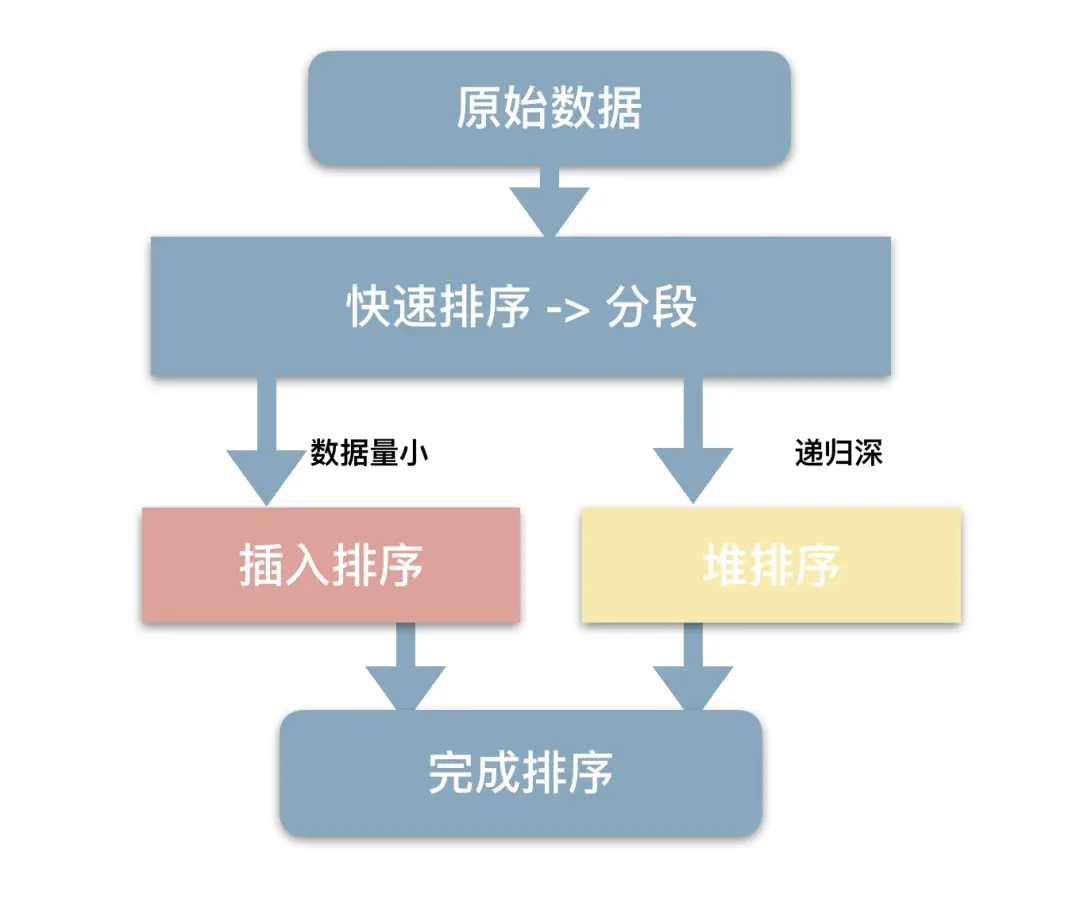
<span>std::sort</span> uses three types of hybrid sorting algorithms:
- QuickSort: Used in most cases, average time complexity **O(n log n)**.
- HeapSort: When the recursion depth is too large (indicating poor data distribution, risking QuickSort degrading to O(n²)), it switches to HeapSort to guarantee O(n log n) worst-case complexity.
- InsertionSort: When the sorting interval is small enough (e.g., length < 16), it switches to InsertionSort, as it is faster for small intervals.
15. What are the advantages of nullptr over NULL?
In C++, <span>nullptr</span> is a new keyword introduced in C++11, which is safer and more explicit than <span>NULL</span>.
In C/C++, <span>NULL</span> is usually defined as 0, which can sometimes be confused with integers.<span>nullptr</span> has a dedicated type <span>std::nullptr_t</span>, which will not be confused with integers.
In modern C++ development, <span>nullptr</span> should be used instead of <span>NULL</span>.