Working Principle and Usage of 51 Microcontroller Timer
TMOD: Controls the working mode of the timer. 8 bits, the high four bits control T1, and the low four bits control T0. There are four working modes for the timer; TMOD = 0x00 (Mode 0), TMOD = 0x01 (Mode 1), TMOD = 0x02 (Mode 2), TMOD = 0x03 (Mode 3). The above controls the low 4 bits, which correspond to T0.
TR0: T0 timer enable switch, TR0 = 1, starts working; = 0 stops working.
ET0: T0 timer interrupt switch, once the timing time is reached, it will run to the interrupt program. ET0 = 1, interrupt enabled; = 0 disabled.
EA: Global interrupt switch, you can imagine it as the main circuit breaker, EA = 1, interrupt enabled; = 0, interrupt disabled.
TH0, TL0: T0 timer counting registers, forming a 16-bit counter, 0x0000–0xFFFF (0–65535). As long as TH0TL0 = 0xFFFF (65535), the program will run to the interrupt program. In the interrupt program, we need to reassign values to TH0 and TL0.
If we want to time for 50 milliseconds, what values correspond to TH0 and TL0? As mentioned above, TH0 and TL0 form a 16-bit counter with a counting range of 0—65535. 50ms = 50,000us, we just need to let TH0 TL0 start counting from (65535 – 50000). TH0 and TL0 will keep increasing by 1 until TH0 and TL0 = 65535, which means it counted 50,000 times, and the time has passed 50ms. We just need to reassign TH0, TL0 = (65535 – 50000) in the interrupt program, and the timer will interrupt every 50ms.
So, TH0 = (65535-50000)/256; TL0 = (65535-50000)%256;
Alright, here is an example program for T0, timing for 20ms:
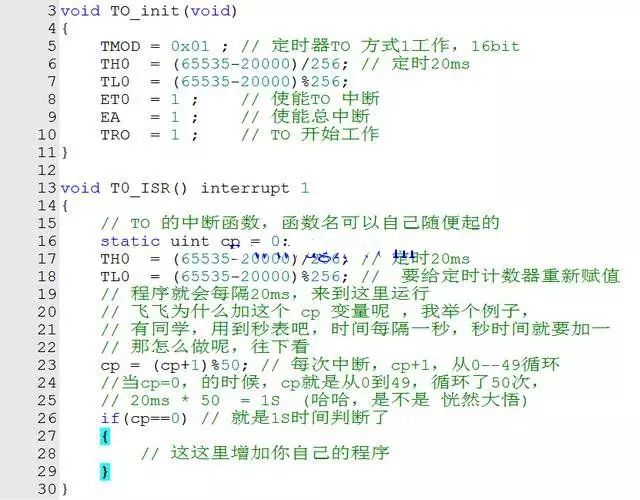
20ms Example Program
Having talked about T0, what about T1? As I mentioned at the beginning, T0 and T1 are twins. Everyone can change the above T0 example program:
(TMOD = 0x01, ET0, TR0, TH0, TL0, interrupt 1) to
(TMOD = 0x10, ET1, TR1, TH1, TL1, interrupt 3) to change it to the T1 timer program.


To help everyone learn better, Changxue Electronics Network has specially added a WeChat public account for microcontrollers and EDA, pushing relevant knowledge daily, hoping to assist your learning!