
Click the blue text to follow us

The full English name of WLAN is Wireless Local Area Networks, which refers to wireless local area networks.
WLAN is a system that uses radio frequency technology for data transmission, mainly including two modes of internet access: WAPI and WiFi, to compensate for the shortcomings of wired local area networks and achieve network extension.
1
Classification of Wireless Networks
1
Classification by Range
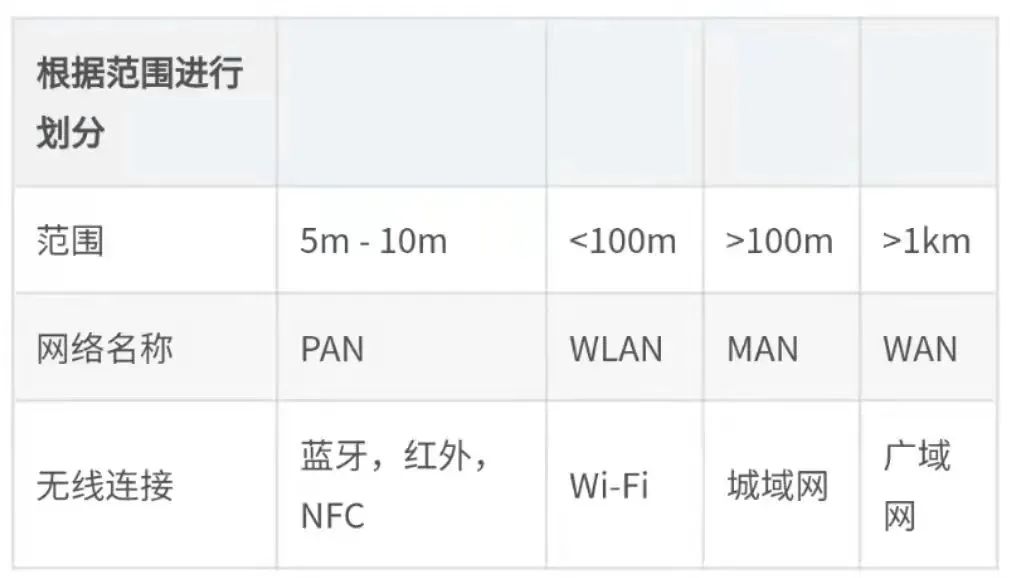
2
Overview of Network Types
① PAN: Personal Area Network (Range: 5 to 10m)
Common wireless connections include: BT (Bluetooth), NFC, infrared.
Wired connections: USB or other connection methods.
Usage: Can be used for transferring small files or data, such as photos, music, etc.
② WLAN: Wireless Local Area Network (Range: Less than 100m)
Uses wireless connections to replace wired connections for communication, expanding Ethernet and enriching device connection methods.
A wireless local area network must have at least two devices using wireless connections to establish a communication channel.
Typically, a wireless local area network consists of a router and one or more wireless devices that can connect to the router.
③ MAN: Metropolitan Area Network (Range: Greater than 100m)
It is a network that spans multiple buildings across a city or town.
Metropolitan area networks are high-speed networks that can share data and resources in a city.
④ WAN: Wide Area Network (Range: Greater than 1Km)
WAN is the largest type of network, which can include multiple LANs, CANs, and MANs.
It is a network that spans a large geographical area, such as a country, a continent, or even the entire planet; a good example of a wide area network is the Internet.
⑤ LAN: Local Area Network
Typically consists of a group of devices, such as personal computers, servers, or other network devices.
The most common type of local area network is Ethernet, where two or more personal computers can transfer data between devices by connecting to a router or switch via network cables.
⑥ CAN: Campus Area Network
Usually a network that connects two or more local area networks within a campus area.
⑦ SAN: Storage Area Network
SAN is a special high-speed network that stores a large amount of data and provides access to it.
1
Overview of WLAN Local Area Network
1
Understanding WLAN Local Area Network
The operation of WLAN is built upon wired networks, expanding wired networks and changing terminal access and interconnection methods.
Basic Ethernet protocols such as ICMP, DHCP, ARP, TCP, etc., as well as data forwarding rules, are also followed in WLAN networks without difference.
In addition to differences in the physical layer and data link layer between LAN and WLAN, other protocols follow the same network protocol rules as Ethernet.
LAN local area networks mainly adhere to the 802.3 protocol.
WLAN mainly consists of stations (Station, STA), access points (Access Point, AP), wireless media (Wireless Medium, WM), and distribution systems (Distribution System, DS).
2
Understanding the IEEE802.11 Protocol Family
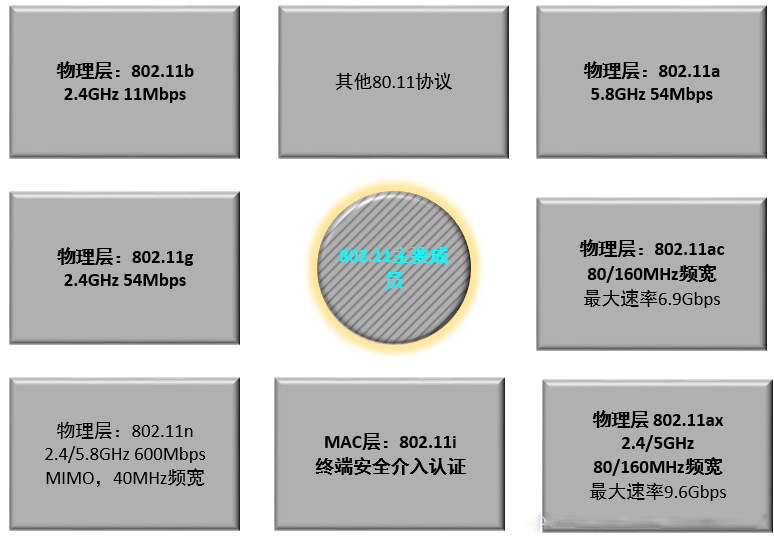
As can be seen from the above figure, with the continuous updates and developments of the 802.11 protocol, the most obvious is that the Wi-Fi communication rate is constantly increasing, and the security protocols are also continuously updated and made more secure, allowing users to use them with more confidence.
3
802.11 Technical Standards
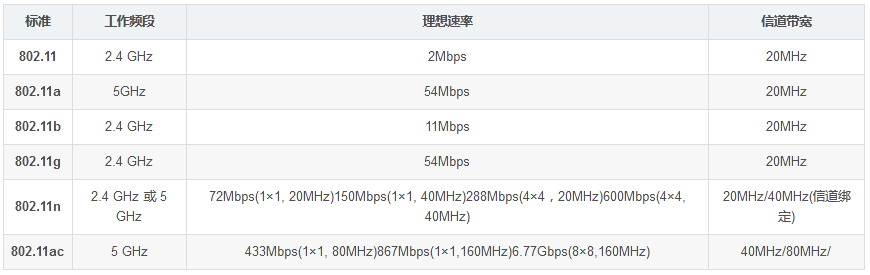
4
Comparison of 2.4GHz and 5GHz
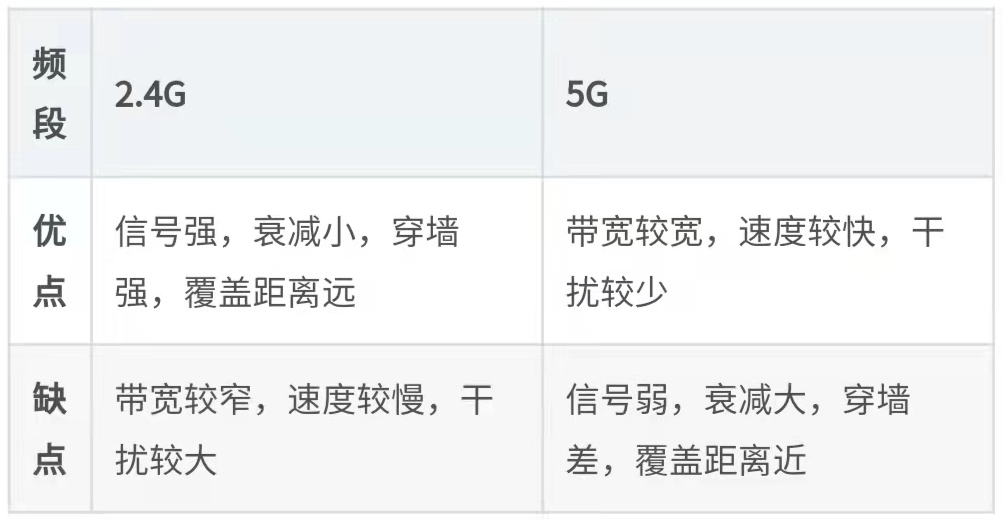
Note: 5G Wi-Fi has a higher frequency, so the energy of the electromagnetic wave is strong, and its penetration ability (in unchanged direction) is strong, but the signal penetration will lose a lot of energy, so there is significant attenuation during the propagation process, and the propagation distance is relatively short.
1
Basic Information on Channels
1
Basic Information
Data transmission medium: Electromagnetic waves (carrier; propagation speed is the speed of light).
The radio frequency bands used by wireless networks: 2.4GHz/5.8GHz.
Channel: The data transmission channel in wireless networks, a concept in the frequency domain.
Each channel identifies a certain frequency range, and each channel has a center frequency and a certain bandwidth. Channels are public resources and are fixed and unchangeable.
2
2.4GHz Band Wi-Fi Channel Division
Overlapping channels will cause interference, and the waveform will become higher; each channel has a center frequency and a certain bandwidth, and channel 14 is only supported in Japan.
The effective width of each channel is 20MHz, with an additional 2MHz of mandatory isolation frequency band (similar to a highway isolation belt).
For example, for channel 1 with a center frequency of 2412 MHz, its frequency range is 2401~2423MHz, except for the three non-interfering channels 1, 6, and 11, there are also three groups of non-interfering channels: 2, 7, 12; 3, 8, 13; 4, 9, 14.
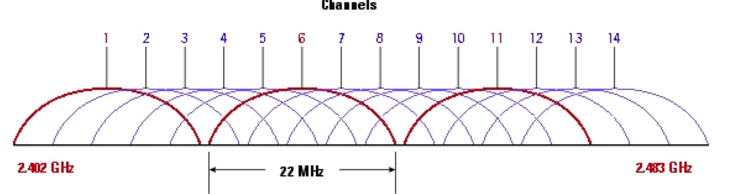
Note: When laying out a 2.4GHz wireless network, try to set adjacent router channels to independent channels or social channels to avoid interference between channels.
3
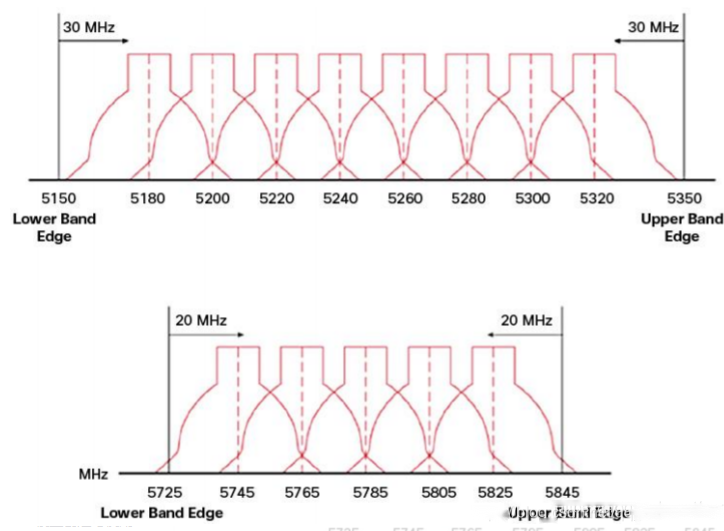
5GHz Channel Division

As shown in the figure above, the number of non-overlapping channels in the 5GHz band is greater than that in the 2.4GHz band, reducing the probability of overlap or congestion.
Below are some 5GHz channel divisions in the United States:
4
Principles for Selecting WLAN Channels
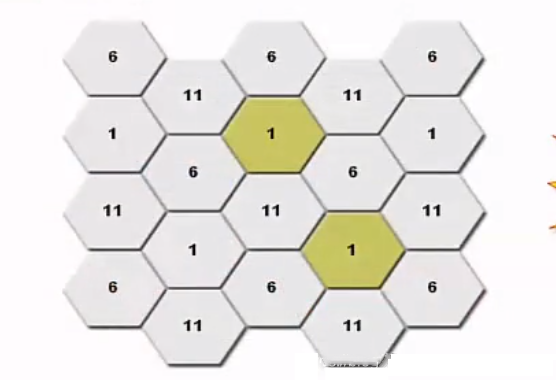
When deploying APs or routers, try to use independent channels. Physically adjacent APs or routers should use different independent channels to reduce interference between channels.
As shown in the figure below (each hexagon represents a router or AP):
1
Introduction to Signals
1
Overview of Signal Strength
Method of identifying signal strength: Power and decibels.
dB is used to measure the ratio of the measured power to a certain reference power.
Its value equals the logarithm (base 10) of the ratio of the measured power to the reference power, multiplied by 10. When the reference power is taken as 1mW, this dB value is expressed as dBm, and measured power (dB) = 10 * lg(measured power mW).
For example, if the indoor AP power is 100mW, the maximum signal strength is 20dBm = 10*lg^100.
2
Signal Transmission Characteristics – Link Loss
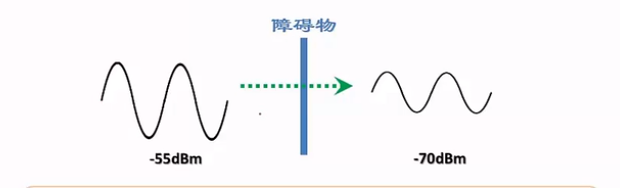
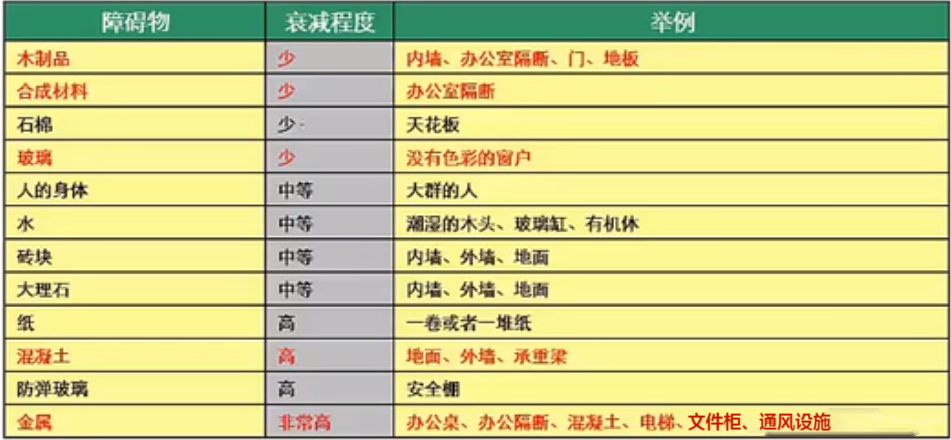
As shown in the figure, when a wireless signal passes through obstacles, the waveform of the wireless signal changes, i.e., the wireless signal undergoes attenuation. Depending on the material of the obstacle, the degree of signal attenuation varies, with metal and concrete having the greatest impact.
As shown in the figure, the analysis of different obstacle materials on attenuation:
3
Signal Transmission Characteristics – Multipath Effect
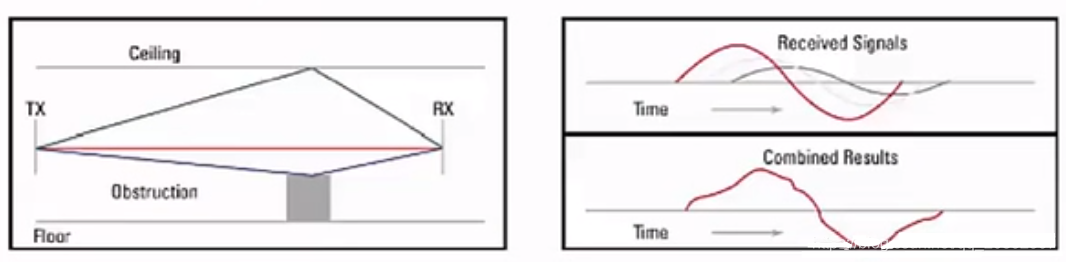
As shown in the figure, when there are multiple paths in the propagation process of the signal from the starting point to the endpoint, multipath propagation occurs.
This is because some signals reach the endpoint directly, while others are reflected by obstacles to reach the endpoint, resulting in some signals having delays and taking longer paths to reach the endpoint, causing phase changes. The signals traveling through different paths will superimpose at the receiving end, resulting in multipath distortion.
4
Signal Transmission Characteristics – Electromagnetic Interference
Signal interference and channel interference generated by different network systems overlapping each other.
Devices within the same network system operating on the same frequency, adjacent frequency interference, etc.
Interference from other devices operating on the same channel as WLAN devices.
1
Basic Components of Wireless Networks
1
Basic Component of Wireless Networks – SSID
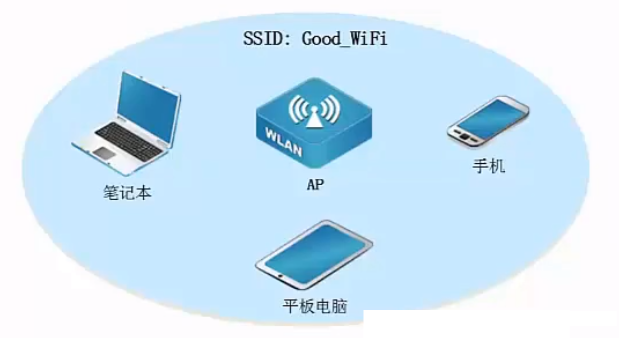
SSID: Service Set Identifier, the “name” or hotspot name of the wireless network we see.
2
Basic Component of Wireless Networks – BSS
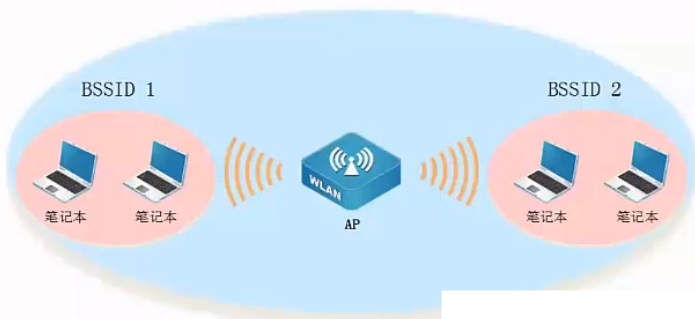
BSS: Basic Service Set, identified by the AP MAC address, i.e., BSSID.
3
Basic Component of Wireless Networks – ESS
ESS (Extended Service Set) is a virtual BSS formed by multiple BSSs using the same SSID.
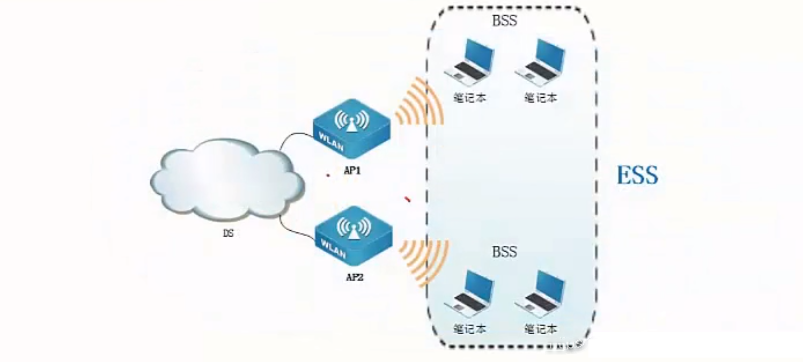
4
VAP (Virtual AP)
A virtual interface, with 16 per frequency band, AP can support multiple SSIDs.
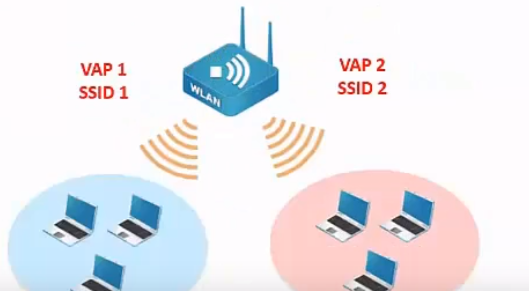
5
Relationship between VAP and BSSID
A physical AP can virtualize 16 virtual APs.
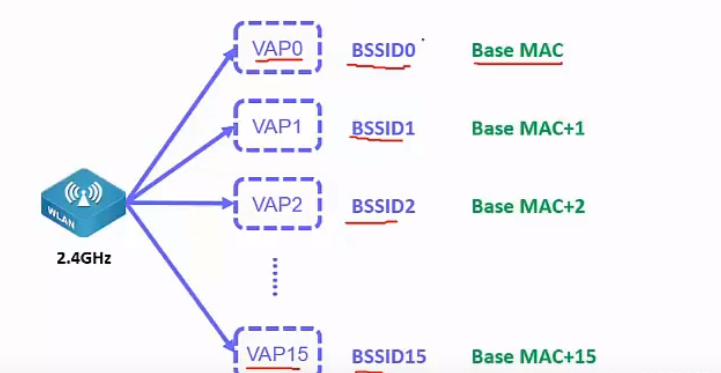
In practice, the ESSID and BSSID relationship.
It is possible to find an SSID that has multiple BSSIDs.
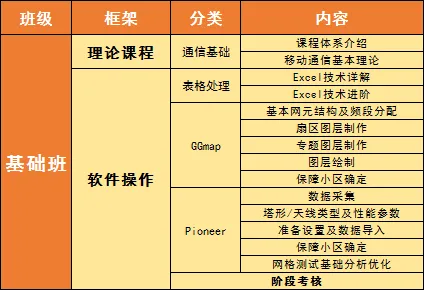
Orange Basic Class Teaching Outline
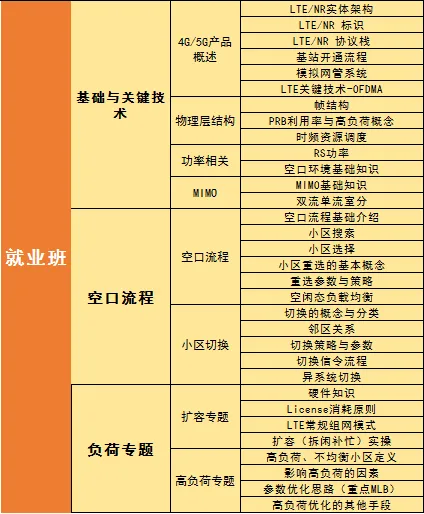
Orange Employment Class Teaching Outline
Want to become a backend intermediate engineer
And get a high-paying offer
Join the network optimization exchange Q group
801549240
Get a free 7-day network optimization learning course!
There are many valuable resources waiting for you!
END
Zhang Xuefeng talks about communication engineering: This position can get a high-paying offer from a state-owned enterprise with zero skills!!
This article teaches you to understand the differences between 5G NR and 4G LTE!
The person chasing the light will eventually shine brightly; the Orange Wuhan campus 241224 basic class is now open!