
 Origin of WiFi Name
The term Wi-Fi is often mistakenly thought to refer to Wireless Fidelity, similar to the historical classification of audio equipment: long-term high fidelity (adopted since 1930) or Hi-Fi (adopted since 1950). Even the Wi-Fi Alliance itself frequently uses the term “Wireless Fidelity” in press releases and documents; in fact, the term Wi-Fi has no meaning.
In 1999, several visionary companies came together to form a global non-profit association—the Wireless Ethernet Compatibility Alliance (WECA)—with the goal of using a new wireless networking technology to provide the best user experience regardless of brand. In 2000, the group adopted the term “Wi-Fi” as the proprietary name for its technical work and announced the official name: Wi-Fi Alliance.
Wireless Frequency
Wireless transmission is a method of transmitting digital signals through electromagnetic waves. Using a wired connection involves physical cables, while using a wireless connection can be imagined as having a (or several) virtual cable between your phone, computer, and the wireless router.
Main Wireless Classifications, Frequencies, and Uses
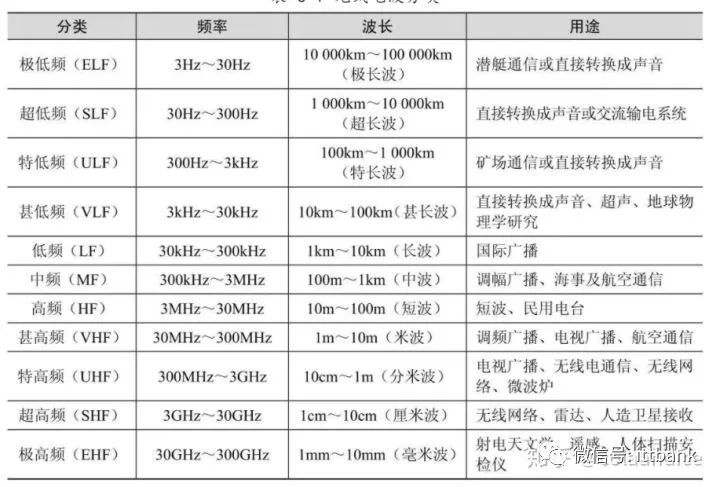
2.4G operates in the UHF band and belongs to the decimeter wave. The 2.4G band is very crowded, with Bluetooth, microwaves, Zigbee (IoT devices), amateur radio, and others all operating in this frequency range, leading to significant interference in daily life. However, 2.4G has a larger coverage area than 5G, which is why you can often detect wireless signals from neighboring houses. Most detectable signals are typically 2.4G signals.
5G operates in the SHF band and belongs to the centimeter wave. There is generally less interference in daily life, with the main sources of interference being radar and similar technologies. The coverage area of 5G is significantly smaller than that of 2.4G.
During transmission, wireless signals can be absorbed by different materials, leading to signal attenuation, which is the primary form of wireless loss. Generally speaking, the higher the density of the material and the more metal it contains, the stronger the absorption of wireless signals. Other factors contributing to wireless signal loss include reflection, scattering, refraction, and diffraction.
In China, most buildings are constructed with load-bearing walls and reinforced concrete structures, which cause significant loss to wireless signals. Therefore, the so-called wall-penetrating capability of routers used at home is virtually ineffective against load-bearing walls.
Electromagnetic Wave Penetration Loss through Different Materials
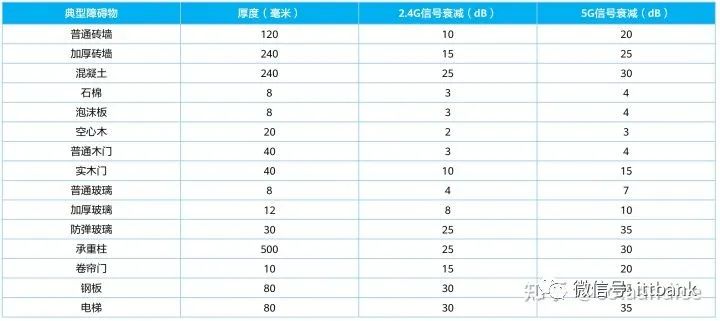
Because electromagnetic waves exhibit both wave and particle properties, they undergo phenomena such as penetration, reflection, diffraction, refraction, and scattering when encountering obstacles during transmission. The wireless signal we connect to is the result of these complex processes.
802.11 Standards
Wi-Fi and IEEE 802.11 are often confused; the distinction can be summarized as IEEE 802.11 being a standard for wireless local area networks, while Wi-Fi is an implementation of the IEEE 802.11 standard.
The formulation cycle of the 802.11 standard is approximately 4 to 5 years; generally, when the latest generation standard is released, the previous standard remains the mainstream.
Technically, there is no immediate need to pursue the new; it should be based on actual needs. Currently, most routers are still using Wi-Fi 5 and Wi-Fi 6. The Wi-Fi standards are backward compatible.
Major Milestones in the Development of the 802.11 Standards
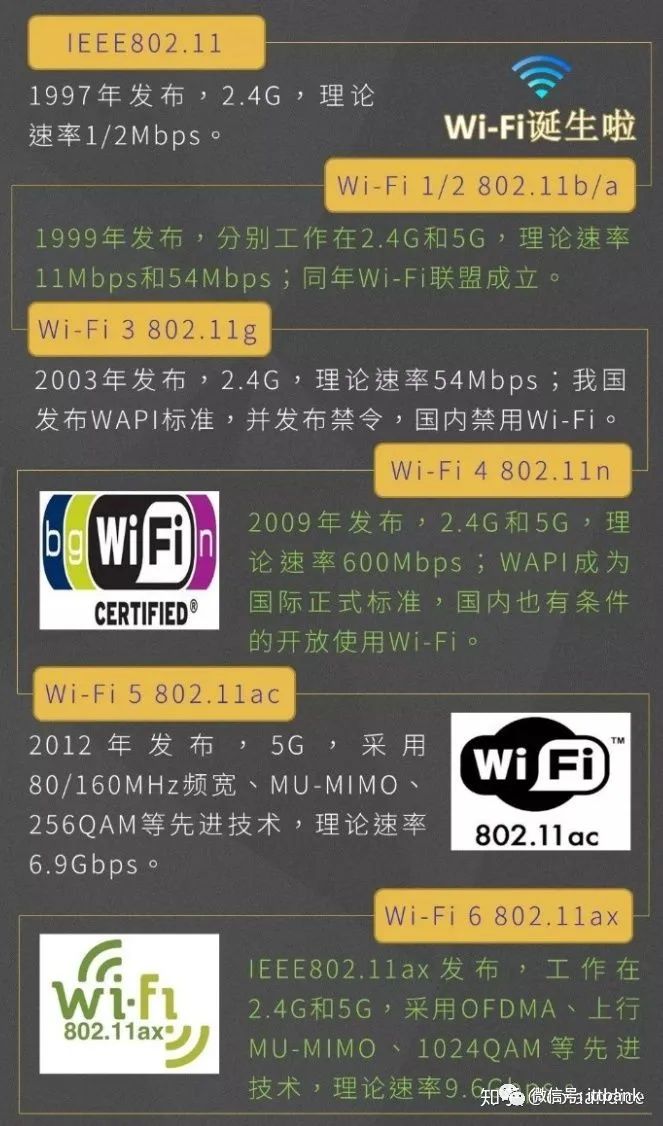
Devices supporting 802.11a and 802.11b are now very rare.
WiFi1: 802.11b 1999 2.4G 11Mbps
WiFi2: 802.11a 1999 5G 54Mbps
WiFi3: 802.11g 2003 2.4G 54Mbps
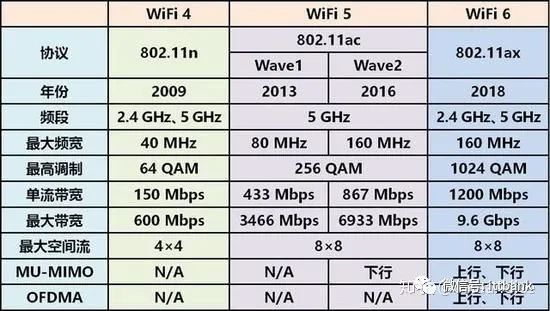
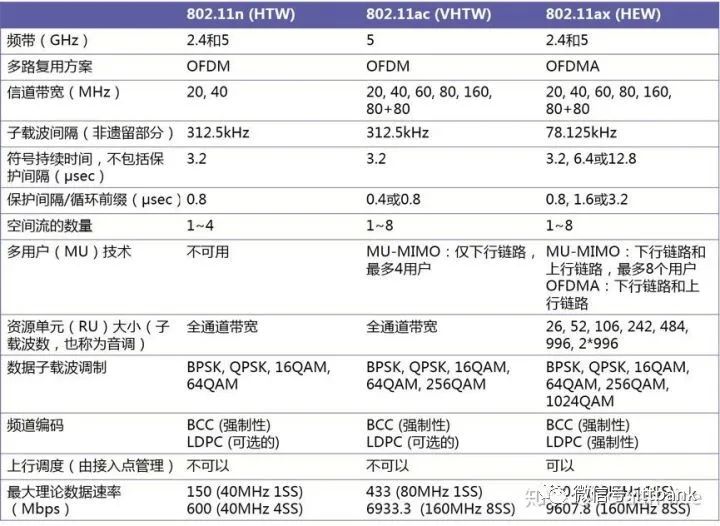
Comparison of WiFi4, WiFi5, and WiFi6
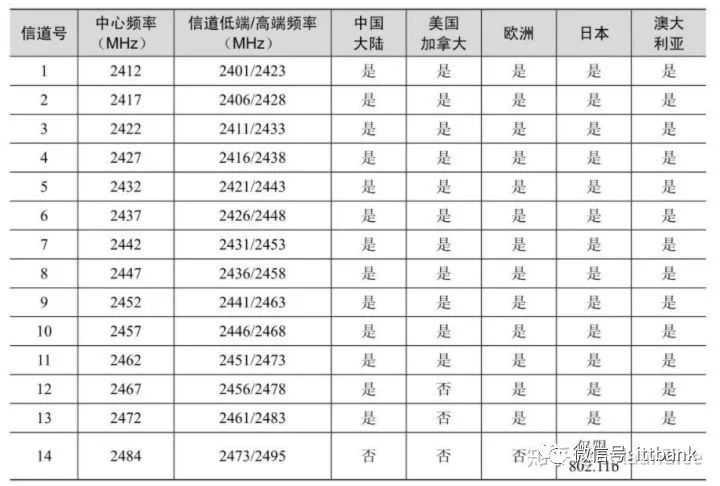
2.4G Band Channels
Countries’ support for the 2.4G band shows that our country supports the 2.4G band from 1 to 13.
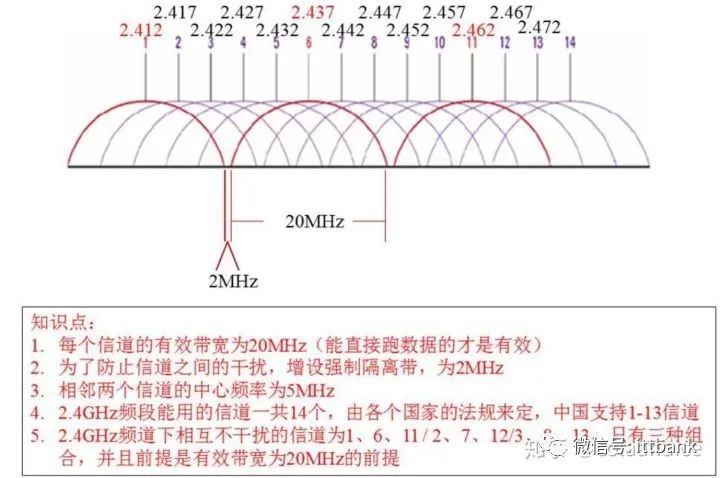
The center frequency between each channel is an integer multiple of 5MHz.
Some terminals may not support channels above 11, so care should be taken when setting.
There are few non-interfering channels in 2.4G, and many consumer devices also operate in the 2.4G band, which is why the 2.4G channels are so crowded.
As a result, interference in the 2.4G channels is significant; many people’s phones often show full wireless signal, but in reality, they cannot connect to the internet at all, which is the reason for this.
The maximum power for the 2.4G band as stipulated by the Ministry of Industry and Information Technology is EIRP≤500mw or EIRP≤27dBm.
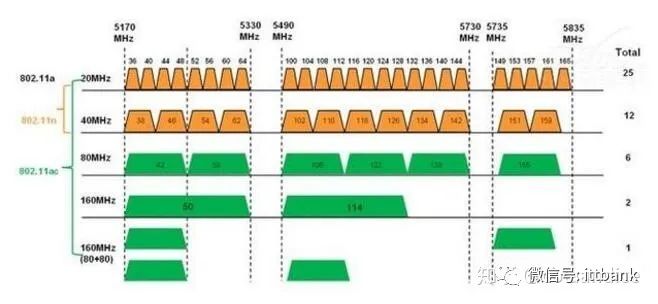
In traditional 802.11 standards, a small portion of bandwidth is reserved for every 20MHz, which can be combined to form a 40MHz bandwidth to enhance bandwidth. However, in the 2.4G band, due to significant interference, it is not highly recommended to use 40MHz.
The non-interfering channels in 2.4G are 1, 6, and 11, but due to the wide propagation range of 2.4G, many nearby neighbors’ 2.4G signals can often be detected at home. Many channels are occupied, making it nearly impossible to find a clean channel to use. Moreover, most routers can optimize channels automatically, so manually setting a channel for 2.4G does not significantly improve network performance.
5G can use 20MHz, 40MHz, 80MHz, and 160MHz. The specific frequencies supported depend on the SOC used by the router.
5G Band Channels
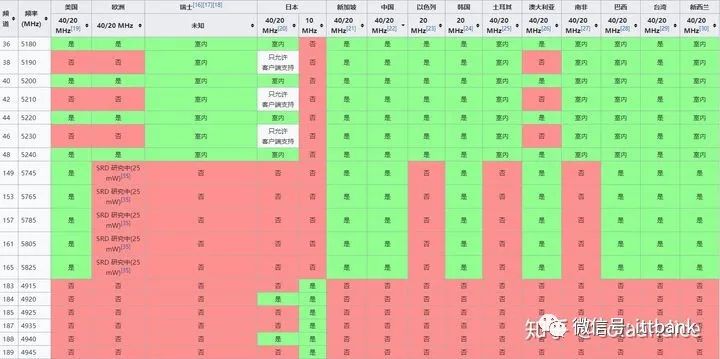
The 5G bands supported in our country are: 36, 38, 40, 42, 44, 46, 48, 149, 153, 157, and 161.
If you purchase a Japanese version of an electronic device and want to connect to a 5G wireless network, you need to change the 5G band to one supported by both Japan and China (36, 40, 44, 48) for the device to search for 5G signals and connect normally. Some older devices may not support 5G channels above 149 and may require channel adjustments.
At the same distance from the router, the 5G signal is relatively weaker than the 2.4G signal. This is due to the physical properties of electromagnetic waves: the longer the wavelength, the less attenuation, and the easier it is to bypass obstacles and continue propagating. The 5G signal has a higher frequency and shorter wavelength, while the 2.4G signal has a lower frequency and longer wavelength, so the 5G signal attenuates more when penetrating obstacles, making its wall-penetrating ability weaker than that of the 2.4G signal. This situation exists for all dual-band wireless routers.
Here are the attenuation formulas for 2.4G and 5.8G in free space (where F is frequency in MHz; D is distance in km): The attenuation formula for radio electromagnetic waves in free space: L=32.5+20lgF+20lgD. The attenuation formula for the 2.4G band: L1=100+20lgD; the attenuation formula for the 5.8G band: L2=108+20lgD. From the above formulas, it can be seen that the attenuation of 5.8G is higher than that of 2.4G, and the corresponding coverage distance is smaller.
Advantages and Disadvantages of 2.4G and 5G
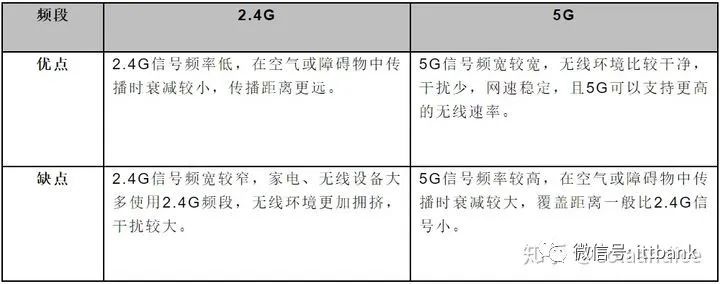
If the terminal (such as a TV) is close to the router and has few obstacles around, it is recommended to connect to 5G. If the terminal (such as a phone) is far from the router and has many obstacles, you can choose 2.4G based on the situation.
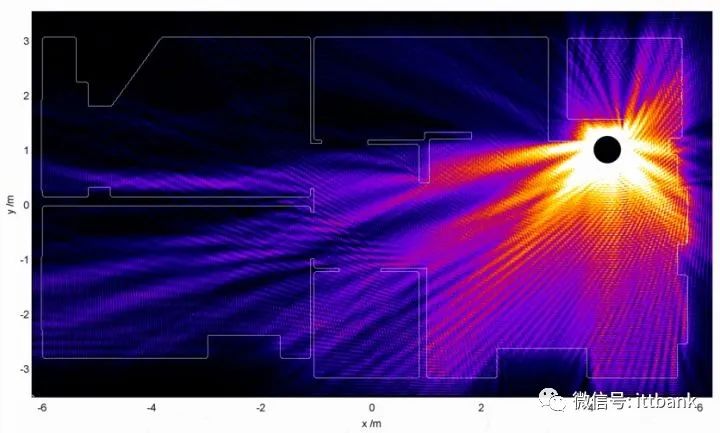
Wireless Propagation Diagram
You can see the blocking effect of walls on wireless signals.
Wireless Power and Antennas
When we look at routers, the features of “wall-penetrating” and multiple large external antennas are often highlighted as selling points. Many people believe that the more antennas a router has, the better the signal. Conversely, they think that routers without external antennas have poor signals. So how much does the number of antennas actually affect wireless coverage?
According to the principle of the barrel, the wireless speed of the terminal depends on the negotiation between the terminal and the router. Depending on the type of terminal and wireless attenuation, the wireless terminal will ultimately negotiate a suitable rate with the router, which is usually lower than the maximum rate supported by the router. The upper limit is the maximum rate supported by the router. Therefore, simply increasing the wireless power of the router does not necessarily yield good results, and each country also has strict regulations on the wireless power of routers.
Wireless Power
Milliwatt (mW)
Power unit; the maximum power for 2.4G is 100mW. The maximum power for 5G is 500mW.
Wireless routers have very low power and are strictly controlled by national regulations. As long as they conform to national standards, they are safe to use. Those who believe that wireless routers pose dangers are often influenced by psychological factors.
Decibel-milliwatts (dBm)
The absolute unit of wireless power is dBm.
Calculation formula for dBm: 10lgP where P = wireless power/1mW
0dBm = 1mW
17dBm = 50mW
20dBm = 100mW
[Example 1] If the transmission power P is 1mW, the dBm value will be 0dBm.
[Example 2] For a power of 40W, the dBm value should be calculated as follows:
10lg(40W/1mW) = 10lg(40000) = 46dBm
dBi
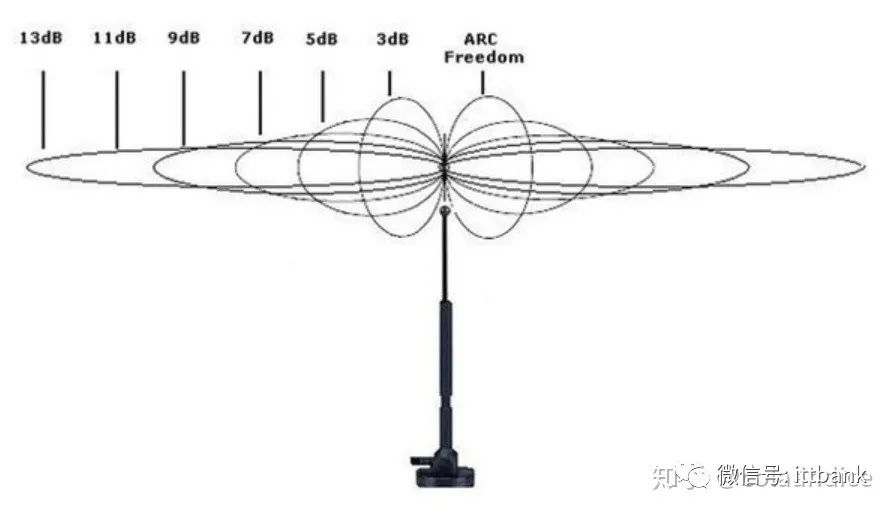
dBi is the unit of measurement for antenna gain. A higher dBi does not enhance the Wi-Fi signal but focuses the transmission and reception of the signal more effectively. The larger the dBi value, the higher the gain, the smaller the vertical angle, and the relatively farther the transmission distance.
Equivalent Isotropic Radiated Power (EIRP)
A common concept in the field of radio communication, it refers to the radiation power of a satellite or ground station in a specified direction, ideally equal to the power of the amplifier multiplied by the antenna gain. The configuration of EIRP reflects the radiation power. It is expressed as the power at the strongest point. The unit is dBW.
EIRP = Effective Power + Antenna Gain – Antenna Feedline Loss
Antennas and Gain
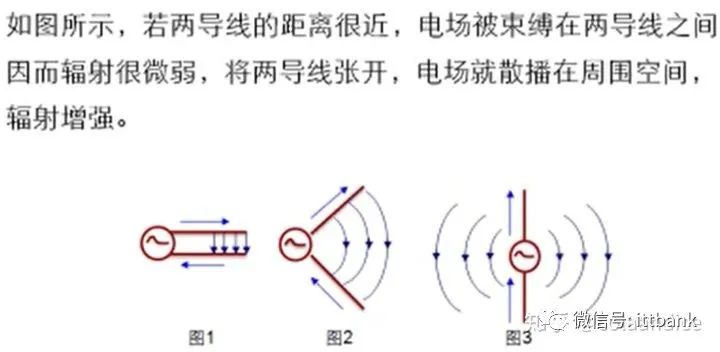
The role of a router’s antenna is to transmit and receive radio waves.
On wireless routers, external antennas are commonly omnidirectional whip antennas, while internal antennas are also omnidirectional. Outdoor base stations may use both omnidirectional and directional antennas.
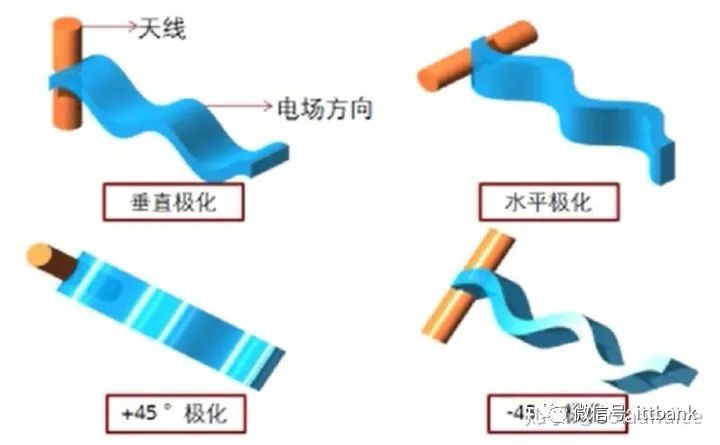
When radiating, antennas generally have two types of polarization: vertical and horizontal. Horizontal polarization, due to the influence of the Earth’s magnetic field, suffers greater losses and is less commonly used; monopole antennas generally use vertical polarization.
At the same power level, the more gain, the stronger the directionality of the antenna, and the smaller the directional angle.
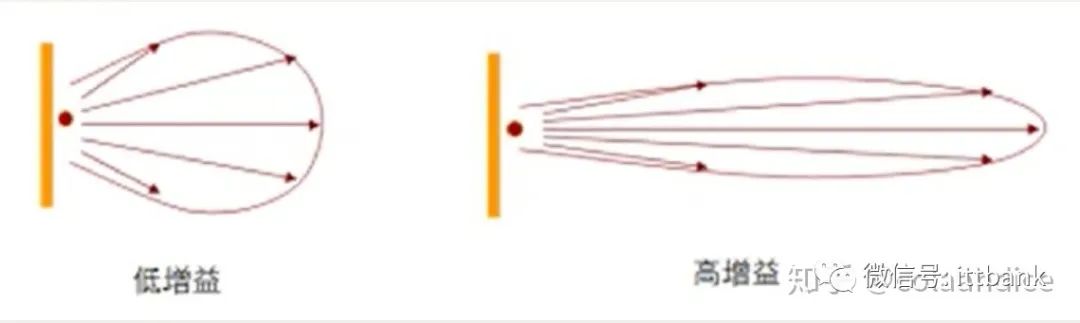
The gain value is measured in dBi. The gain of the antenna, in the direction of maximum radiation, is the multiple by which the input power is amplified compared to an omnidirectional ideal point source.
The signal strength diagram of an omnidirectional antenna resembles a doughnut shape.
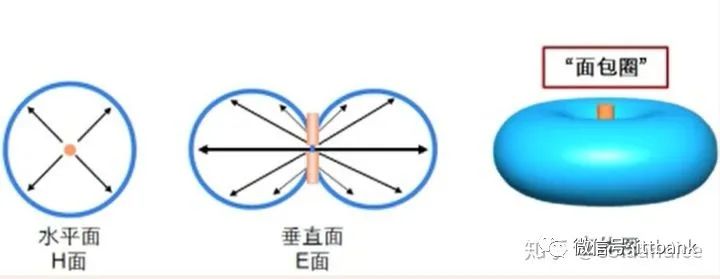
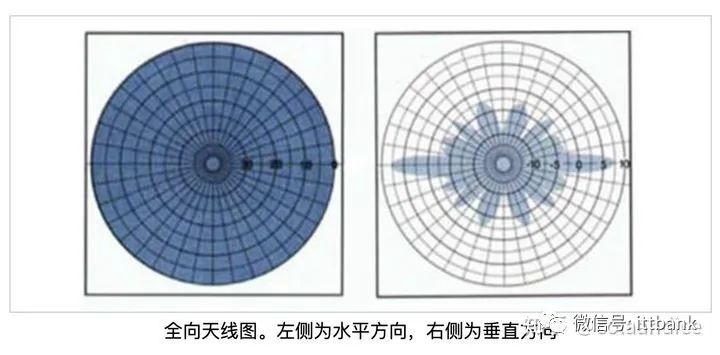
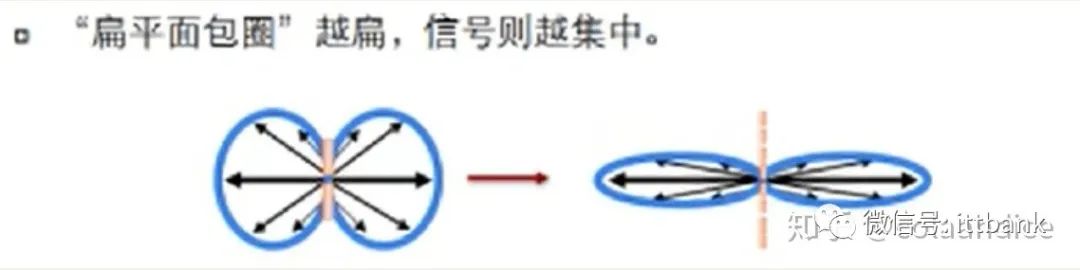
After gain, the doughnut shape becomes flatter, increasing the coverage area. The energy becomes more concentrated, resulting in a stronger signal in the horizontal direction and a better ability to resist interference, while the signal weakens in certain directions.
The number of antennas should match the MIMO technology supported by the router, whether they are external or internal antennas.
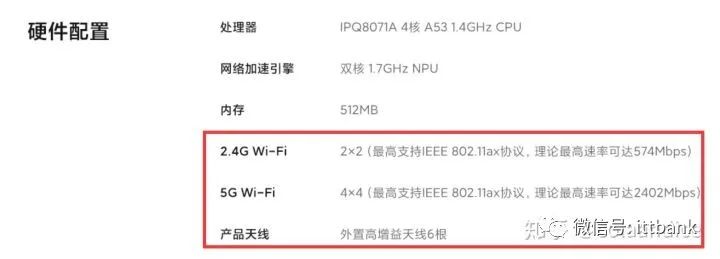
If it is a 2*2 MIMO, then only 2 antennas are needed. Many routers are dual-band routers for 2.4G and 5G, and can use separate antennas to transmit 2.4G and 5G signals, resulting in a higher number of antennas.
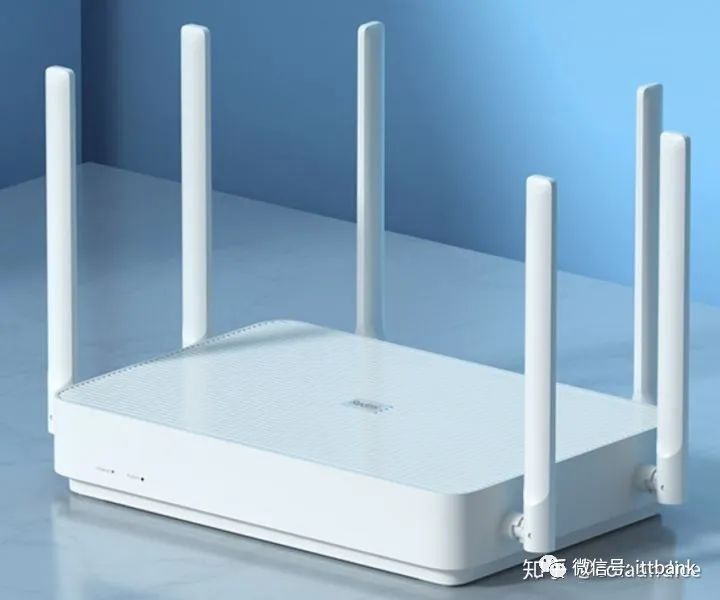
For example, the Redmi AX6 has 6 antennas, with 2 responsible for 2.4G and 4 for 5G.
Router Placement
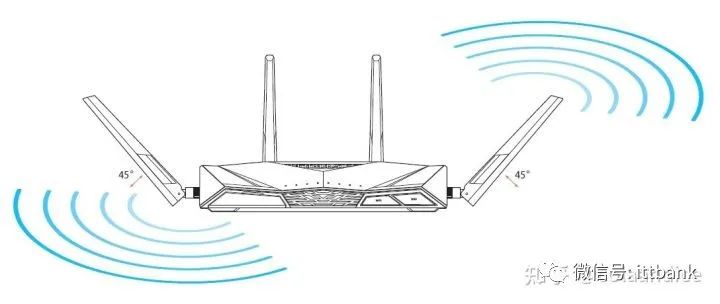
Based on the previous discussion of antennas and wireless characteristics, when placing the router, it should be positioned as high as possible, ideally in the center of the room with minimal obstructions, and the router’s antennas should be oriented vertically at a 90-degree angle to the ground. This way, the wireless signal in the horizontal direction is strongest and has the widest coverage. If the router has more than 2 antennas, the other antennas can also be adjusted at different angles to achieve more uniform coverage.
MIMO Technology
MIMO (Multiple Input Multiple Output)
MIMO is a key technology for enhancing wireless performance, first proposed in the 802.11n standard.
By using multiple antennas at both the sending and receiving ends, MIMO can greatly increase channel capacity, enhancing transmission reliability, range, and throughput.
Prior to MIMO, there was SISO (Single Input Single Output).
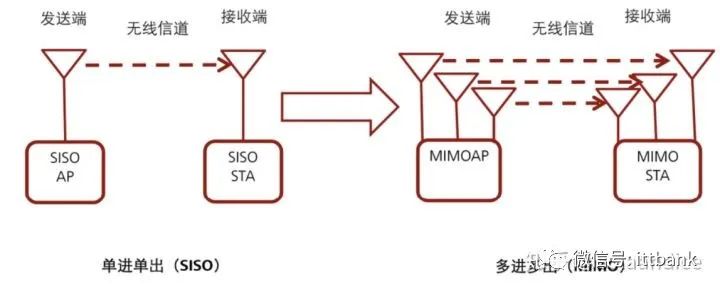
When using a wired connection, the cable serves as a physical channel. When using a wireless connection, to achieve faster speeds, virtual cables (channels) need to be combined for data transmission.
MIMO is written as AxB MIMO, where A represents the number of antennas at the sending end and B represents the number of antennas at the receiving end.
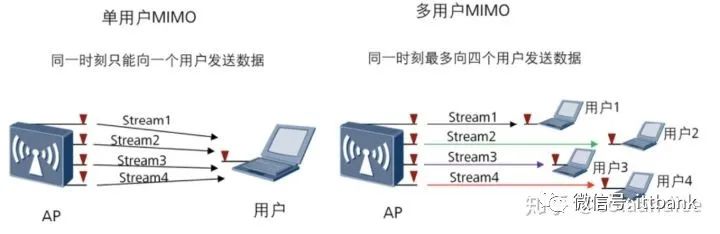
MIMO is further divided into SU-MIMO and MU-MIMO.
SU-MIMO (Single-User Multiple Input Multiple Output)
MU-MIMO (Multi-User Multiple Input Multiple Output)
Among them, MU-MIMO can further enhance rates. MU-MIMO was first proposed in Wi-Fi 5.
WIFI6
On January 3, 2020, the 802.11ax standard was adopted by the Wi-Fi Alliance, which introduced the new naming Wi-Fi 6 for easier memory and promotion.
Wi-Fi 6 is backward compatible with 11a/b/g/n/ac.
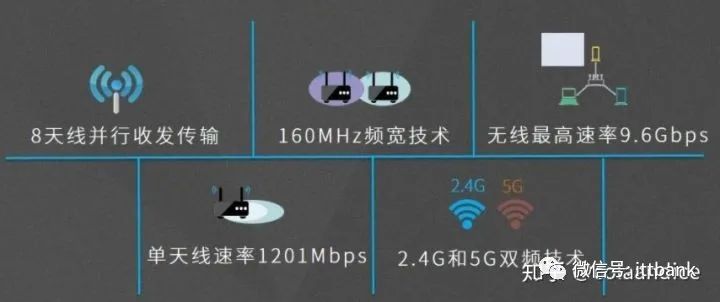
Main Features of Wi-Fi 6
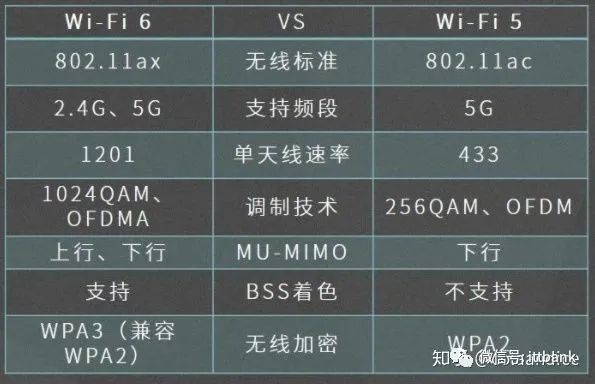
Comparison of Wi-Fi 6 and Wi-Fi 5
Main Enhanced Features of Wi-Fi 6
-
Wi-Fi 6 supports both upstream and downstream MU-MIMO, while Wi-Fi 5 only supports downstream.
-
Wi-Fi 6 supports OFDMA (Orthogonal Frequency Division Multiple Access), while Wi-Fi 5 supports OFDM (Orthogonal Frequency Division Multiplexing).
Difference Between OFDM and OFDMA
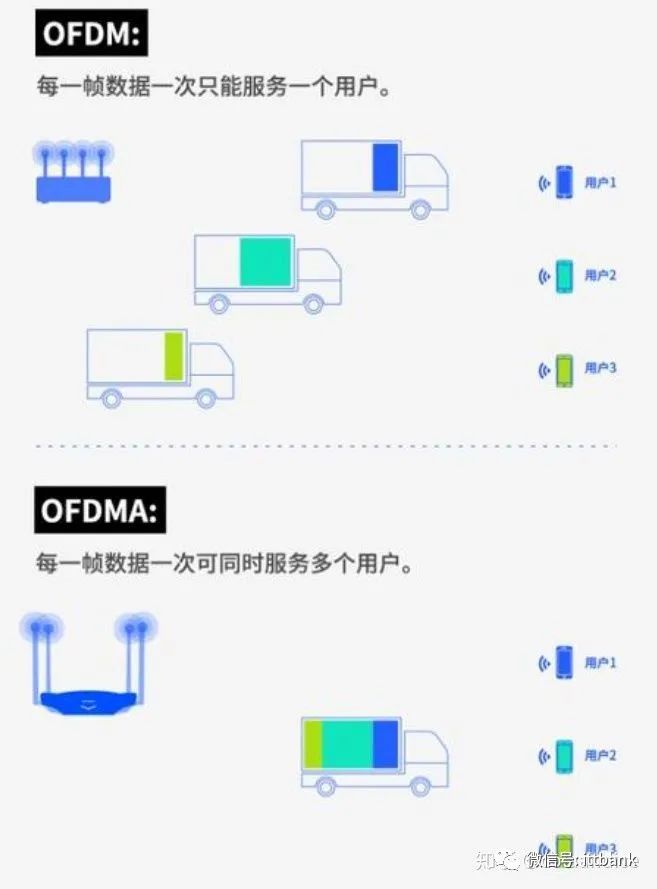
Wi-Fi 6 has a theoretical speed of up to 9.6Gbps, making it suitable for scenarios with heavy data transmission on internal networks. Since the mainstream home broadband is still below 1G, Wi-Fi 6 will only become a bottleneck when the external bandwidth reaches 10G. However, the new features brought by Wi-Fi 6, in combination with Wi-Fi 6-supported terminals, will provide a better wireless experience.
CPU and Wireless Chips
For wireless routers, the number of functions and performance largely depend on the CPU and wireless power amplifier chip. The router’s system is more of an enhancement. If you have specific OS-level requirements, consider router models that allow for system updates.
CPU
The CPU determines the functions that the router can provide. The CPU also performs a lot of calculations, which can lead to significant heat generation in high-end routers.
Currently, routers mainly use CPUs from Qualcomm, Broadcom, and MTK. Previously, Huawei’s HiSilicon CPUs were also used.
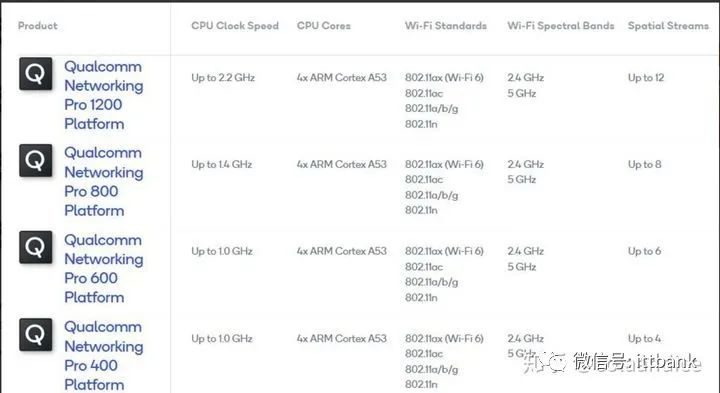
Taking Qualcomm chips as an example, Qualcomm’s Wi-Fi 6 chip solution, the highest-end platform is the Qualcomm Networking Pro 1200 Platform, which can support up to 12 spatial streams; followed by Pro 800, Pro 600, and Pro 400, which can support up to 8, 6, and 4 spatial streams, respectively. The specific specifications are as follows:
NETGEAR’s RAX120 AX6000M teardown diagram, sourced from Koolshare, highlights the importance of this CPU chip.
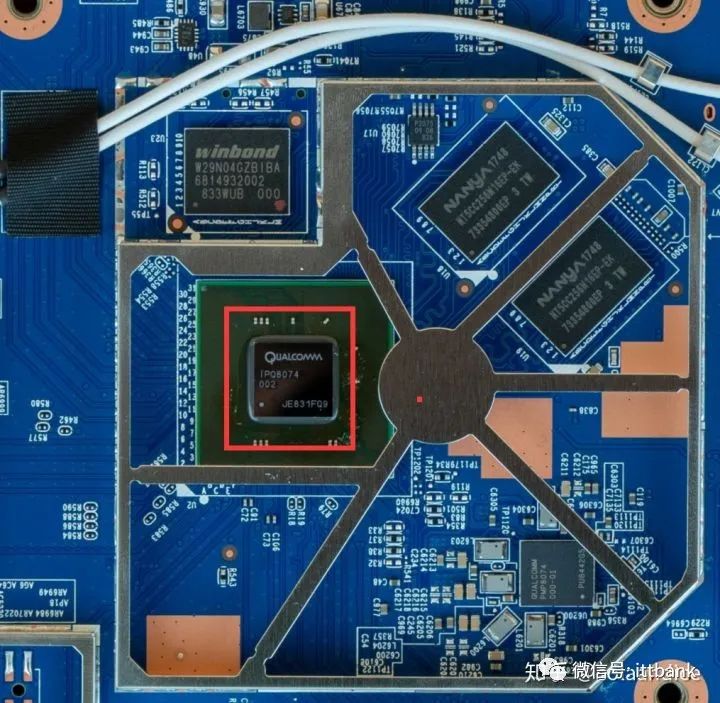
Wireless Chips
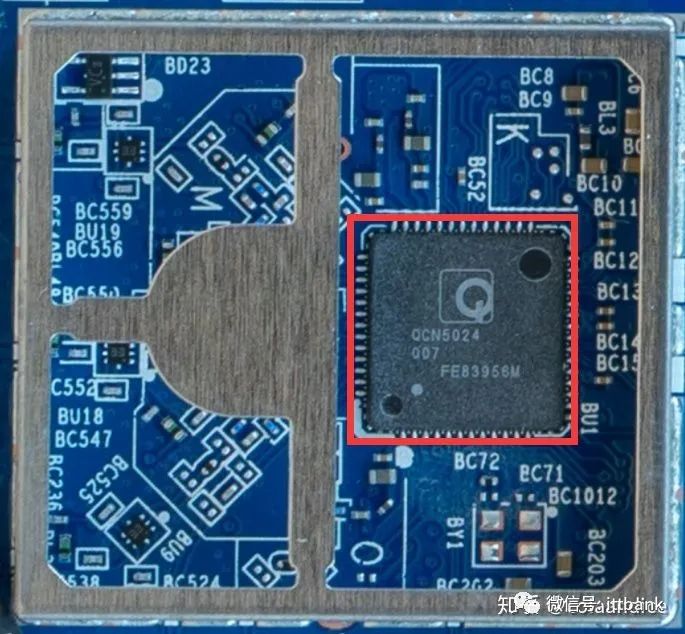
Working in conjunction with the CPU, there are 2.4G chips and 5G chips. High-end routers can use multiple wireless chips to multiply the wireless bandwidth.
The wireless chip in the NETGEAR RAX120 AX6000M teardown diagram, sourced from Koolshare, is Qualcomm’s QCN5024, a 2.4G chip supporting 4×4 MIMO, supporting 802.11ax, with a maximum rate of 1200Mbps.
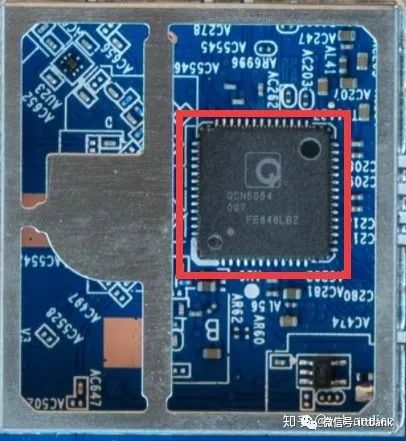
The wireless chip in the following image is Qualcomm’s QCN5054, a 5G chip supporting 802.11ax, supporting 4×4 MU-MIMO, 80MHz.
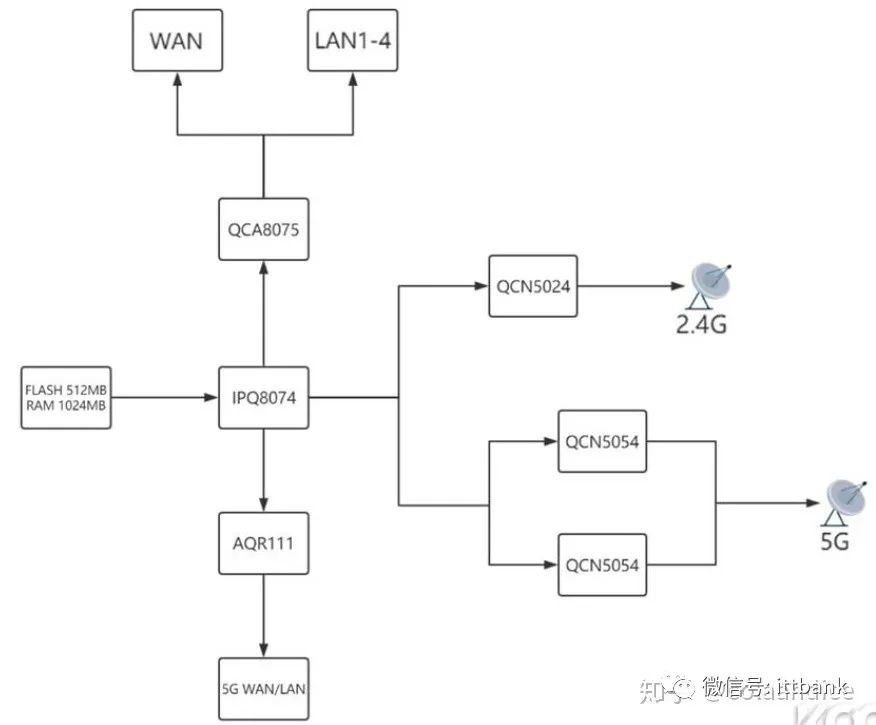
Router Chip Topology Diagram
MESH Technology
MESH distributed technology creates a mesh network among routers, allowing different access points to form a complete mesh network in star, tree, series, and bus configurations. In this large network, not only is the SSID unified, but wireless devices can also freely seek out the node with the best signal for data transmission, allowing for seamless switching as users move between nodes.
For extensive wireless coverage, MESH offers simple and flexible deployment while ensuring a good roaming experience. However, most MESH networking products require wireless bandwidth, so for the best experience, it is recommended to use wired connections for MESH networking, or choose tri-band routers that have a dedicated frequency band for wireless MESH, ensuring that terminal speeds are not affected and enhancing the experience.
MESH Networking is Suitable for Users Who Meet the Following Needs
1. Need wireless coverage over 100 square meters, or have many load-bearing walls within the coverage area.
2. Did not reserve network cables during renovation.
3. Require a good wireless roaming experience.
MESH Networking Diagram
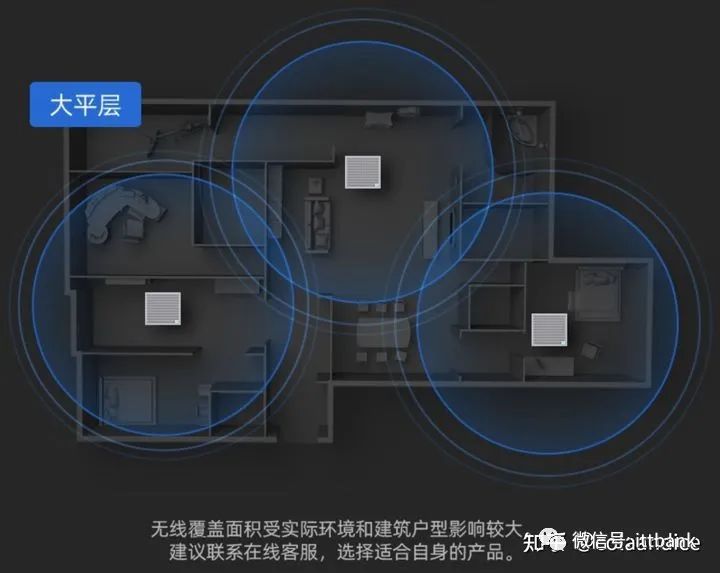
AC+AP
Introduction to AC+AP
For large homes, duplex buildings, villas, hotels, shopping malls, and enterprises, multiple routers are needed for coverage, and a good roaming experience is required. In this case, the best experience is to use the AP method for networking, paired with AC for unified management. AC can be standalone hardware or implemented through software. Some branded products require all data to be processed by the AC, and the performance of the AC determines the performance of the entire network. In some brands, the AC only serves a management role and does not forward data. APs need to be supplied with power via POE-supported switches, so when deploying AC+AP networks, not only must network cables be pre-installed, but the number of devices involved is considerable, requiring higher technical knowledge from users.
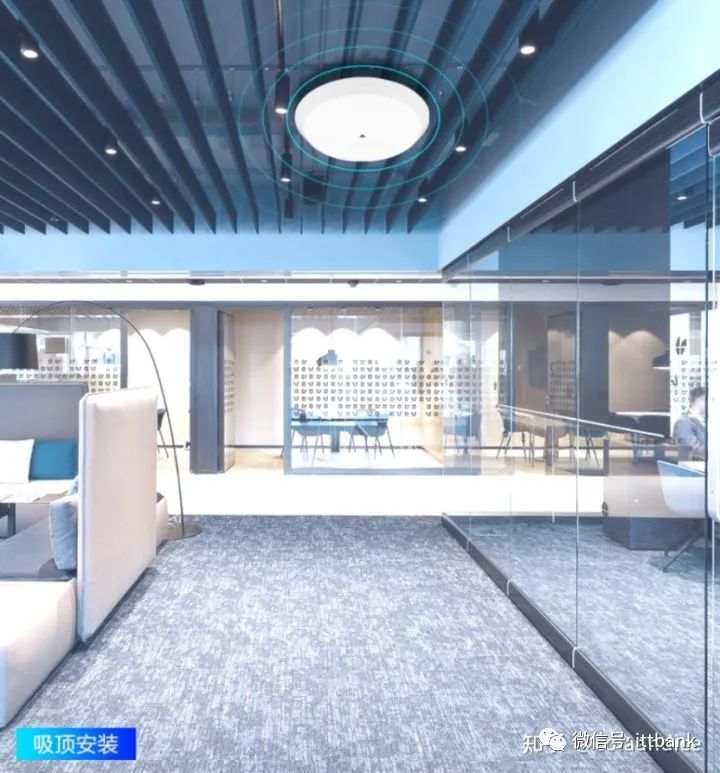
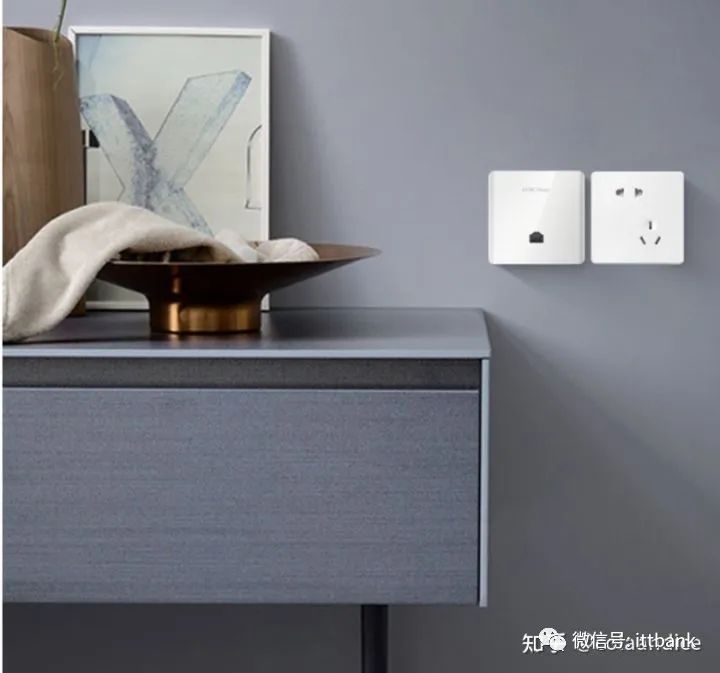
AP stands for Wireless Access Point, responsible for releasing wireless signals and forwarding wireless data. The wireless coverage area relies on multiple APs. Due to installation methods, APs generally have internal antennas. AP installation types are divided into ceiling-mounted APs and panel APs. Ceiling-mounted APs can be made larger and have stronger performance. Panel APs, due to size and installation location constraints, will generally have lower performance, heat dissipation, and signal coverage. Whenever conditions permit, ceiling-mounted APs should be chosen whenever possible.
Ceiling-Mounted AP Diagram
Panel AP Diagram
AC Wireless Controller
Responsible for controlling all settings of the AP. In some brands, the AC will concentrate on data forwarding, while in others, the AC only manages and does not participate in data forwarding. For ACs that concentrate on data forwarding, their performance can become a bottleneck in the network, so it is essential to choose a high-performance AC. The brands of AC and AP should be consistent.
Common ACs resemble switches in shape.
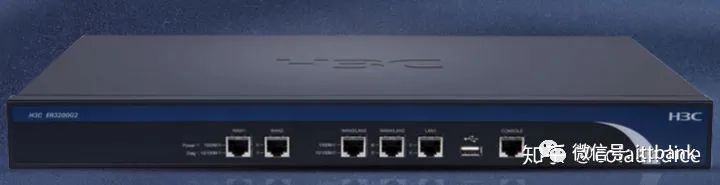
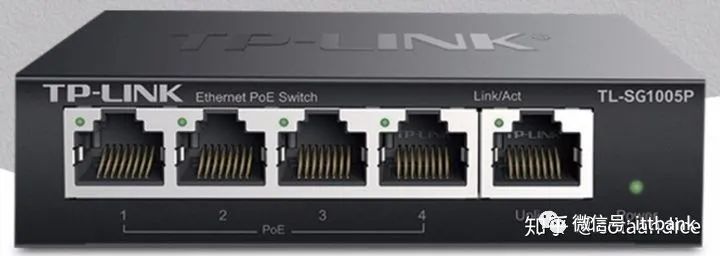
POE Switch
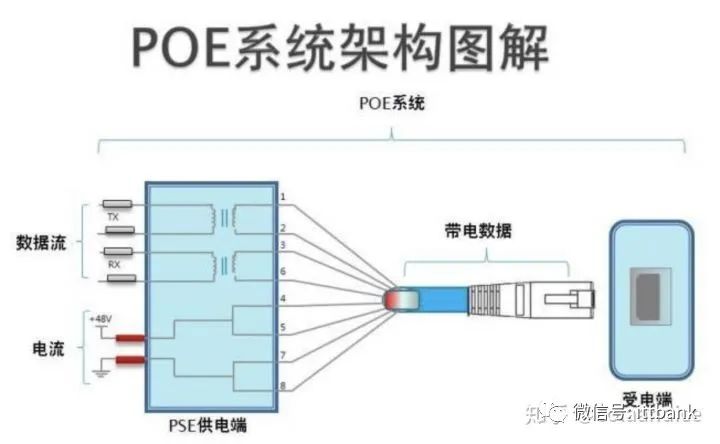
POE (Power Over Ethernet)
Based on network cables, it can provide power to IP-based terminals (cameras, IP phones, APs, etc.) while transmitting data. This can reduce the need for additional wiring and save costs. It is important to note the POE power standards and power specifications, as the power standard must be consistent with what the AP supports, and the power must exceed the AP’s requirements.
POE Switch Diagram
POE System Architecture Diagram
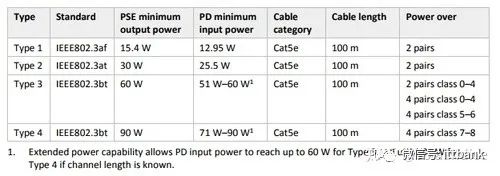
POE power has three standards: 802.3af (PoE), 802.3at (PoE+), and 802.3bt (PoE++).
Different standards have different voltage and power specifications. For POE power supply, it is best to start with Category 6 cables.
Device List for AC+AP Networking
AC: Required. Some brands have hardware ACs, while others have software ACs that need to be installed on a host or other systems.
AP: Required. The wireless performance and coverage depend on it, the higher the performance, the better. Note that the AP and AC must be from the same brand.
POE Switch: Required. It needs to be a Gigabit POE switch, and the POE protocol must match the protocol supported by the AP. Some brands integrate AC and POE, which can save costs, while high-end products are generally standalone models. It can be from other brands.
Gateway Device: Required. Used to connect to broadband; it does not need to release wireless signals, focusing on network forwarding performance. It can be from other brands.
Network Cables: Required. They need to be pre-laid, and at least Category 6 cables should be used. Ensure the quality of the cables used in construction and that all 8 cores of the cables are connected.
Cabinet: Not required. If many devices are used, a small cabinet may be configured to install devices, for integrated wiring and heat dissipation. If only a few devices are used, they can be installed in a weak current box, but attention must be paid to heat dissipation for system stability.
Wireless Roaming
When using AP or MESH networking, multiple routers provide the same wireless signal, allowing terminals to seamlessly roam during movement, automatically connecting to the appropriate router without data loss or with minimal data loss.
Wireless Roaming Diagram
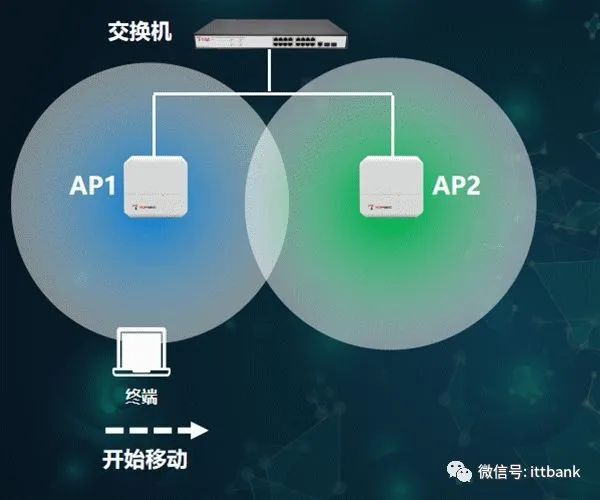
Roaming requires that there are no blind spots in the wireless signal coverage. If there are blind spots, the terminal will not be able to connect to the wireless signal when moving into the blind spot, resulting in a disconnected state. Or, if the terminal is at the edge of the signal coverage, it may be able to connect, but performance will be poor.
When terminals roam, the more complex the authentication methods, such as Radius authentication, the more re-authentication steps are required, and the longer reconnection time will be. To speed up authentication, three standards related to fast roaming have been introduced.
The three standards related to fast roaming are: 802.11k, 802.11v, and 802.11r.
STA: Terminal
-
802.11k helps STA understand the distribution of nearby APs.
-
802.11v helps AC guide STA to switch APs instead of letting STA decide by itself, allowing for better switching.
-
802.11r allows STA to switch between APs without re-authentication, speeding up the connection.
Apple’s official website clearly states which products support the 802.11kvr protocol, but there are many Android phone brands, and only some models from Samsung have clear markings. Generally, Android phones may not support this. If the AP enables support for the kvr protocol but the terminal does not support it, it may cause roaming anomalies for the terminal. In complex network environments, it is recommended not to enable this feature. Compatibility and stability of the network are most important.
Conclusion
This concludes the introduction to Wi-Fi-related knowledge, which is a relatively general description. Each small knowledge point can be elaborated in its own article. I hope this helps everyone understand Wi-Fi technology and provides more technical references when choosing a router.