This article is authored by
Author: Yan Zhenjie
Link:
https://yanzhenjie.blog.csdn.net/article/details/93098495
This article is published with the author’s permission.
This article primarily helps readers understand the collaborative principles of HTTP, the various layers of protocols related to HTTP, architectural design on both the server and client sides, and some optimization techniques. The main focus is on logical thinking and protocol distancing, with some Java code used, but detailed explanations will be provided, making it understandable even for non-developers.
I have personally implemented a WebServer/WebFramework HTTP server framework and two standard HTTP client frameworks, which received widespread acclaim after being open-sourced on GitHub. During the development of these open-source projects, I encountered many detours, and this article serves as a record and sharing of those experiences. I hope it can help readers, and please feel free to point out any typos.
1Content of this article
-
Network Reference Model and HTTP Protocol
-
Data Structures of TCP/IP and HTTP
-
Implementing HTTP Server and Client
-
Various Methods of Data Transmission in HTTP
-
Common HTTP Response Codes and Their Combinations
After reading this article, you will gain knowledge about:
-
What are the differences between TCP/IP protocol, HTTP protocol, and Socket?
-
How to implement an HTTP server or client based on TCP/IP?
-
Why does the server’s HTTP API not crash when an unhandled exception occurs?
-
In what situations does HTTP request timeout occur?
-
What are the differences and connections between Cookie and Session?
These five questions run throughout the article.
2Network Reference Model and HTTP Protocol
HTTP stands for HyperText Transfer Protocol. To clearly describe HTTP, we first need to understand the OSI reference model and the TCP/IP reference model.
If someone were to ask us to introduce what HTTP is, I believe most people would answer like this:
HTTP is an application layer protocol based on the TCP/IP protocol.
However, do we really understand the TCP/IP protocol? Let’s peel back the layers one by one.
OSI Reference Model
In my opinion, TCP/IP corresponds to the transport layer and network layer of the Open Systems Interconnection (OSI) model. According to the acronym of this model, it is referred to as the OSI reference model. The OSI reference model is a conceptual framework that attempts to interconnect computers worldwide into a network. It is merely a reference model and does not provide a specific implementation method or standard. In other words, it serves as a conceptual framework for providing reference for customized standards.
The OSI reference model divides the computer network architecture into seven layers, from bottom to top:
Physical Layer
Fiber optics, network cards, etc., responsible for communication between communication devices and network media.
Data Link Layer
Ethernet, used to enhance the functionality of the physical layer.
Network Layer
IP protocol and ICMP protocol, responsible for routing and forwarding data.
Transport Layer
TCP protocol and UDP protocol, serving as a bridge, controlling connections and flow.
Session Layer
Establishing and maintaining session relationships.
Presentation Layer
Converting data into a format compatible with the recipient’s system.
Application Layer
HTTP, FTP, SMTP, and SSH, roughly understood as the programmer’s layer.
The OSI reference model defines the hierarchical structure of open systems and the relationships between each layer, serving as a framework to coordinate and organize the services provided by each layer. To put it more closely, it resembles a behavioral specification, akin to a company’s corporate culture.
TCP/IP Reference Model
The TCP/IP protocol represents an entire family of network transport protocols, not just the TCP and IP protocols. The TCP and IP protocols are the two core protocol standards that were first passed in this family, which is why this family of protocols is referred to as the TCP/IP protocol suite, commonly known as the TCP/IP protocol.
To complete a task, various protocols in this family must collaborate, similar to how programmers are divided into front-end, back-end, and database roles. These protocols are categorized based on their responsibilities, leading to the emergence of the TCP/IP reference model. In this reference model, the network architecture is divided into four layers, from bottom to top:
Network Interface Layer
Protocols connecting hosts to the network, such as Ethernet.
Internet Layer
IP protocol and ICMP protocol, responsible for routing and forwarding data.
Transport Layer
TCP protocol and UDP protocol, controlling end-to-end connections, flow, and stability.
Application Layer
HTTP, FTP, SMTP, and SSH, roughly understood as the programmer’s layer.
The TCP/IP reference model appears to have some similarities with the OSI reference model; however, due to the differences in the implementation of various application layers, there is no absolute symmetrical relationship between them. We can roughly understand and distinguish them according to the following corresponding relationships:
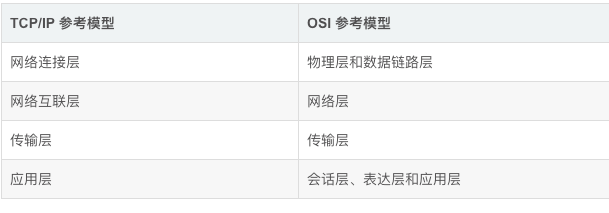
However, the above corresponding relationship still feels a bit forced. I believe it is better to distinguish them for understanding. From a microscopic perspective, they are two different reference models.
HTTP Protocol and TCP/IP Protocol
If we carefully examine the table above, we can see that HTTP is one implementation of the application layer in the TCP/IP reference model. The network layer of the HTTP protocol is based on the IP protocol, and the transport layer is based on the TCP protocol, which leads us back to what we mentioned at the beginning:
HTTP protocol is an application layer protocol based on the TCP/IP protocol.
As mentioned earlier, the application layer can be understood as the “programmer’s layer”. The TCP/IP protocol needs to provide a programmable API to programmers, and this API is the Socket, which is an important implementation of the TCP/IP protocol. Almost all computer systems provide a Socket implementation for the TCP/IP protocol suite.
In summary, we can use Sockets for network communication, and the HTTP protocol also needs to provide a programmable API, which is implemented based on Sockets.
How to understand Socket? It is like making a phone call; there is one end making the call and another end receiving it. Sockets are the same; as an implementation of the TCP/IP protocol suite, they are inherently designed for communication. Although each host device can act as either the calling end (client) or the receiving end (server), the actions of making and receiving calls are different in behavior.
Therefore, the Socket implementation in computer systems provides two sets of APIs. Here, we will agree that the capability to provide server functionality is called ServerSocket, and the capability to provide client functionality is called Socket.
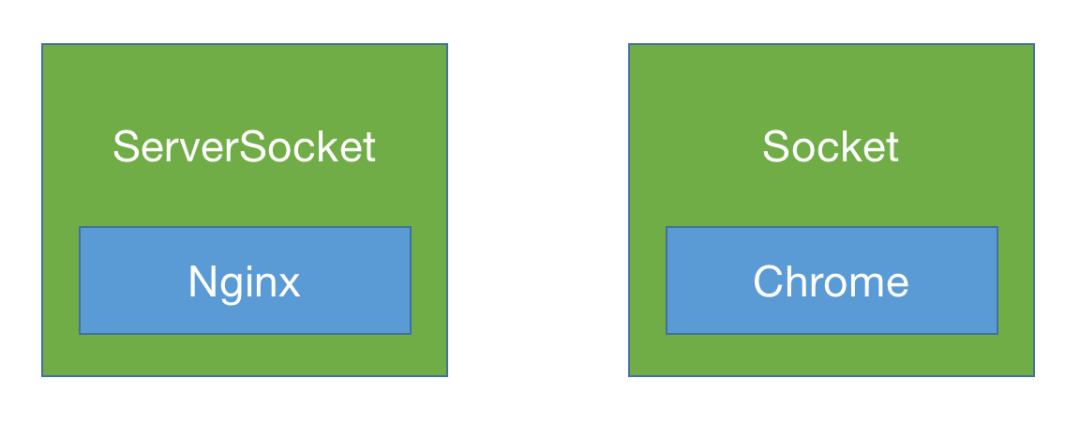
Nginx and my developed AndServer are both HTTP servers based on Socket implementation, while OkHttp and URLCollection are HTTP clients based on Socket implementation, and browsers are the concrete representations of these HTTP clients.
At this point, we can answer the first question:
What are the differences between TCP/IP protocol, HTTP protocol, and Socket?
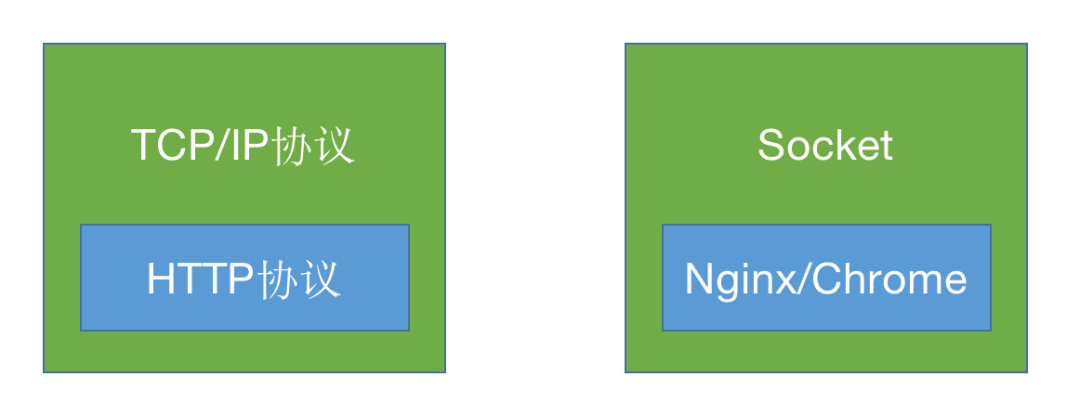
Let’s first look at a few diagrams. From a vertical perspective, their inheritance relationship is as follows:
From a horizontal perspective, their inheritance relationship is as follows:
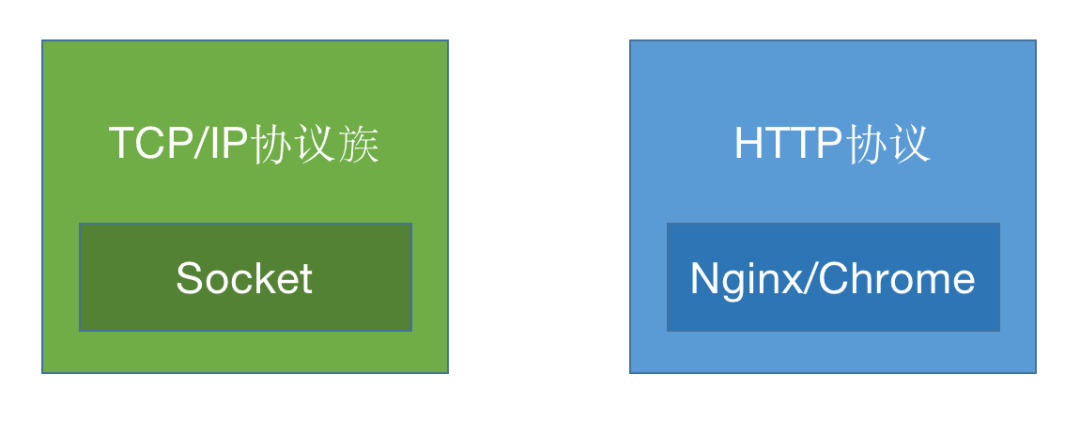
In summary, TCP/IP is a family of protocols, and Socket is the API implementation of the TCP/IP protocol family; HTTP is the abbreviation for HyperText Transfer Protocol, belonging to the application layer of the TCP/IP reference model. The API implementation of HTTP generally relies on the API implementation of TCP/IP.In other words, under normal circumstances, HTTP servers or clients are implemented based on Sockets, and software like Nginx, Apache, Chrome, and IE are developed based on HTTP servers or clients.
3Data Structures of TCP/IP and HTTP
As the application layer of the TCP/IP reference model, discussing the data structure of HTTP inevitably requires understanding the data structures of other layers in the TCP/IP reference model. Placing HTTP within the TCP/IP reference model, their inheritance structure is as follows:
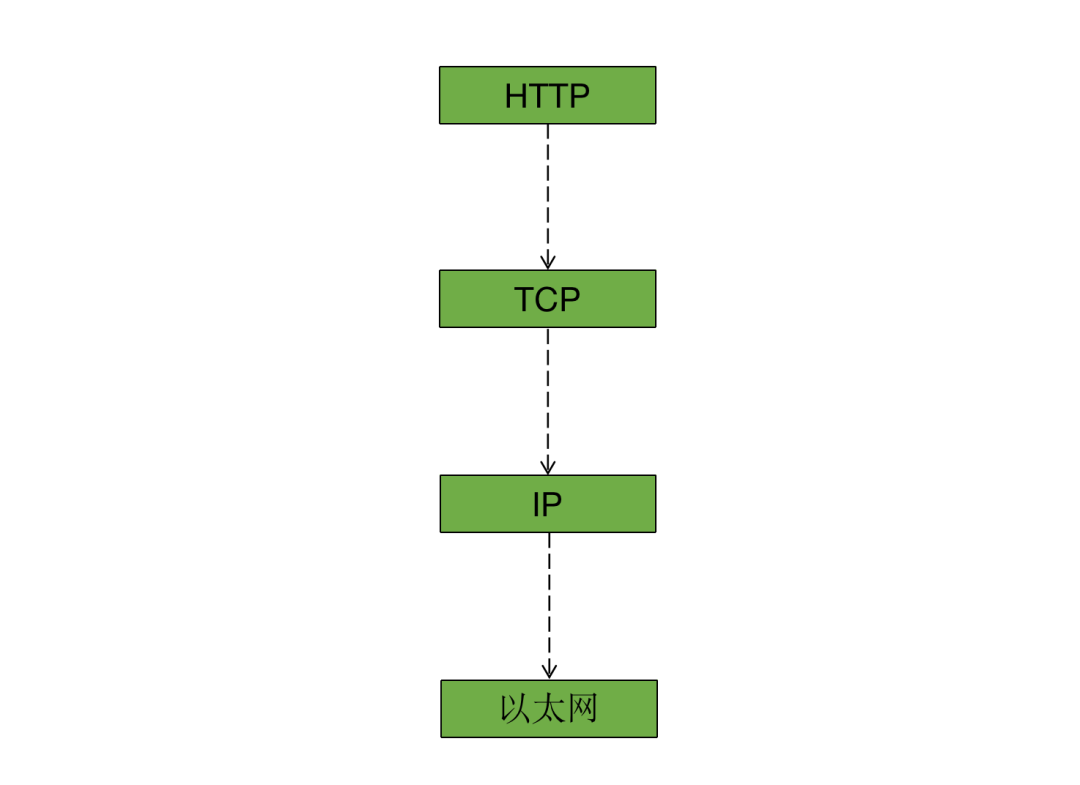
In the above inheritance structure, each layer has its own structure, just like a grandfather, father, and son, although they are in a parent-child relationship, the grandfather has grandfather characteristics, the father has father characteristics, and the son has son characteristics. Similarly, the structure of each layer above is roughly the same, generally consisting of Header + Body, with the Ethernet layer having an additional footer, so the structure of the Ethernet layer is Header + Body + Footer.
If we take Ethernet as the lowest layer, the overall data structure in the TCP/IP reference model is: IP as the direct bottom layer of Ethernet, the header and data of IP combined serve as the data of Ethernet, similarly, the header and data of TCP/UDP combined serve as the data of IP, and the header and data of HTTP combined serve as the data of TCP/UDP. I will use a more illustrative diagram to help readers understand:
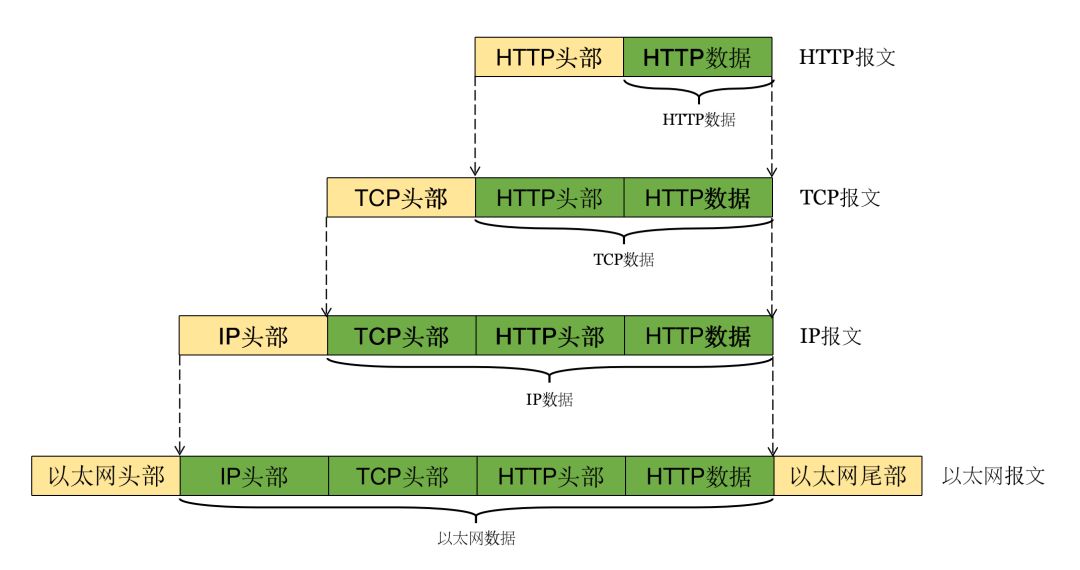
This diagram took me some effort and time, and I hope it can genuinely help readers. Additionally, I want to clarify that in the above diagram, I used TCP for transmission, but UDP can also be used, for example, HTTP/3 uses UDP as the transport layer. In this article, I will still explain using the TCP protocol as the transport layer.
In HTTP, the data structure of the Ethernet layer is too low-level for ordinary developers, and it is likely to be difficult to understand, so we will start from the IP layer, which ordinary developers can access.
Data Structure and Interaction Process of IP
We all know that in a successful HTTP request, the server can obtain the client’s IP address in a request, as well as the IP address of the host requested by the client. But how is this achieved?
This relies on the IP protocol, which stipulates that the header of IP must contain the source IP address and destination IP address. This is also why IP is positioned in the Internet layer of the TCP/IP reference model, one reason being to locate the server and client addresses. Let’s take a look at the data structure of IP:
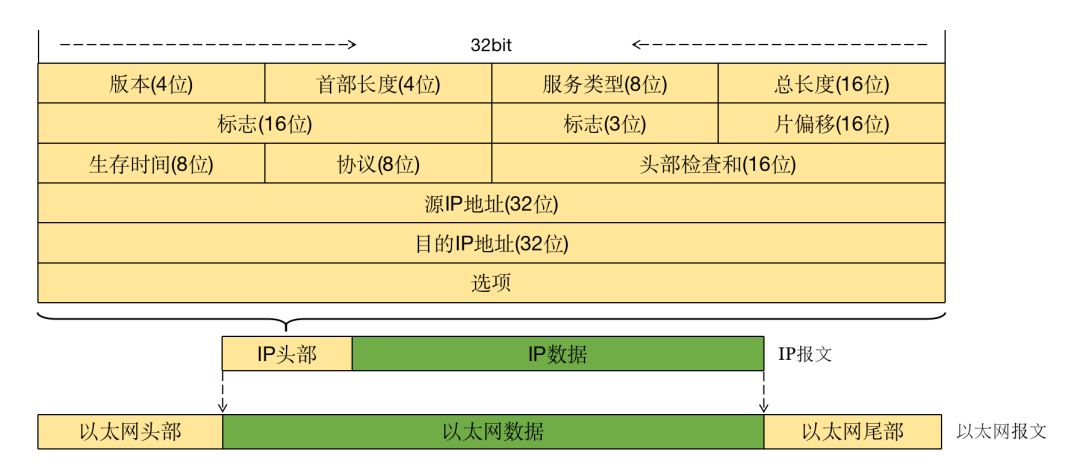
It can be clearly seen that the source IP address and destination IP address each occupy 32 bits in the IP header, and the IPV4 IP address is represented in dotted decimal format, for example: 192.168.1.1, which in binary representation in the IP header is exactly 4 bytes, 32 bits.
However, the 32-bit representation of IP addresses is limited. Currently, in North America, there are over 3 billion IP addresses, while China has nearly 300 million IP addresses. Unfortunately, there are too many internet users in China, leading to the use of IP address translation technology (NAT).
For example, all devices in three neighborhoods may share a public IP address, with NAT technology assigning each household a private IP address. When communicating within the neighborhood, they may use private IP addresses, but when communicating externally, they use the public IP address.
When a client wants to establish a connection with a server, it needs to specify the server’s domain name or IP address. Generally, a host’s IP address is fixed and unique, and multiple applications can be deployed on one host.
When a client directly connects to the server using the IP address, it cannot determine which application the client wants to connect to solely based on the address; it can only specify the port to determine which application to connect to. Remembering IP + Port is not user-friendly, so to connect multiple applications on the same host using the same port (even based on a default port for a specific application, such as HTTP using port 80), one must rely on the address.
Additionally, due to the characteristics of IP addresses, the number of IP addresses is limited, and IP addresses are actually owned by ISPs, only leased to developers for use. Therefore, when developers change ISPs, the IP address does not follow the developer.
Based on these two points, domain names were created. Domain names are unlimited; if multiple domain names resolve to the same IP address, then this host has multiple aliases. When external applications connect to this host through different domain names, the host can internally direct these connections to different applications based on different aliases.
The above explanation may seem a bit convoluted, so let me provide an example:
In your company, there is a server with the IP address 192.168.1.11, which hosts a document website, a design website, and an office website. Without domain names, the access to these three websites would be as follows:
Document website: http://192.168.1.11:8080
Design website: http://192.168.1.11:9090
Office website: http://192.168.1.11:8899
Even on another host, there may be a CRM system and CMS system, etc., which would require remembering (or writing down) multiple IPs and different ports. Now, assuming our company’s domain name is 666.com, if we use domain names, the above addresses would become much easier to remember:
Document website: http://doc.666.com
Design website: http://ui.666.com
Office website: http://oa.666.com
CRM system: http://crm.666.com
Now, when the client connects to the server using the domain name, it needs to determine the server’s location in the network through IP addressing, which mainly involves the following two steps:
-
Look up the IP address corresponding to the hostname through hosts or DNS.
-
Find the MAC address corresponding to the host through ARP addressing.
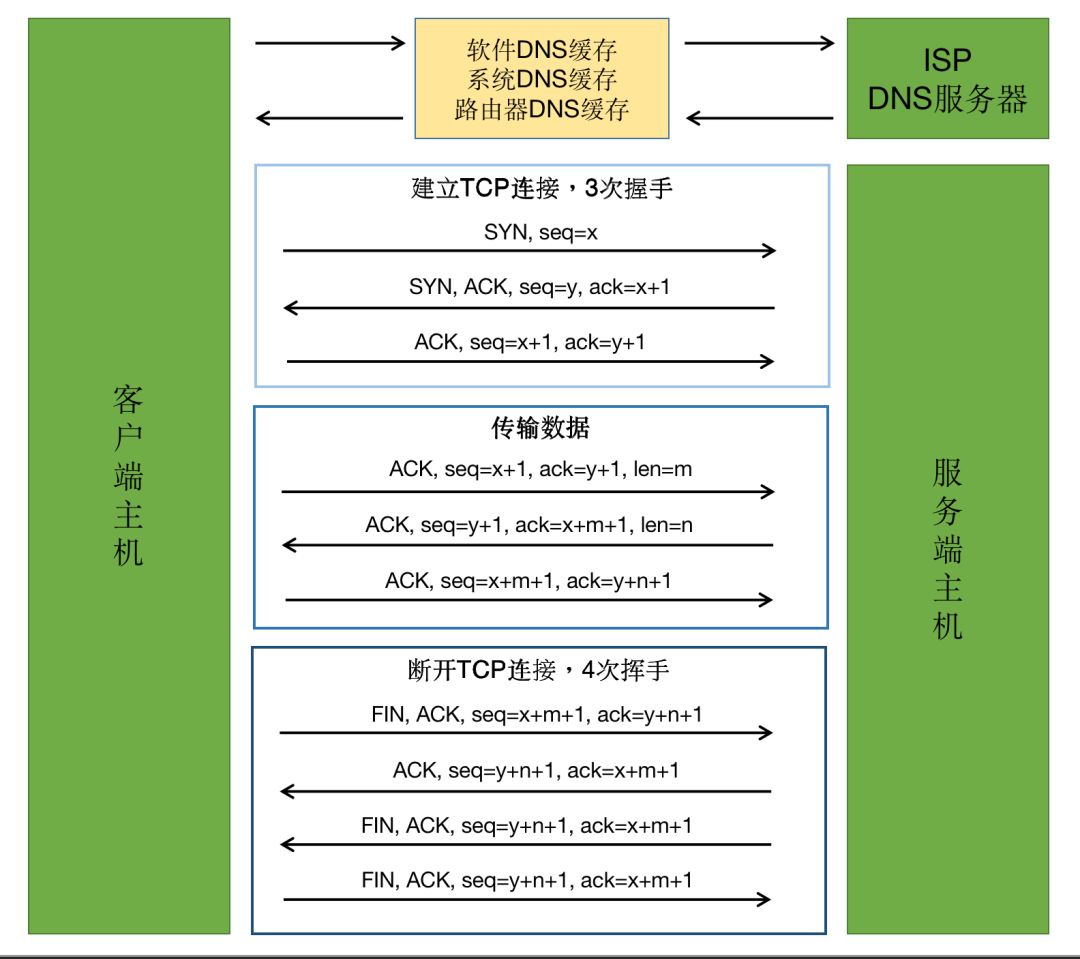
The main purpose of these two steps is to find the MAC address for encapsulation at the network link layer and data transmission. The MAC address is found through ARP addressing based on the IP address. Therefore, it is essential to know the IP address corresponding to the specified domain name, which requires looking up the IP address corresponding to the domain name through DNS caching. Generally, there are several levels:
-
Look up the DNS mapping configured in the system’s hosts.
-
Look up the DNS cache in the system itself.
-
Look up the DNS cache in the router.
-
Look up the DNS cache in the ISP.
Each level of DNS cache has a time limit. Once a corresponding mapping is found in the previous level, it will not search further down. After obtaining the IP, the client calculates its subnet based on the IP address and subnet mask, then searches for the corresponding host’s MAC address within that subnet, and finally encapsulates and sends data at the data link layer.
The ARP addressing mentioned here is discussed quite briefly, as it involves more network protocol knowledge. Delving deeper would take us away from IP, so I will leave it at that.
Data Structure and Interaction Process of TCP
What we commonly refer to as the three-way handshake and four-way handshake of HTTP are actually completed by TCP. In fact, this has nothing to do with HTTP, but many people like to say it this way. Strictly speaking, we should say the three-way handshake and four-way handshake of TCP.
To understand the interaction process of TCP, we first need to understand the data structure of TCP. Let’s take a look at the data structure of TCP:
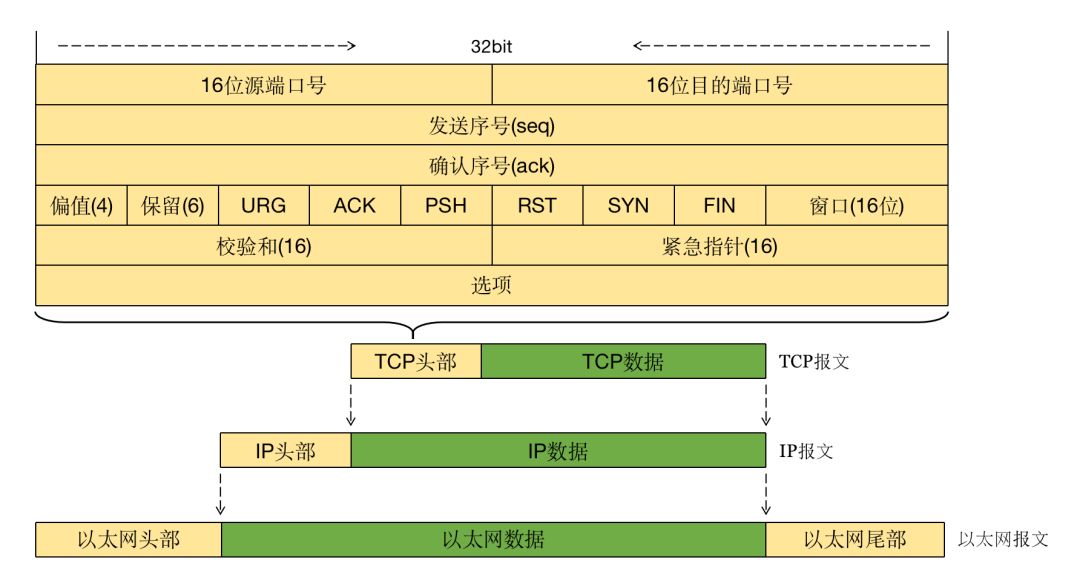
The above TCP data structure diagram is crucial for understanding the interaction process of HTTP. We need to remember five key positions:
-
SYN: Connection establishment identifier
-
ACK: Response identifier
-
FIN: Connection termination identifier
-
seq: Sequence number
-
ack: Acknowledgment number
After the server application starts, it listens for client connection requests on a specified port. When a client attempts to create a TCP connection to the server’s specified port, the server receives the request, processes the data, and responds to the client. Once the client receives the response, it accepts the response data, and a complete request process is completed.
A complete TCP lifecycle goes through the following four steps:
Establishing a TCP connection, three-way handshake
-
The client sends SYN, seq=x, and enters the SYN_SEND state.
-
The server responds with SYN, ACK, seq=y, ack=x+1, and enters the SYN_RCVD state.
-
The client responds with ACK, seq=x+1, ack=y+1, and enters the ESTABLISHED state. The server enters the ESTABLISHED state upon receiving this.
Data transmission
-
The client sends ACK, seq=x+1, ack=y+1, len=m.
-
The server responds with ACK, seq=y+1, ack=x+m+1, len=n.
-
The client responds with ACK, seq=x+m+1, ack=y+n+1.
Disconnecting the TCP connection, four-way handshake
-
Host A sends FIN, ACK, seq=x+m+1, ack=y+n+1, and enters the FIN_WAIT_1 state.
-
Host B responds with ACK, seq=y+n+1, ack=x+m+1, enters the CLOSE_WAIT state, and Host A enters the FIN_WAIT_2 state upon receiving this.
-
Host B sends FIN, ACK, seq=y+n+1, ack=x+m+1, and enters the LAST_ACK state.
-
Host A responds with ACK, seq=x+m+1, ack=y+n+1, enters the TIME_WAIT state, waiting for Host B to possibly request retransmission of the ACK packet. Host B, upon receiving this, closes the connection and enters the CLOSED state, or requests Host A to retransmit the ACK. If the client does not receive a request for retransmission of the ACK packet from Host B within a certain time, it disconnects and enters the CLOSED state.
I have simplified the above process into a diagram to help readers understand this process:
Looking back at the TCP data structure diagram, we can see that in the fourth row, the mentioned SYN, ACK, and FIN each occupy a position, meaning their values are either 1 or 0, while the sequence number and acknowledgment number are both 32 bits. The maximum value that 32 can represent is 2 to the power of 32 minus 1: 4294967295. Currently, this value is more than sufficient in the foreseeable future within human computer systems.
Establishing connections, transmitting data, and disconnecting connections rely entirely on these identifiers. For example, SYN can also be used as a means of DOS attack, and FIN can be used to scan specified ports on the server.
Data Structure of HTTP
As mentioned earlier, Socket is the programmable API of TCP/IP, and the implementation of HTTP’s programmable API relies on Socket. In my view, the implementation of HTTP server applications and HTTP client applications is essentially various encapsulations and logical processing of Sockets. In fact, I gained a deeper understanding of this while developing AndServer and Kalle.
Since HTTP is the HyperText Transfer Protocol, the headers and data of HTTP appear more intuitive. In most cases, they are characters or strings, making it easier for most people to understand the header and data format of HTTP. Indeed, the data format of HTTP is very easy to understand; the upper part is the header, and the lower part is the body.
The data structure during HTTP requests and responses is generally the same, but there are some subtle differences. Let’s first look at the data structure during HTTP requests:
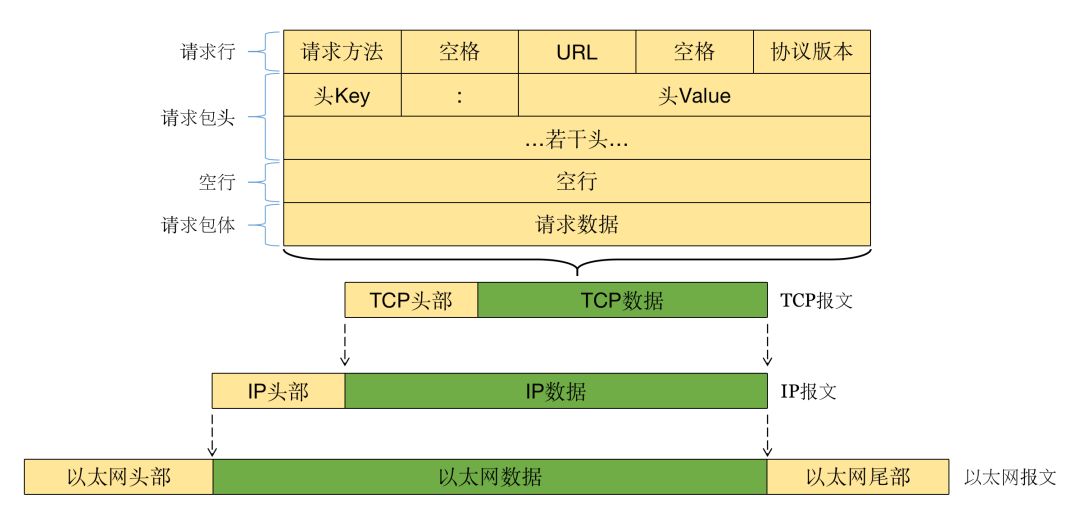
Now let’s look at the data structure during HTTP responses:
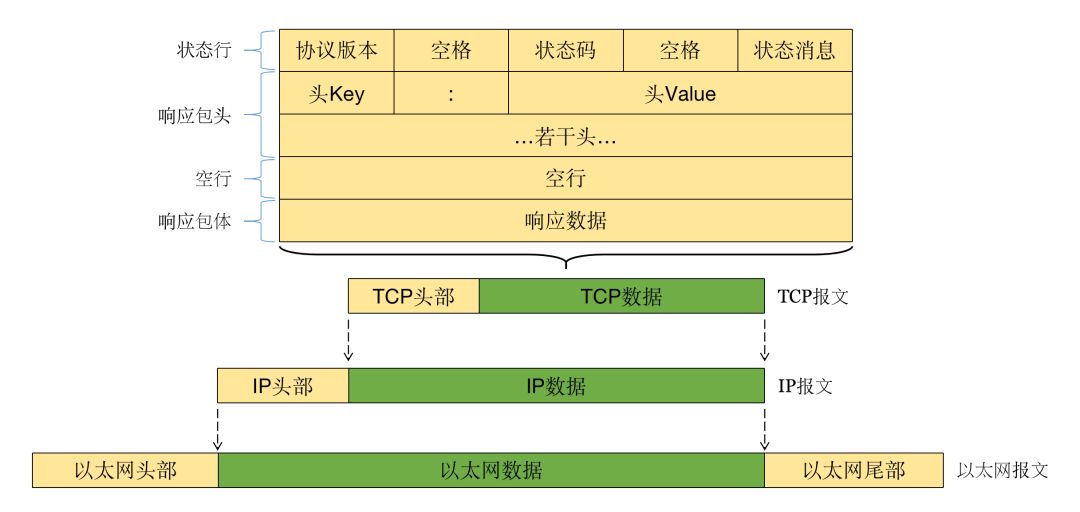
By carefully observing the above images, we can see that they have a certain format of text content. Now, let’s use a packet capture tool to capture any HTTP request to compare and understand the above structure. Below is a capture of a login HTTP API request:
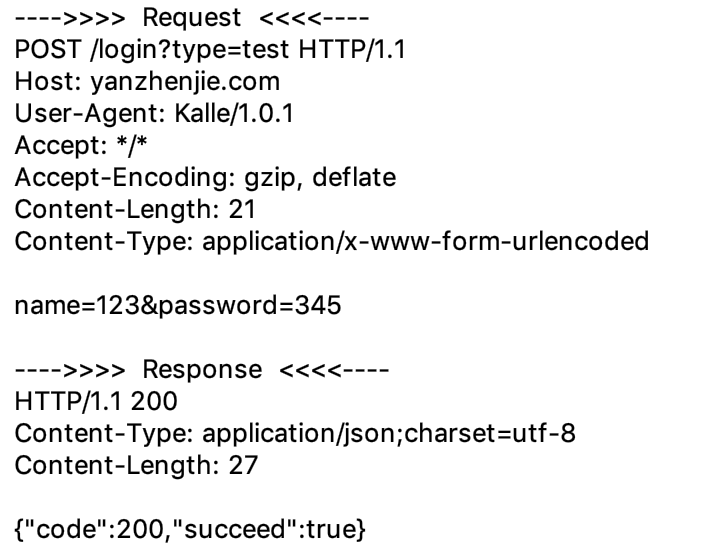
Combining the three images above, we can simply understand the data structure of HTTP. It was also mentioned that based on Socket, we can implement a programmable API for the HTTP protocol. Now, let’s think about how we would implement an HTTP server or client using Socket.
Now, I ask readers not to look further down; think about how you would implement it. After you finish thinking, continue reading, and I will provide examples.
4Implementing HTTP Server and Client
If readers have finished thinking, you can look down. If it were me, I would think: we can use Socket to establish a connection between the client and server, and then use the input and output streams of Socket to read and write data according to the data structure in the above diagram. Whether implementing an HTTP server or client follows this thought process.
This section mainly explains the code logic. Those who do not understand can clone the complete source code from my GitHub:
https://github.com/yanzhenjie/HttpImpl
Implementing HTTP Server
Step 1: Start the server and listen for client connections on the local IP and specified port:
ServerSocket server = new ServerSocket();

// IP and port to listen on
SocketAddress address = new InetSocketAddress("192.168.1.111", 8888);
server.bind(address);

while (true) {
  Socket socket = server.accept();
  ... // Read request, send response
}
The above code specifies the IP and port to listen on from top to bottom, then calls ServerSocket#bind() to bind to the server’s Socket. If the port is occupied or any exception is thrown, the code will not continue executing. If the binding is successful, it will loop to listen for client connections. If no one connects, it will block at ServerSocket#accept(). If someone connects, it will execute the following code and loop back to wait for or accept the next connection.
Step 2: Dispatch client requests. Since many clients will connect to the server, if we handle requests in the same thread, the server will be overwhelmed. We start a new thread to handle the request:
public class RequestHandler extends Thread {

    private Socket mSocket;

    public RequestHandler(Socket mSocket) {
        this.mSocket = mSocket;
    }

    @Override
    public void run() {
        ... // Read request, send response
    }
}
Next, we optimize the listening of client connections:
while (true) {
  Socket socket = server.accept();

  System.out.println("---->>>>> Client request detected <<<<<----");
  RequestHandler handler = new RequestHandler(socket);
  handler.start();
}
This way, we can listen for countless client connections.
Step 3: Read the request simply and print the request data:
/**
 * Read request.
 */
private void readRequest(Socket socket) throws IOException {
    InputStream is = socket.getInputStream();
    ByteArrayOutputStream bos = new ByteArrayOutputStream();
    byte[] buffer = new byte[2048];
    int len;
    while ((len = is.read(buffer)) > 0) {
        bos.write(buffer, 0, len);
        if (len < 2048) break;
    }
    System.out.println(new String(bos.toByteArray()));
}
Step 4: Send the response header, newline, and response data according to the format:
/**
 * Send response.
 */
private void sendResponse(Socket socket, byte[] data) throws IOException {
    OutputStream os = socket.getOutputStream();

    // Send response header
    PrintStream print = new PrintStream(os);
    print.println("HTTP/1.1 200 Beautiful");
    print.println("Server: HttpServer/1.0");
    print.println("Content-Length: " + data.length);
    print.println("Content-Type: text/plain; charset=utf-8");

    // Send newline between response header and response data
    print.println();

    // Send response data
    print.write(data);
    os.flush();
}
In the structure diagram above, we see that each line of the response header has a newline at the end. In the above code, we call the println() method instead of the print() method. The method with ln at the end will generally add a newline at the end in most languages, so we do not need to send a newline character ourselves.
Now, let’s call these encapsulated methods in the run() method of the thread:
public class RequestHandler extends Thread {

  private static final Charset UTF8 = Charset.forName("utf-8");

    private Socket mSocket;

    public RequestHandler(Socket mSocket) {
        this.mSocket = mSocket;
    }

    @Override
    public void run() {
        readRequest(mSocket);

        String data = null;
        try {
          // Equivalent to server HTTP API processing business, querying data from the database, etc.
          data = "A Lin Mei Mei fell from the sky";
        } catch(Exception e) {
          data = "It's nothing serious, just an HTTP API exception, it won't crash";
        }

        sendResponse(mSocket, data.getBytes(UTF8));

        // Close Socket connection
        mSocket.close();
    }
}
Now we have completed a simple HTTP server. After starting the server, we can request it from a browser or any HTTP client:
http://192.168.1.111:8888
For example, if we send a POST request with a string, we can see the following output in the console:
POST / HTTP/1.1
User-Agent: Kalle/1.0.1
Accept: */*
Host: 192.168.1.111:8888
Accept-Encoding: gzip, deflate
Content-Type: text/plain; charset=utf-8
Content-Length: 15

A Lin Mei Mei
We can see that the browser received the data:
A Lin Mei Mei fell from the sky
Now we can answer the third question:
Why does the server’s HTTP API not crash when an unhandled exception occurs?
From the example above, we can see that when any client connects, the server starts a new thread to handle that request. If the server does not crash (the above code is a server), but only a certain API processing business encounters an exception, the server has wrapped this HTTP API in an exception, so the server will not crash. Even if there is no exception wrapping for that HTTP API, only the current thread will crash, and the client will not receive a response, resulting in a timeout.
Implementing HTTP Client
Step 1: Use Socket to establish a connection with the server:
// Host domain name and port to connect
InetSocketAddress address = new InetSocketAddress("192.168.1.111", 8888);

// Establish connection
Socket socket = new Socket();
socket.setSoTimeout(10 * 1000);
socket.connect(address, 10 * 1000);
The above code specifies the host domain name, port, read data timeout, and connection timeout from top to bottom. After calling the Socket#connect() method, if the connection to the server fails, an exception will be thrown, and the code will not continue executing.
Step 2: Send the request header, newline, and request data according to the format:
// Send request header
PrintStream print = new PrintStream(socket.getOutputStream());
print.println("POST /abc/dev?ab=cdf HTTP/1.1");
print.println("Host: 192.168.1.111:8888");
print.println("User-Agent: HttpClient/1.0");
print.println("Content-Length: 15");
print.println("Accept: *");

// Send newline between request header and request data
print.println();

// Send request data
print.println("A Lin Mei Mei fell from the sky");
In the structure diagram above, we see that each line of the request header has a newline at the end. In the above code, we call the println() method instead of the print() method. The method with ln at the end will generally add a newline at the end in most languages, so we do not need to send a newline character ourselves.
Step 3: Read the response simply and print the response data:
InputStream is = socket.getInputStream();
ByteArrayOutputStream bos = new ByteArrayOutputStream();
byte[] buffer = new byte[2048];
int len;
while ((len = is.read(buffer)) > 0) {
  bos.write(buffer, 0, len);
  if (len < 2048) break;
}

String body = new String(bos.toByteArray());
System.out.println(body);
Finally, remember to disconnect the Socket connection:
socket.close();
After running this code, we find the console output as follows:
HTTP/1.1 200 Beautiful
Server: HttpServer/1.0
Content-Length: 24
Content-Type: text/plain; charset=utf-8

A Lin Mei Mei fell from the sky
Here, we can change the request address to www.csdn.net, remembering to modify the Host value in the request header to www.csdn.net, and we can see that we can also receive a response correctly.
At this point, I believe readers have a basic understanding of what HTTP is. However, this is just the surface; there is still much more to learn, as we have only simulated HTTP requests based on Socket. We have not yet understood how HTTP transmits parameters, how it transmits files, and the various methods of parameter transmission.
At this point, we have inadvertently answered the second question:
How to implement an HTTP server or client based on TCP/IP?
<spanthe address="" already="" answered.="" been="" fourth="" has="" let's="" now="" question="" question:
In what situations does HTTP request timeout occur?
HTTP request timeout occurs on the client side. The first situation is during the establishment of the Socket connection. As mentioned earlier, the first step is IP addressing. When resolving the domain name, if the host cannot be found on the DNS server, this does not yet constitute a timeout; it should be classified as HostNameCannotResolver. Once the IP corresponding to the host is found, the connection is established. If the connection cannot be established at the data link layer within the specified time, a connection timeout will occur. This is generally due to poor network connectivity between the client and server hosts.
The second situation occurs during data transmission. After establishing a connection, the client first sends request data. If the data transmission is interrupted midway due to a sudden network disconnection, the data will be blocked at the data link layer, resulting in a timeout.
When the client sends the data, it will attempt to receive the response data returned by the server. At this point, the server may be processing business logic, such as reading and writing to a database. If there is no data being transmitted in the connection layer stream due to the server taking too long to operate on the database (e.g., database deadlock), the client will wait for a specified time and may also experience a timeout.
5Various Methods of Data Transmission in HTTP
HTTP is the HyperText Transfer Protocol, and as the name suggests, one of its purposes is to facilitate data transmission for developers. So why not directly use the TCP/IP implementation of Socket and design an application layer protocol? One reason is convenience, including data format, data segmentation, data transmission, and caching strategies. If we were to create a separate logic for each application, it would be better to design a standardized protocol.
Starting from the data structure of HTTP mentioned above, we can see that there are three positions where data can be included in requests: one is the URL, the second is the request header, and the third is the body. In responses, there are also three positions where data can be included: one is the status message, the second is the response header, and the third is the body.
The request header and response header generally describe the overall request or response without any actions related to data layers; the status message describes the status of the server’s response for this request, which is a logical status at the HTTP level. Therefore, the request header, response header, and status message are not suitable for data transmission.
Parameters in the URL
The URL points to the resource for this request, informing the HTTP server which resource to request. The URL also includes Query and Fragment, which essentially describe the characteristics of this resource. Therefore, when the client requests the server, it can include some parameters in the URL, but these parameters are descriptive and are treated by the server as query conditions rather than results from the client.
This is a complete structure diagram of a URL:

In the above diagram, http://www.example.com:8080 is used to describe the information needed for TCP/IP, scheme indicates whether to establish a connection using SSL, host indicates the server’s domain name or IP, and port indicates the port of the server to connect to.
The remaining /aa/bb/cc?name=kalle&age=18#usage describes the resource, where path indicates the location of the resource for this request, query indicates the characteristics of this resource, and fragment is an anchor point that guides browser actions and is invalid in HTTP requests.
Parameters in the Body
As we learned in the HTTP data structure section, the body starts after a blank line below the header, and the content of the body is a byte stream, so any content can be written in the body, and indeed, this is the case.
According to the HTTP protocol, the content type of the body can be categorized into three main types: URL parameters, arbitrary streams, and forms.
The first type is sending URL parameters, where the data in the body is concatenated as follows:
name=harry&gender=man
At this time, the request header Content-Type is:
Content-Type: application/x-www-form-urlencoded
This method looks similar to the Query in the URL, but the significance is different. Here, the parameters are not conditions but rather results or products from the client, which the server will process as data and may write to the database depending on the business logic.
The second type is arbitrary streams, which can be byte streams, character streams, or file streams, etc.
Example 1: Sending JSON or other specific format data, the data in the body looks like this:
{ "name": "harry", "gender": "man" }
At this time, the request header Content-Type is:
Content-Type: application/json
Example 2: Sending arbitrary string data, the data in the body looks like this:
Why are you so good-looking?
At this time, the request header Content-Type is:
Content-Type: text/plain
Example 3: Sending known types of files, such as a JPEG image, the body can be imagined as follows:
~~~~~~~~~~~~~~~~~~~~~~~~~
At this time, the request header Content-Type is the corresponding file’s MimeType:
Content-Type: application/octet-stream
Example 4: Sending unknown types of data or files, the body can be imagined as follows:
~~~~~~~~~~~~~~~~~~~~~~~~~
At this time, the request header Content-Type is:
Content-Type: application/octet-stream
The third type is form data. Since forms have a specific format, complex data can be transmitted by following the format. For example, a form can transmit all strings, all files, or a mix of files and strings. A form can be understood as an object of key-value pairs. Below is the data structure of a form:
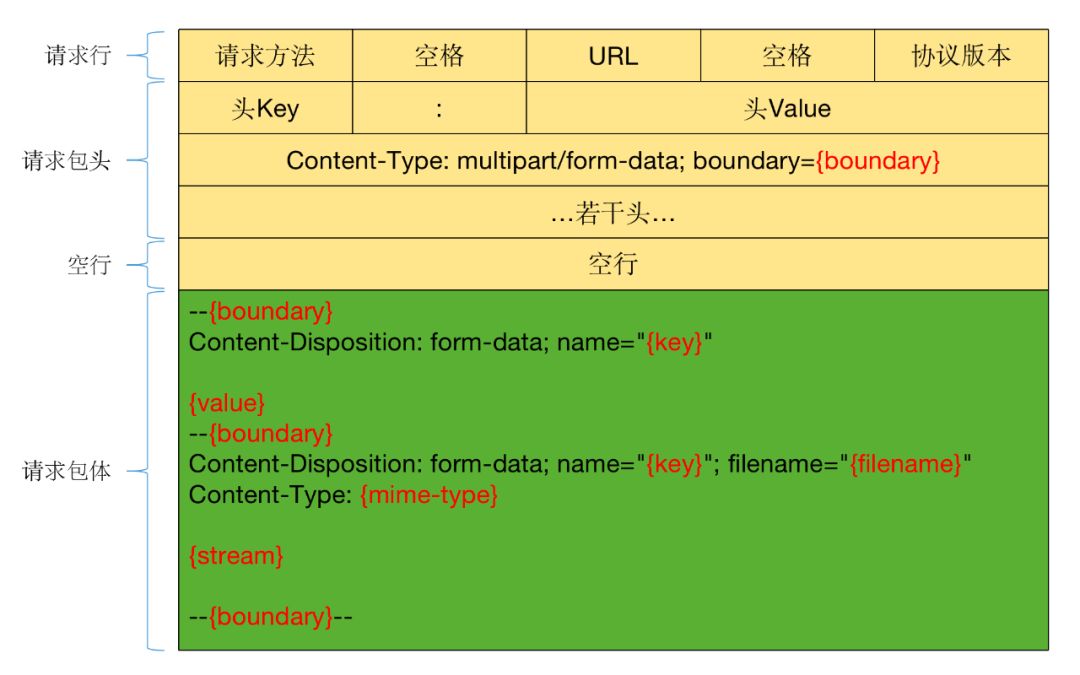
Now, let’s use a packet capture tool to capture any HTTP form request to compare and understand the above structure. Below is a capture of a login HTTP API request:
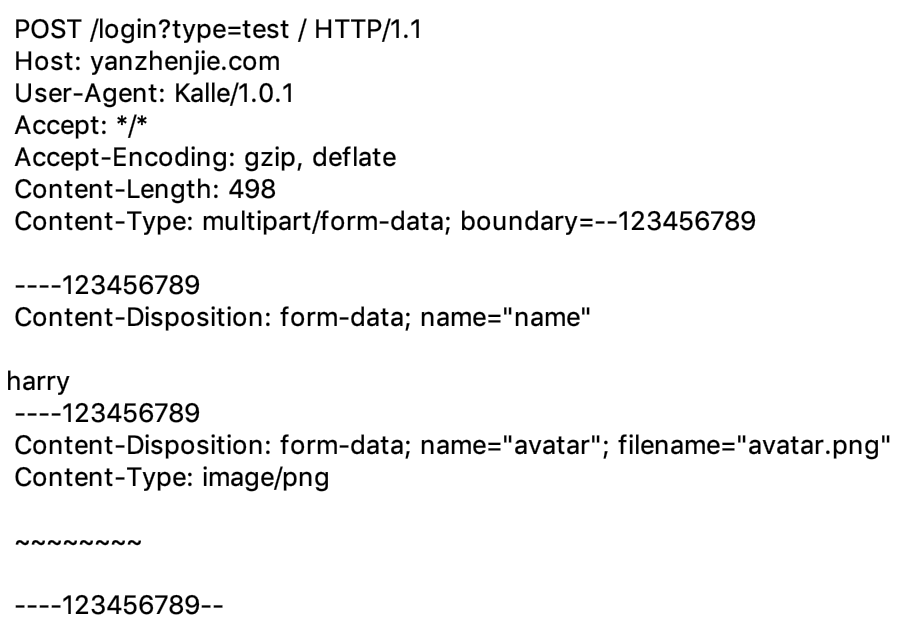
At this time, the request header Content-Type is:
Content-Type: multipart/form-data; boundary={boundary}
Each form has a randomly generated boundary used to separate form data. We refer to each item in the form as a Part. Each Part starts with –boundary, followed by the header information of that Part, followed by a newline, and then the body data of that Part. Following this pattern, we can write all items sequentially.
6Common HTTP Response Codes and Their Combinations
Descriptions of various HTTP response codes:
https://developer.mozilla.org/en-US/docs/Web/HTTP/Status
Descriptions of various HTTP headers:
https://developer.mozilla.org/en-US/docs/Web/HTTP/Headers
For more response codes and header descriptions, please refer to the above links. Here are some common examples.
200 Series Response Codes
Generally indicates a successful request, with 200 being the most commonly used.
Among them, a particularly common and special code is 206, which is generally used for resuming downloads. Suppose a file on the server has 200 bytes, and the client downloads 100 bytes but is interrupted. When the client wants to continue downloading from the 100-byte mark, it adds the request header Range: bytes=100-. If the server supports this operation, it will return response code 206 and add Content-Range: 100-199/200 in the response header. At this point, the data read by the client will be from the 101st byte to the 200th byte.
The two numbers before Content-Range represent the starting and ending byte positions, while the number 200 represents the total size of the file.
Range can also specify a segment of data to download. For example, if the client wants to download from the 101st byte to the 150th byte, it can specify Range: bytes=100-149, and the server will return Content-Range: 100-149/200. This feature is often used in multi-threaded downloads, significantly improving download efficiency when the network is stable.
300 Series Response Codes
Generally indicates a request redirection, with 302 being the most commonly used, indicating redirection to another URL. The client can discover the new URL through the Location response header and re-initiate the request.
A particularly common and special code is 304. When a request for a certain URL returns Cache-Control: public, max-age={int}, Last-Modified: Wed, 21 Oct 2020 07:28:00 GMT, the client will cache the data from this request. For any requests to this URL before 7:28 AM on October 21, 2020, the client will not connect to the server but will read the cached data directly.
After this time point, the client will request the server, but it will add the request header If-Modified-Since: Wed, 21 Oct 2020 07:28:00 GMT. The server will compare the time in this request header with the modification time of the data corresponding to this URL. If the data has changed, it will return 200 and the new data. If the data has not changed, it will only return 304, and the client should still read the cached data.
However, commonly used with this response code are ETag and If-Match headers, which can be referenced in the links above, and will not be elaborated here.
400 Series Responses
Generally indicates a client error, with 400 being the most commonly used, indicating parameter errors or that the server did not understand the client’s request.
-
401 indicates that a username and password are required, or that the username and password are incorrect.
-
403 indicates insufficient permissions.
-
404 indicates that the resource specified by the URL was not found.
-
405 indicates that the request method specified by the client is not allowed.
-
406 indicates that the content from the server is not acceptable to the client, generally when the Content-Type specified by the server does not match the Accept specified by the client.
-
415 indicates that the content from the client is not acceptable to the server, generally when the Content-Type specified by the client does not match the expected Content-Type of the server API.
-
416 indicates that the server cannot support the Range request header specified by the client, commonly used for resuming downloads.
500 Series Response Codes
Generally indicates that an error occurred on the server, with 500 being the most commonly used, indicating that an unknown exception occurred on the server.
Other Common Headers
Accept is generally used in the request header to indicate the expected content type from the server, such as application/json. If the content generated by the server is not JSON, a 406 response code may be received.
Content-Type is commonly used in both request and response headers, generally indicating the content type or format of the body for this request, and the server or client should parse the data according to this format.
Connection indicates whether to close the connection after processing this request. In HTTP/1.0, the default is close, indicating that the connection should be closed. In HTTP/1.1, the default is keep-alive, indicating that the connection should be maintained.
Content-Length indicates the length of the content, which is very useful for reading content. The client or server can read the stream in the most optimal way, significantly improving IO reading efficiency.
Cookie is used by the server to mark the client. For example, if a user visits a certain page, a marker is given: Set-Cookie: news=true; expires=…; path=…; domain=…, and when the user requests that page again, the request header will carry Cookie: news=true, and the server will perform some logical processing.
Host must be included in every request, indicating the domain name and port of the server that the client wants to request. Generally, if the port is not specified in the Host, the HTTP application defaults to using port 80 to connect to the server.
Referer indicates the source address of the current page. For example, if a user accesses https://github.com from https://www.google.com, the value of Referer will be https://www.google.com.
When discussing HTTP headers, we can address the fifth question:
What are the differences and connections between Cookie and Session?
First, we need to understand that a Cookie is a marker from the server to the client, clearly stating the value of this marker, such as the previously mentioned Set-Cookie: news=true…, which also carries some time and path parameters. Before this time, regardless of whether the browser is restarted (connection re-established), requests for that domain will carry this Cookie.
Session is not specifically reflected in the HTTP headers or data; it is a logical implementation of the server. It is realized through Cookies.
In fact, a Session represents a session. When a client and server establish a connection, the server generates a Session for that client. The Session is an object on the server that can store a lot of data. Since this data is not visible to the user, it is persisted in a file or database, which serves as a persistent implementation of the Session to prevent data loss in memory.
Therefore, each Session will have an ID in the list. To associate this Session with the current user connection, the ID of this Session is sent to the client as the value of the Cookie. When the client requests the server again, it will carry the previously received Cookie value. The server can then retrieve this Session based on the Cookie value and access various values stored in that Session.
For example, when the client requests the server’s login API, a Session is generated:
public void login(Request request, Response response) {
  // Get the name and password from the request parameters
  String name = request.get("name");
  String pwd = request.get("pwd");

  // Save the name and password in an object
  Account account = new Account();
  account.setName(name);
  account.setPwd(pwd);

  // Save the above name and password object in the user's Session
  Session session = ...;
  session.setObject("user_account", account);

  // Save the Session on the server and generate an ID
  String sessionId = saveSession(session);

  // Add this SessionID to the Cookie and send it to the client
  Cookie cookie = new Cookie();
  cookie.setKey("session_id");
  cookie.setValue(sessionId);
  response.addCookie(cookie);

  ...
}
The above is pseudocode to help readers understand the difference between Cookie and Session. In actual development, the handling is not that simple.
At this point, a response header will be sent to the user:
Set-Cookie: session_id=xxxxxx
Now, when the user accesses the API to get personal information, it will carry the following request header:
Cookie: session_id=xxxxxx
The server will handle it as follows:
public String ownerInfo(Request request, Response response) {
  // Get the Cookie with key session_id
  Cookie cookie = request.getCookie("session_id");
  // Get the value from that Cookie, which is the Session ID
  String sessionId = cookie.getValue();

  // Retrieve the corresponding Session on the server based on the Session ID
  Session session = getSession(sessionId);

  // Get the object from the Session
  Account account = session.getObject("user_account");
  ...
}
With the above code, the server can access various objects previously saved for that user’s session. This entire process illustrates the difference between Cookie and Session.
Originally, I also wanted to discuss the business design of the server and client, but due to space limitations, this article must come to an end.
Additionally, you can refer to my answers on Zhihu:
Common handling mechanisms for App tokens and the consequences of token expiration?
https://www.zhihu.com/question/62936562/answer/371225253
What are the differences between sending parameters in the body and in the URL using the POST method?
https://www.zhihu.com/question/64312188/answer/370779721
In what situations does HTTP request timeout occur?
https://www.zhihu.com/question/21609463/answer/160100810
Next time, I will specifically write an article on HTTP business design. Goodbye!
This article references the following links:
https://zh.wikipedia.org/wiki/OSI_Model
https://zh.wikipedia.org/wiki/TCP/IP_Protocol_Suite
https://zh.wikipedia.org/wiki/Hypertext_Transfer_Protocol
https://zh.wikipedia.org/wiki/Network_Socket
https://developer.mozilla.org/en-US/docs/Web/HTTP/Status
https://developer.mozilla.org/en-US/docs/Web/HTTP/Headers
Finally, I recommend my website, WanAndroid: wanandroid.com, which contains a detailed knowledge system, useful tools, and a collection of articles from this public account. Welcome to experience and bookmark!
Recommended reading:
Android interview questions worth deep thinking | 5Incredible Canvas, the weather cannot be that cuteIn 2023, if you still don’t know why Android is laggy?

Scan to follow my public account
If you want to share your article with everyone, feel free to submit!
┏(^0^)┛See you tomorrow!