Share interest, spread happiness, increase knowledge, and leave beautiful.
Dear, this is the Learning Yard Academy!
Today, the editor brings the understanding of how much does MATLAB know.
Welcome to visit!
This article usually takes about 8 minutes to read.
Please be patient and read.

MATLAB (matrix & laboratory), which means matrix factory (matrix laboratory), is a software for data analysis, wireless communication, deep learning, image processing and computer vision, signal processing, quantitative finance and risk management, robotics, control systems, etc.
The software mainly faces the high-tech computing environment of scientific computing, visualization, and interactive programming. It integrates many powerful functions such as numerical analysis, matrix calculation, scientific data visualization, and modeling and simulation of nonlinear dynamic systems in an easy-to-use Windows environment.
Advantages of MATLAB
1. Efficient numerical calculation and symbolic calculation functions can free users from complicated mathematical operation analysis.
2. It has complete graphics processing functions to realize the visualization of calculation results and programming.
3. Friendly user interface and natural language close to mathematical expressions make it easy for scholars to learn and master.
4. Feature-rich application toolboxes (such as signal processing toolboxes, communication toolboxes, etc.) provide users with a large number of convenient and practical processing tools.
Important Functions
·MATLAB: Unit testing framework for MATLAB language
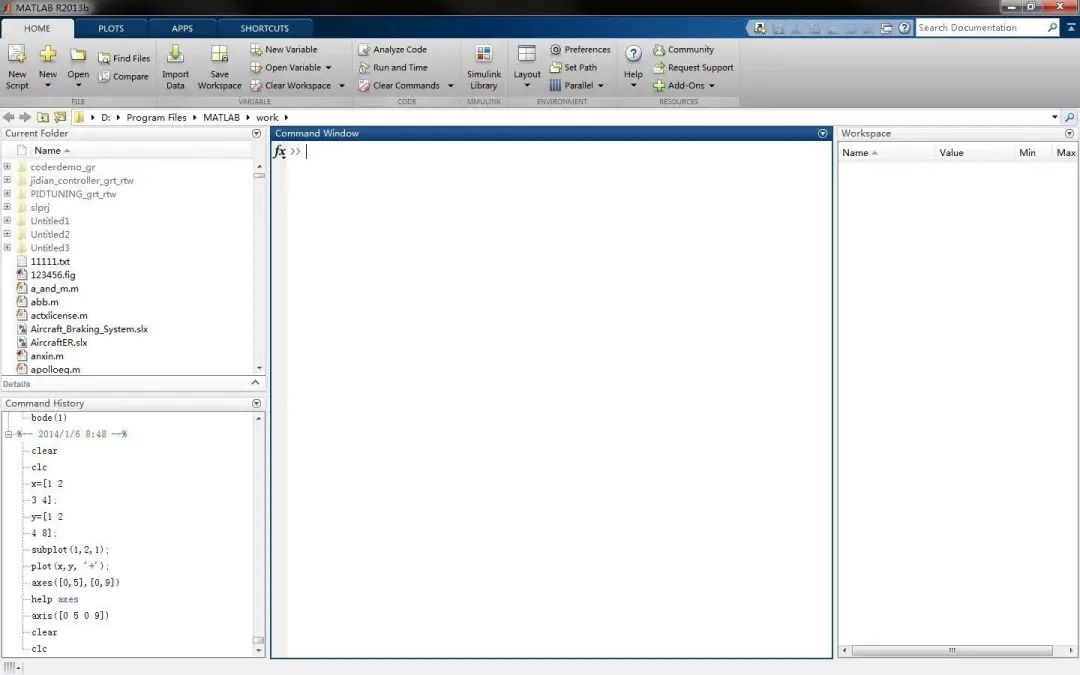
Images of the Working Interface
·Trading Toolbox: A new product for accessing prices and sending orders to trading systems
·Financial Instruments Toolbox: Calibration and Monte Carlo simulation of Hull-White, linear Gaussian, and LIBOR Market Models
·Image Processing Toolbox: Image segmentation with efficient contours, C code generation for 10 functions, GPU acceleration for 11 functions
·Image Acquisition Toolbox: Kinect for Windows sensor support for acquiring image, depth map and frame data
·Statistics Toolbox: Support Vector Machine (SVM) for binary classification, PCA algorithm for missing data, and Anderson-Darling goodness-of-fit test
·Data Acquisition Toolbox: Support package is provided for Digilent Analog Discovery Design Kit
·Vehicle Network Toolbox: Provides XCP for accessing ECUs on the CAN bus
Applications
The MATLAB family of products can be used to do a variety of tasks:
●Numerical Analysis
●Numerical and Symbolic Computing
●Engineering and Science Drawing
●Design and Simulation of Control Systems
●Digital Image Processing Technology
●Digital Signal Processing Technology
●Communication System Design and Simulation
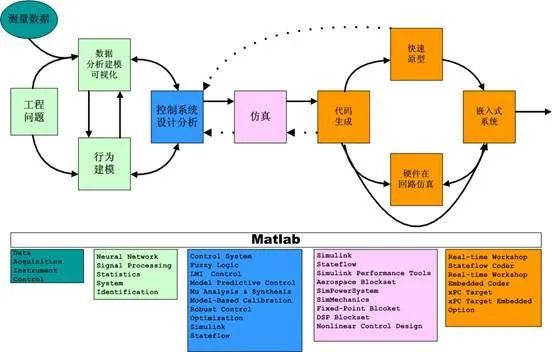
Applications of MATLAB in Communication System Design and Simulation
●Finance and Financial Engineering
●Management and Scheduling Optimization Calculations (Operations Research)
The application range of MATLAB is very broad, including signal and image processing, communications, control system design, test and measurement, financial modeling and analysis, and computational biology. Additional toolboxes (dedicated sets of MATLAB functions provided separately) extend the MATLAB environment to solve specific types of problems within these application areas.
MATLAB is used in a wide variety of applications, including signal and image processing, communications, control system design, test and measurement, financial modeling and analysis, and computational biology. Additional toolboxes (dedicated sets of MATLAB functions provided separately) extend the MATLAB environment to solve specific types of problems within these application areas.

That’s all for today’s sharing.
If you have a unique idea about the article,
please leave us a message.
Let us meet tomorrow,
I wish you a happy day!
References: Google Translate, Baidu
This article is organized and published by Learning Yard Academy. If there is any infringement, please leave a message for communication!


Learning Yard Academy
Copywriting|Rue
Typesetting|Rue
Review|Circle