Are you still doing “mechanical work”?
“Repetition” is humanity’s greatest enemy and the most time-consuming task.
Imagine this: you are stuck in front of a huge table that requires manually copying 100 times, or your boss asks you to send personalized emails to 1000 people…
Doesn’t it feel like your soul is being drained instantly?
In the world of programming, we absolutely do not allow this kind of “mechanical work” to exist. Because we have the ultimate weapon—loops.
Today, we will learn about the “Universal Traversal King” in the Python loop family: <span>for</span> loop. Its sole purpose is: to automate all repetitive and mechanical tasks!
1. For Loop: Your “Automatic Delivery Person”
1. Core Idea: Call out each member of the team!
<span>for</span> loop’s philosophy is simple: it acts like a diligent “automatic delivery person”. You give it a sequence (a list, a queue), and it ensures that every item in the queue is processed without missing a single one.
- Sequence: is that “queue”, such as a string, a list, or a tuple.
- Variable: is the “package” that the delivery person temporarily holds.
Remember this image:
❝
<span>for</span>variable<span>in</span>sequence:Do something with the package in hand
# Syntax structure: Simplicity is the ultimate sophistication
for variable in sequence:
    # Loop body statement: Action performed on the current "package"
    print(variable)
Here, the variable is a temporary variable used to store each element in the sequence. The sequence can be a list, tuple, string, or any iterable object. The loop body statement is the code block that needs to be executed repeatedly and can be any valid Python code. The else statement is optional and is used to perform some operations after the loop ends.
Specifically, the execution flow of the for loop statement is as follows:
- Take the first element from the sequence and assign it to the variable;
- Execute the loop body statement;
- Take the next element from the sequence and assign it to the variable;
- Repeat steps 2 and 3 until all elements in the sequence have been processed;
- If the for loop statement has an else statement, execute the else statement; otherwise, end the loop directly.
2. Practical Scenarios: Can it really traverse everything?
Scenario A: Traversing a string (calling out each character)
Your name, in the eyes of the computer, is just a sequence of characters.
# Example 1: Traversing a string—breaking a sentence apart!
message = 'Hello, world!'
print("Printing information one by one...")
for char in message: # char is the character held in hand during each loop
    print(f'Current character is: {char}')
Output:
H
e
l
l
o
,

w
o
r
l
d
!
Scenario B: Traversing a list (greeting each person)
If you have a team and need to greet each member.
# Example 2: Traversing a list—team members appear one by one
names = ['Bear', 'Andy', 'Little Bear']
print("My team members are:")
for hero in names: # hero is the name held in hand during each loop
    print(f'Hello everyone, I am {hero}!')
Scenario C: Traversing a tuple (listing one by one)
Tuples are similar to lists, but are a more stable “collection”.
# Example 3: Traversing a tuple—listing three major programming languages
languages = ('Python', 'Java', 'C++')
print("These are top weapons:")
for lang in languages:
    print(f'>>> {lang} <<<')
Summary: As long as it is ordered, the <span>for</span> loop can arrange everything clearly for you. It is the “cleaner” of sequences, leaving no dead ends.
2. Range Function: The “Time Machine” of For Loops
Just traversing existing sequences is not enough! If I want to repeat an action 10 times, or calculate numbers within 100, but I don’t have a ready-made list, what should I do?
At this point, you need to call upon <span>for</span> loop’s trusty partner—**<span>range()</span> function**.
<span>range()</span> function is very powerful: it is not a list, but it can create a “virtual” sequence of numbers!
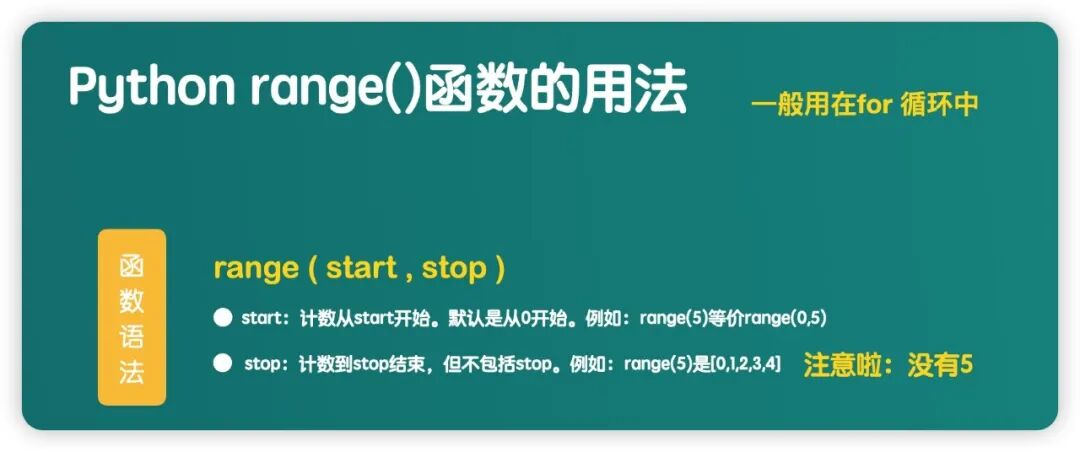
The range function is a commonly used function for generating sequences and can be used in for loop statements. Its syntax format is as follows:
range(start, stop[, step]) # Note: The end value is "exclusive", for example, range(1, 101) can reach 100
Here, start is the starting value in the sequence, stop is the ending value in the sequence, and step is the increment of the sequence. Start and step are optional, with default values of 0 and 1, respectively.
1. Running Principle Made Easy
Looping 3 times, the generated sequence is [0, 1, 2]:
for i in range(3): # i is 0, 1, 2 in turn
    print(f"Current number i is: {i}")
    print(i * 'Bear') # i * string: repeat printing i times
Output:
0

1
Bear
2
BearBear
In this code, the <span>for</span> loop will iterate through the sequence generated by <span>range(3)</span>, which is <span>[0, 1, 2]</span>, and in each loop, it performs two operations: first printing the current number <span>i</span>, and then printing the string <span>'Bear'</span> repeated <span>i</span> times.
2. Using For Loop to Calculate the Sum from 1 to 100
Let’s use the for loop to complete the story of Gauss.
# Example 6: Calculate the sum from 1 to 100
total = 0 # Initialize an "empty basket"
for number in range(1, 101): # Start from 1, end at 100
    total += number # Accumulate: throw each number into the basket
print(f"The result of adding from 1 to 100 is: {total}") # 5050
3. Enumerate: The “Positioning System” of For Loops
Sometimes, we not only need to know what is in the “package”, but also need to know the “position of the package in the queue!”
For example, if you are distributing jerseys to members of a team, you need to know:
- Who is number 0?
- Who is number 1?
At this point, you need a function that gives you both “Index” and “Element”—**<span>enumerate()</span>**.
Its core value: Get two pieces of data at once!
# Syntax: Simultaneously retrieve "number" and "content"
enumerate(sequence)
Scenario: Traversing a list while outputting elements and their indices
# Example 7: List traversal—simultaneously knowing the number and name
names = ['Bear', 'Andy', 'Little Bear']
print("Distributing identity numbers...")
# Key: Use two variables (index, name) to receive data simultaneously
for index, name in enumerate(names):
    print(f'Number {index} is: {name}')
❝
Remember:
<span>enumerate</span>is your most efficient “dual-core engine” when processing data.
4. Advanced: The “Multiverse” of For Loops (Nested Loops)
If a <span>for</span> loop is a conveyor belt, then nested loops are a multi-layered warehouse.
Core: The inner loop runs once before the outer loop proceeds to the next step!
# Nested loop syntax
for outer in sequenceA:
    print("[Outer loop starts]")
    for inner in sequenceB:
        print("    [Inner loop running]") # Inner will run many times
    print("[Outer loop ends this time]")
1. Practical Scenario: Shocking! Printing the Multiplication Table
The multiplication table is a classic “warehouse” problem. We need:
- Outer loop (i): to determine the number of rows (from 1 to 9).
- Inner loop (j): to determine the number of columns (from 1 to the current i).
# Example 1: Multiplication table
for i in range(1, 10): # Outer: rows (1, 2, 3... 9)
    for j in range(1, i + 1): # Inner: columns (from 1 to i)
        # Visual: print a calculation without changing lines, separated by spaces (end='  ')
        print(f'{j}*{i}={j*i}', end='  ')
    print() # After the inner runs once, the outer moves to the next line!
Using nested for loops to implement this example, we use i to represent rows and j to represent columns. The range of i should start from 1 to 9, noting that I need to fill in 10. The range of j should be from 1 to the current row number, which is i+1, outputting all columns in this row, then using a newline.
Output:
1 * 1 = 1

2 * 1 = 2  2 * 2 = 4

3 * 1 = 3  3 * 2 = 6  3 * 3 = 9

4 * 1 = 4  4 * 2 = 8  4 * 3 = 12  4 * 4 = 16

5 * 1 = 5  5 * 2 = 10  5 * 3 = 15  5 * 4 = 20  5 * 5 = 25

6 * 1 = 6  6 * 2 = 12  6 * 3 = 18  6 * 4 = 24  6 * 5 = 30  6 * 6 = 36

7 * 1 = 7  7 * 2 = 14  7 * 3 = 21  7 * 4 = 28  7 * 5 = 35  7 * 6 = 42  7 * 7 = 49

8 * 1 = 8  8 * 2 = 16  8 * 3 = 24  8 * 4 = 32  8 * 5 = 40  8 * 6 = 48  8 * 7 = 56  8 * 8 = 64

9 * 1 = 9  9 * 2 = 18  9 * 3 = 27  9 * 4 = 36  9 * 5 = 45  9 * 6 = 54  9 * 7 = 63  9 * 8 = 72  9 * 9 = 81
Output: A perfect triangular table, neat and concise, this is the elegance of code!.
2. Practical Scenario: Traversing a Multi-Dimensional List (Unpacking a Rubik’s Cube)
If you have a 3X3 matrix (a two-dimensional list), nested loops can help you unpack it layer by layer.
# Traversing a 3x3 two-dimensional list
matrix = [[1, 2, 3], [4, 5, 6], [7, 8, 9]]

for row in matrix: # Outer: get a whole row [1, 2, 3]
    for num in row: # Inner: take each number from this row
        print(num, end=' ')
    print() # After finishing one row, move to the next line
Output:
1 2 3
4 5 6
7 8 9
In the above example, we used two layers of for loops, where the outer loop traversed each row of the two-dimensional list, and the inner loop traversed each element in that row.
The inner loop is the “executor” of the outer loop! Remember this core logic, and nested loops will no longer be a challenge.
Leave Some Thoughts: Where in Your Work is There Repetition?
Alright, you have mastered the basic usage of <span>for</span> loops and the two golden partners (<span>range</span> and <span>enumerate</span>).
But in learning programming, the most important thing is not to remember the code, but to find the real-world problems it solves.
Now, please think about your daily work:
- Are there any files that need to be processed in batches regularly?
- Are there any images that need to be traversed in a folder?
- Are there any test data that need to be repeatedly input?
These are all places where <span>for</span> loops can be applied.
Programming is not about writing code, but about freeing your time.
Every loop you learn is a freedom reclaimed from repetitive labor.
Today’s Assignment (Challenge Yourself, Go Practice)
- Challenge 1: Output all numbers between 1 and 100 that are divisible by 3.
- Challenge 2: Use
<span>for</span>loops nested to calculate the average of all elements in a 3D list. - Challenge 3: Use
<span>enumerate</span>to traverse a string and find all occurrences of ‘o’ along with their positions and counts.