In Python, whether it is a module, class, or object, there exists an internal dictionary called __dict__ that stores the binding relationships between names and values. It is not only the core support of the reflection mechanism but also reflects the dynamic characteristic of the Python language where “naming is binding”.
To truly understand the operational logic of namespaces, the lifecycle of scopes, and the process of attribute lookup, one must delve into how __dict__ works.
1. Definition and Basic Function of __dict__
__dict__ is a built-in attribute used to save the mapping of writable attributes of an object.
In other words, it is a storage container for the object’s namespace.
Syntax:
object.__dict__Type:
🔹 For ordinary instance objects and modules: type is dict
🔹 For class objects: it is mappingproxy (a read-only mapping view)
Main Functions:
🔹 Displays all current attributes of the object and their corresponding values.
🔹 As a reflection interface, it supports dynamic addition, deletion, and modification of attributes.
🔹 Reflects the immediate state of the namespace.
Example:
class Person:
    def __init__(self, name):
        self.name = name
p = Person("艾婉婷")
print(p.__dict__)
# Output: {'name': '艾婉婷'}
This means that the object’s attributes are recorded in a regular dictionary at the underlying level.
2. Namespaces and Lifecycle
Each namespace in Python is a mapping table that records the binding relationship between names and objects. The existence and disappearance of these namespaces determine the lifecycle of variables.
(1) Hierarchy of Namespaces
🔹 Module-level namespace: represented by the module’s __dict__.
🔹 Class-level namespace: represented by the class’s __dict__ (mappingproxy).
🔹 Instance-level namespace: represented by the instance object’s __dict__.
(2) Lifecycle Characteristics
🔹 The module’s __dict__ is created when the module is imported and destroyed when the interpreter exits.
🔹 The class’s __dict__ is created when the class definition is executed and destroyed when the class object is collected.
🔹 The instance’s __dict__ is generated when the object is constructed (during __init__ call) and destroyed when __del__ is called or the reference count drops to zero.
Note:
The destruction of a namespace is accompanied by the release of the dictionary’s contents, and the reference count of the objects referenced in the dictionary decreases accordingly.
3. __dict__ of Classes, Instances, and Modules
(1) Module’s __dict__
Stores all variables, functions, classes, etc., defined in the module:
import math
print(math.__dict__.keys())  # View the namespace of the math module
(2) Class’s __dict__
Stores class attributes and method definitions, but returns a mappingproxy to prevent direct modification:
class A:
    x = 10
    def show(self): pass
print(A.__dict__)  # <mappingproxy object at ...>
If you want to modify class attributes, you need to assign directly through the class object:
A.x = 99(3) Instance’s __dict__
Only saves attributes defined by the instance itself (not inherited):
a = A()
a.y = 123
print(a.__dict__)  # {'y': 123}
4. Dynamic Reflection and Runtime Modification
A powerful use of __dict__ is dynamic reflection, which allows us to read and modify object attributes at runtime without needing to define them in advance.
class Config:
    pass
cfg = Config()
cfg.__dict__["version"] = "1.0"
print(cfg.version)  # Output: 1.0
This mechanism is very common in frameworks (like Django, Flask) and metaprogramming. For example, ORM models dynamically generate class attributes based on database fields.
Note:
Although directly modifying __dict__ is feasible, it may be disabled in complex objects (such as those using __slots__ or C extension types).
5. __dict__ and Attribute Lookup Mechanism
The underlying logic of object attribute access can be simplified as follows:
1. First, look up the instance’s __dict__.
2. If not found, look up the class’s __dict__.
3. If still not found, continue up the inheritance chain (MRO).
class Base:
    x = 1
class Child(Base):
    pass
c = Child()
print(c.x)
Lookup path (logical order):
c.__dict__ → Child.__dict__ → Base.__dict__This hierarchical lookup is the foundation of Python’s dynamic binding.
6. Implicit Logic of Lifecycle and Memory Management
Understanding the lifecycle of __dict__ can help better grasp the memory behavior of Python objects.
(1) Name Binding and Reference Counting
Each name binding records a reference in __dict__.
When a name is unbound (via del or namespace destruction), the reference count decreases by 1.
(2) Destruction of Namespaces
When a namespace (module, class, object) is released, its __dict__ is destroyed synchronously.
If the objects within still have external references, their lifecycle continues.
(3) Circular References
If objects in __dict__ reference each other, Python’s garbage collector (gc module) will detect and clean them up.
Example:
import gc
class Node:
    def __init__(self):
        self.ref = self
n = Node()
del n
gc.collect()  # Force collection of circular reference objects
7. Considerations and Best Practices
(1) Relationship with Other Mechanisms
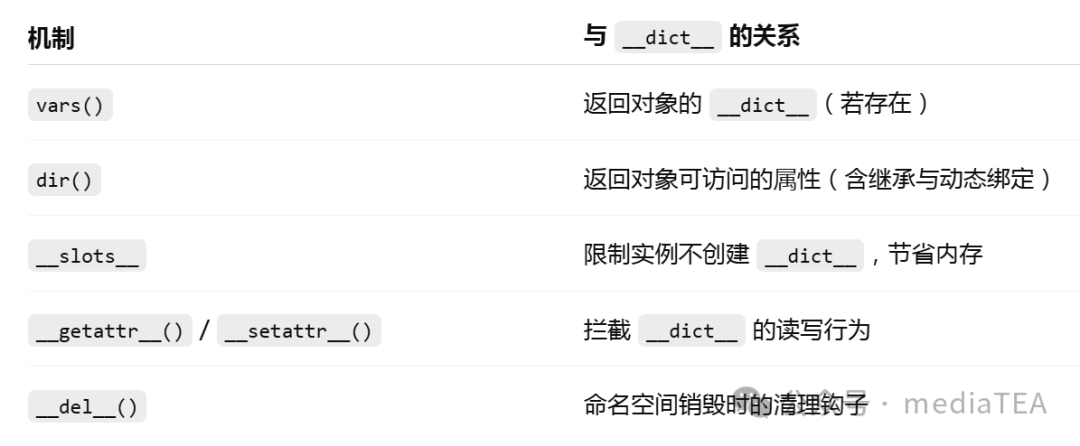
(2) Avoid frequently manipulating __dict__ directly in ordinary business logic.
(3) If dynamic attribute injection is needed, use setattr() / getattr().
(4) Avoid modifying the class’s __dict__; manage it through class definitions or decorators.
(5) If performance or memory control is a concern, consider using the __slots__ mechanism.
📘 Summary
__dict__ is one of the core structures of the Python object system; it serves as both a carrier of namespaces and the foundation of the dynamic language reflection mechanism.
By understanding __dict__, we can comprehend:
🔹 How name binding occurs.
🔹 How attributes are looked up.
🔹 How objects perish with the lifecycle of namespaces.
__dict__ is the “memory” of an object, recording the origins and paths of every name in the Python world. Understanding __dict__ is fundamental to mastering the Python object model and its dynamic characteristics.
 “Likes are a form of appreciation, and recognition is encouragement”