When it comes to pointers, it is impossible to separate them from memory. People who learn pointers can be divided into two types: those who do not understand the memory model and those who do.
Those who do not understand typically think of pointers as “pointers are the address of a variable” and are quite afraid to use pointers, especially for various advanced operations.
To learn C language well, it is crucial to understand memory, pointers, and the various aspects of compilation and linking.
01
What is a Pointer?
We can obtain the actual address of a variable using the operator &, and this value is the starting address of the memory block occupied by the variable.
PS: In fact, this address is a virtual address, not a true physical memory address.
We can print this address out:
printf(“%x”, &a);
It will look something like this: 0x7ffcad3b8f3c
02
Structures and Pointers
A structure contains multiple members. How are these members stored in memory?
For example:
1. struct fraction {
2. int num; // Integer part
3. int denom; // Decimal part
4. };
5. ;
6. struct fraction fp;
7. fp.num = 10;
8. fp.denom = 2;
This is a fixed-point decimal structure that occupies 8 bytes in memory (not considering memory alignment). The two member fields are stored like this:
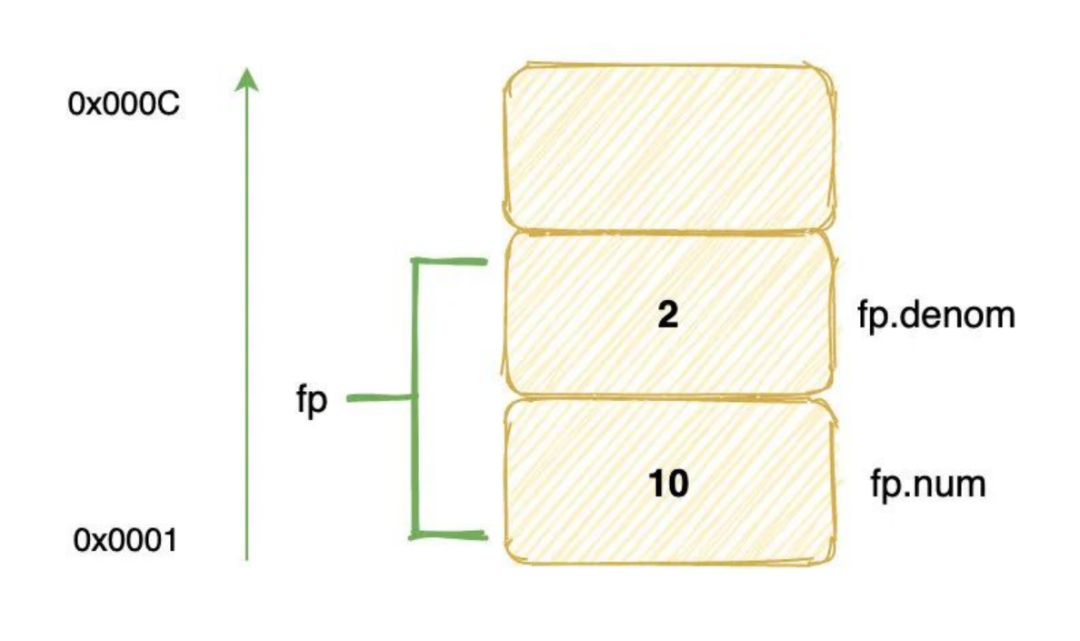
We put 10 in the field at an offset of 0 from the base address of the structure, and 2 in the field at an offset of 4.
Next, we perform the following operations:
1. ((fraction*)(&fp.denom))->num = 5;
2. ((fraction*)(&fp.denom))->denom = 12;
3. printf(“%d\n”, fp.denom); // What will it output?
Now, let’s analyze what happens during this process:
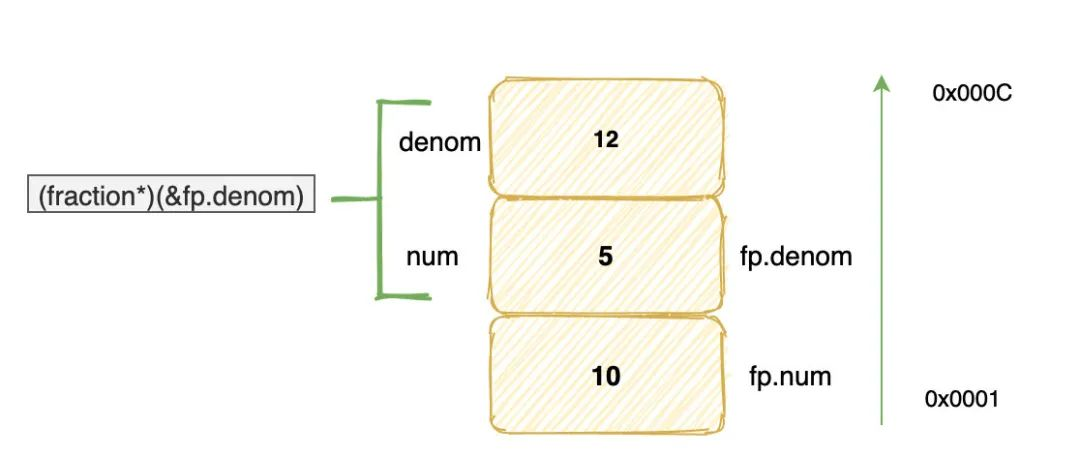
First, &fp.denom represents the address of the denom field in the structure fp. Then, taking this address as the starting address, we read 8 bytes and treat them as a fraction structure.
In this new structure, the top four bytes become the denom field, while the denom field of fp corresponds to the num field of the new structure.
Thus:
((fraction*)(&fp.denom))->num = 5
actually changes fp.denom, while
((fraction*)(&fp.denom))->denom = 12
assigns the top four bytes to 12.
Of course, writing a value to those four bytes of memory can lead to unpredictable results, potentially causing a program crash, because that memory may contain critical information from the function call stack, or it may not have write permissions.
Many core dump errors encountered by beginners in C language are caused by similar reasons.
So the final output is 5.
03
Pointers and Arrays
(1) One-dimensional Arrays
Arrays are a basic data structure provided by C. Thoroughly understanding arrays and their usage is the foundation for developing efficient applications.
Arrays are closely related to pointer representation, and they can be interchangeable in appropriate contexts.
For example:
int array[10] = {10, 9, 8, 7};
printf(“%d\n”, *array); // Outputs 10
printf(“%d\n”, array[0]); // Outputs 10
printf(“%d\n”, array[1]); // Outputs 9
printf(“%d\n”, *(array + 1)); // Outputs 9
int *pa = array;
printf(“%d\n”, *pa); // Outputs 10
printf(“%d\n”, pa[0]); // Outputs 10
printf(“%d\n”, pa[1]); // Outputs 9
printf(“%d\n”, *(pa + 1)); // Outputs 9
In memory, an array is a contiguous block of memory:
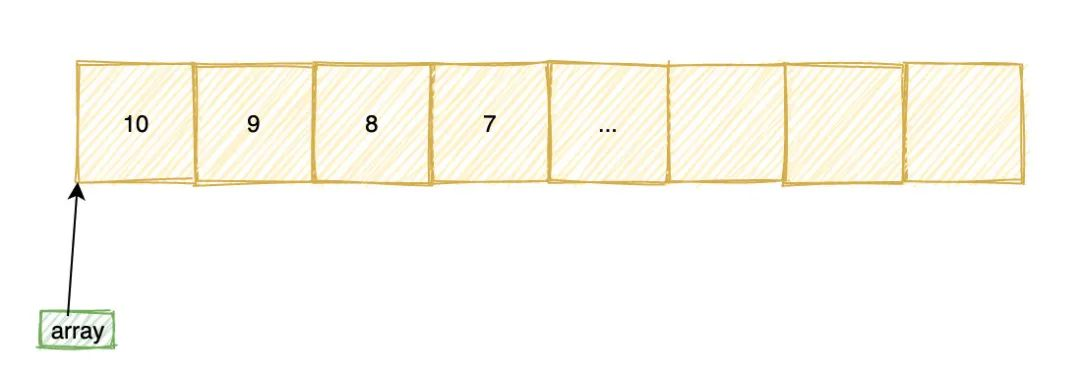
The address of the 0th element is called the base address of the array, and the name of the array actually points to the base address of the array. When we access array elements using array[1] or *(array + 1),
it can actually be seen as
address[offset], where address is the starting address and offset is the offset. However, note that the offset is not directly added to the address; it must be multiplied by the number of bytes occupied by the array type, that is: address + sizeof(int) * offset.
After reading the above code, many students may think that pointers and arrays are completely identical and interchangeable, which is completely wrong.
Although the name of an array can sometimes be used as a pointer, the name of an array is not a pointer.
The most typical case is in sizeof:
1. printf(“%u”, sizeof(array));
2. printf(“%u”, sizeof(pa));
The first will output 40 because the array contains 10 int type elements, while the second will output 4 on a 32-bit machine, which is the length of a pointer.
Reasons for Different Results:
1. From the compiler’s perspective, variable names and array names are both symbols. They are both typed and ultimately need to be bound to data.
2. A variable name refers to a piece of data, while an array name refers to a group of data (data collection). They are both typed to infer the length of the data they refer to.
3. The type of an array is determined by the type of its elements and the length of the array. sizeof calculates length based on the type of the variable, and this calculation occurs at compile time, not at runtime.
The compiler creates a special table during the compilation process to store variable names and their corresponding data types, addresses, scopes, etc.
sizeof is an operator, not a function. When using sizeof, it can query the length from this table.
Thus, using sizeof on an array name can query the actual length of the array.
pa is merely a pointer to an int type; the compiler does not know whether it points to one integer or a bunch of integers.
Although it points to an array here, an array is just a contiguous block of memory with no start and end markers, and no additional information to record the length of the array.
Therefore, using sizeof on pa can only yield the length of the pointer variable itself.
In other words, the compiler does not associate pa with the array; pa is merely a pointer variable. Regardless of where it points, sizeof will always yield the number of bytes it occupies.
(2) Two-dimensional Arrays
Do not think that a two-dimensional array is stored in memory as a two-dimensional structure of rows and columns. In fact, whether it is a two-dimensional or three-dimensional array… they are all syntactic sugar from the compiler.
There is no essential difference in storage from a one-dimensional array. For example:
int array[3][3] = {{1, 2, 3}, {4, 5, 6}, {7, 8, 9}};
array[1][1] = 5;
You might think that in memory the array will look like a two-dimensional matrix:
1 2 3
4 5 6
7 8 9
But in fact, it looks like this:
1 2 3 4 5 6 7 8 9
There is no difference from a one-dimensional array; they are all arranged linearly in one dimension.
When we access elements like array[1][1], how does the compiler calculate the actual address of the accessed element?
To generalize, suppose the array is defined as:
int array[n][m]
Accessing: array[a][b]
Then the calculation method for the address of the accessed element is: array + (m * a + b)
This is the essence of a two-dimensional array in memory; it is actually the same as a one-dimensional array, just syntactic sugar wrapped in a two-dimensional form.
SPRING FESTIVAL

SPRING FESTIVAL
Image and text editing | Ma Lingjie
Reviewed by | Zhang Hongyan
Final review | Chen Hao