[Beginner’s Confusion]
Many beginners in PLC programming often find themselves in the dilemma of “understanding tutorials but getting lost when writing on their own”: staring at the Siemens 1200 programming software, wanting to write a motor control program but not knowing where to start; the examples found online are either too complex or lack clear logic, resulting in errors when copied directly. In fact, when starting with PLC programming, there is no need to rush into complex projects. First, mastering the two basic cases of “one-button start-stop” and “single-button motor start-stop” can help establish a programming mindset. These two cases represent the most commonly used control logic in industrial settings, such as starting and stopping conveyor belts on production lines or controlling motors on machine tools, which are essentially extensions of these two logics. When programming with Siemens 1200, you will not only become familiar with PLC input/output configurations, contact instructions, and the use of timers/counters, but also grasp core programming concepts like “self-locking” and “interlocking”. Today, I will thoroughly explain the steps, logic breakdown, and program code for these two cases, allowing beginners to apply them directly without staring blankly at the software, thus easily taking the first step into PLC programming.
1. One-Button Start-Stop Programming for PLC
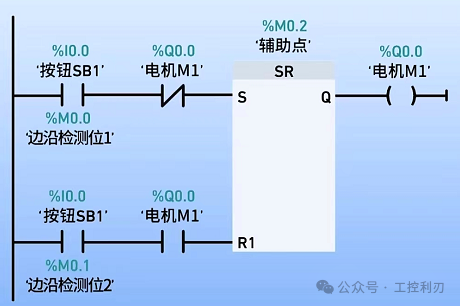
Method 1: Use SR Set/Reset Trigger. Press button SB1 (10.0), the normally closed contact connects to the S terminal of the SR trigger. R1 is not connected, Q0.0 is set, and motor M1 starts.
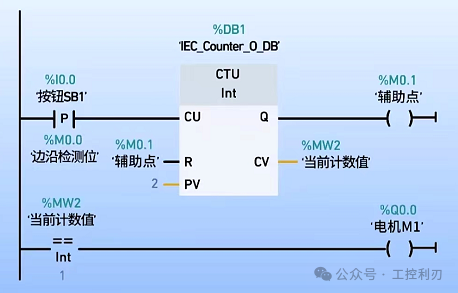
Method 2: Use a Counter. Press button SB1 (10.0), the CTU counter increments by 1, and the current count value (MW2) is 1; MW2 is compared with 1, and if equal, Q0.0 is activated, and motor M1 starts. Press button SB1 (10.0) again, the CTU counter increments by 1, and the current count value (MW2) is 2; at this point, reset the counter, and compare MW2 with 1, if not equal, Q0.0 disconnects, and motor M1 stops.
2. Single-Button Start-Stop for Three-Phase Asynchronous Motor
Control Requirement: Use PLC control to achieve single-button start-stop operation of a three-phase asynchronous motor. Pressing the button once starts the motor, and pressing it again stops the motor.
Implementation Steps
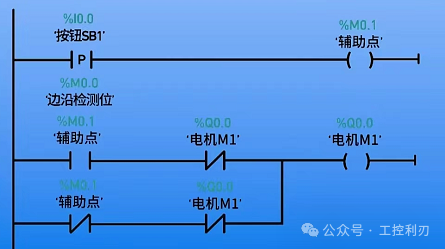
(1) Use auxiliary contacts to implement
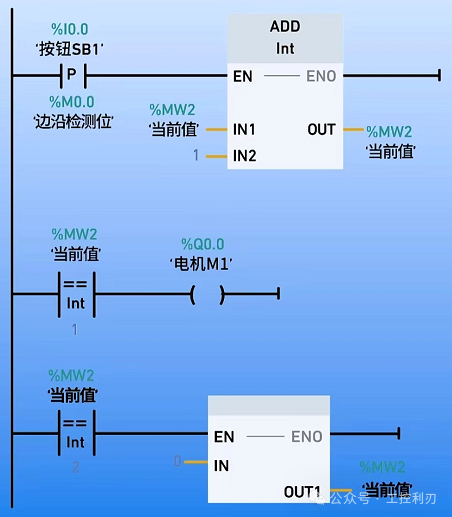
(2) Use addition instructions to implement
In fact, the core of PLC programming is not to memorize instructions but to understand “control logic”—the key to one-button start-stop is the “self-locking circuit”, which keeps the motor running after it is powered on; single-button start-stop relies on “state flipping” to achieve one press to start and another press to stop. Once you master these two logics, you can flexibly adapt to similar control requirements. When programming with Siemens 1200, just follow the steps to configure hardware, drag and drop instructions, associate variables, and debug to run, and you will quickly get the hang of it. Many people find PLC difficult because they start with the wrong examples and do not build a solid foundation.
If you encounter problems while applying these two cases, such as the motor not responding after downloading the program or the button not working, feel free to leave a comment, and we can troubleshoot together. I will also share more practical cases of Siemens 1200 in the future, so follow me to make PLC learning smoother, progressing from basic cases to becoming a programming expert!
Previous Recommendations
One article is enough: Mitsubishi WORKS2 programming shortcut keys, improving programming efficiency by 50%
A must-read for industrial control personnel! Incorrect wiring of PLC serial ports = wasted effort, the essence of RS232/422/485 wiring is here! Quickly save and learn~
7 ladder diagrams that must be learned for PLC learning, check them out if you haven’t!
Urgent save! 13 universal passwords for frequency converters, unlock parameters in 1 minute
A must-have! Through these 30 PLC programming examples, take you from beginner to electrical expert!
Standardized design of PLC alarm programs: a three-stage implementation plan from lamp control logic to fault handling! Hurry up and save it
A must-read for industrial control personnel! 100 technical questions about Kunlun Tongtai revealed, after learning you will be an industrial control expert!
A must-have tool for industrial control personnel: complete manual collection, hurry up and save!
Mitsubishi WORKS2 programming software beginner’s tutorial, even those with zero foundation can easily get started!
Beginner’s guide to learning Siemens Smart, from wiring to writing a complete program!