In actual frontend development, when interacting with backend APIs, have you ever been confused between <span>application/json</span>、<span>application/x-www-form-urlencoded</span> and <span>multipart/form-data</span>? This article will provide detailed code examples (using Fetch API and Axios) to thoroughly explain the differences, applicable scenarios, and practical applications of these three common Content-Types, allowing you to navigate the path of request body formatting smoothly.
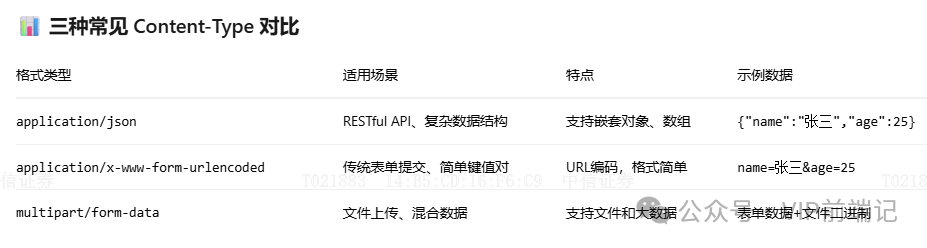
1. application/json (Most Common)
Usage Scenario: RESTful API, Complex Data Structure Transmission
1. Fetch API Example
// Example 1: Basic POST request
async function postUserData(user) {
    try {
        const response = await fetch('/api/users', {
            method: 'POST',
            headers: {
                'Content-Type': 'application/json',
            },
            body: JSON.stringify(user) // Key: needs manual serialization
        });
        if (!response.ok) throw new Error('Request failed');
        return await response.json();
    } catch (error) {
        console.error('Error:', error);
    }
}

// Usage example
const user = {
    name: 'Zhang San',
    age: 25,
    hobbies: ['Basketball', 'Swimming'],
    address: {
        city: 'Beijing',
        street: 'Chaoyang District'
    }
};
postUserData(user).then(data => console.log('User created successfully:', data));

// Example 2: More complete encapsulation (Recommended!!!)
class ApiClient {
    async request(url, method = 'GET', data = null) {
        const config = {
            method,
            headers: {
                'Content-Type': 'application/json',
            },
        };
        if (data) {
            config.body = JSON.stringify(data);
        }
        const response = await fetch(url, config);
        return response.json();
    }
    // Shortcut methods
    get(url) { return this.request(url); }
    post(url, data) { return this.request(url, 'POST', data); }
    put(url, data) { return this.request(url, 'PUT', data); }
    delete(url) { return this.request(url, 'DELETE'); }
}

// Usage
const api = new ApiClient();
api.post('/api/products', { name: 'Mobile Phone', price: 2999 });
2. Axios Example
// Example 1: Basic usage (automatically handles JSON serialization)
async function postUserData(user) {
    try {
        const response = await axios.post('/api/users', user, {
            headers: {
                'Content-Type': 'application/json'
            }
        });
        console.log('Response data:', response.data);
        return response.data;
    } catch (error) {
        console.error('Request error:', error.response?.data || error.message);
    }
}

// Usage example
const user = {
    name: 'Li Si',
    email: '[email protected]',
    profile: {
        avatar: 'path/to/avatar.jpg',
        bio: 'Frontend Developer'
    }
};
postUserData(user);

// Example 2: Create Axios instance (Recommended!!!)
const apiClient = axios.create({
    baseURL: 'https://api.example.com',
    timeout: 10000,
    headers: {
        'Content-Type': 'application/json'
    }
});

// Request interceptor (automatically add token)
apiClient.interceptors.request.use(config => {
    const token = localStorage.getItem('authToken');
    if (token) {
        config.headers.Authorization = `Bearer ${token}`;
    }
    return config;
});

// Response interceptor (unified error handling)
apiClient.interceptors.response.use(
    response => response.data,
    error => {
        console.error('API error:', error.response?.data);
        return Promise.reject(error);
    }
);

// Using the encapsulated instance
apiClient.post('/users', user)
    .then(data => console.log('Success:', data))
    .catch(error => console.error('Failed:', error));
2. application/x-www-form-urlencoded
Usage Scenario: Traditional Form Submission, OAuth Authentication, Simple Key-Value Pairs
1. Fetch API Example
// Manual encoding function
function encodeFormData(data) {
    return Object.keys(data)
        .map(key => `${encodeURIComponent(key)}=${encodeURIComponent(data[key])}`)
        .join('&');
}

// Example 1: Login form submission
async function login(username, password) {
    const formData = {
        username: username,
        password: password,
        grant_type: 'password'
    };
    try {
        const response = await fetch('/oauth/token', {
            method: 'POST',
            headers: {
                'Content-Type': 'application/x-www-form-urlencoded',
            },
            body: encodeFormData(formData)
        });
        return await response.json();
    } catch (error) {
        console.error('Login failed:', error);
    }
}

// Usage
login('zhangsan', 'mypassword123').then(console.log);

// Example 2: Using URLSearchParams (simpler)
async function submitForm(formData) {
    const params = new URLSearchParams();
    params.append('name', formData.name);
    params.append('email', formData.email);
    params.append('message', formData.message);
    const response = await fetch('/api/contact', {
        method: 'POST',
        headers: {
            'Content-Type': 'application/x-www-form-urlencoded'
        },
        body: params
    });
    return response.json();
}

// Shortcut: Directly pass FormData (will automatically set the correct Content-Type)
async function quickSubmit(data) {
    const formData = new FormData();
    Object.keys(data).forEach(key => {
        formData.append(key, data[key]);
    });
    const response = await fetch('/api/submit', {
        method: 'POST',
        body: formData // Note: Do not set Content-Type, the browser will set it automatically
    });
    return response.json();
}
2. Axios Example
// Example 1: Using URLSearchParams
async function login(username, password) {
    const params = new URLSearchParams();
    params.append('username', username);
    params.append('password', password);
    params.append('grant_type', 'password');
    try {
        const response = await axios.post('/oauth/token', params, {
            headers: {
                'Content-Type': 'application/x-www-form-urlencoded'
            }
        });
        return response.data;
    } catch (error) {
        console.error('Authentication failed:', error);
    }
}

// Example 2: Using qs library (handling nested objects)
import qs from 'qs';
async function submitComplexData(data) {
    try {
        const response = await axios.post('/api/complex', qs.stringify(data), {
            headers: {
                'Content-Type': 'application/x-www-form-urlencoded'
            }
        });
        return response.data;
    } catch (error) {
        console.error('Submission failed:', error);
    }
}

// Complex data example
const complexData = {
    user: {
        name: 'Wang Wu',
        profile: { age: 30 }
    },
    tags: ['vue', 'react']
};
// qs.stringify result: user[name]=王五&user[profile][age]=30&tags[]=vue&tags[]=react
submitComplexData(complexData);

// Example 3: Global configuration (recommended)
const formApi = axios.create({
    baseURL: '/api',
    headers: {
        'Content-Type': 'application/x-www-form-urlencoded'
    },
    transformRequest: [function (data) {
        // Automatically convert request data to URL encoded format
        return qs.stringify(data);
    }]
});
// Usage: directly pass an object, automatically convert
formApi.post('/submit', { name: 'Zhao Liu', age: 28 });
3. multipart/form-data
Usage Scenario: File Upload, Mixed Data (File + Text)
1. Fetch API Example
// Example 1: Single file upload
async function uploadFile(file) {
    const formData = new FormData();
    formData.append('file', file); // 'file' is the expected field name by the backend
    formData.append('description', 'This is a file description');
    formData.append('category', 'documents');
    try {
        const response = await fetch('/api/upload', {
            method: 'POST',
            body: formData // Note: Do not set Content-Type!
        });
        if (!response.ok) throw new Error('Upload failed');
        return await response.json();
    } catch (error) {
        console.error('Upload error:', error);
    }
}

// Usage example
const fileInput = document.getElementById('fileInput');
fileInput.addEventListener('change', async (event) => {
    const file = event.target.files[0];
    if (file) {
        const result = await uploadFile(file);
        console.log('Upload result:', result);
    }
});

// Example 2: Multiple file upload + progress monitoring
async function uploadMultipleFiles(files, onProgress) {
    const formData = new FormData();
    // Add multiple files
    files.forEach((file, index) => {
        formData.append(`files`, file); // Same field name, backend receives an array
    });
    // Add other fields
    formData.append('albumName', 'My Album');
    formData.append('isPublic', 'true');
    try {
        const response = await fetch('/api/upload/multiple', {
            method: 'POST',
            body: formData
        });
        return await response.json();
    } catch (error) {
        console.error('Batch upload failed:', error);
    }
}

// Example 3: Encapsulation with progress monitoring
function uploadWithProgress(url, formData, onProgress) {
    return new Promise((resolve, reject) => {
        const xhr = new XMLHttpRequest();
        // Progress monitoring
        xhr.upload.addEventListener('progress', (event) => {
            if (event.lengthComputable) {
                const percent = (event.loaded / event.total) * 100;
                onProgress?.(percent);
            }
        });
        xhr.addEventListener('load', () => {
            if (xhr.status === 200) {
                resolve(JSON.parse(xhr.responseText));
            } else {
                reject(new Error(`Upload failed: ${xhr.status}`));
            }
        });
        xhr.addEventListener('error', () => reject(new Error('Network error')));
        xhr.open('POST', url);
        xhr.send(formData);
    });
}
2. Axios Example
// Example 1: Basic file upload
async function uploadFile(file) {
    const formData = new FormData();
    formData.append('file', file);
    formData.append('description', 'File description');
    try {
        const response = await axios.post('/api/upload', formData, {
            headers: {
                'Content-Type': 'multipart/form-data'
            }
        });
        return response.data;
    } catch (error) {
        console.error('Upload failed:', error);
    }
}

// Example 2: Multiple file upload + progress bar
async function uploadWithProgress(files, onProgress) {
    const formData = new FormData();
    files.forEach(file => {
        formData.append('files', file);
    });
    try {
        const response = await axios.post('/api/upload', formData, {
            headers: {
                'Content-Type': 'multipart/form-data'
            },
            onUploadProgress: (progressEvent) => {
                if (progressEvent.total) {
                    const percent = Math.round(
                        (progressEvent.loaded * 100) / progressEvent.total
                    );
                    onProgress?.(percent);
                }
            },
            timeout: 30000 // 30 seconds timeout
        });
        return response.data;
    } catch (error) {
        if (axios.isCancel(error)) {
            console.log('Upload canceled');
        } else {
            console.error('Upload error:', error);
        }
        throw error;
    }
}

// Usage example
const files = document.getElementById('fileInput').files;
uploadWithProgress(files, (percent) => {
    console.log(`Upload progress: ${percent}%`);
    // Update progress bar UI
    document.getElementById('progressBar').style.width = percent + '%';
});

// Example 3: Advanced encapsulation - supports canceling uploads
class FileUploader {
    constructor() {
        this.cancelTokenSource = null;
    }
    async upload(file, onProgress) {
        // Cancel previous request
        if (this.cancelTokenSource) {
            this.cancelTokenSource.cancel('New upload request');
        }
        this.cancelTokenSource = axios.CancelToken.source();
        const formData = new FormData();
        formData.append('file', file);
        try {
            const response = await axios.post('/api/upload', formData, {
                headers: { 'Content-Type': 'multipart/form-data' },
                onUploadProgress: onProgress,
                cancelToken: this.cancelTokenSource.token
            });
            return response.data;
        } catch (error) {
            if (!axios.isCancel(error)) {
                throw error;
            }
        }
    }
    cancel() {
        if (this.cancelTokenSource) {
            this.cancelTokenSource.cancel('User canceled upload');
        }
    }
}
// Usage
const uploader = new FileUploader();
uploader.upload(file, (progress) => {
    console.log(`Progress: ${progress}%`);
});
// Cancel upload
// uploader.cancel();
Selection Suggestions
- Simple Projects → Use Fetch API (reduce dependencies)
- Complex Projects → Use Axios (more complete features)
- File Upload → Both can be used, Axios’s progress monitoring is simpler
- Need Compatibility with Old Browsers → Axios (better polyfill support)
——————Advanced Version:
// Choose the appropriate method based on project requirements
class ApiService {
    constructor(useAxios = true) {
        this.useAxios = useAxios;
        if (useAxios) {
            this.setupAxios();
        }
    }
    setupAxios() {
        this.api = axios.create({
            baseURL: process.env.API_BASE_URL,
            timeout: 10000,
        });
    }
    async request(method, url, data, contentType = 'json') {
        if (this.useAxios) {
            return this.axiosRequest(method, url, data, contentType);
        } else {
            return this.fetchRequest(method, url, data, contentType);
        }
    }
    // Axios implementation
    async axiosRequest(method, url, data, contentType) {
        const config = { method, url };
        if (contentType === 'form-data') {
            const formData = new FormData();
            Object.keys(data).forEach(key => formData.append(key, data[key]));
            config.data = formData;
            config.headers = { 'Content-Type': 'multipart/form-data' };
        } else {
            config.data = data;
        }
        const response = await this.api.request(config);
        return response.data;
    }
    // Fetch implementation
    async fetchRequest(method, url, data, contentType) {
        const config = { method };
        if (contentType === 'form-data') {
            const formData = new FormData();
            Object.keys(data).forEach(key => formData.append(key, data[key]));
            config.body = formData;
        } else if (contentType === 'json') {
            config.headers = { 'Content-Type': 'application/json' };
            config.body = JSON.stringify(data);
        }
        const response = await fetch(url, config);
        if (!response.ok) throw new Error(`HTTP error: ${response.status}`);
        return response.json();
    }
}
// Usage
const api = new ApiService(true); // true uses Axios, false uses Fetch
// Unified calling method
api.request('POST', '/users', { name: 'Zhang San' }, 'json');
ap.request('POST', '/upload', { file: fileObject }, 'form-data');- Be sure to bookmark this!!!!!!!!