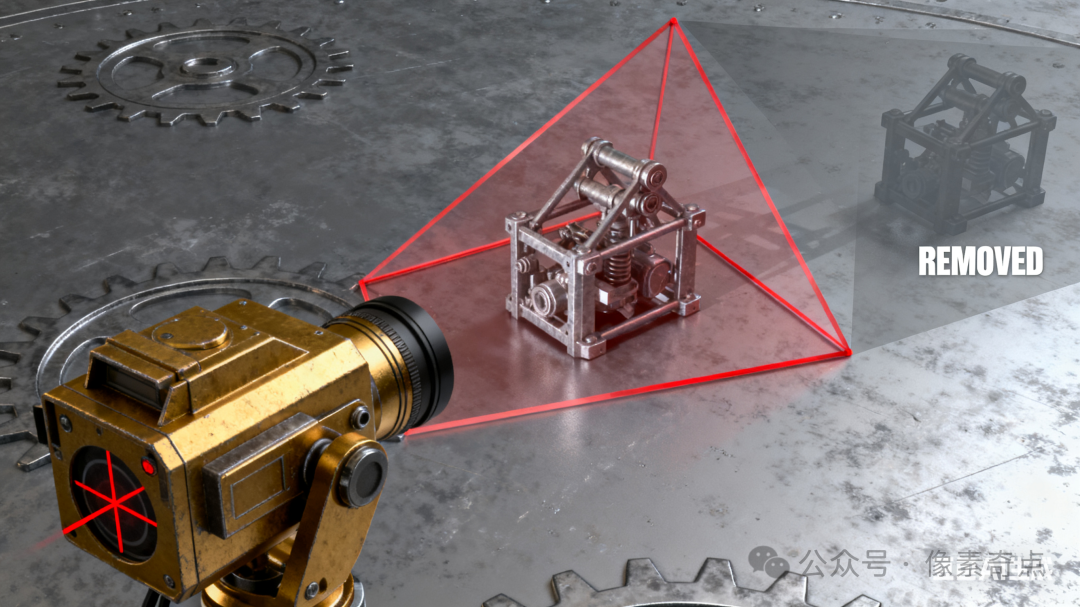
The following are specific call examples for controlling object display and culling with a perspective camera based on UEC++, including usage in different scenarios (such as initializing the camera, dynamically updating the view distance, manually hiding objects, etc.):
Example 1: Initializing the Clipping Planes of the Perspective Camera
When initializing the player controller or camera manager, set the basic near/far clipping planes:
#include "CameraCullingController.h"
#include "GameFramework/Actor.h"
#include "GameFramework/PlayerCameraManager.h"
#include "Components/SceneComponent.h"
#include "Engine/World.h"
// 1. Set the near/far clipping planes of the perspective camera
void UCameraCullingController::SetPerspectiveClipPlanes(APlayerCameraManager* CameraManager, float NearClip, float FarClip) {
    if (!IsValid(CameraManager)) {
        UE_LOG(LogTemp, Warning, TEXT("CameraManager is invalid!"));
        return;
    }
    // Validate clipping plane effectiveness (NearClip < FarClip)
    NearClip = FMath::Max(0.1f, NearClip); // NearClip cannot be 0 or negative
    FarClip = FMath::Max(NearClip + 100.0f, FarClip); // FarClip must be greater than NearClip
    // Set the perspective camera's clipping planes (unit: centimeters)
    CameraManager->SetNearClipPlane(NearClip);
    CameraManager->SetFarClipPlane(FarClip);
    UE_LOG(LogTemp, Log, TEXT("Perspective clip planes set - Near: %f, Far: %f"), NearClip, FarClip);
}
// 2. Dynamically adjust the far clipping plane (based on camera height, similar to previous orthographic camera logic)
void UCameraCullingController::UpdateDynamicFarClip(APlayerCameraManager* CameraManager, AActor* TargetActor) {
    if (!IsValid(CameraManager) || !IsValid(TargetActor))
        return;
    // Get the Z-axis height of the target Actor (assumed to be camera height)
    float ActorHeight = TargetActor->GetActorLocation().Z;
    // Calculate dynamic far clipping plane (the higher the height, the further the view distance)
    float DynamicFarClip = FMath::Clamp(ActorHeight * 3.0f, 10000.0f, 300000.0f); // 100m ~ 3000m
    // Apply to the camera
    SetPerspectiveClipPlanes(CameraManager, CameraManager->GetNearClipPlane(), DynamicFarClip);
}
// 3. Manually control the culling state of a single Actor
void UCameraCullingController::SetActorCullingState(AActor* TargetActor, bool bShouldBeVisible) {
    if (!IsValid(TargetActor))
        return;
    // Method 1: Set Actor visibility (affects all components)
    TargetActor->SetActorHiddenInGame(!bShouldBeVisible);
    // Method 2: Fine control of component visibility (e.g., only hide mesh components)
    TArray<USceneComponent*> Components;
    TargetActor->GetComponents(Components);
    for (USceneComponent* Comp : Components) {
        if (Comp->IsVisible() != bShouldBeVisible) {
            Comp->SetVisibility(bShouldBeVisible, true); // Second parameter: whether to affect child components
        }
    }
}
// 4. Manually cull objects by distance (objects within the frustum but too far away)
void UCameraCullingController::CullActorsByDistance(APlayerCameraManager* CameraManager, UWorld* World, float MaxDistance) {
    if (!IsValid(CameraManager) || !IsValid(World) || MaxDistance <= 0.0f)
        return;
    FVector CameraLocation = CameraManager->GetCameraLocation();
    TArray<AActor*> AllActors;
    UGameplayStatics::GetAllActorsOfClass(World, AActor::StaticClass(), AllActors);
    for (AActor* Actor : AllActors) {
        if (!IsValid(Actor) || Actor->IsHidden())
            continue;
        // Calculate the distance between the camera and the object
        float Distance = FVector::Distance(CameraLocation, Actor->GetActorLocation());
        // Hide if the distance exceeds MaxDistance
        bool bShouldBeVisible = (Distance <= MaxDistance);
        SetActorCullingState(Actor, bShouldBeVisible);
    }
}
Example 2: Dynamically Updating the Far Clipping Plane Based on Character Height
When the character moves (e.g., in a flying game), adjust the view distance in real-time based on height:
// Call in the character's Tick function (update every frame)
void AMyCharacter::Tick(float DeltaTime) {
    Super::Tick(DeltaTime);
    // Get the camera manager
    APlayerCameraManager* CameraManager = GetWorld()->GetFirstPlayerController()->PlayerCameraManager;
    if (IsValid(CameraManager)) {
        // Dynamically adjust the far clipping plane based on the character's height
        UCameraCullingController::UpdateDynamicFarClip(CameraManager, this);
    }
}
At this point, the higher the character flies, the further the camera’s far clipping plane extends, increasing the visible range.
Example 3: Manually Hiding/Showing Specific Objects
When a storyline is triggered or during interaction, hide a specific Actor or component:
// Assume called when triggering an event (e.g., hide an item after picking it up)
void AMyInteractableActor::OnPickedUp() {
    // Hide itself
    UCameraCullingController::SetActorCullingState(this, false);
    // You can also hide specific components (e.g., model component, keep collision)
    UStaticMeshComponent* MeshComp = FindComponentByClass<UStaticMeshComponent>();
    if (MeshComp) {
        MeshComp->SetVisibility(false);
    }
}
Example 4: Bulk Culling Distant Objects by Distance
In large scenes, force hide objects that are extremely far away (for performance optimization):
// Call in the level blueprint or manager class's Tick
void ALevelCullingManager::Tick(float DeltaTime) {
    Super::Tick(DeltaTime);
    // Execute every 0.5 seconds (to avoid calculations every frame, optimizing performance)
    static float CullInterval = 0.5f;
    CullInterval -= DeltaTime;
    if (CullInterval <= 0.0f) {
        APlayerCameraManager* CameraManager = GetWorld()->GetFirstPlayerController()->PlayerCameraManager;
        if (IsValid(CameraManager)) {
            // Hide all objects more than 1000 meters (100000 centimeters) away from the camera
            UCameraCullingController::CullActorsByDistance(CameraManager, GetWorld(), 100000.0f);
        }
        CullInterval = 0.5f;
    }
}
Example 5: Setting LOD Distances for Static Meshes (in conjunction with culling)
Set LOD switch distances for objects, allowing distant objects to display simplified models:
// Initialize LOD in the Actor's BeginPlay
void AMyStaticMeshActor::BeginPlay() {
    Super::BeginPlay();
    UStaticMeshComponent* MeshComp = FindComponentByClass<UStaticMeshComponent>();
    if (MeshComp) {
        // Set LOD switch distances (unit: centimeters)
        TArray<float> LODDistances;
        LODDistances.Add(5000.0f);   // Show LOD 0 (highest precision) within 50 meters
        LODDistances.Add(20000.0f);  // Show LOD 1 from 50 to 200 meters
        LODDistances.Add(50000.0f);  // Show LOD 2 from 200 to 500 meters
        MeshComp->SetLODDistances(LODDistances);
    }
}
At this point, the further the object is from the camera, the lower the model precision, achieving progressive performance optimization in conjunction with the far clipping plane.
Calling Considerations
- Obtaining the Camera Manager is usually done through
<span>APlayerController::GetPlayerCameraManager()</span>or<span>UWorld::GetFirstPlayerController()->PlayerCameraManager</span>. - Performance Control For batch operations (like
<span>CullActorsByDistance</span>), avoid executing every frame; it is recommended to set intervals (e.g., 0.5 to 1 second). - Unit Consistency All distance parameters are in centimeters (default in UE), and care should be taken to match the actual scale in the game (e.g., 1000.0f = 10 meters).
Through these examples, different culling mechanisms can be combined based on actual needs to balance visual effects and performance.
In Unreal Engine, the perspective camera (Perspective Camera) controls the display and culling of objects through clipping planes (Clip Planes), frustum culling, and LOD (Level of Detail) mechanisms. The following are specific implementation methods and core principles based on C++:
1. Core Control Mechanisms
The visibility control of the perspective camera relies on the following key mechanisms:
- Near/Far Clipping Planes control the “nearest” and “farthest” visible distances within the camera’s field of view.
- Frustum Culling automatically culls objects outside the camera’s field of view (not within the pyramid-shaped frustum).
- LOD System switches different precision models based on the distance between the object and the camera (the further away, the simpler the model).
- Manual Culling Switch forces the rendering of objects on or off through code.
2. C++ Implementation Code
The following is commonly used code for controlling object display and culling with a perspective camera:
#include "CameraCullingController.h"
#include "GameFramework/Actor.h"
#include "GameFramework/PlayerCameraManager.h"
#include "Components/SceneComponent.h"
#include "Engine/World.h"
// 1. Set the near/far clipping planes of the perspective camera
void UCameraCullingController::SetPerspectiveClipPlanes(APlayerCameraManager* CameraManager, float NearClip, float FarClip) {
    if (!IsValid(CameraManager)) {
        UE_LOG(LogTemp, Warning, TEXT("CameraManager is invalid!"));
        return;
    }
    // Validate clipping plane effectiveness (NearClip < FarClip)
    NearClip = FMath::Max(0.1f, NearClip); // NearClip cannot be 0 or negative
    FarClip = FMath::Max(NearClip + 100.0f, FarClip); // FarClip must be greater than NearClip
    // Set the perspective camera's clipping planes (unit: centimeters)
    CameraManager->SetNearClipPlane(NearClip);
    CameraManager->SetFarClipPlane(FarClip);
    UE_LOG(LogTemp, Log, TEXT("Perspective clip planes set - Near: %f, Far: %f"), NearClip, FarClip);
}
// 2. Dynamically adjust the far clipping plane (based on camera height, similar to previous orthographic camera logic)
void UCameraCullingController::UpdateDynamicFarClip(APlayerCameraManager* CameraManager, AActor* TargetActor) {
    if (!IsValid(CameraManager) || !IsValid(TargetActor))
        return;
    // Get the Z-axis height of the target Actor (assumed to be camera height)
    float ActorHeight = TargetActor->GetActorLocation().Z;
    // Calculate dynamic far clipping plane (the higher the height, the further the view distance)
    float DynamicFarClip = FMath::Clamp(ActorHeight * 3.0f, 10000.0f, 300000.0f); // 100m ~ 3000m
    // Apply to the camera
    SetPerspectiveClipPlanes(CameraManager, CameraManager->GetNearClipPlane(), DynamicFarClip);
}
// 3. Manually control the culling state of a single Actor
void UCameraCullingController::SetActorCullingState(AActor* TargetActor, bool bShouldBeVisible) {
    if (!IsValid(TargetActor))
        return;
    // Method 1: Set Actor visibility (affects all components)
    TargetActor->SetActorHiddenInGame(!bShouldBeVisible);
    // Method 2: Fine control of component visibility (e.g., only hide mesh components)
    TArray<USceneComponent*> Components;
    TargetActor->GetComponents(Components);
    for (USceneComponent* Comp : Components) {
        if (Comp->IsVisible() != bShouldBeVisible) {
            Comp->SetVisibility(bShouldBeVisible, true); // Second parameter: whether to affect child components
        }
    }
}
// 4. Manually cull objects by distance (objects within the frustum but too far away)
void UCameraCullingController::CullActorsByDistance(APlayerCameraManager* CameraManager, UWorld* World, float MaxDistance) {
    if (!IsValid(CameraManager) || !IsValid(World) || MaxDistance <= 0.0f)
        return;
    FVector CameraLocation = CameraManager->GetCameraLocation();
    TArray<AActor*> AllActors;
    UGameplayStatics::GetAllActorsOfClass(World, AActor::StaticClass(), AllActors);
    for (AActor* Actor : AllActors) {
        if (!IsValid(Actor) || Actor->IsHidden())
            continue;
        // Calculate the distance between the camera and the object
        float Distance = FVector::Distance(CameraLocation, Actor->GetActorLocation());
        // Hide if the distance exceeds MaxDistance
        bool bShouldBeVisible = (Distance <= MaxDistance);
        SetActorCullingState(Actor, bShouldBeVisible);
    }
}
3. Key Mechanism Analysis
1. Clipping Planes (Near/Far Clip Planes)
- Function defines the “near boundary” and “far boundary” of the camera’s visible range.
- Distance < NearClip → Culling (not rendered).
- Distance > FarClip → Culling (not rendered).
- Code Control is implemented through
<span>APlayerCameraManager::SetNearClipPlane</span>and<span>SetFarClipPlane</span>, units are in centimeters. - Note A near clipping plane that is too small may cause precision issues (e.g., Z-fighting), it is recommended to set it above
<span>1.0f</span>(1 centimeter); a far clipping plane that is too large may affect performance.
2. Frustum Culling
- Principle The perspective camera’s field of view is a pyramid-shaped “frustum”, and the engine automatically culls objects outside the frustum (regardless of distance).
- Trigger Method The engine automatically executes by default, no manual calls are needed.
- Verification Method Check if an object is within the frustum using
<span>Actor->WasRecentlyRendered()</span>(whether it was rendered in the last frame).
3. LOD System (Level of Detail)
- Function The further the object is from the camera, the simpler the model used (reducing the number of triangles), indirectly achieving “performance-optimized culling”.
- Code Control
// Set LOD distances for static mesh components
UStaticMeshComponent* MeshComp = Actor->FindComponentByClass<UStaticMeshComponent>();
if (MeshComp) {
    TArray<float> LODDistances = {1000.0f, 5000.0f, 10000.0f}; // Switch LOD at 10m, 50m, 100m
    MeshComp->SetLODDistances(LODDistances);
}
4. Manual Culling Control
- Actor Level Hiding
<span>Actor->SetActorHiddenInGame(true)</span>hides the entire Actor. - Component Level Hiding
<span>Component->SetVisibility(false)</span>only hides specific components (e.g., mesh, particles). - Distance Driven Culling combines
<span>FVector::Distance</span>to calculate distance and manually control the visibility of extremely distant objects (suitable for special scenarios).
4. Best Practices
- Dynamically Adjust Clipping Planes Automatically adjust
<span>FarClipPlane</span>based on game state (e.g., character height, scene scale) to balance visibility and performance. - Combine Frustum and Distance Culling Frustum handles “out of view” culling, while clipping planes handle “too far/too close” culling within the view.
- Use Manual Culling Sparingly Rely primarily on the engine’s automatic culling mechanisms; manual control should only be used for special logic (e.g., storyline-triggered hiding).
- LOD and Clipping Coordination The far clipping plane should be slightly larger than the distance of the highest LOD to avoid sudden model disappearance.
By using the above methods, you can precisely control the display and culling of objects under the perspective camera, optimizing rendering performance while ensuring visual quality.