What are Bit Fields?
Imagine you are moving and have many small items: a few screws, some bottle caps, and a few coins. If you use a huge moving box for each item, it can hold them, but it wastes a lot of boxes, and the moving truck won’t fit many boxes.Bit fields are the “organization technique” in C language that helps you solve this problem. They allow you to cleverly pack many small data items into a “big box” (like an integer), thus saving a lot of space.Bit fields are a special data structure feature in C language that allows us to specify the memory length occupied by its members in a structure (struct) in terms of “bits”.The core purpose is to: efficiently utilize memory, especially when modeling compact data structures such as hardware registers, network protocol headers, and file formats, which can save a significant amount of storage space.
Why Do We Need Bit Fields?
Let’s first look at an example without using bit fields. Suppose we want to record the state of a box:
- Is the box empty? (Yes or No, only needs 1 bit to record)
- What color is the box? (For example, there are 4 colors, which need 2 bits to record, because in binary form,00,01,10,11 can represent 4 colors)
- Is the box fragile? (Yes or No, only needs 1 bit to record)
If we use ordinary int type variables to record:
int P;int L;int C;On most computers, 1 int occupies 4 bytes (32 bits). So these three variables occupy a total of 4 + 4 + 4 = 12 bytes (96 bits)! But we know that the actual amount of information we need is only 1 + 2 + 1 = 4 bits. This is like using 3 huge boxes to hold 3 small items, wasting a lot of space. This is where the bit field feature comes into play.
How Do Bit Fields Work?
Bit fields allow us to tell the compiler: “I don’t need a whole int, just a few bits will do!”
Now let’s define the “box state” using bit fields:
struct BoxStatus { unsigned int P : 1; // occupies 1 bit unsigned int L : 2; // occupies 2 bits unsigned int C : 1; // occupies 1 bit};To explain simply:
-
unsigned int: Tells the compiler that we want to use a “unsigned integer big box” to hold these items.
-
P: This is the name we give to the first data.
-
: 1: The number after the colon is key! It tells the compiler: “Please allocate only 1 bit of space for is_empty.”
Thus, P(1 bit) + L(2 bits) + C(1 bit) = a total of 4 bits. The compiler will find a way to compactly fit this 4 bits of data into an unsigned int (32 bits) “big box”.
So how much space does this structure ultimately use? Let’s try using the sizeof operator to see, and the final compiled result is as follows:
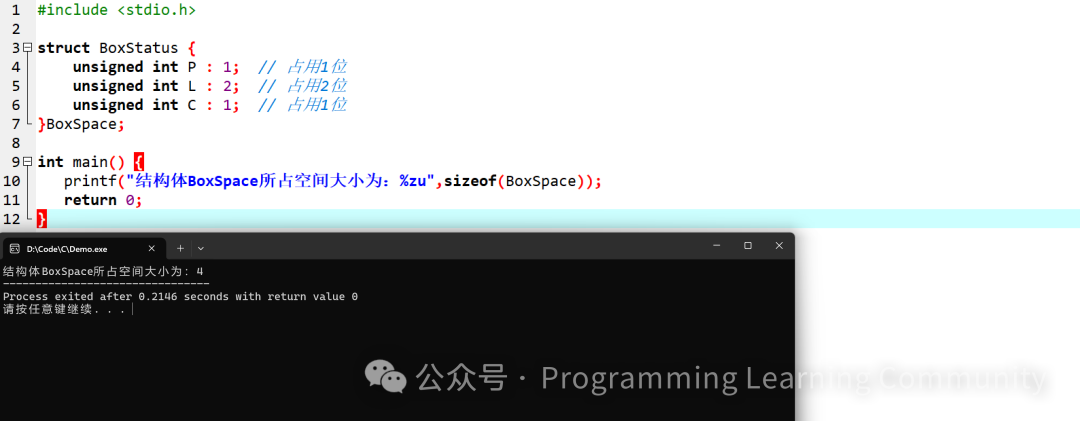
It can be seen that the structure occupies a total size of 4 bytes, even though we only used 4 bits, the compiler still allocated a minimum unit ( Why is it 4 bytes instead of 8 bytes? Some students may confuse this with the memory bar principle from the previous chapter; the basic unit of bit fields depends on the type of member declaration, which is our unsigned int, not the CPU’s bit count. ) There may be differences between compilers, but even so, this is already a huge saving compared to the initial 12 bytes scheme!
How to Use Bit Fields?
Using them is just as simple as using ordinary structures:
#include <stdio.h>
struct BoxStatus  {unsigned int P : 1; // occupies 1 bit
unsigned int L : 2; // occupies 2 bits
unsigned int C : 1; // occupies 1 bit} BoxSpace;
int main()  {
    // Assign values to members
	BoxSpace.P = 1;
	BoxSpace.L = 2;
	BoxSpace.C = 0;
    // Read its values
	printf("The value of member P is: %u\n",BoxSpace.P);
	printf("The value of member L is: %u\n",BoxSpace.L);
	printf("The value of member C is: %u\n",BoxSpace.C);
	return 0;
}
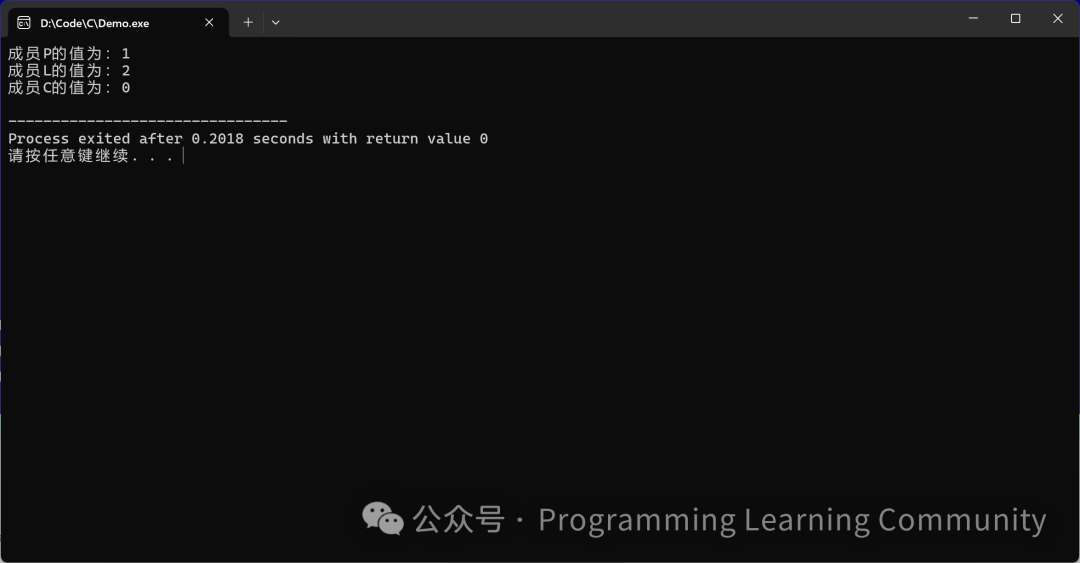
Compilation Result is as follows:
Common Pitfalls
Bit fields are great, but there is a small trap: never exceed the defined bit range! Do you remember we defined L : 2? What is the maximum number that can be represented with 2 bits? Let’s calculate: 2 bits in binary, the maximum is 11, which is 3 in decimal (2^2 – 1 = 3), so the valid values for L can only be 0, 1, 2, 3. If we exceed the maximum value, it will result in undefined behavior, as shown in the example below:
#include <stdio.h>
int main() {
    struct { unsigned int age:3; } u;
    u.age = 7;  // 3 bits can store 7
    printf("%d\n", u.age);  // 7
    u.age = 8;  // 8 = 1000, can only keep the low 3 bits → 0
    printf("%d\n", u.age);  // 0
    return 0;
}
Simple rule: A bit field occupying N bits can store a maximum value of 2^N – 1.Cross-platform: Byte order and alignment are determined by the compiler; do not use for direct memory copying of network byte streams (memcpy).Addressing: &bit.a is not allowed; bit fields do not have independent addresses.Debugging: When printing, use unsigned int to avoid sign extension.Well, that’s about it for our discussion on bit fields in C language. Defining structures is similar to structures and unions; everyone can practice more, and you might discover a new world . In the next lesson, we will delve into C language keyword typedef, see you next class (づ。◕‿‿◕。)づ!