Recently, when performing a dnf update on Rocky Linux 9 to update the system, an error message appeared, specifically:Error: Transaction test failed: file /usr/lib64/ossl-modules/fips.so from install of openssl-libs-1:3.2.2-7.el9.x86_64 conflicts with file from package openssl-fips-provider-so-3.0.7-6.el9_5.x86_64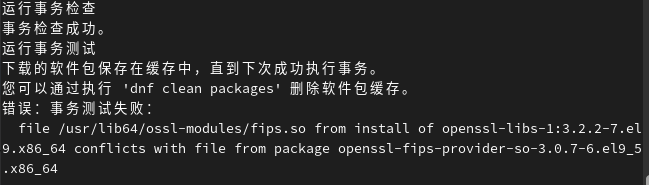 This error indicates that there is a file conflict when trying to install or update the openssl-libs package with the already installed openssl-fips-provider-so package. Specifically, the file /usr/lib64/ossl-modules/fips.so exists in both packages, causing the conflict.The solution is as follows:1. Uninstall openssl-fips-provider-so:
dnf remove openssl-fips-provider-so2. If during the uninstallation process the system prompts: Error: Problem: this operation will remove the following protected packages: systemd (try adding ‘–nobest’ to not only use the best candidate for the package), you can execute the following command to force the removal (there is some risk involved, so consider carefully):
rpm -e --nodeps openssl-fips-provider-so3. Clean the dnf cache and re-execute the system update:
dnf clean packages
dnf update
You can also install openssl-libs separately:
dnf install openssl-libsFinally, it is worth mentioning that this article is applicable not only to Rocky Linux but also to various Linux systems derived from Red Hat Enterprise Linux 9, including Red Hat Enterprise Linux 9 itself.—————–Related historical articles about Rocky Linux:Simple testing of software compatibility on Rocky Linux 10Experience sharing: Solutions to some anomalies regarding Rocky Linux (or other RHEL derivatives) and WindowsOperations for replacing hard drives and increasing available space in Rocky Linux—————Recently published articles:Project management system Redmine: “The default queue adapter for development/testing environments has changed” shows a red exclamation markWhat is the “ZTHELPER” service in Windows 11 24H2?Replaced the phone battery