For more exciting content, click to follow “Industrial Control Learning Society”
In a large supermarket, it is necessary to regularly recheck the expiration dates of products. The traditional method is to manually check the barcodes and then sort them. Now, an automatic sorting production line with a barcode scanner has been introduced. Products are transported via a conveyor belt, and when they reach the scanning position, the scanner is activated. Successful scan information is stored in the PLC, while unsuccessful scans are pushed out by a cylinder. When reaching the sorting position, the scan results are evaluated: products within the expiration date proceed to the next station, while expired products are removed by the cylinder. A schematic diagram of the equipment is shown in Figure 1.
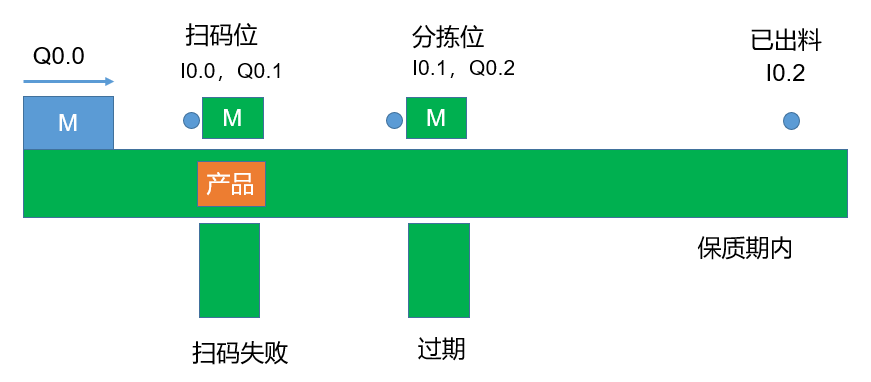
Figure 1 Equipment Schematic
1. Core Hardware Introduction
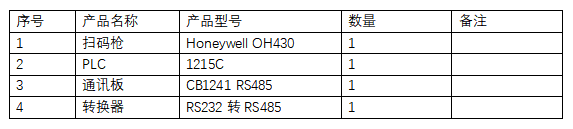
In this case, a Honeywell OH430 barcode scanner is used, with an RS232 interface, and a 1215C PLC. Since the barcode scanner uses an RS232 interface, an additional communication module is required for the PLC. In the inventory, there is a CB1241 RS485 communication board that can be connected via an RS232 to RS485 converter. The core hardware list is shown in Table 1.
Table 1 Core Hardware List
2. Device IO Variable Table
The device’s IO variables are shown in Figure 2.
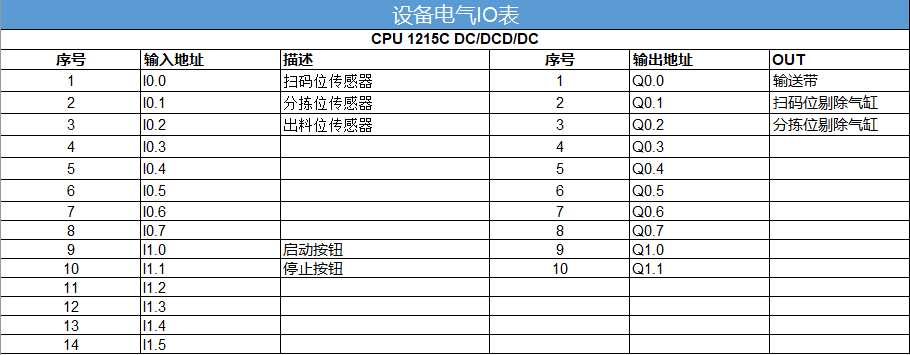
Figure 2 IO Variable Table
3. Hardware Connection Between Barcode Scanner and PLC
The hardware connection between the barcode scanner and the PLC is shown in Figure 3.
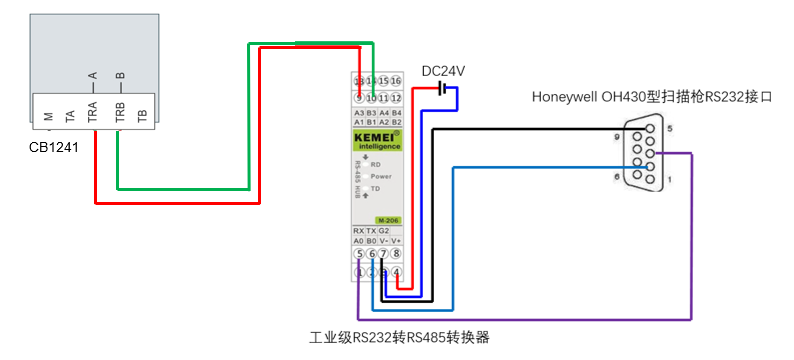
Figure 3 Hardware Connection Diagram
4. Settings for Barcode Scanner and PLC
1) Barcode Scanner Settings
For the barcode scanner, some simple parameter settings are required. The easiest way is to scan the settings using the barcode scanner. Common setting codes are shown in Figure 4.

Figure 4 Common Setting Codes for the Barcode Scanner
2) PLC Settings
On the PLC side, the communication parameters of the module also need to be set, as shown in Figure 5.
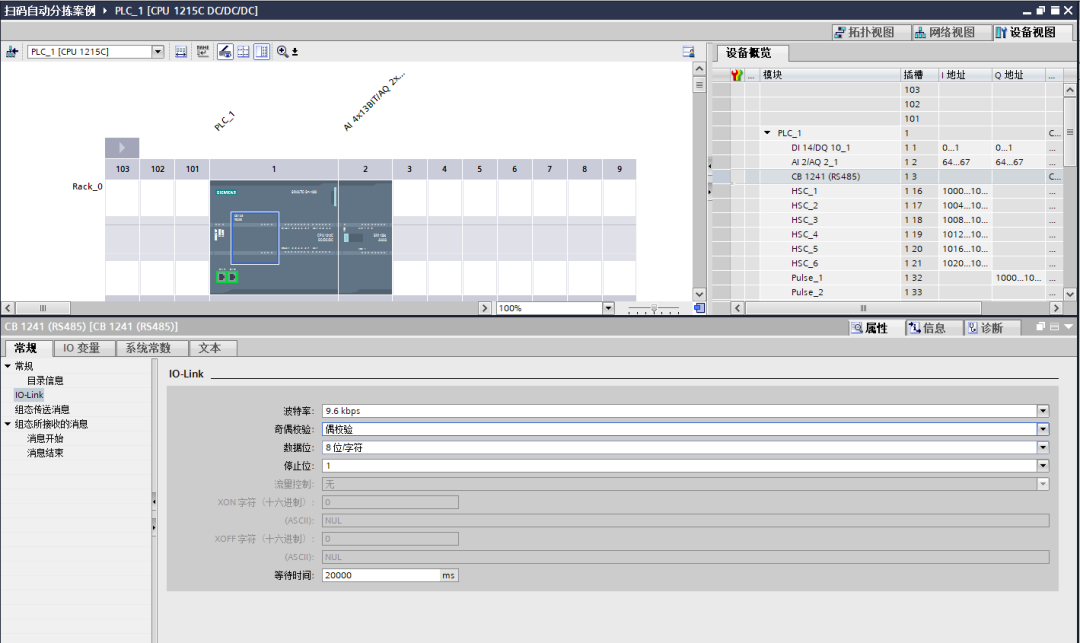
Figure 5 PLC Communication Board Parameter Settings
5. Device Control Program
In the entire program, there are mainly three program blocks: one main program, one subroutine for the barcode scanner, and one subroutine for automatic sorting. The detailed programs are shown below.
1) Main Program
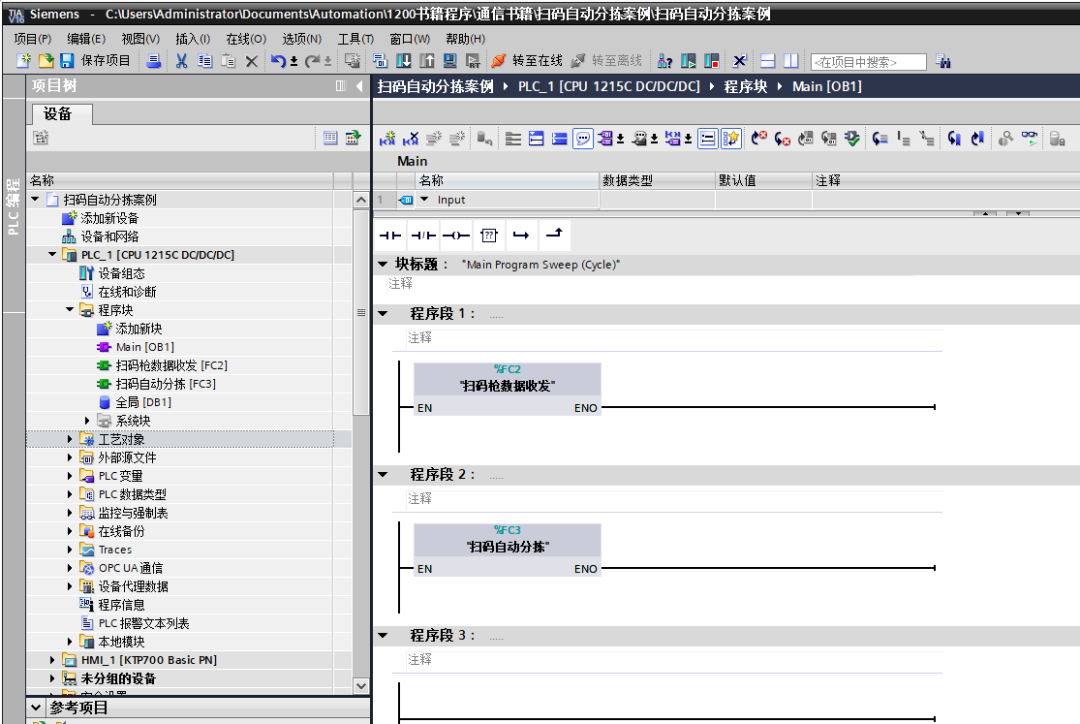
Figure 6 Main Program
2) Barcode Scanner Data Transmission Subroutine
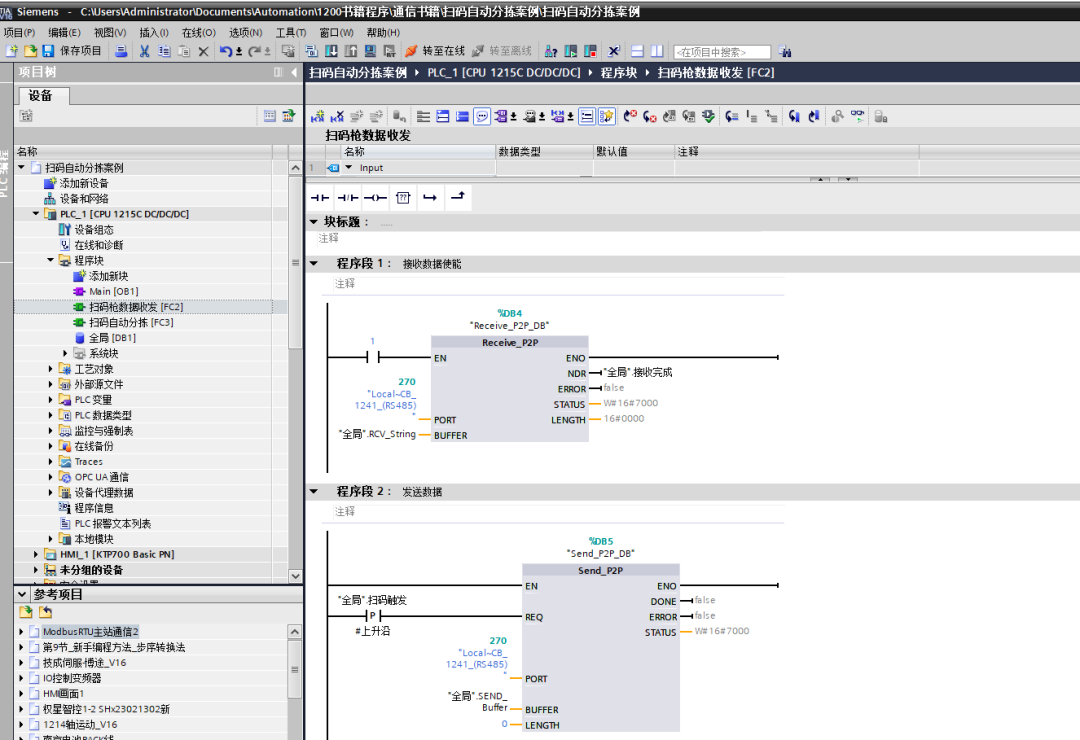
Figure 7 Data Transmission
In the program shown in Figure 7, the instruction PORT is the hardware identifier of the communication board. “Global”.RCV_String uses a string data type, while “Global”.SEND_Buffer uses a Byte array to send the corresponding command. In this case, the command to trigger the scanning is shown in Figure 8.
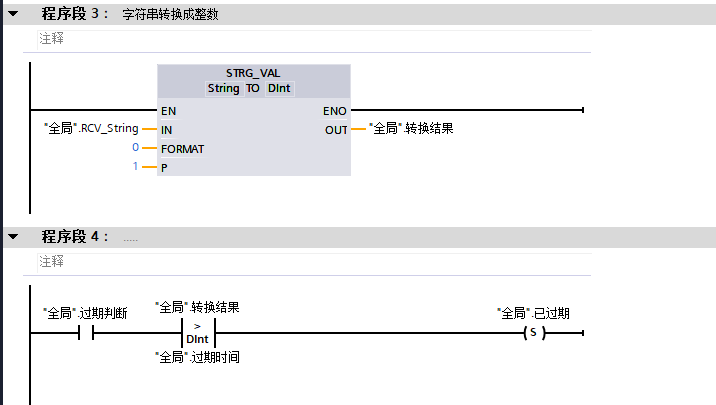
Figure 8 Data for Triggering the Scan
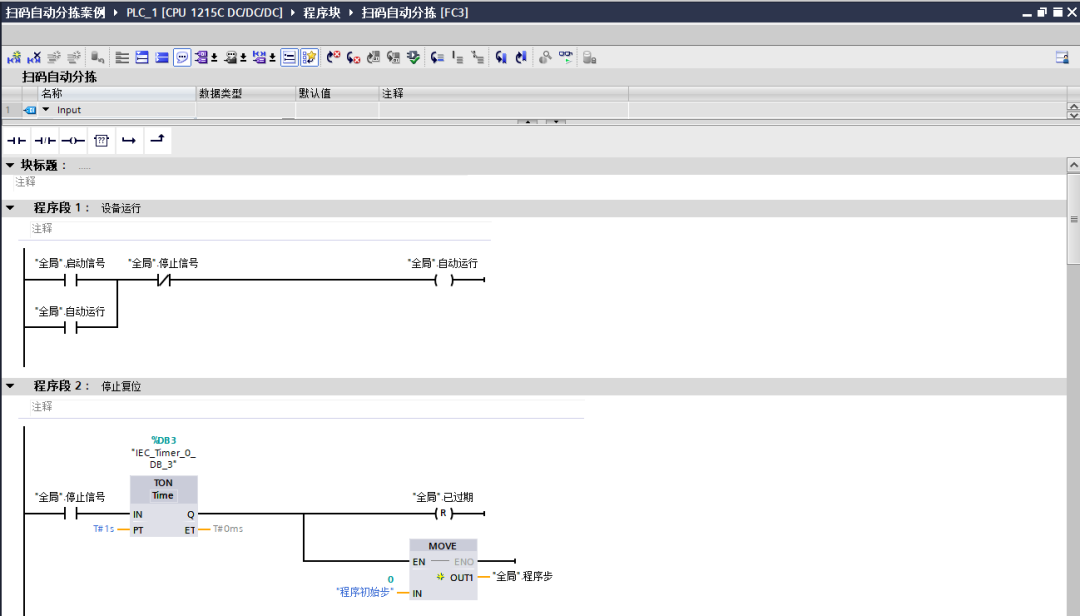
Figure 9 Data Processing
In Figure 9, the conversion of the received data type is shown. The data returned by the barcode scanner is a date. To facilitate comparison, it is converted to an integer before comparison.
1) Automatic Sorting
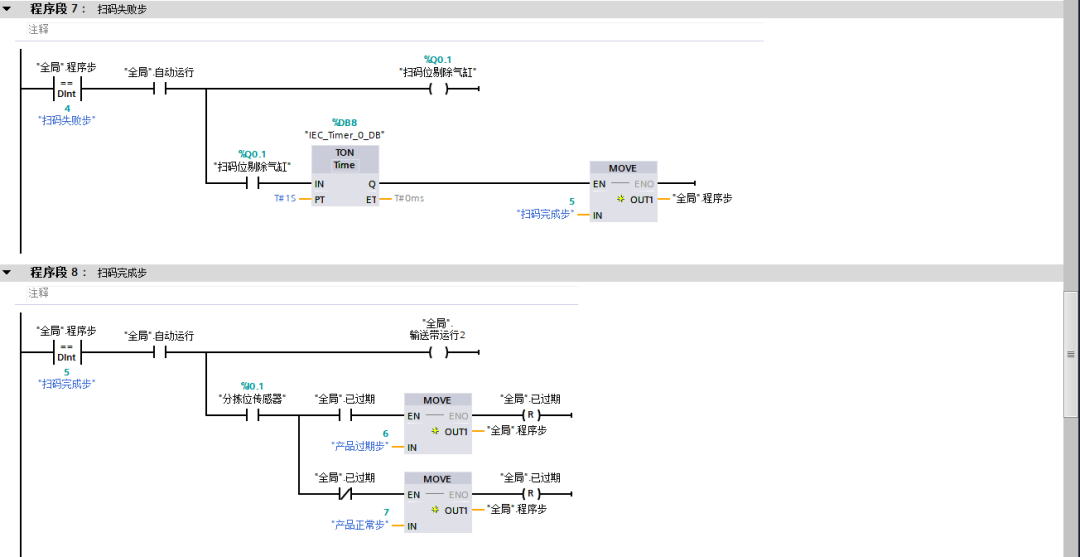
Figure 10 Sorting Program – 1
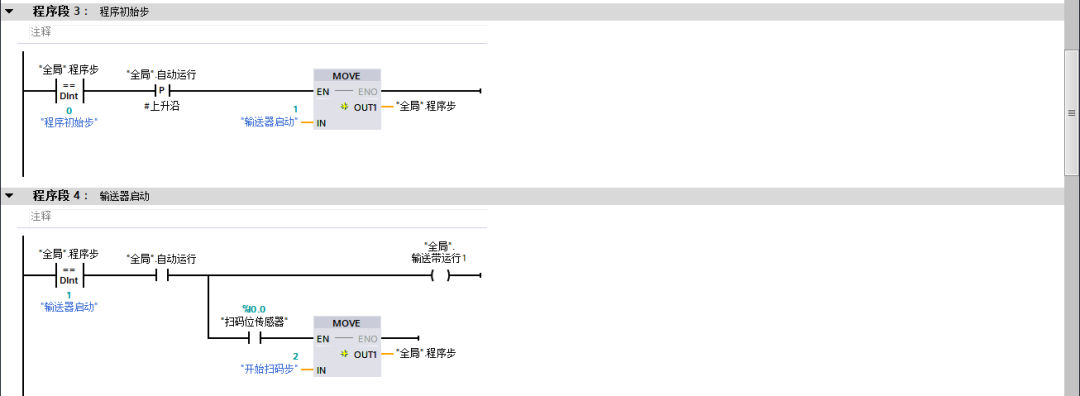
Figure 11 Sorting Program – 2
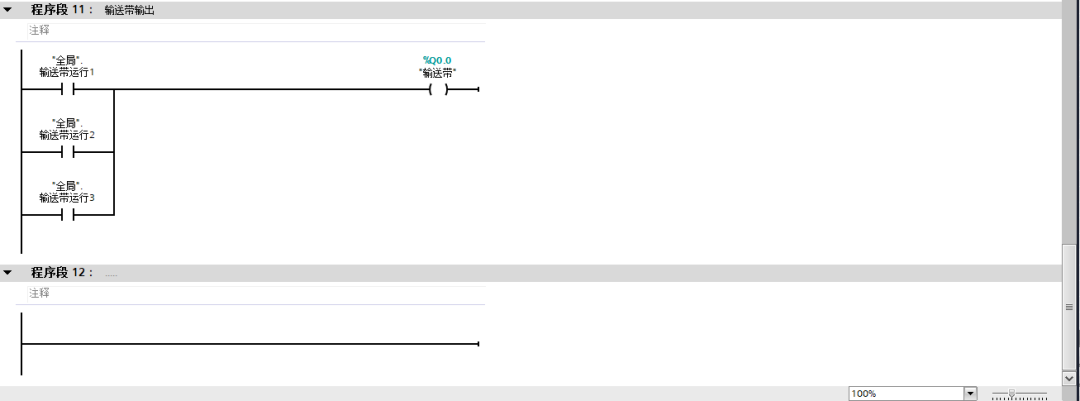
Figure 12 Sorting Program – 3
In the program in Figure 12, the completion signal for receiving is used twice. When the PLC sends the trigger command to the barcode scanner, the scanner first returns a command indicating that it has received the command. When the barcode scanner successfully scans, it sends the result back to the PLC. If no result is returned within 2 seconds, it indicates that the scan has failed.
Figure 13 Sorting Program – 4
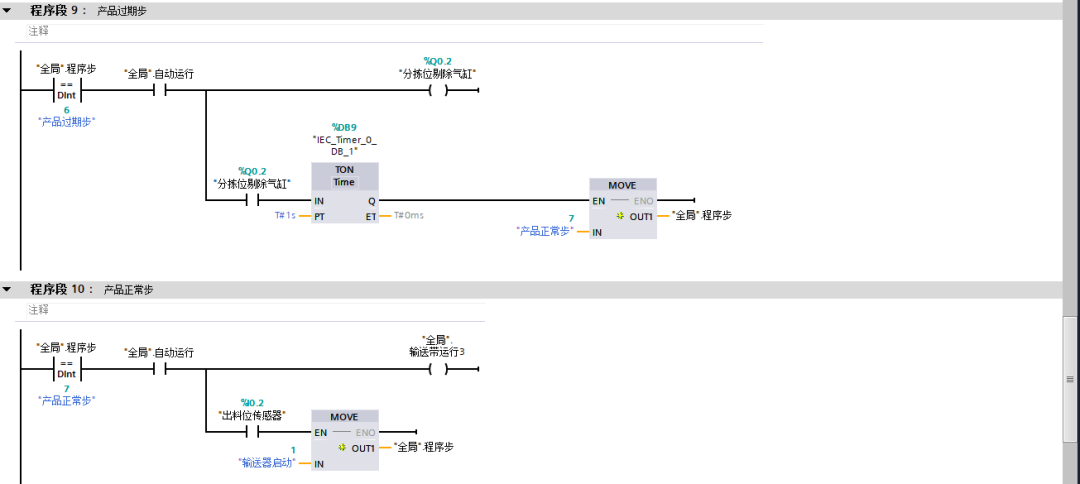
Figure 14 Sorting Program – 5
Figure 15 Sorting Program – 6
Conclusion
This article introduces the application case of communication between the S7-1200 and the barcode scanner. The program is relatively simple, and it is important to pay attention to the processing of the barcode scanner data. If the received string can be converted into a data type that is easier to handle. If the received data is in hexadecimal format, it also needs to be converted into a more understandable data type based on the specific requirements of the site. If you have more applications related to communication, feel free to leave a message for discussion.
Source: Jicheng Training Network, Author: Jicheng – Liu Chen, unauthorized reproduction is prohibited!
 Scan the QR code below↓↓↓
FreeGet【Complete Siemens Set】

Previous Recommendations
[Free Book] Complete Electronic Book Library! 64 classic Siemens e-books available for free.
Really? It’s already 2023! Those in electrical engineering still don’t have these 3 small programs on their phones?
1000 electrical control circuit wiring diagrams, finally sorted out, recommended for collection!
No more hiding, old electricians are using these few electrical simulation software, the first one is classic!
5000 sets of electrical CAD drawings available for free!
[Free Download] Industrial control professionals are rushing to collect! A comprehensive Siemens data package is available for free download!
Essential calculation software for electrical engineers (automatically generated), recommended for everyone!
Is learning Mitsubishi PLC difficult? Recommended tools for beginners, including installation tutorials!