Dictionaries
1. Core Features
-
Format: Composed of key-value pairs, separated by commas, and enclosed in { }.
-
Order: In Python 3.7+, dictionaries maintain insertion order; unordered in 3.6 and earlier.
-
Mutability: Supports adding, deleting, and modifying key-value pairs (the dictionary itself is mutable).
2. Element Rules:
-
Key: Must be an immutable type (e.g., int, str, tuple) and unique (duplicate keys will overwrite the previous value).
-
Value: Can be of any type (int, str, list, or even a dictionary), and can be duplicated.
3. ExplanationThe keys in the elements must be of an immutable type and unique; if there are duplicate keys, the later key will overwrite the previous value. For example:
dic1={'name':'xiaoming','name':'xiaohong'}
print(dic1['name'])
The result is:
F:\python\python.exe "F:/my python study/my_test/test.py"xiaohongBecause the second key has the same name as the first key, both are ‘name’, so the value of the latter ‘name’ will overwrite the value of the former ‘name’.4: Methods to Retrieve Elements from a DictionaryFirst method: Use the format ‘dictionary[key]’. However, if the ‘key’ does not exist, it will raise an error.
dic1={'name':'xiaoming','age':'23','gender':'male'}
print(dic1['name'])# Can retrieve the value corresponding to 'name'
print(dic1['class'])# Since there is no 'class' key in the dictionary, it will raise an error.
Second method: Use the get method to retrieve values. This method can be used when you are unsure if the key exists; even if the key does not exist, it will not raise an error but return a None value.
dic1={'name':'xiaoming','age':'23','gender':'male'}
print(dic1.get('name'))# Outputs the value corresponding to 'name' 'xiaoming'
print(dic1.get('class'))# Key does not exist, returns None
print(dic1.get('class','unknown key'))# If the key does not exist, define a default return value 'unknown', at this time it returns 'unknown key'
5: General Uses
- To store structured data, such as basic user information, product details, etc.
- For quick data lookup, such as finding a user’s ID based on their username.
- As function parameters/return values, to pass multiple key-value parameters or return multiple associated results.
Example of passing multiple key-value parameters:When there are many function parameters, and some are optional, we can use key-value pairs in a dictionary to automatically unpack them into the function’s ‘keyword parameters’. Without using a dictionary, the function might need to define many optional parameters, for example: def user_file(name, age=None, hobbies=None).Using a dictionary to pass multiple key-value parameters:Let’s illustrate with a function ‘generate_user_profile’, which requires a function user_file to generate user profiles, where:Required parameter: name (username)Optional parameters: age (age), hobbies (hobbies), class (class) (note that class is a variable name in Python)
def user_file(name, **kwargs):# '**kwargs' is Python's 'keyword argument collector', which can automatically pack all 'key=value' parameters passed during the call into a dictionary, allowing the function to flexibly accept an uncertain number of keyword parameters
    user={'name':name}  # Merge the key-value pairs received by **kwargs into the user profile (optional parameters)
    user.update(kwargs)  # Set default values for optional parameters that were not passed (e.g., hobbies defaults to an empty list)
    if 'hobbies' not in user:
        user['hobbies']=[]
    return user      # Call the function, passing a dictionary as a parameter (using ** unpacking)
user_info={'age':25,'class':'Class 1'}# User 1 calls the function user_file and passes the dictionary parameter 'user_info'
user1=user_file(name='MAOMAO', **user_info)# Using ** unpacking the dictionary for age=25, class='Class 1'
print('User 1 profile:', user1)
Result:
F:\python\python.exe "F:/my python study/my_test/test.py"User 1 profile: {'name': 'MAOMAO', 'age': 25, 'class': 'Class 1', 'hobbies': []}By passing parameters in this way, we can avoid redundancy due to too many function parameters. Moreover, optional parameters can be freely selected, making it quite flexible. However, if we do not use this method and directly define function parameters, the function’s parameters will be fixed.For example:
def user_file(name, age=None, hobbies=None, class_=None):
    user={'name':name,
          'age':age if age else 'not assigned',
          'hobbies':hobbies if hobbies else 'not assigned',
          'class_':class_ if class_ else 'not assigned'}
    return user  # When calling the function, parameters must be passed by name
user_info=user_file(
                    name='Xiaoming',
                    age=25,
                    hobbies=['table tennis','calligraphy'],
                    class_='')
print(user_info)
If you want to pass other parameters, it will result in an error, and you will need to redefine the function. Additionally, ‘class’ is a keyword in the function and cannot be used as a variable name.Second example of returning multiple associated results:Suppose we define a function ‘calculate_student_scores’ that receives student scores and returns a list of total scores, average scores, and maximum scores.Total (total), average (avg), maximum score (max_score)For example:
def calc_score(score):
    total=sum(score)
    avg=sum(score)/len(score)
    max_score=max(score)
    return {'total':total,'avg':avg,'max_score':max_score}
match_score=[88,89,50,34,55,66,77,45]
score_dic=calc_score(match_score)
print(score_dic)
These two scenarios are very common in actual development (for example, passing request header parameters in web scraping, returning structured data from scraping; passing interface parameters in web development, returning interface response data). Mastering these can greatly enhance the flexibility and readability of the code.
6: Common MethodsAssume a dictionary user={‘name’:’Alice’,’age’:25,’email’:’[email protected]’}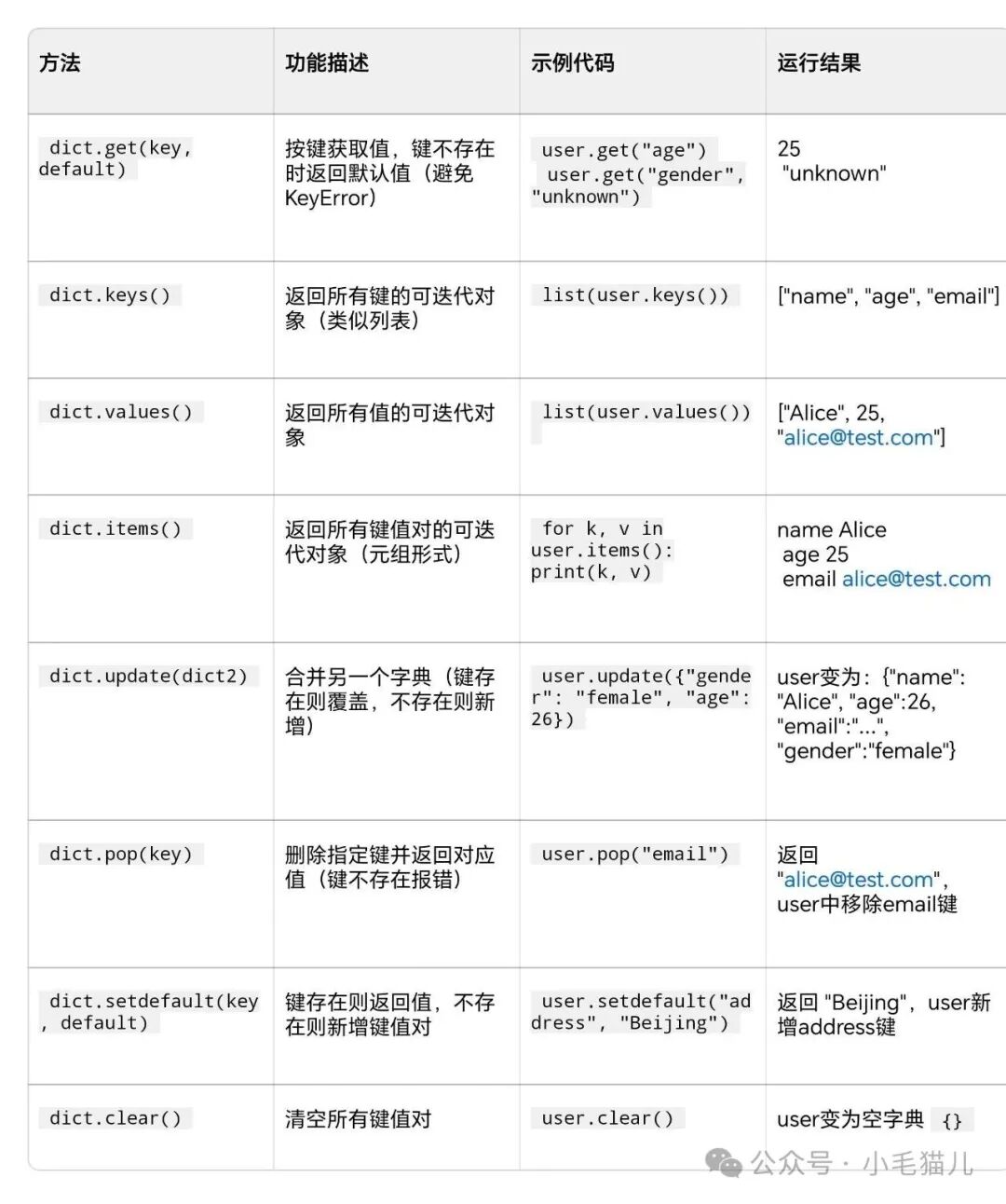
- dict.pop(key) example
user={'name':'Alice','age':25,'email':'[email protected]'}
email=user.pop('email')# Remove email and assign it to email
print(email)
print(user)
Result:
F:\python\python.exe "F:/my python study/my_test/test.py"[email protected]{'name': 'Alice', 'age': 25}- dic.setdefault(key, default) example:1: When the key does not exist
user={'name':'Alice','age':25,'email':'[email protected]'}
user.setdefault('address','beijing')
print(user)
Result (new element ‘address’: ‘beijing’):
F:\python\python.exe "F:/my python study/my_test/test.py"{'name': 'Alice', 'age': 25, 'email': '[email protected]', 'address': 'beijing'}2: When the key exists
user={'name':'Alice','age':25,'email':'[email protected]'}
new_age=user.setdefault('age')
print(new_age)
print(user)
Result:
F:\python\python.exe "F:/my python study/my_test/test.py"25{'name': 'Alice', 'age': 25, 'email': '[email protected]'}Stay calm, keep going, and good luck!