Abstract
Introduction (Overview of the Functional Characteristics and Market Applications of the S32K Series Automotive General-purpose MCU)1. Supported S32DS IDE Versions for S32K3xx MCU Software Development and Downloading and Installation2. Comparison of Debuggers Supporting S32K3xx MCU3. Compiling S32K3xx Multi-Core Projects Using S32DS v3.4 (Independent Compilation Settings and Multiple ELF vs. Single ELF)
3.1 Creating and Compiling Multi-Core Multiple ELF (Separate ELF for Each Core) Application Projects
3.2 Decoupling Multi-Core Multiple ELF (Separate ELF for Each Core) Application Projects to Shorten Compilation Time
3.3 Creating and Compiling Multi-Core Single ELF (Single ELF for Multi-Core) Application Projects
3.4 Comparison Summary of the Startup Process for Multi-Core Multiple ELF (Separate ELF for Each Core) and Multi-Core Single ELF (Single ELF for Multi-Core) Application Projects
4. Debugging S32K3xx Multi-Core Application Projects Using S32DS v3.4
4.1 Debugging Multi-Core Multiple ELF (Separate ELF for Each Core) Application Projects
4.2 Debugging Multi-Core Single ELF (Single ELF for Multi-Core) Application Projects
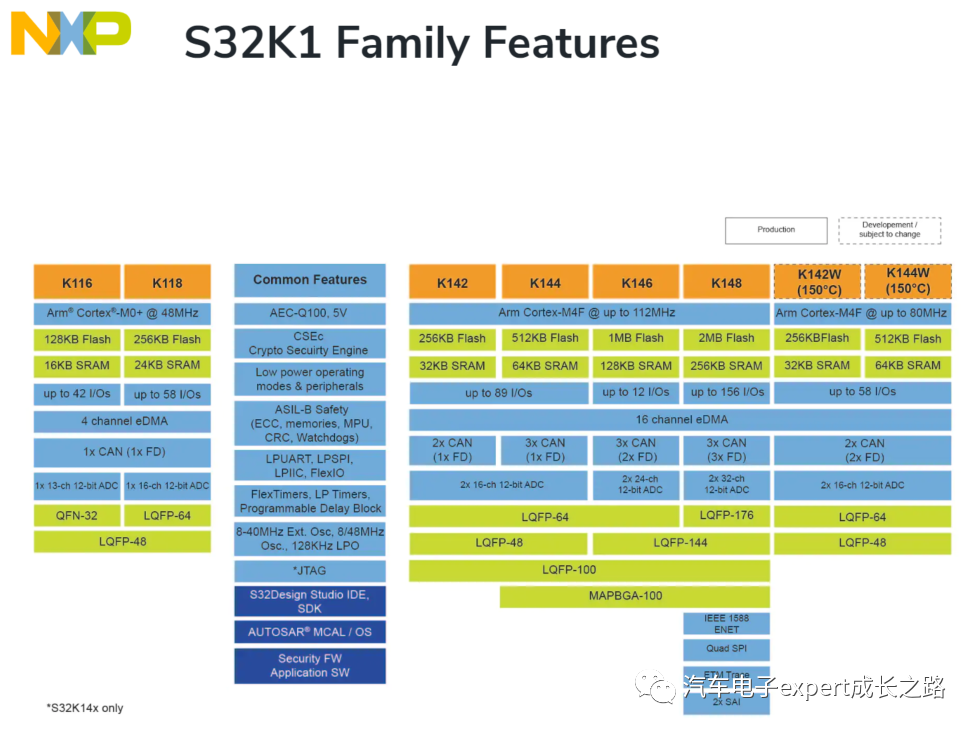
5. Downloading and Debugging with Multilink Debugger After HSE-FW InstallationConclusionIntroduction (Overview of the Functional Characteristics and Market Applications of the S32K Series Automotive General-purpose MCU)NXP’sS32K1xxSeries ARM Cortex-M Core Automotive General-purpose MCU has been highly favored in the market since its launch in2017, extensively used in body electronic ECUs (such as door and window controllers, lighting controllers, wiper controllers, mirror folding, BCM), various on-board low-power motor controllers (such as water pumps, oil pumps, cooling fans, etc.), T-BOX, low-end gateways, central entertainment navigation system auxiliary MCUs, and low-power companion MCUs for autonomous driving domain controllers:
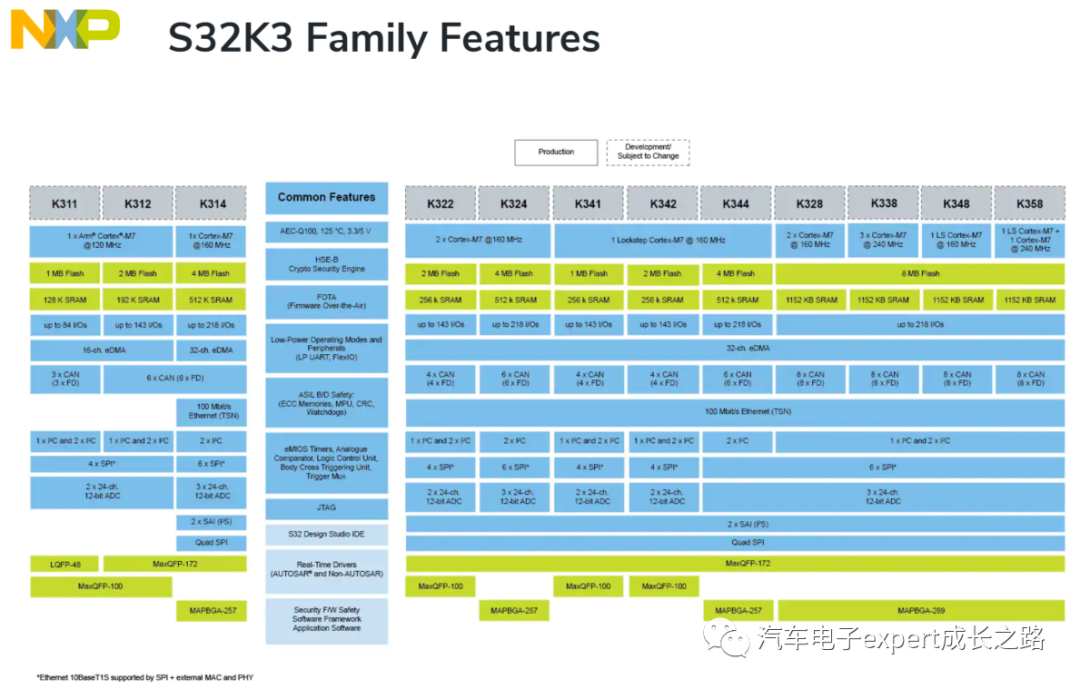
NXP is about to mass-produce the next generation of ARM Cortex-M core automotive general-purpose MCU —S32K3xxseries inNovember 2021, equipped with CM7 multi-core (1~3/lockstep dual-core), up to8x CAN-FD, 16x LIN and 100M (EMAC) or even Gigabit (GMAC) automotive Ethernet (supportingAVB and TSN) automotive communication bus interfaces, higher functional safety ASIL-D, and stronger information security HSE-B (supporting asymmetric encryption algorithmsECC,RSA and HASH, meetingEvital-Full requirements), with larger pin packaging(up to 218 user pins with MBAG-289 package)and largerFlash(up to 8MB P-Flash)andSRAM/TCM(up to 1152KB)memory. It can meet the requirements for the computing performance of core and the variety and quantity of peripherals for the domain controllers and zonal controllers in the current and future automotive electronic architecture development:
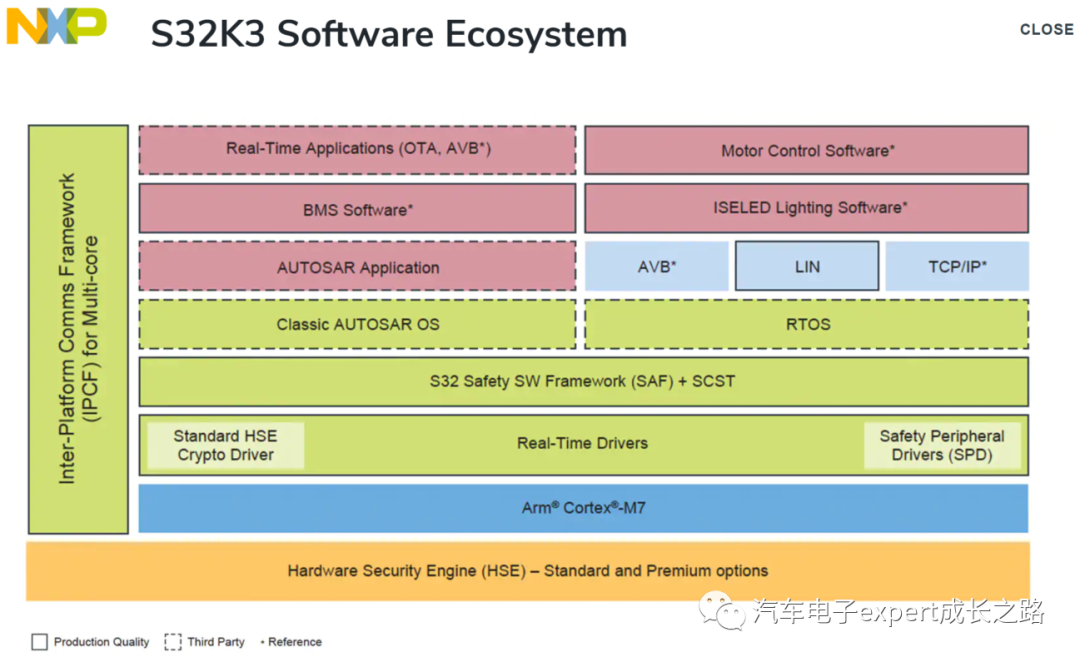
At the same time, it has strengthened the software ecosystem by providing freeRTD(including AutoSAR MCAL and SDK/LLD) and free information security HSE-B encryption drivers (Crypto Driver) and functional safety software (SAF and SPD) to reduce customers’ application software development costs and shorten product development cycles:
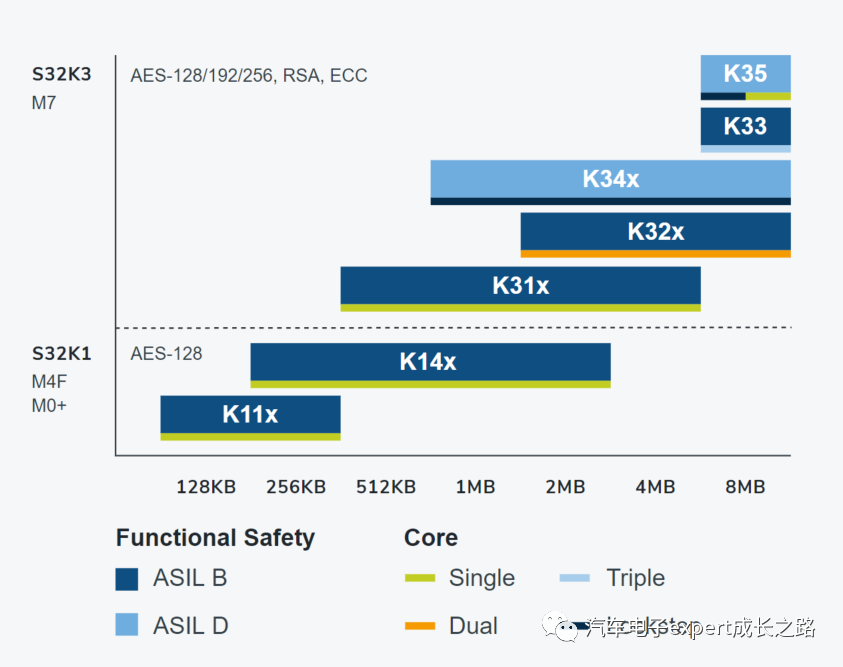
The complete development roadmap for the S32K1 and S32K3 product families of automotive general-purpose MCUs is as follows:
Tips: For more detailed information about NXP S32K series automotive general-purpose MCUs, please visit the following NXP product website:
-
S32K automotive general-purpose MCU family product website:www.nxp.com/S32K
-
S32K1xx product website:www.nxp.com/S32K1
-
S32K3xx product website:www.nxp.com/S32K3
This article aims to introduce several common issues encountered during the early stages of S32K3 series MCU software development, hoping to assist everyone in getting started with S32K3.
1. Supported S32DS IDE Versions for S32K3xx MCU Software Development and Downloading and InstallationSimilar to the S32K1xx series MCUs, NXP also provides customers of the S32K3xx series MCUs with S32DS IDE based on the GNU toolchain (GCC + GDB), with the version beingS32 Design Studio for S32 Platformv3.4 (based on GCC 9.2 version), the download link is as follows (login to NXP account required, any valid email can register):www.nxp.com/S32DS-S32PLATFORM
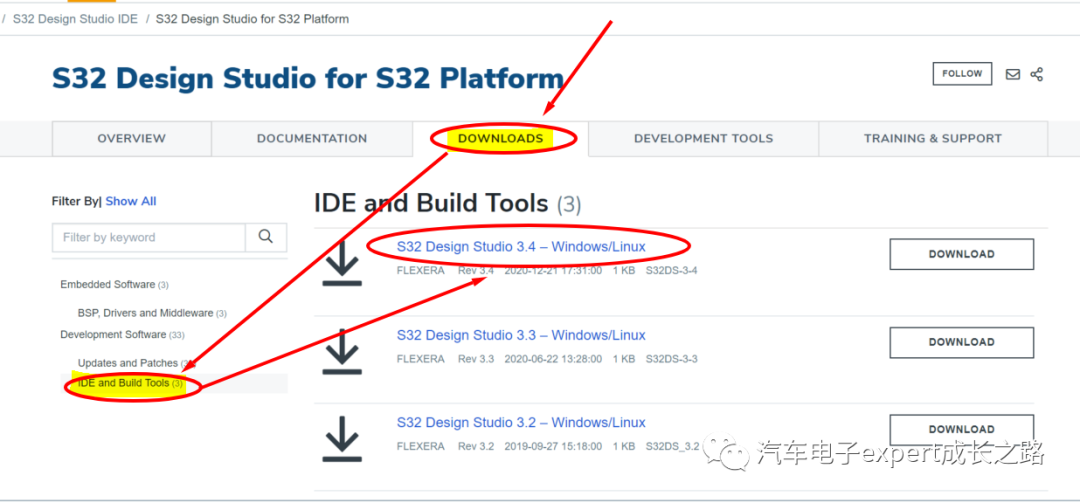
PS:Currently, the development support package for S32K3xx must be obtained by contacting NXP authorized agents or factory FAE/Sales. After mass production in November, it can also be downloaded from the above link; the installation guide, I have shared in the following Baidu cloud disk for reference, you can download it yourself if needed:Link: https://pan.baidu.com/s/16xLHIZOnBd_L7Yp_fMau_gExtraction code: qg5s2. Comparison of Debuggers Supporting S32K3xx MCUContinuing the previous S32K1xx ARM Cortex-M core debugging tool ecosystem, the following debuggers can support program downloading and debugging for S32K3xx series MCUs:
|
Debugger |
Debug Software |
Version Requirements |
Comments |
|
LauterBach |
T32/S32DS v3.4 |
Debugging multi-core requires Multi-Core License, T32 2021.04 or later, contact NXP to install K3 patch |
Most powerful functionality, but expensive |
|
J-LINK/Trace |
Ozone/S32DS v3.4 |
JLINK v10/11, upper computer driver software 7.54 or above (strongly recommended to download the latest version of upper computer software and driver from Segger’s official website) |
Domestic counterfeit versions on Taobao are cheap, but currently, they have poor compatibility with S32DS IDE, can only use J-Flash to download, Segger Ozone debugging (only supports single-core) |
|
P&E U-Multilink/FX |
/S32DS v3.4 |
U-Multilink Rev.C/D U-Multilink Rev.B |
High cost-performance ratio, good compatibility, officially recommended by NXP |
Tips: The download links for Segger JLINK/Trace related software are as follows:
-
J-Link upper computer software and driver package:https://www.segger.com/downloads/jlink/
-
Ozone standalone debugging software:https://www.segger.com/products/development-tools/ozone-j-link-debugger/
Tips: Later, mainstream third-party debugging tools such asiSystem, i-Jet, ULINK will also successively support the S32K3xx series MCUs;3. Compiling S32K3xx Multi-Core Projects Using S32DS v3.4 (Independent Compilation Settings and Multiple ELF vs. Single ELF)3.1 Creating and Compiling Multi-Core Multiple ELF (Separate ELF for Each Core) Application ProjectsFrom the introduction at the beginning of the article, it can be seen that the S32K3xx series MCUs include dual-core S32K32x series and tri-core S32K338 series and other multi-core part numbers. In S32DS v3.4, when creating a project, selecting a multi-core part number will create an independent application project for each CM7 application core (including its own startup code, interrupt vector table, independent link files, memory partitions, and application code main() function), and will generate independent ELF files during compilation:
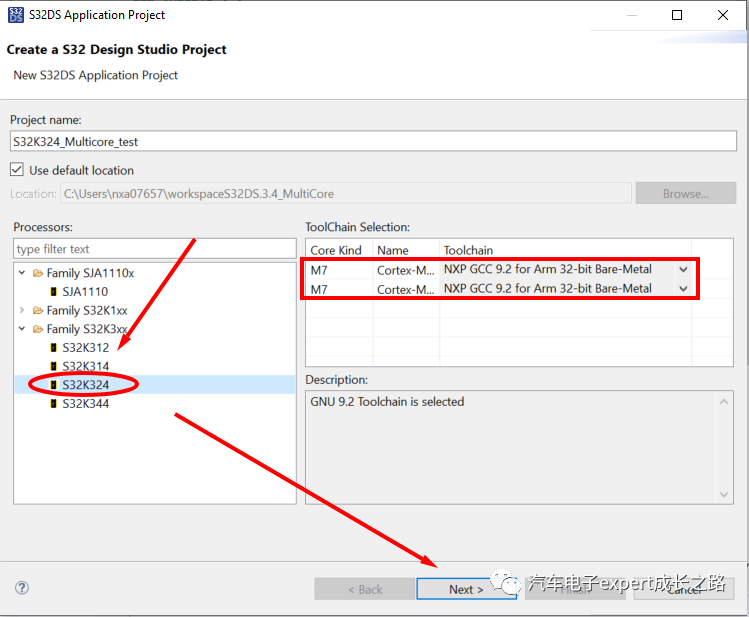
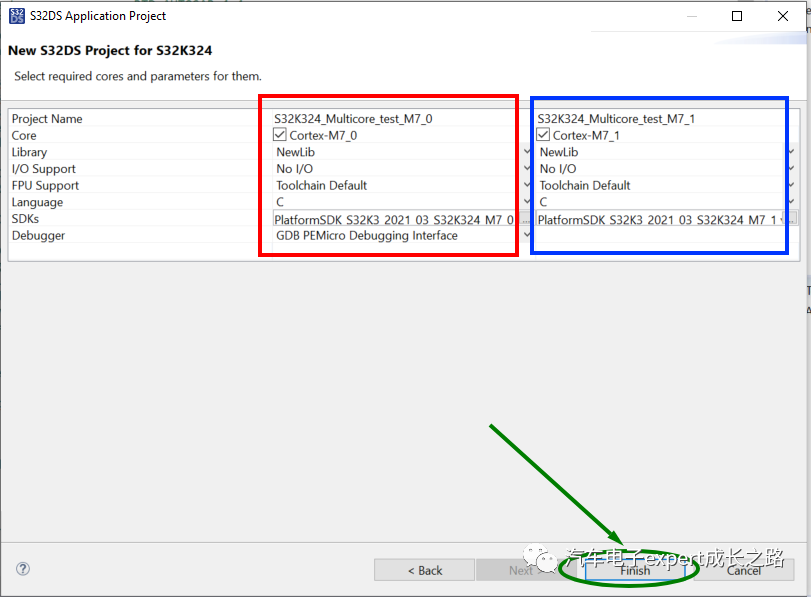
The compilation results are as follows:
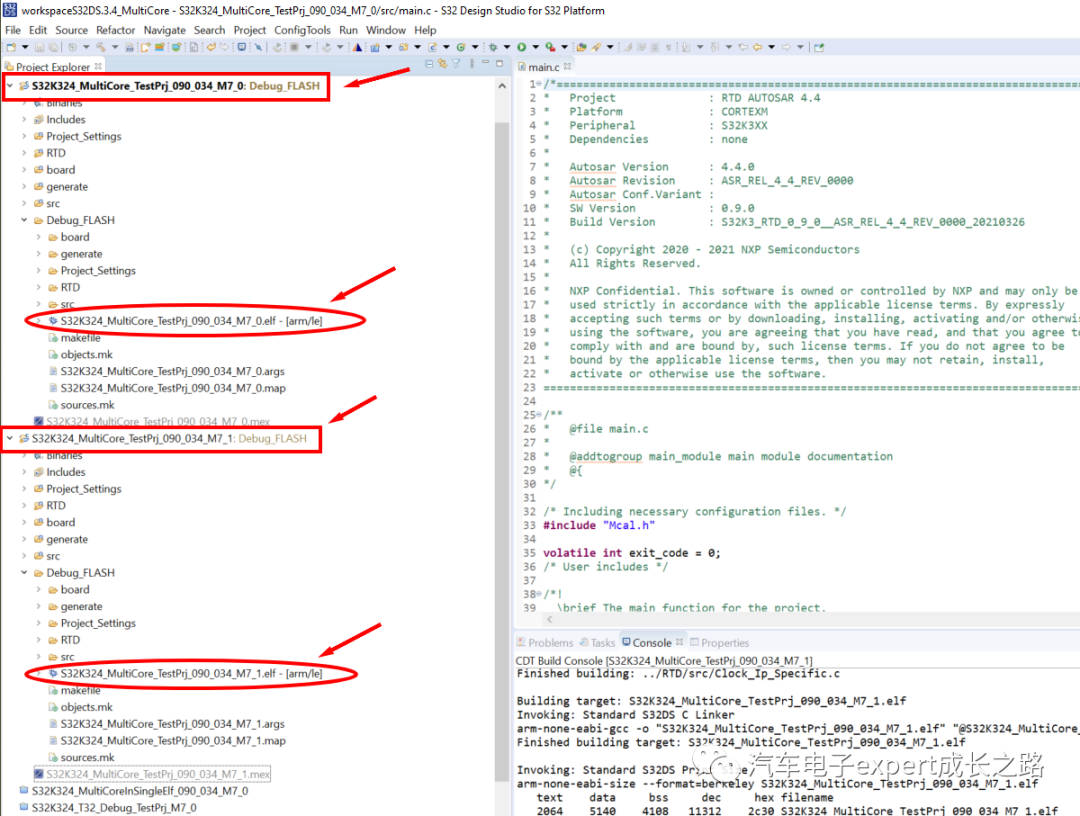
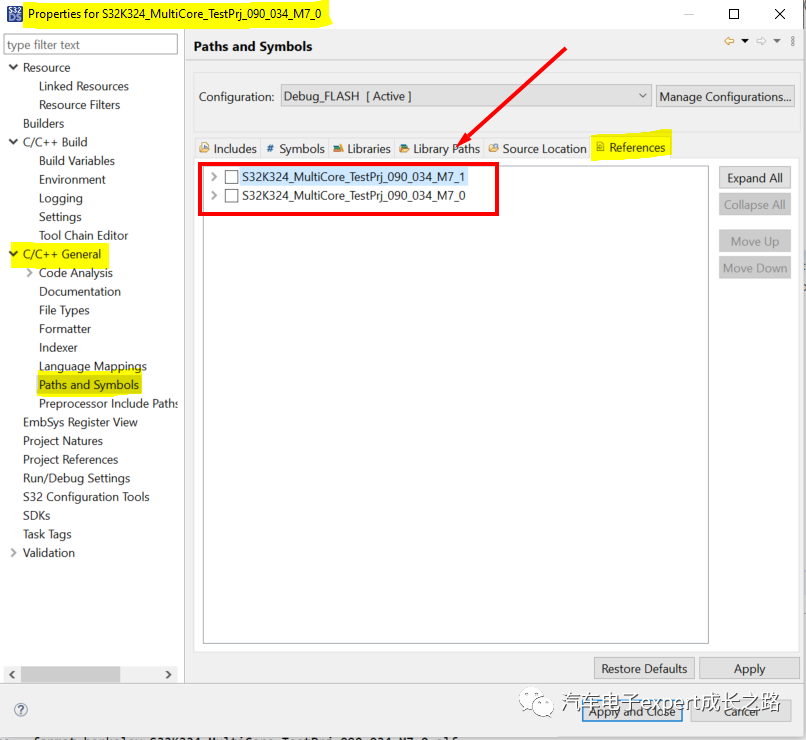
Such created multi-core application projects will also compile related other CM7 core application projects when compiling one CM7 core (such as CM7_0) application project.3.2 Decoupling Multi-Core Multiple ELF (Separate ELF for Each Core) Application Projects to Shorten Compilation TimeAs the application functions increase, the code for each CM7 will also increase. If only one CM7 core’s code is modified, while the other CM7 core’s code remains unchanged, it will also be recompiled together, which will increase unnecessary compilation time.To avoid this problem, the following settings can be used to decouple multi-core projects (must perform the following settings for each CM7 core application project of the multi-core application project to take effect):① double check: UncheckProject Properties –> C/C++ General –> Paths and Symbols –> References for application project association:
② double check: UncheckProject Properties –> Project References for application project association:
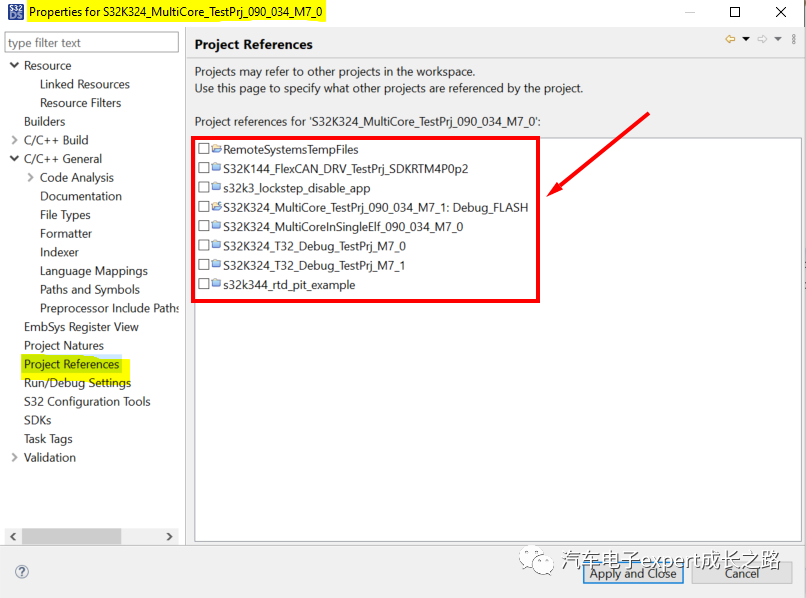
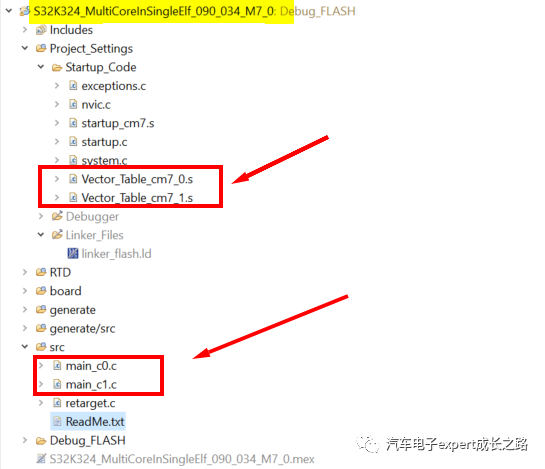
Creating multiple application projects for multi-core MCUs and generating multiple ELF files is relatively simple for application development, but it will occupy more Flash space. Accessing shared memory can only be done through pointer access, which is not very convenient.3.3 Creating and Compiling Multi-Core Single ELF (Single ELF for Multi-Core) Application ProjectsFor this reason, many users of multi-core MCUs tend to create a single project for the multi-core MCU, generating a single ELF file, so that the multi-core can reuse the startup code and peripheral drivers, thus reducing Flash memory space. Access to shared memory can also directly use variable names defined in C language, which is very convenient. Such a single ELF multi-core application project, although only has one link file, must independently allocate stack and interrupt vector table addresses for the multi-core in the startup code, and according to the read core ID, perform respective stack (MSP) and interrupt vector offset addresses (VTOR) andFPU + MPU configuration initialization, and finally jump to different main functions (such asmain_c0() and main_c1()):Below is a single ELF multi-core application project for S32K324 created based on S32K3x4 RTM Beta 0.9.0, with corresponding link files and startup code modified, and tests can work normally:
I have shared it in the following Baidu cloud disk for everyone to reference and learn:Link: https://pan.baidu.com/s/1Me5qpoDilfp8wYZT4fEeSQExtraction code: aai63.4 Comparison Summary of the Startup Process for Multi-Core Multiple ELF (Separate ELF for Each Core) and Multi-Core Single ELF (Single ELF for Multi-Core) Application ProjectsFinally, the comparison summary of the startup process for multi-core multiple ELF (Separate ELF for Each Core) and multi-core single ELF (Single ELF for Multi-Core) application projects based onS32K3x4 RTD 0.9.0for S32K324 is as follows:
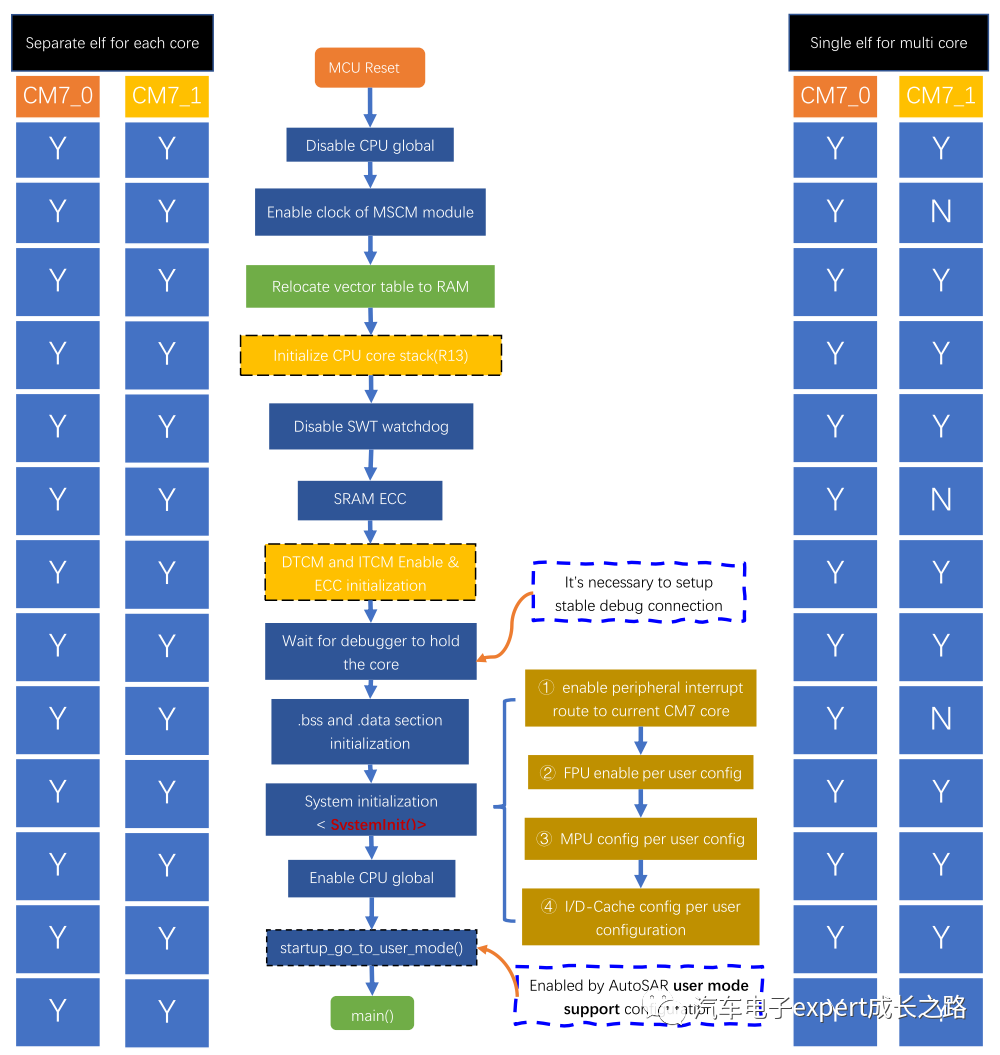
Tips: I will write a dedicated article to introduce the multi-core development considerations for the S32K3xx series MCUs later, please pay attention.4. Debugging S32K3xx Multi-Core Application Projects Using S32DS v3.44.1 Debugging Multi-Core Multiple ELF (Separate ELF for Each Core) Application ProjectsFor multi-core multiple ELF (Separate ELF for Each Core) application projects, during debugging, just selectDebug Configuration‘s Launch Group:
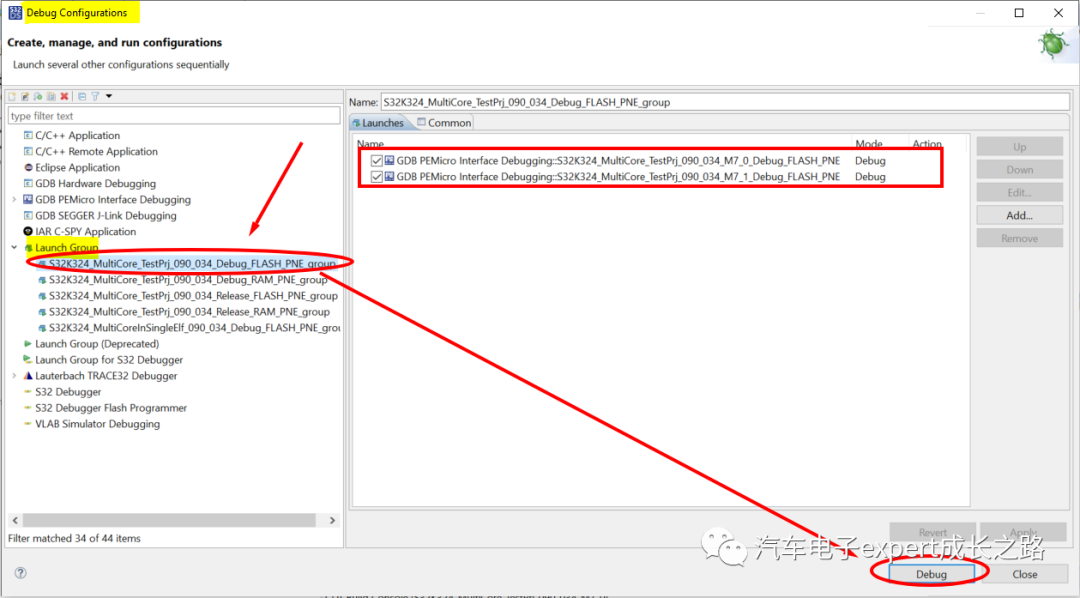
It will invoke two sub-debugging targets, whereCM7_0 acts as the main core, and its debugging target will start the GDB server and download all ELF files to the target MCU:
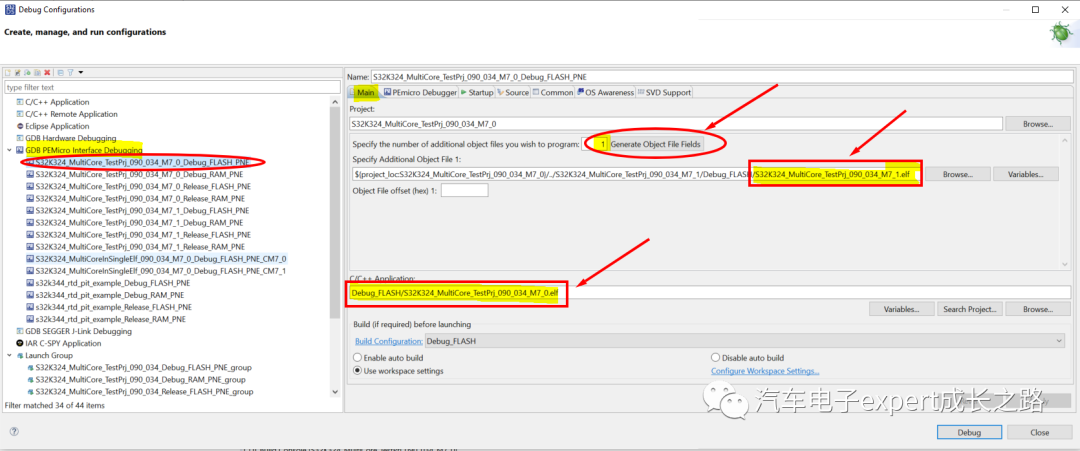
While the non-main coreCM7_1 debugging target does not start an independent GDB server, but is configured to attach to the GDB server of the main coreCM7_0, of course, this debugging target does not download any ELF, but will load its own ELF debugging information:
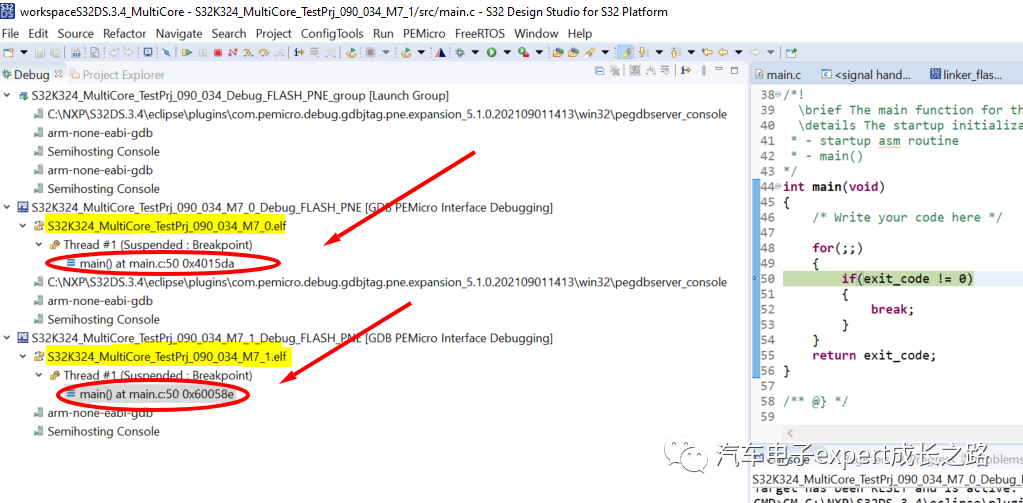
Once successfully entered debugging, it will automatically pause at the first line of code in its ownmain() function, switching between different debugging targets to view and debug the code and peripherals of each core:
Tips: IfCM7_1 core enters the debugging interface and experiences a runaway situation (i.e., does not automatically pause at the first line of the main() function), you can delete or rename the corresponding part number debugging startup control scriptmac fileunder the PEMicro software installation directory to avoid invocation:
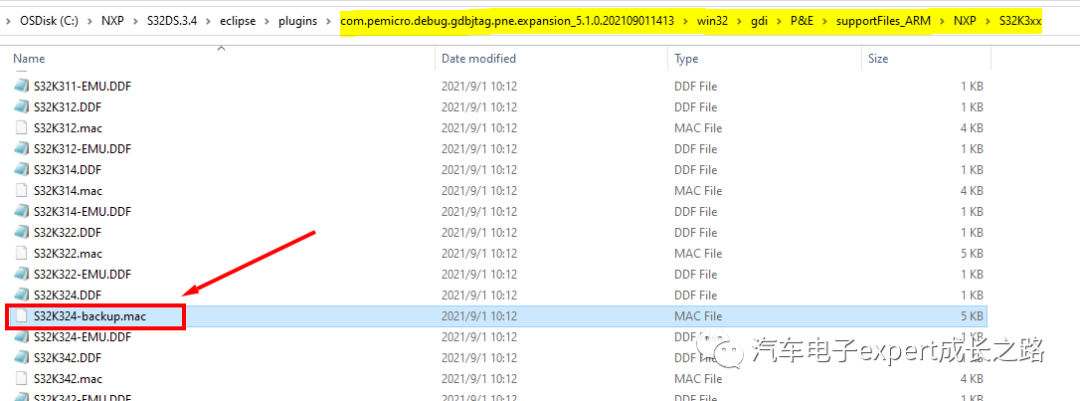
Note: The installation directory of the PEMicro software can be viewed in thepegdbserver_console window of the debugging interface, and the deleted or renamed mac file must be in this directory to take effect:
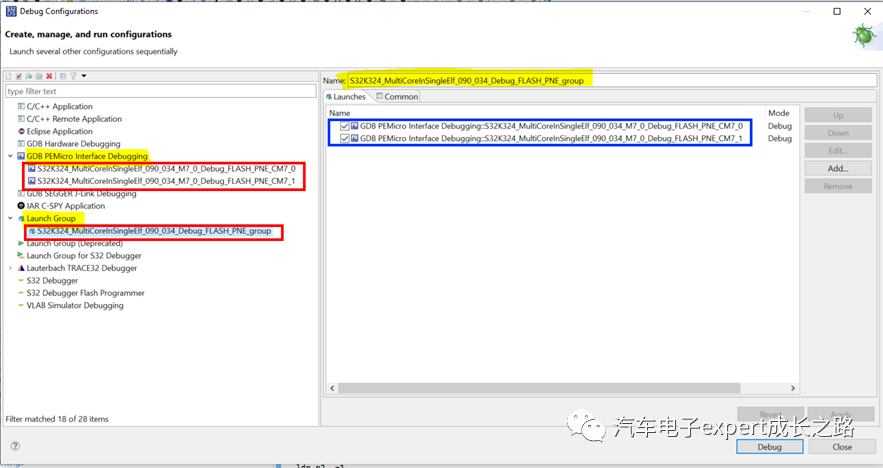
4.2 Debugging Multi-Core Single ELF (Single ELF for Multi-Core) Application ProjectsRelatively speaking, in the S32DS v3.4 IDE, debugging methods for multi-core single ELF (Single ELF for Multi-Core) application projects are similar to those for multi-core multiple ELF (Separate ELF for Each Core) application projects, also by selectingDebug Configuration‘s Launch Group to start:
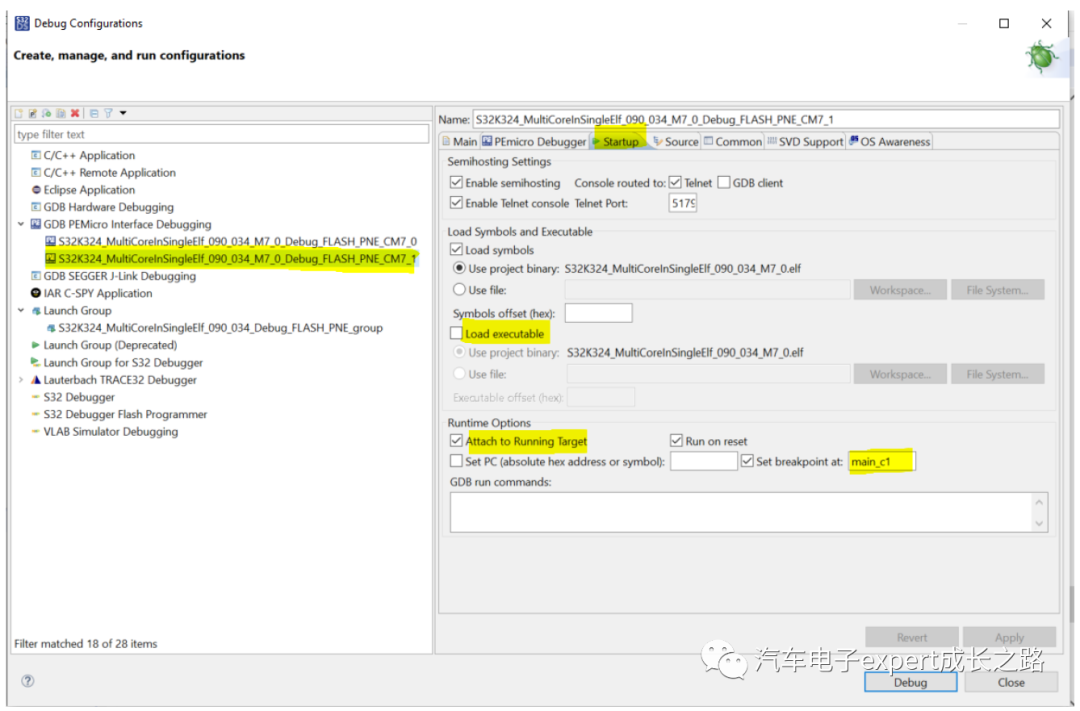
It is also necessary to create two debugging targets, selecting CM7_0 and CM7_1 of S32K324 as debugging target cores, but both the main coreCM7_0 and the non-main coreCM7_1 use the debugging information of the same ELF file, with the default breakpoints set atmain_c0() and main_c1():The debugging target configuration for the main coreCM7_0:CM7_0 is the main core, its debug target will launch the GDB server and download the ELF at first
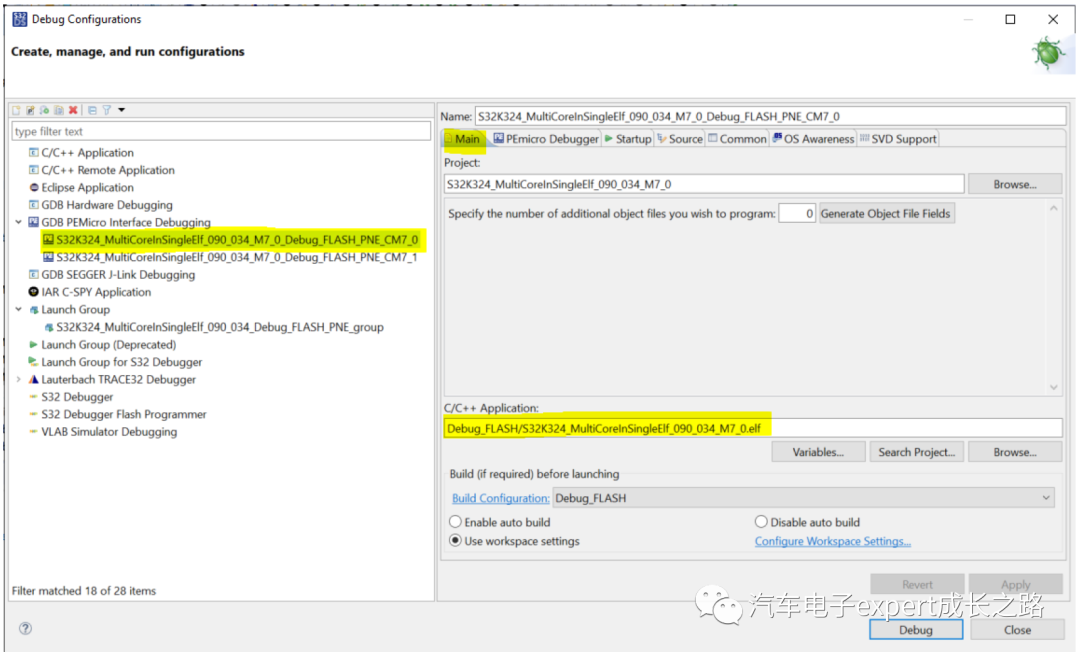
Target device select: S32K324 → M7_0:
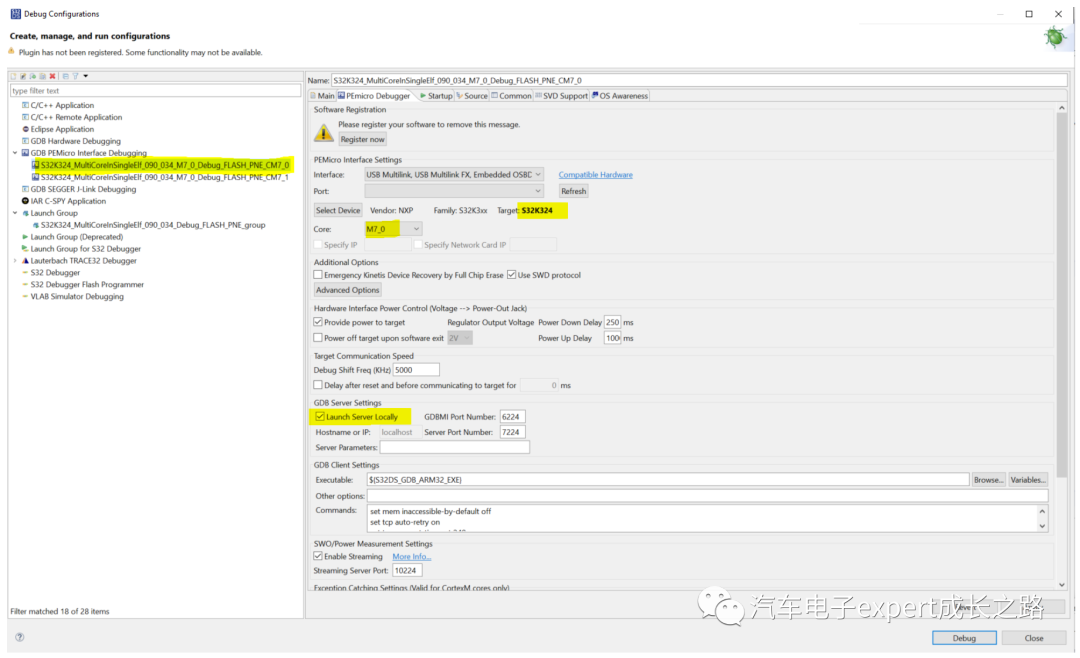
Default breakpoint is set at main_c0():
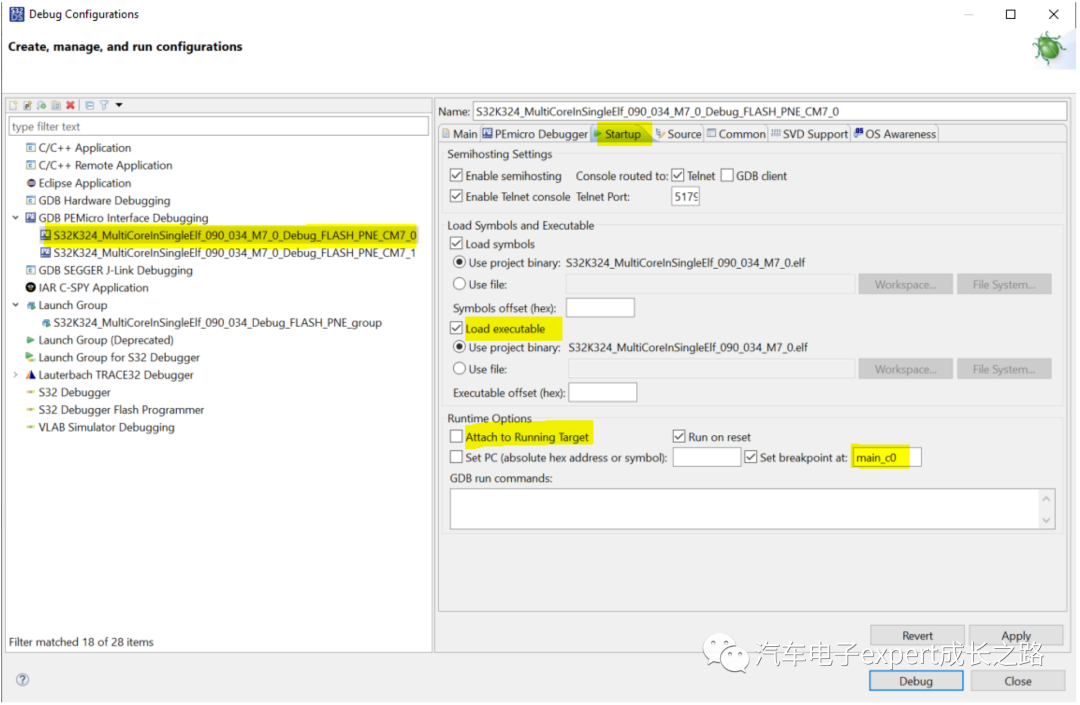
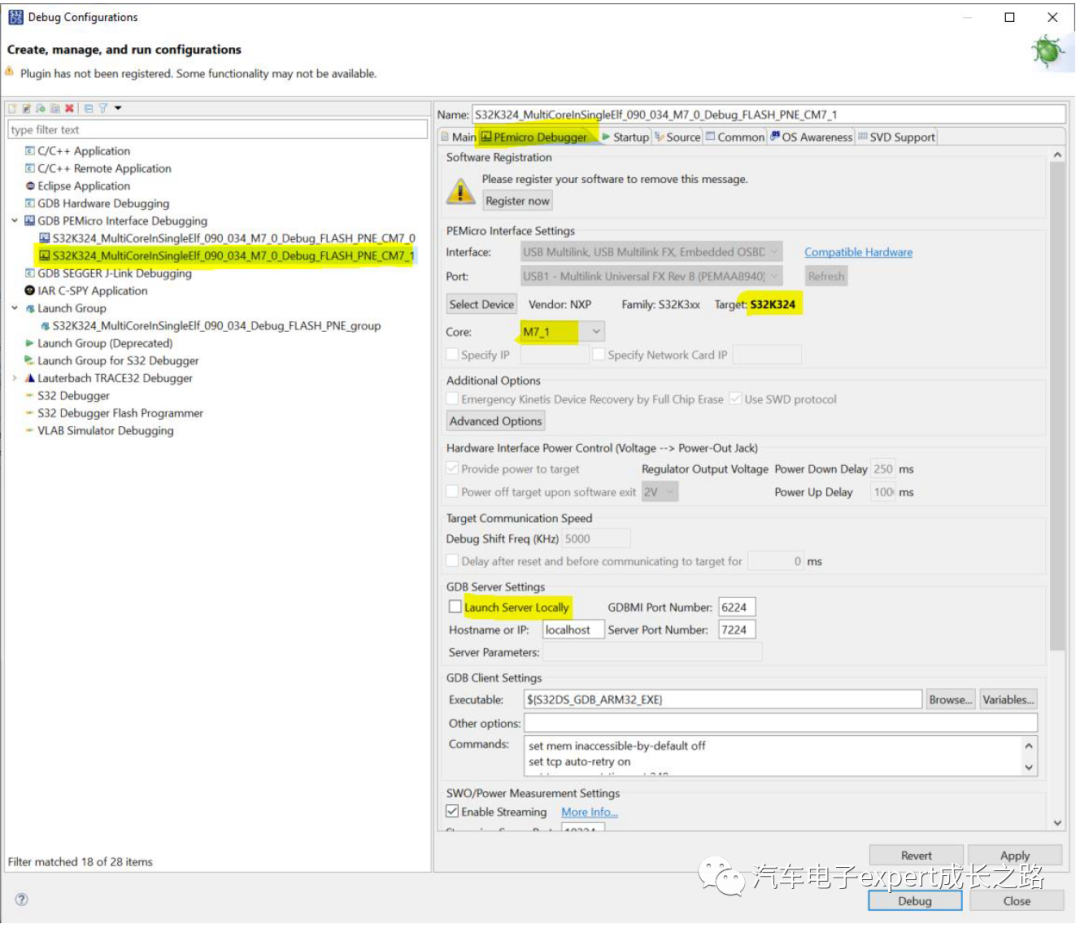
The debugging target configuration for the non-main coreCM7_1:CM7_1 is the application code, which uses the same ELF, but does not need to launch a separate GDB server, just attach to the running CM7_1 core:
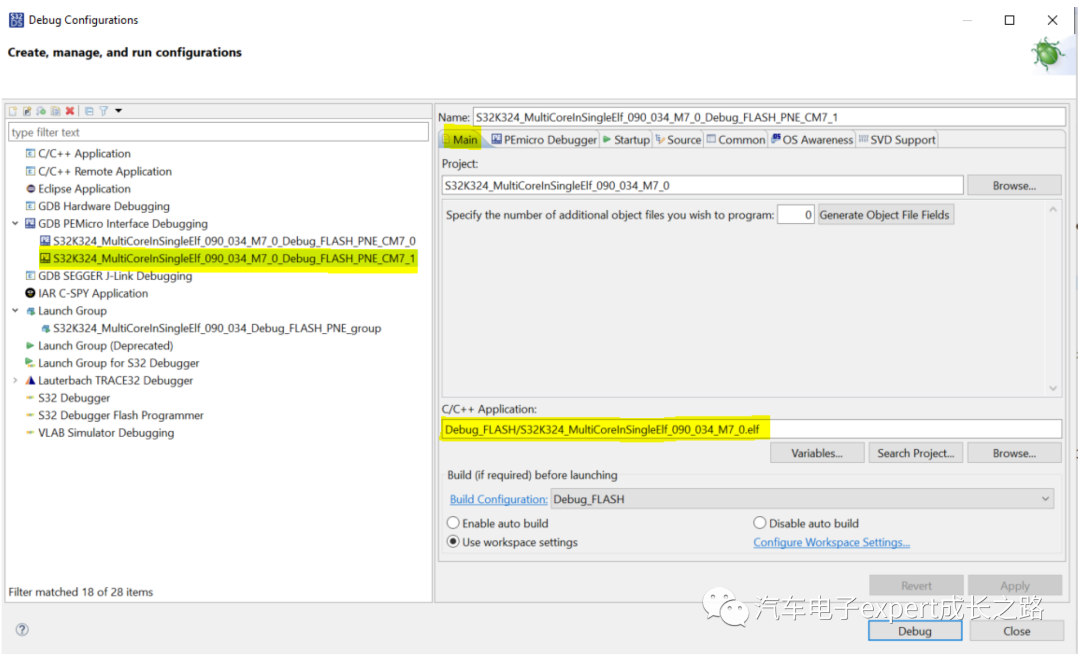
Target device select: S32K324 → M7_1:
Default breakpoint is set at main_c1():
After successfully starting the debugging, the results in the debugging interface are as follows:① The main coreCM7_0 debugging target automatically pauses at the first line of code of themain_c0() function, but the non-main coreCM7_1 has not started:
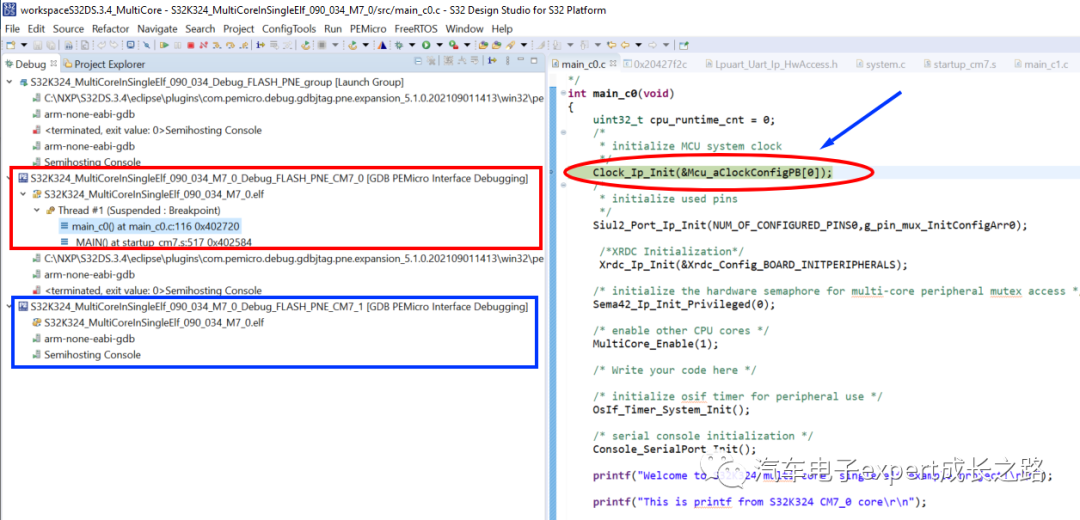
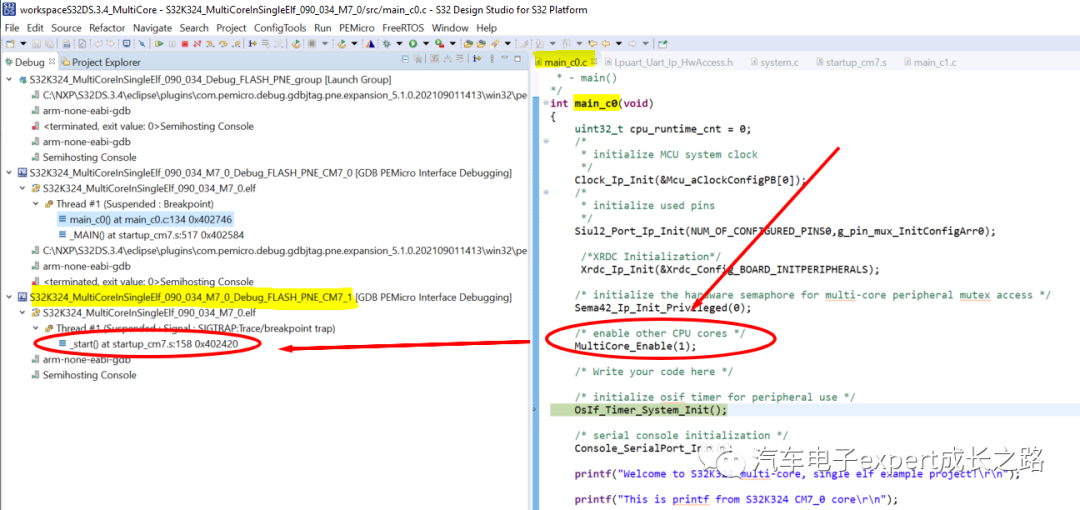
② Running the main coreCM7_0 debugging to enable the non-main coreCM7_1 code (MultiCore_Enable(1)) after which the non-main coreCM7_1 will be started and paused at its reset function_start():
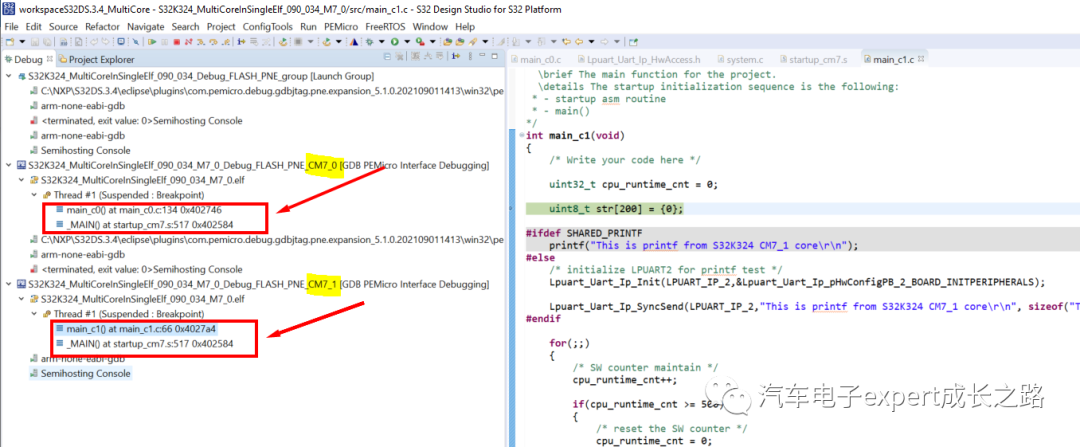
③ Running the non-main coreCM7_1 at full speed will pause at its debugging target’s default breakpoint — the first line of code in themain_c1() function
5. Downloading and Debugging with Multilink Debugger After HSE-FW InstallationThe S32K3xx series MCUs integrate a hardware information security encryption module based on the ARM Cortex-M0+ core, and the chips shipped from the factory only install a security auxiliary boot firmware (sBAF), and have not installedHSE-FW(HSE-B encryption algorithm firmware) so that HSE-B cannot be used for information security encryption operations. At this time, use the default configuration of the U-Multilink/FX S32K3xx MCU Flash algorithm when creating S32DS application projects to download and debug:
To useHSE-B, users need to installHSE-FW, at this time, using the default Flash algorithm file will hang during the Flash erase stage of the download process, eventually promptingtimeout and terminating debugging:
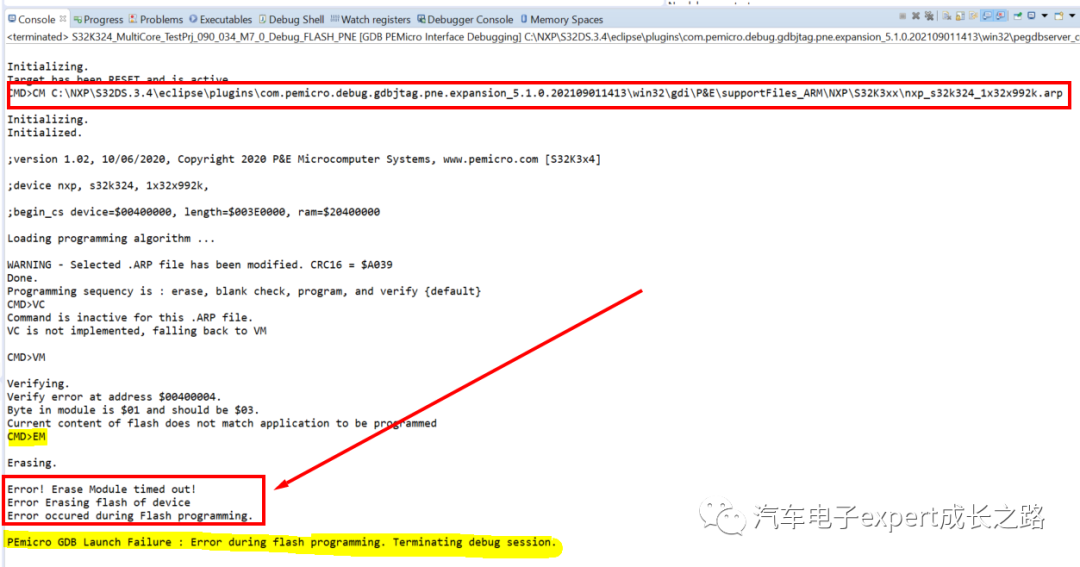
The reason is: the installedHSE-FW will occupy additionalP-Flash and D-Flash memory space, and these addresses will be protected by XRDC after executingsBAF during the chip boot phase, making it inaccessible (read/write/erase and programming) to both the CM7 application core and the debugger:
|
Enabling HSE-B (Installing HSE-FW) |
Required P-Flash size |
Required D-Flash size |
|
Not enabled (factory default settings) |
Final48KB for sBAF |
– |
|
Enabled (Full-Memory) |
Final176KB (adding 128KB for HSE-FW) |
Final168KB (for Secure NVM and sBAF backup) |
|
Enabled (A/B swap for OTA) |
Final176KB (adding 128KB for HSE-FW) |
Final128KB (for Secure NVM) |
In the default Flash algorithm, only the last128KB P-Flash and the last128KB D-Flash are reserved:
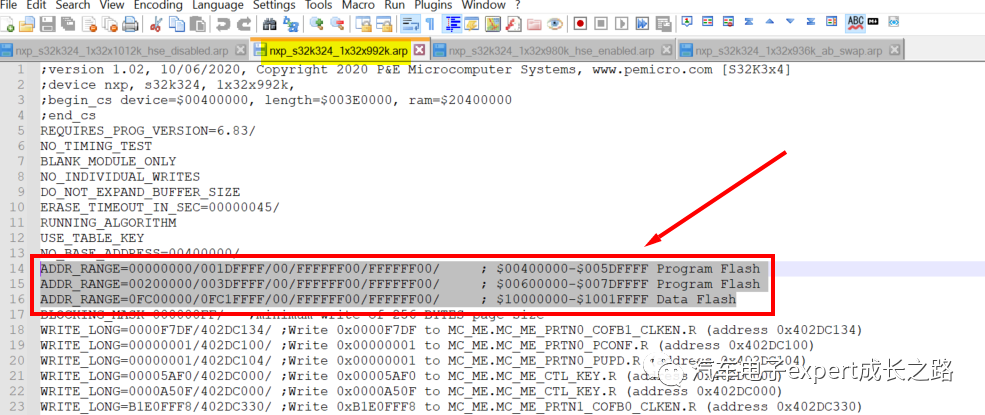
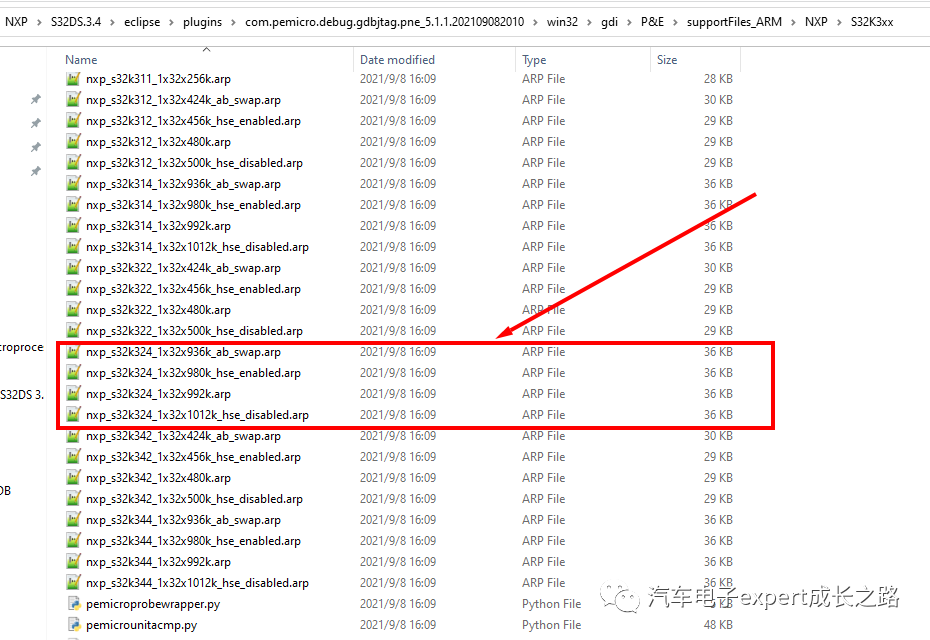
Although application programs usually do not occupy these P-Flash and D-Flash address spaces, the Flash algorithm provided by U-Multilink does not erase Flash sectors on demand, but erases all P-Flash and D-Flash outside the reserved addresses, which causes the chip erase failure.The solution is to install the latest5.11-20210908 U-Multilink driver and Flash algorithm support package provided by PEMicro:I have shared it in the following Baidu cloud disk link, those who need can download and install it themselves:Link: https://pan.baidu.com/s/1dpkHtZItYFaZ_tqpoDS_-AExtraction code: vbk4You can also directly download from the following PEMicro official website link:https://www.pemicro.com/fixedlinks/com.pemicro.debug.gdbjtag.pne.updatesite.base-5.1.1-SNAPSHOT.zipAmong them, different .arp Flash algorithm files are provided for different Flash Memory configurations after HSE-FW installation and HSE-B enabling:
-
A/B swap for OTA: nxp_s32k3xx_xxx_ab_swap.arp
-
Full-Memory: nxp_s32k3xx_xxx_hse_enabled.arp
The other two .arp Flash algorithm files serve the following functions:
-
Default factory configuration: nxp_s32k3xx_xxx_ab_swap.arp
-
Not enabling HSE and installing HSE-FW: nxp_s32k3xx_xxx_hse_disabled.arp
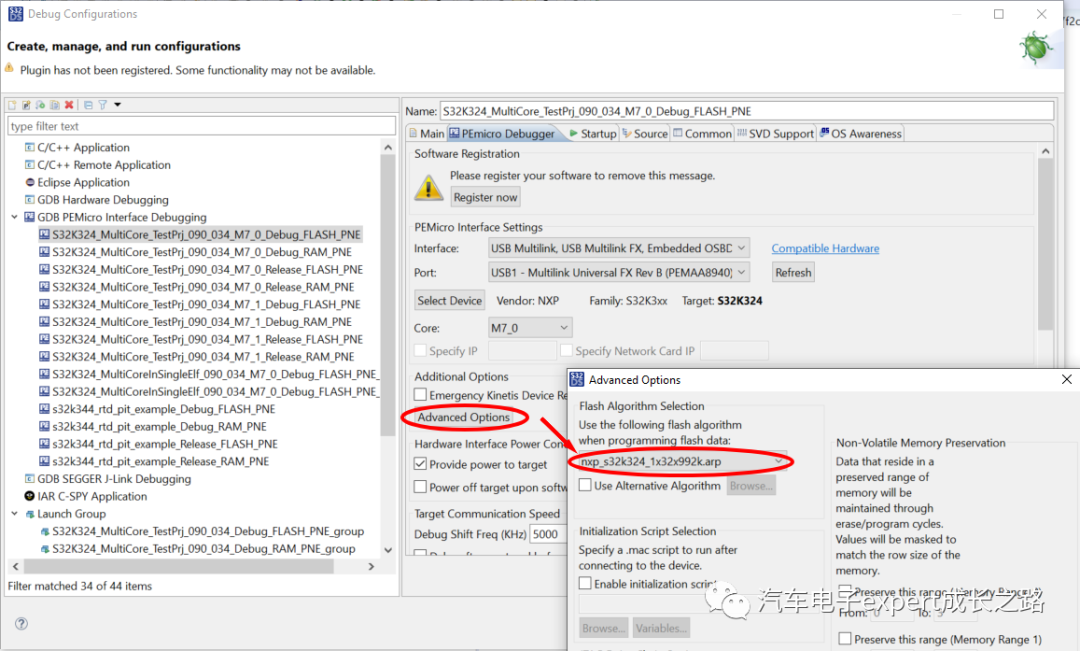
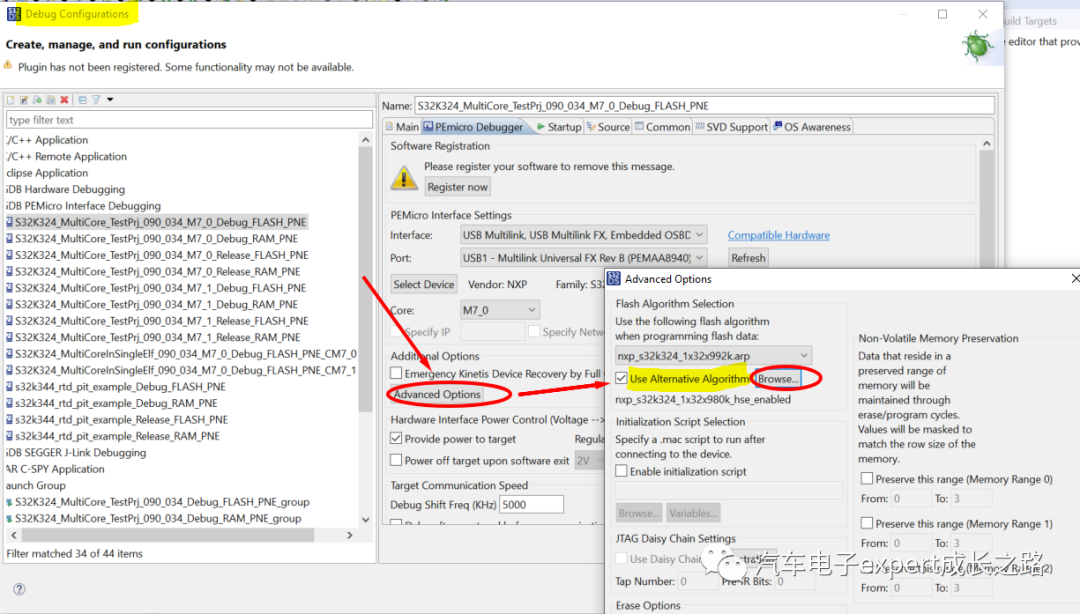
In the debugging target options of the application project, enter the Advanced Options configuration in thePEMicro Debugger option bar, check “Use Alternative Algorithm” –>”Browse..” to select the correct Flash .arp algorithm file:
ConclusionThis article introduces the functional characteristics of NXP’s S32K3xx series MCUs and the S32DS v3.4 IDE installation and debugging support required for its application software development, the creation and debugging methods of S32K3xx multi-core application projects, and common technical problems summarized, such as the inability to download and debug after HSE-FW installation. In the future, this public account will bring more original technical sharing articles on software and hardware development for the S32K3xx series MCUs. Everyone is welcome to forward and share, so that more people can benefit from my public account articles.
Recommended Selections from Recent Articles in this Public Account (click the article title to jump directly to read):
1.《Original Technical Sharing Articles Collection of Automotive Electronics Expert Growth Path Public Account2020Year》;
2. 《Original Technical Sharing Articles Collection of Automotive Electronics Expert Growth Path Public Account – 2019 Annual Edition》;
3.《Original Technical Sharing Articles Collection of Automotive Electronics Expert Growth Path Public Account – 2017~2018》;
4. In-depth Discussion on the Privilege Mode Definition and Switching Methods of ARM Cortex-M Series CPU Cores in Embedded MCU;
5. A Brief Discussion on the Reasons for Normal Online Debugging Function of Embedded MCU Software Development and Abnormal Offline Operation (Taking NXP Automotive MCU as an Example);
6. S32K1xx ECU bootloader development of RAM NVM driver (S19 file) generation, integration, invocation, and testing details;
7. Detailed Development of Independent Secure Bootloader for S32K1xx Series MCU NVM Driver;
8. S32K1xx Series MCU Application Guide: Detailed Functions and Applications of FlexCAN Module;
9. S32K SDK Usage Details: Detailed Use of can_pal Component and flexcan Component (Including RxFIFO DMA and ID Filter and Bus Shutdown Recovery, etc.);
10. A Brief Discussion on the Startup Process and Startup Time Optimization Methods of S32K1xx Series MCU in Embedded MCU Software Development;
11. A Brief Discussion on the Implementation Principles and Methods of Redirecting Application Code to Run on System Stack in Embedded MCU Software Development;
12. A Brief Discussion on the Factors Affecting Interrupt Latency in Embedded MCUs;
13. A Brief Discussion on the Importance of Atomic Operations for Control and Configuration Registers of Low-level Drivers in Embedded MCU Software Development (Analysis of FlexCAN Module Driver MB Lost CAN Message Problem);
For more exciting articles, please visit the homepage of this public account, access through the classification menu or click the following historical article classification list directory to get reading links:
《Historical Article Classification List Directory (Click the article title to jump directly to read, as of September 15, 2021)》;
Original writing is not easy. If you find this article helpful for your work and study, you are also welcome to appreciate and encourage it—-I will continue to write and bring you more exciting original articles.
Tips:Click the “Like Author” at the end of this article to appreciate this article or “Looking” to share, and leave a message to ask questions, I will reply to everyone’s concerns as soon as possible!
Welcome to learn/discuss automotive electronics and embedded system hardware and software design technologies with me here. If you have any opinions and suggestions regarding this public account or the articles shared, please feel free to leave a message. Your likes/follows/forwards are the greatest support and affirmation for my hard writing!

This public account has opened the keyword reply function. Please reply to the following keywords on the public account homepage to get more information and exciting articles:
-
About the author, please reply with the keyword “Author Introduction”;
-
Contact the author, please reply with the keyword “Contact Author”;
-
Get a high-definition PDF version of the public account article, please reply with the keyword “Get Article”;
-
Get professional and timely technical support services, please reply with the keyword “Professional Services”;
-
Annual original technical article collection high-definition PDF acquisition, please reply with the keyword “Article Collection”;
-
CodeWarrior IDE license purchase and installation usage issues consultation, please reply with the keyword “CW License”;
-
Purchase of automotive Ethernet to industrial Ethernet converter, please reply with the keyword “Ethernet Converter Purchase”;
-
Get the latest and complete directory of original technical sharing articles from this public account, please reply with the keyword “Article Directory”;
Statement: All original technical articles of this public account are free to read, and all views/conclusions in the text are personal views and do not represent the official views of any company; all demo codes/programs are for reference and learning only, and do not guarantee quality. If used for commercial purposes, the responsibility is self-responsible; all articles in this public account are owned by the author, and any unauthorized reproduction is illegal, and piracy will be investigated~!
If you like the articles of this public account, please click the public account follow at the beginning of the article or WeChat directly long press to scan the QR code below to follow. You can also add friends in WeChat –>Public Account –> enter “Automotive Electronics Expert Growth Path” search –> click follow. If you have any opinions and suggestions regarding this article, please feel free to leave a message.

Your attention, likes, forwards, and shares are the greatest affirmation of my hard writing!
Enwei Hu (胡恩伟)September 23, 2021, in Mountain City · Chongqing