Table of Contents
Introduction
1. Environment Configuration
1. Arduino IDE
2. Data Acquisition
1. Follow the WeChat public account – Star Aid Studio and send the keyword (ESP32-CAM)
2. Data description editing
3. Reference for setting up MQTT service
3. Implementation Effects
1. Output Base64 data via serial port
2. Verify if the output Base64 data is correct
3. Send to remote subscribed devices via MQTT service
4. Concatenate MQTT data to convert into an image
4. Example Code
5. References
Introduction
This article introduces how to use the ESP32-CAM to achieve remote image transmission via the MQTT protocol. The content includes environment configuration (Arduino IDE), data acquisition, MQTT service setup, implementation effects (serial output of Base64 data, data verification, remote transmission, and image concatenation), as well as example code. The code implements the functionality of automatically capturing and segmenting image data every 10 seconds to send to a specified MQTT topic, suitable for remote monitoring scenarios.
Keywords: ESP32-CAM, MQTT, image transmission, Base64, Arduino IDE
1. Environment Configuration
This is a common topic, so I won’t elaborate too much, just attach the link. Every chip we develop requires environment configuration; to do a good job, one must first sharpen their tools. Here, I will introduce two methods to develop our ESP32 series.
1. Arduino IDE
I have previously mentioned and configured the Arduino environment, so I will directly attach the link for installation and configuration.
Arduino IDE installation and importing the ESP32 library (offline)
https://blog.csdn.net/herui_2/article/details/135296814?spm=1001.2014.3001.5501
2. Data Acquisition
1. Follow the WeChat public account – Star Aid Studio and send the keyword (ESP32-CAM)
➡️🫡🫡🫡🫡🫡🫡🫡🫡➡️
Editor
2. Data Description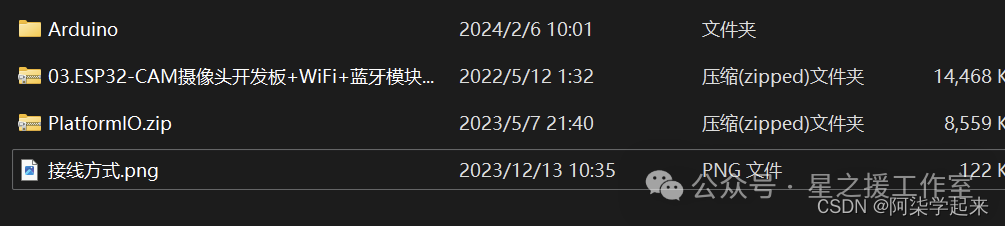 Editor
Since this is based on previous project code, you should follow the previous project’s code and then overlay the article’s code. Additionally, since this uses the MQTT service, you will need to add some libraries online, which can be referenced in the article below.
3. Reference for Setting Up MQTT Service
ESP32/ESP8622 – Connecting to Cloud Platform Using MQTT Protocol (with illustrations)https://herui.blog.csdn.net/article/details/135317019?spm=1001.2014.3001.5502
3. Implementation Effects
1. Output Base64 Data via Serial Port
This is the Base64 data of the image converted by the program.
/9j/4AAQSkZJRgABAQEAAAAAAAD/2wBDAA8KCw0LCQ8NDA0REA8SFyYYFxUVFy4hIxsmNjA5ODUwNTQ8RFZJPEBSQTQ1S2ZMUllcYWJhOkhqcWlecVZfYV3/2wBDARARERcUFywYGCxdPjU+XV1dXV1dXV1dXV1dXV1dXV1dXV1dXV1dXV1dXV1dXV1dXV1dXV1dXV1dXV1dXV1dXV3/xAAfAAABBQEBAQEBAQAAAAAAAAAAAQIDBAUGBwgJCgv/xAC1EAACAQMDAgQDBQUEBAAAAX0BAgMABBEFEiExQQYTUWEHInEUMoGRoQgjQrHBFVLR8CQzYnKCCQoWFxgZGiUmJygpKjQ1Njc4OTpDREVGR0hJSlNUVVZXWFlaY2RlZmdoaWpzdHV2d3h5eoOEhYaHiImKkpOUlZaXmJmaoqOkpaanqKmqsrO0tba3uLm6wsPExcbHyMnK0tPU1dbX2Nna4eLj5OXm5+jp6vHy8/T19vf4+fr/xAAfAQADAQEBAQEBAQEBAAAAAAAAAQIDBAUGBwgJCgv/xAC1EQACAQIEBAMEBwUEBAABAncAAQIDEQQFITEGEkFRB2FxEyIygQgUQpGhscEJIzNS8BVictEKFiQ04SXxFxgZGiYnKCkqNTY3ODk6Q0RFRkdISUpTVFVWV1hZWmNkZWZnaGlqc3R1dnd4eXqCg4SFhoeIiYqSk5SVlpeYmZqio6Slpqeoqaqys7S1tre4ubrCw8TFxsfIycrS09TV1tfY2dri4+Tl5ufo6ery8/T19vf4+fr/wAARCADwAUADASEAAhEBAxEB/9oADAMBAAIRAxEAPwC2I0/uineWn9wUEco7y0/uCnCNP7goCw7y0/uCnCNP7goHyocIk/uCneUn9wUg5UPEcf8AcFL5UZ/gFA7FeW2UfwDFUrmBNv3BTFYyxEiyMuwcVJ5af3RSHyjvLT+4KPLT+4KYcovlp/cFHlp/cFAWDy0/uCjy0/uikFhPKT+6KPLT+4KYconlp/cFMmgWSF1CjJHFAWEjEckauEXkUvlJ/cFMXKhvlp/dFIY0/uigLCeWn9wU3y0/uCgLCeWn9wU3y0/uCkFhpjT+4KaY0/uCmKwzYn90VCqKJnBUeopBYdsX0puxfSgdhuxfSmlF9KBWOyFPApFDqcKYDqcKQx1LTAdS5pALuqtcRBgdtAGHdp5c2fWgUwHUtABRQAtFACUUAJSUAQQ7VaWNRja2fz5qQ0ANpKAENNoAbSUANNNNMBhqCQYmRv8AgNIQ6mMwX7xxQBF5hf8A1S59+lJtc/ebH0oEdqKdSGKKdTGOp1IBc0bqAE300y0wImuap3Gpxx9W59KAKEt2bk/cwKdFyv0OKBktLSAWimIKKACkoASkoAgk3LdRtn5GBU/XtUtADabQA2koAbSUANptAiNmCjJYD61VkmV0yoJA5zigYpWR/wCPC/7PegQopzjn3oELSUAdfTqBjqXNABuo30AJ5lRtNQBBJdAd6pS6l/d5oAqmWeb+LA9qWO3Ve1AywqY6UAbLrGPlkGfxFAE2KKBC0UgCimAlFABSUAQXY/0Zj/c+cfhUnHboelACU2gBtNNADTTCcDk0AQfaAV/dAyfTpTSs7feZYx6LyaAEECZ3Ebm9TTiOMdqNwIYOYueo4pxoENphoA68UuaQw3Um+mA0y1G09AFaa8VOpqk97JIfkXA96AIvLaT/AFjE/WpViAoGThafigQ4CmXGBF5n/PM76AJqWgAooAKMUAFJQAlFABgHr0qvagrD5bYzGSvFAEpFMNADe2artcJzszI3onNADcTuedsQ/wC+jSfZ0zl/3h9X5oAdSU2IbTDSEQDiWQfQinGgY00ygDpvP9qXz6BiebUf2hXXKnIoArS3gBwvzVWaWWX/AGR7UDGrDUwWgCQCngUCHgU7FIYtL9elMBlsCsXlscmM7e34VLQIWigAopAJRimAYpMUAGKg+5dsPm/eLu9uKAElnijO3O5/7qjJqNjOx+VBEP8Aa5NADPsqk5mLTH/b6U/GBgcD0oAbTaYDTTDQA002kBA4xPG/b7tOoENNMoA6CigYVXA2zyJxhvnGB+dADynzA0uygBNlLsoGO204LQAuKKAHYooEM/1d0P7so/UVNQAUuKADFGKAF20u2kAbaikljTq3PoKYD7e2vr0/6Jakr/ffp1pNS0m60+1hmvHjbzGCnn7vHIoAiCBR8oAHtTTQAw0ygBlNNADDTTTAYabSEQ3P+pJ/u/NTjQAymmgDoKKBhUNyvCS45jP6d6AJcUYoAMUtAxaWgBaKAHYopAR3P+oLAZ2fP19KmGGGV5B6UCHYpdtMAxTttIBjukf3jz6U+GG6uz/otszL/ebgUAaFt4ZuJkBvbnZnqkf0rYttFsLU5jt1yO7c0wL9Z3iC2+16NcR+g3flQgONiO+IflQaAIzTDQAw0w0wG0w0gGU2mAxhkYqKE7o/pxSELTaBnQUtACUMqupVxlTwRQBFbgrFsbGU+XipaBhS0AOpaAFooAdRQAo61HagqGiLbihxn+VIRYxQzKn3mApgLCs9y2LW3d/9o8CtG38O3M0f+l3HlZ/gT6UgNW10SwtTlIAxHdua0KYBRQAUhAYEMMg0AcDLCbW9ubc8bH+Ue1MNMBhqM0gGGmGmAymGgBpplIBpqEf62Qe+aAFptAjoaKBhSUDIyNlwGCjbIME47jpUtAC0tABS0AOpaBhS0CEd0j++wX61CJfn8yPOwjB3ZGTQI2YPD9/cL/pMogX+6nWte10Gxtm3eX5jf7dAGiqhRhQAPaloAKKACigAooA5HxTAIdXhuM/65dtZpoAjNRmgBhphoAYaYaAGUygBpqB+J0PY8UAPNMNAjoaWgYlFADZl3REAZbqv1pY3EiB170DHUtAC0tAC0EhRliFHqaAIkuRKm63RpR69BSlLib78giX+7F16UASLDGrlwg3evU0s6b4WGMnqKBHXaNc/atMidvvgYar1ABRQAUUAFFABRQBjeKrcy6SZEXMkR3CuY6rmgBhqM0ARmmGgBhphoAYaYaAG1FP9zP8AdOaBBTTQM6GloGJRQAtRRfJM8XA/jUZ7d6AJaWgBe3tUf2pCP3Qab/coANtw7cssKf7PzGnLbRh95Xe3q5zQInpaAFpRQBp+FpvKnns8fL99a6SgAooAKKACigAooAiuoRcWskJ/jXFcDEvl+ZCesbEGjoANTDQBGajoAYaYaAIzTaAGmo3G5SPWgCOI7oxRQB0VFABS0DCorjjbN/zzPOT270ALJcInHLv/AHU5oH2h3+6kS+/zE80AKLVD/rt0x/6aGp8cAdhQAtLQAtFADqUUhDopfsuoW9z0CnDcdq7WmAUUAFFABRQAUUAFcVrkJt9dlwPklG78aAKTVG1AEZqM0AMNRmgBpphoAZTTQIr7wpb60m5z0XA96BnTUUDCmPPHGdrN8391eTQAgeVvuxhB/t9aRbfP+ulkk/HAoAdbZ2lWxuU44qagYtLQAtLSEFLTAWlpCCVS8LAdccV1OiXP2nTYznJX5aAL9FMAooAKKACigArnPGFv+6gu+P3ZwaAMA1G1AERqM0AMNMNADDULyqnDNz6UAR73YcR4/wB6mGIt99yfagBv3ZgMcGnmgDoZHSJcyOEHvUYld1zHCfYycCgYnks/+vlLf7KfKtShVXO1Qv0oAWloAiIKXasPuuNp479qmoAWloAWloAWlpALS0xDxWh4bm8rUZrbgLIN46daQHS0UwCigAooAKKACqOtW/2nSp48ZO3IoQHERHMfPbikahgRNUZoAgknSNtrMN3pUZkdvuRj6saAGGJm/wBZKT7DigIq/dGKQCU2mBDN/CfenUgN+OFIjuVfmPfvT6ZTCigQUUANnTzImUY3fw59aWKTzIw/rQBJS0ALRSAWloAWlpiHCnrL9muoLnr5bc89qBnaA5GR0ooEFFABRQAUUAFFAHnt1F9k1S5tuwclR7VBNNHGcMwB9O9DArtK7f6uL8X4qPymZf30pPsvyikAKix/cUCkNMBlMNADKbQBFKN0bD2oVtyg0AdHRTGFFIApaACo0IjuHi4G794o/nQMmpaACloELS0ALS5pCHU4/MhX1oA6XQLr7Tpq7m3PH8jVo0wCigAooAKRnVBl2Cj3oAybrxLp8HEbmeQ9FjrGuvE9/OSLaJLdf7zcmgDDu2llbzrlzLIThm6cGgIifcULRcBKjNIBhNMNMBhphNADDTaAG1FH8oK+hoA6aigAooGFFABUdydqCX/nmc5/2e9AyWloELS0ALRQAtLSELUgNAGj4duvK1OS2Y/LOu5evUV01MAooARmVBlmAHvWVd+JNPtwdrmdvSPmgDKuvEd9M2LaNYE9W5asiYy3LFrud5SfU0gEwq/dAFNLUAQTDzInT+8MVHHL5sSvnrT1ADTTSAjphpgMJphoAaaaaAG1EOJW96AOmooGFFABRTGLR9elIRFbH5TGzZaPjr+VTUALRQAtFAC0tAC04GkIDMbeWK5RctE2fwruPMQReYzBUxnJ4oAzLrxHp9vkK5mccYjGay7nxDfTjFvGtup7nlqYGZMZJ3L3E7y5PTPFMG1BhRikAhamk0AMJphNAyPNQR8SSpjHO786LiHGmE0ANJqM0AMNNNMBpptAhtQycSI34UAdPRQUJRQAUUALS0AROfLuEfPyt8jf0qagApaAClpAFLTEFMaeNG2lvm9F5NIBC5mTb5RCN1L0qr5qr5rSEJ8gUk4FK4Eq4QfLxRupgM3U3NACZpmaAGmmE0gGE1Xkyt0jfwspU/0pgPphNADDTDQIbTKYDabSGIaikG5f1piOlooGFFAwpaACigBJE8yIpnk9KSCUTRB+aAJKWgAooAa1xEjbS/zeg5NMEk0g+SLy/eWkIUw7/wDWSu4/u9BUiKkYxGioPYUALmogQl2V/wCeg3Dj060AS5pKACmE0AJmmk0AMJpmaAGmoLn/AFBbn5Pm49qAHE+nSmGgBhppoAZTaYDaSgBlNNAjo6KYwopDCigApaAFqEHy7kp2kG4cenWgCeopLmKM7S2X/uryaADzJ2+7EIx6ydaTyPMH+kSvJ7fdFAEyhU+4qr9BTqACikAZqG4O1BJ/zzOfw70CJTSZpAJmm5pgNpuaQDTTDTAaTTDyOenSgCCAnysN1XinE0ANphNMBtNpANNNzQAlNpiOhpaYxKKACikMWloAie5iVtu7c/8AdXk1HM0h+fyioi+bmgByRebHmWVpQfwFTIqoPkAX6UAPooAWjNAgzRQAU04IwehpARWzHytrfeQ7TUlACU2gBuabmgBCaYTQA0mmE0AQA4uGX+98wpxoAbmmGgBtNpiENNNAEbSAfWm7mPbFAHQQOWT5uq8VJTGFFIA61EbiJf4tx9E5oGBedjhIxGPV+aTyd3+tdn/QUASoqoMKoA9qfQBDbna0kRz8h4yexqegAooAWjNAgzSZpAGaTNAEG7Zebe0q5/EVLQAmaTNAxuabmgQ002kAwmmmgCvNwUk9Dj86fmqAbTaAG0xnUd/ypAMLMei4+tN25+8aBC4xSUwNpz5cwfs3ymp6BkTXMS/xbj6JzTd9xIPljEQ/6adaYxTBv/1rtJ7dBUqgIm1eF9BSAWigAzRmgCKb5Zo5uePkP0NT5oAM0tACZozQAUZoASjNAiG5OI9+SNh3cU/NAwzSZpCG5puaAG5ptIBhNMNAEcvzRkU1H3KDTAaZV9c/SmlmPRcfWgBpXd98k+1AUKMCgApDTEMpKANgmSUbdm1fUmkji80ZmLsQfunpQMsKAgwoAHtS5oAKKYwozSAKKAGuvmRsn94YpIHLxfN1HBoAkpc0AFFABmkzSAKSmIQ88HpUNufk2HqhxSAkpM0ANzTSaAG5puaBjSahaZex3f7vNAhm6Q9Bj61Gij7npTAfgDoKKAEptIQlJQAykpgb1Rf6u4B6I/X69qBk1FMBaKQCZooAKM0DCoh8l1jHEgz+IoAmzRmgAozQAZozQAmaKAG5qEny7npxIOT7ikIlpuaAG5prNgZJxQBD54P3Mv8AQU3Mp9E/WgBvlD+Ml/rTuOwoAaaiPEoPYigB1JTASm0gEppoENptMDezTZF3xkDr2pgLG+9A350+kMKKACigBKKBhmorgEx5X7yncKBEwOQCO9GaBhRmgQmaM0DEzRmkITNQ3H+q3d1+agBWkVRljge9R+fn7is/6UANxK/V9g9BR5S5ycsf9o5pgOptIBuabQAhqKTpn0OaYDqSgBtJQA00lAhtJSA3KXNUBF9yf/Zfn8amzQMM0UgCjNACUUDCjNMCKD92Wi/u8ips0gCkoATNGaACo2lRTywoER+exOI4z/vHijEh+8/4AUARwxopYY5B61NmgBM000gEzTaYDaSgBCaaeaQEcZOzntxTqYhKbQMbTaBCUlIDbzRVANmBaM469RT1fcM0h3FooAKKAEpc0AJRQMil+WRJf+An6VLmgQZooGRNMinBbn0FN8yVh8sW0er0AJ5bN9+Qn2Xinqip9xQKAFpM0CIW+WdT2bipKQDaTNACU2mAlJSAbSUwGD7zUtDEJTaQDaSmAlNoA//ZAAAAACU2gQlJQA2koA//2QAAAExx6J8tOSNI/uqBQAuaSgCEnbcr6OOakJpCG0maYCU0mkA2koAbTaYDF+8wpaBiU2gkSm0DG0lAj//ZAAAAAADmgR//2Q==
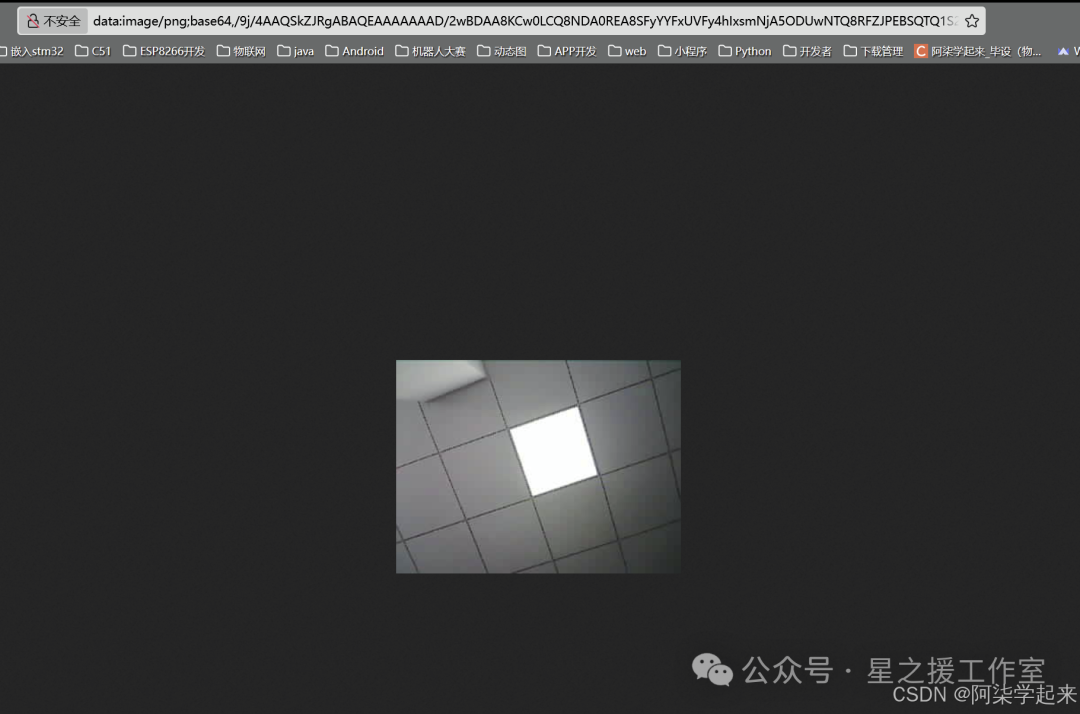
2. Verify if the Output Base64 Data is Correct
This method is very simple; just open a webpage and enter data:image/png;base64, followed by the generated Base64 code in the browser’s address bar.
data:image/png;base64,You can then obtain the converted image in the browser.
3. Send to Remote Subscribed Devices via MQTT Service
This requires two devices to send Base64 data through the subscribed MQTT topic. Due to the length of the data, segmented sending is used, with a maximum length of 512 bytes per segment.
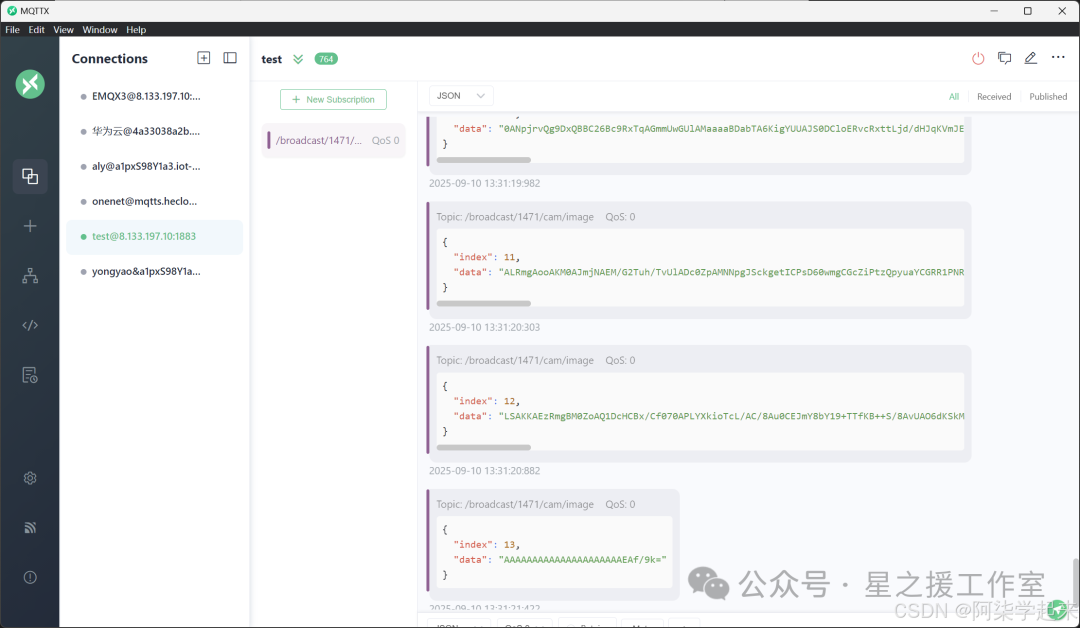
4. Concatenate MQTT Data to Convert into an Image
In this way, the remote device can receive the data. By concatenating the received data, we can obtain the image data. This will require modifications based on the specific device implementation needs. I will not add parsing software here; next time I will post an example of using Android to parse and convert it into an image.
4. Example Code
This code implements the effect of capturing an image every 10 seconds and automatically sending it to the required publishing topic. Of course, this requires using a server, so it must be connected to the internet.
#include<WiFi.h>#include<PubSubClient.h>#include"esp_camera.h"#include<base64.h>// Add necessary header files at the beginning#include<algorithm>// For std::min function// Select camera model#define CAMERA_MODEL_AI_THINKER// Camera pin configuration#include"camera_pins.h"// Set WiFi access informationconstchar* ssid = "NET";constchar* password = "12345678";constchar* mqttServer = "8.133.197.10";// MQTT authentication informationconstchar* mqttUserName = "147-1-device";constchar* mqttPassword = "147-1-device";constchar* clientId = "147-1-device";constchar* subTopic = "/broadcast/1471/test1";constchar* pubTopic = "/broadcast/1471/test2";constchar* imgTopic = "/broadcast/1471/cam/image"; // Image publishing topicWiFiClient wifiClient;PubSubClient mqttClient(wifiClient);// Image related variablesbool captureAndSend = false;unsignedlong lastCaptureTime = 0;constunsignedlong captureInterval = 10000; // Capture once every 10 secondsvoidsetup(){ Serial.begin(115200); Serial.setDebugOutput(true);// Initialize cameracameraBegin();// Set ESP32 to work in station mode WiFi.mode(WIFI_STA);// Connect to WiFiconnectWifi();// Set MQTT server and port number mqttClient.setServer(mqttServer, 1883); mqttClient.setCallback(receiveCallback);// Connect to MQTT serverconnectMQTTserver();// Set flash pinpinMode(4, OUTPUT);digitalWrite(4, LOW);}voidloop(){// If the board fails to connect to the server, try to connectif (!mqttClient.connected()) {connectMQTTserver(); }// Process MQTT messages mqttClient.loop();// Periodically capture and send imagesif (millis() - lastCaptureTime > captureInterval || captureAndSend) {if (captureAndSend) { captureAndSend = false; }captureAndSendImage(); lastCaptureTime = millis(); }delay(100);}// Connect to MQTT server and subscribevoidconnectMQTTserver(){if (mqttClient.connect(clientId, mqttUserName, mqttPassword, 0, 0, 0, 0, 1)) { Serial.println("MQTT Server Connected.");subscribeTopic(); // Subscribe to specified topic } else { Serial.print("MQTT Server Connect Failed. Client State:"); Serial.println(mqttClient.state());delay(5000); }}// Callback function after receiving messagesvoidreceiveCallback(char* topic, byte* payload, unsignedint length){ Serial.print("Message Received ["); Serial.print(topic); Serial.print("] "); String message;for (int i = 0; i < length; i++) { message += (char)payload[i]; } Serial.println(message);// If the capture image command is receivedif (message == "capture") { captureAndSend = true; }}// Subscribe to specified topicvoidsubscribeTopic(){if (mqttClient.subscribe(subTopic, 1)) { Serial.println("Subscribed to: " + String(subTopic)); } else { Serial.print("Subscribe Fail..."); }}// ESP8266 connect to wifivoidconnectWifi(){ WiFi.begin(ssid, password);//Wait for WiFi connection, output success message after successful connectionwhile (WiFi.status() != WL_CONNECTED) {delay(1000); Serial.print("."); } Serial.println(""); Serial.println("WiFi Connected!"); Serial.print("IP Address: "); Serial.println(WiFi.localIP());}// Capture and send imagevoidcaptureAndSendImage(){ Serial.println("Capturing image...");// Turn on flashdigitalWrite(4, HIGH);delay(200);// Capture imagecamera_fb_t *fb = esp_camera_fb_get();if (!fb) { Serial.println("Camera capture failed");digitalWrite(4, LOW);return; }// Turn off flashdigitalWrite(4, LOW); Serial.printf("Image captured! Size: %d bytes\n", fb->len);// Convert image data to Base64 encoding String imageData = base64::encode((uint8_t *)fb->buf, fb->len);// Release image bufferesp_camera_fb_return(fb);// Calculate how many chunks need to be sentint chunkSize = 512; // Maximum length limit for MQTT messagesint totalChunks = (imageData.length() + chunkSize - 1) / chunkSize; String chunkMsg; Serial.printf("Image encoded to Base64. Length: %d, Chunks: %d\n", imageData.length(), totalChunks);// Send image information (total chunks) String infoMsg = "{\"chunks\": " + String(totalChunks) + "}";//mqttClient.publish(imgTopic, infoMsg.c_str());// Send image data in chunksfor (int i = 0; i < totalChunks; i++) {int start = i * chunkSize;int end = std::min((i + 1) * chunkSize, (int)imageData.length()); // Fixed line String chunk = imageData.substring(start, end);// Create a message containing chunk index and data chunkMsg = "{\"index\": " + String(i) + ",\"data\": \"" + chunk + "\"}";// Publish chunk data mqttClient.publish(imgTopic, chunkMsg.c_str()); Serial.printf("%s", chunk.c_str()); // Use format string and c_str() method//Serial.printf("Sent chunk %d/%d\n", i + 1, totalChunks); chunkMsg = "";delay(500); // Short delay to ensure MQTT client processes messages } Serial.println("\n"); Serial.println("Image sent completely");}// Camera initializationvoidcameraBegin(){camera_config_t config; config.ledc_channel = LEDC_CHANNEL_0; config.ledc_timer = LEDC_TIMER_0; config.pin_d0 = Y2_GPIO_NUM; config.pin_d1 = Y3_GPIO_NUM; config.pin_d2 = Y4_GPIO_NUM; config.pin_d3 = Y5_GPIO_NUM; config.pin_d4 = Y6_GPIO_NUM; config.pin_d5 = Y7_GPIO_NUM; config.pin_d6 = Y8_GPIO_NUM; config.pin_d7 = Y9_GPIO_NUM; config.pin_xclk = XCLK_GPIO_NUM; config.pin_pclk = PCLK_GPIO_NUM; config.pin_vsync = VSYNC_GPIO_NUM; config.pin_href = HREF_GPIO_NUM; config.pin_sscb_sda = SIOD_GPIO_NUM; config.pin_sscb_scl = SIOC_GPIO_NUM; config.pin_pwdn = PWDN_GPIO_NUM; config.pin_reset = RESET_GPIO_NUM; config.xclk_freq_hz = 20000000; config.pixel_format = PIXFORMAT_JPEG;// Use lower resolution and higher compression to reduce image size config.frame_size = FRAMESIZE_QVGA; // 320x240 resolution config.jpeg_quality = 15; // Higher compression (the larger the value, the lower the quality and smaller the file) config.fb_count = 1; // Reduce the number of frame buffers// Camera initializationesp_err_t err = esp_camera_init(&config);if (err != ESP_OK) { Serial.printf("Camera init failed with error 0x%x", err);return; }sensor_t *s = esp_camera_sensor_get();// Initial settingsif (s->id.PID == OV3660_PID) { s->set_vflip(s, 1); // Flip s->set_brightness(s, 0); // Reduce brightness s->set_saturation(s, -2); // Reduce saturation s->set_contrast(s, 0); // Reduce contrast }// Ensure using lower resolution s->set_framesize(s, FRAMESIZE_QVGA); s->set_quality(s, 15); // Set image quality (higher compression)}5. References
ESP32/ESP8622 – Connecting to Cloud Platform Using MQTT Protocol (with illustrations)
【Embedded Peripherals】 ESP32-CAM (Local Image Transmission + STM32 Communication)
Real-time Image Transmission of ESP32CAM Camera