Little by little, one travels far;Little by little, one accumulates a river and a sea.Daily sharing of Java technologyFollow 【Programming Reflections】 to receive valuable content promptly!

01 Introduction
In the previous two issues, we introduced four tools that allow calling third-party <span>APIs</span> as smoothly as calling interfaces.
- •
<span>dromara</span>‘s<span>Forest</span> - •
<span>SpringCloud</span>‘s<span>OpenFeign</span> - •
<span>Spring6</span>‘s<span>@HttpExchange</span> - •
<span>retrofit</span><span>-spring-boot-starter</span>
This method requires ensuring that the project can start; during unit testing, the project must be able to run to retrieve the client from the temporary <span>Spring</span> container and then call it.
However, during regular development, for convenience in testing, sometimes we want to call it directly like the <span>main</span> method without debugging the local environment.
So today, I will recommend several tool libraries!
02 Tool Library Recommendations
Since they are tools, the more convenient they are, the more they will be favored by developers.
2.1 <span>Apache HttpClient</span>
<span>Apache</span> is a well-established, powerful, and flexible <span>HTTP</span> client library. It is extremely feature-rich and can handle almost all complex <span>HTTP</span> scenarios, making it a historical choice for many enterprises and projects. As the saying goes, <span>Apache</span> products are guaranteed to be high quality.
Test URL:<span>http://shanhe.kim/api/za/xingzuo.php?msg=双鱼座</span>
Example
@Test
void apacheClient() {
    // 1. Create HttpClient object
    try (CloseableHttpClient client = HttpClients.createDefault()) {
        // 2. Create HTTP GET request
        HttpGet httpGet = new HttpGet(BASE_URL);
        // 3. Execute request and get response
        try (CloseableHttpResponse res = client.execute(httpGet)) {
            // 4. Get response entity
            HttpEntity entity = res.getEntity();
            if (entity != null) {
                // 5. Convert response entity to string
                String result = EntityUtils.toString(entity);
                System.out.println(result);
            }
        }
    } catch (Exception e) {
        e.printStackTrace();
    }
}
Notes:
- • Resource Release: Must correctly close
<span>CloseableHttpClient</span>and<span>CloseableHttpResponse</span>to release network connection resources; it is recommended to use<span>try-with-resources</span>statement. - • Connection Pool Management: In production environments, configure and use a connection pool (
<span>PoolingHttpClientConnectionManager</span>) to improve performance. - • Complexity: The API is relatively low-level, with many configuration options, making simple requests somewhat cumbersome to write.
If you are using a traditional <span>Spring</span> MVC project and do not want to introduce additional dependencies, it is a reliable choice.
2.2 <span>OkHttp</span>
<span>Square</span> has open-sourced a modern, efficient, and lightweight HTTP client. It natively supports HTTP/2 and <span>WebSocket</span>, and its API design is user-friendly, making it the first choice for Android and many open-source projects.
Example
@Test
void okClient() {
    // 1. Create OkHttpClient instance (recommended as a global singleton)
    OkHttpClient client = new OkHttpClient();
    // 2. Build Request object
    Request req = new Request.Builder().url(BASE_URL).get().build();
    // 3. Make synchronous call and receive response
    try (Response response = client.newCall(req).execute()) {
        if (response.isSuccessful() && response.body() != null) {
            // 4. Get response body as string
            String result = response.body().string();
            System.out.println(result);
        } else {
            System.out.println("Request failed: " + response.code());
        }
    } catch (Exception e) {
        e.printStackTrace();
    }
}
Notes:
- • Singleton Pattern: The
<span>OkHttpClient</span>instance should share a single global instance, as it internally manages its own connection pool and thread pool; creating multiple instances will waste resources. - • String Conversion:
<span>response.body().string()</span>can only be called once; multiple calls will throw an exception. If multiple reads are needed, save it to a variable first.
It can be perfectly combined with the Retrofit library (also produced by <span>Square</span>) to convert <span>HTTP APIs</span> into <span>Java</span> interfaces using annotations, greatly improving development efficiency.
2.3 <span>RestTemplate</span>
<span>Spring Framework</span> provides a template utility class for synchronous <span>HTTP</span> requests. It simplifies interactions with HTTP services and integrates with the Spring ecosystem (such as message converters).
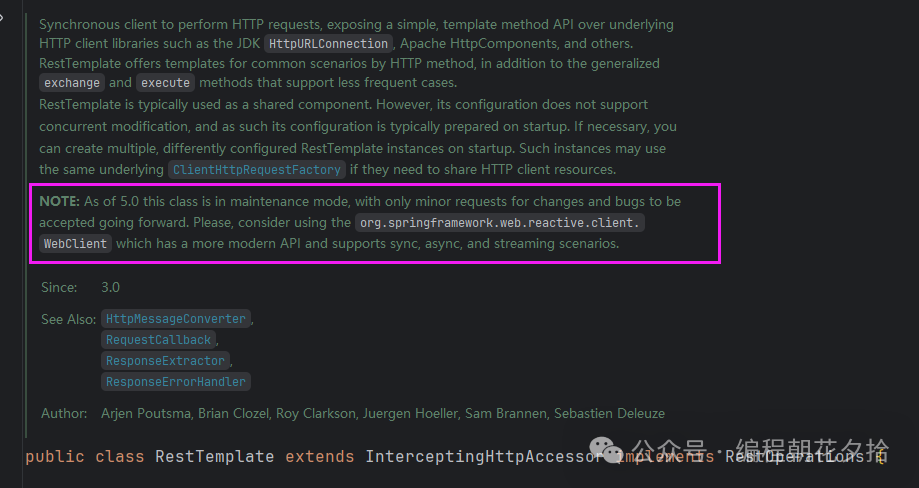
Note: It has been marked as deprecated since Spring 5, and it is recommended to use <span>WebClient</span>.
Example
@Test
void restTemplateClient() {
    RestTemplate restTemplate = new RestTemplate();
    String result = restTemplate.getForObject(BASE_URL, String.class);
    System.out.println(result);
}
Notes:
- • Deprecated: The official team is no longer actively developing new features, and it will be removed in future versions.
- • Synchronous Blocking: All requests are synchronous and blocking, which may affect the performance of high-concurrency applications.
- • Error Handling: By default, exceptions will be thrown for
<span>4xx/5xx</span>status codes, and custom error handling needs to be implemented using<span>ResponseErrorHandler</span>.
The official statement is that after <span>Spring 5.0</span>, it is in maintenance mode, only fixing <span>bugs</span>, and no new features will be added; it is recommended to use <span>WebClient</span>.
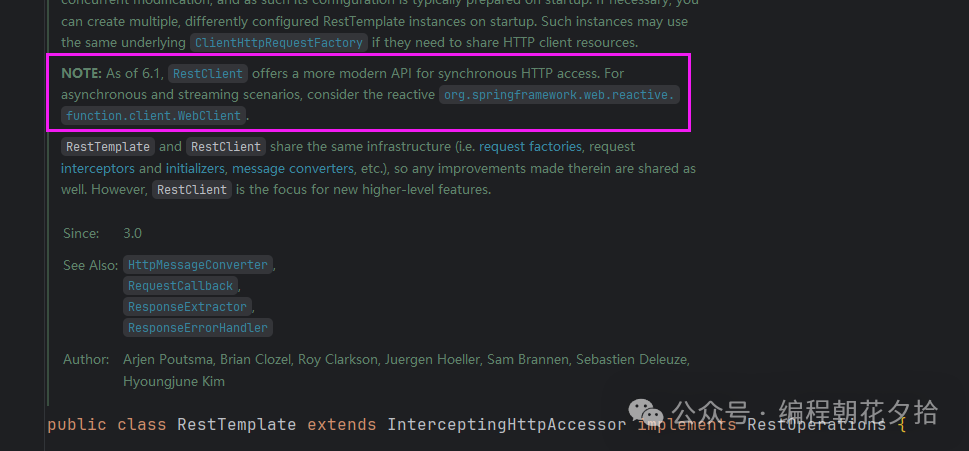
However, in <span>Spring 6.1</span>, the <span>RestClient</span> was introduced, and the upgrade is incredibly fast!
2.4 <span>admin4j/common-http</span>
<span>admin4j/common-http</span> is an open-source Java HTTP client library on <span>GitHub</span>. It wraps the <span>OkHttp</span> framework with the <span>OkHttpUtil</span> utility class, making HTTP requests incredibly simple.
<span>GitHub</span> address: https://github.com/admin4j/common-http
Example
@Test
void okUtil() throws IOException {
    Response r = HttpUtil.get(BASE_URL, new Pair<>());
    if (r.isSuccessful() && r.body() != null) {
        System.out.println(r.body().string());
    } else {
        System.out.println("Request failed: " + r.code());
    }
}
Notes:
- • Dependencies and Versions: This is a third-party library that requires additional Maven dependencies. Pay attention to its version updates and compatibility when using.
- • Learning Curve and Ecosystem: Compared to
<span>OkHttp</span>or<span>Spring</span>‘s clients, its community size and ecosystem maturity may be slightly inferior. You will need to spend some time reading its dedicated documentation to understand all features.
If you are tired of template code and want to complete HTTP communication in the simplest and most intuitive way, this library is an excellent choice.
2.5 <span>Hutool</span>‘s <span>HttpUtil</span>
<span>HttpUtil</span> is a component in the <span>Hutool</span> utility library that wraps around the <span>JDK</span>‘s <span>HttpURLConnection</span>. Its core design philosophy is simplicity and convenience, providing an extremely simple <span>API</span> through static methods, aiming to accomplish the most common HTTP request tasks with minimal code, greatly enhancing development efficiency.
Example
@Test
void hutoolTest() {
    String body = HttpUtil.get(BASE_URL);
    System.out.println(body);
}
Notes:
- • Flexibility: Although simple, for some extremely complex scenarios (such as custom SSL context, fine-tuned connection timeout and pooling configurations, interceptors, etc.),
<span>HttpUtil</span>‘s encapsulation may not be flexible enough. In such cases, choose a lower-level library. - • Singleton and Connection Pool: The static methods of
<span>HttpUtil</span>will create a new connection each time. For high-performance scenarios that require connection reuse, it is recommended to use the<span>HttpRequest</span>class and configure it accordingly. - • High Concurrency: For large, high-concurrency production environments, if its performance becomes a bottleneck, consider replacing it with
<span>OkHttp</span>or<span>Apache HttpClient</span>, but<span>Hutool</span>is sufficient in most scenarios.
It is the absolute first choice for rapid prototyping, small projects, internal tool scripts, and test code. Nothing is faster than it.
2.6 <span>Spring6</span>‘s <span>RestClient</span>
<span>RestClient</span> is a modern replacement for <span>RestTemplate</span>, introduced in <span>Spring 5</span>, which is a reactive, non-blocking HTTP client. It is part of <span>Spring WebFlux</span>, supporting asynchronous and stream processing, with lower resource consumption and stronger concurrency capabilities.
<span>RestClient</span> is a new synchronous <span>HTTP</span> client introduced in <span>Spring Framework 6.1</span>. It adopts a modern <span>fluent API</span> (chain calling) design, and the underlying implementation can be based on the non-blocking engine of <span>WebClient</span> or adapt to other HTTP libraries (such as <span>JDK HttpClient</span>). Its goal is to provide a simple, intuitive, and powerful way to perform synchronous <span>HTTP</span> requests, making it the official successor to <span>RestTemplate</span>.
Here we take <span>RestClient</span> as an example.
Example
@Test
void webclientTest() {
    String body = RestClient.create(BASE_URL)
            .get()
            .retrieve()
            .body(String.class);
    System.out.println(body);
}
Notes:
- • Version Requirement: Requires
<span>Spring Framework 6.1.0</span>or higher. Corresponding to<span>Spring Boot 3.2.0</span>or higher. - • Error Handling: Use the
<span>.onStatus()</span>method to provide custom handling logic for specific HTTP status codes, which is clearer and more flexible than the exception handling in<span>RestTemplate</span>. - • Flexibility: Although it is synchronous, its underlying implementation can be non-blocking (such as based on
<span>WebClient</span>), which means it can run efficiently in reactive environments without requiring users to change their programming paradigm. - •
<span>API</span>Design: The API design is very similar to<span>WebClient</span>, reducing the learning cost of switching between synchronous and asynchronous clients.
If you are starting a new project and do not want to use a reactive programming model, <span>RestClient</span> is the most official and modern choice.
03 Conclusion
The Java ecosystem offers a rich selection of HTTP clients, each with its own strengths. Spring developers prefer <span>RestClient</span> (synchronous) and <span>WebClient</span> (asynchronous); those pursuing lightweight and performance can choose <span>OkHttp</span>; for extreme development efficiency, the domestic tools <span>Hutool</span> and <span>admin4j/common-http</span> are recommended; while complex enterprise-level scenarios can still rely on the classic <span>Apache HttpClient</span>.
These six excellent <span>HTTP</span> client libraries are magical, helping you choose precisely based on project needs and efficiently complete network request tasks; there is always one that suits you.
END
After following, check the keywords to receive the corresponding PDF materials.
Click the card below to follow, to avoid getting lost!
↓ ↓ ↓ ↓