Rain Drop Sensor: Embedded Development with ESP32 in Rust
The rain drop sensor is an environmental sensing device that can perceive the presence of rain, the amount of rainfall, and the intensity of precipitation in real-time. Its core function is to convert the physical property changes caused by raindrop contact (such as changes in resistance, capacitance, and light reflectivity) into electrical signals that can be recognized by electronic systems, providing accurate rain condition data for subsequent automation control, data collection, or early warning decision-making.
In terms of application scenarios, the practicality of rain drop sensors widely covers multiple fields: in the automotive sector, it acts as the “eyes” of the automatic wiper system, automatically adjusting the wiper’s swing speed based on rainfall, while also linking to the window control system to trigger automatic window closure during heavy rain, preventing water from entering the vehicle; in smart home scenarios, it can interact with smart skylights and outdoor smart clothes drying racks, immediately issuing commands to close the skylight and retract the drying rack upon detecting rain, ensuring household items remain dry and the indoor environment stays comfortable; in agricultural production, rain drop sensors can be integrated into greenhouse or farmland irrigation systems, dynamically adjusting irrigation frequency and water volume based on monitored rainfall, avoiding excessive irrigation and water resource waste, thus supporting precision agriculture; additionally, in meteorological monitoring stations, road traffic safety warning systems (such as alerts for slippery road conditions), and outdoor equipment protection (such as rain protection for unattended devices), rain drop sensors, with their sensitive perception capabilities, become key components in enhancing system automation levels and operational safety.
Functionality Implementation
- 1. Obtain information on
<span>whether it is raining</span>.
Familiarizing with Hardware:
Rain Drop Sensor
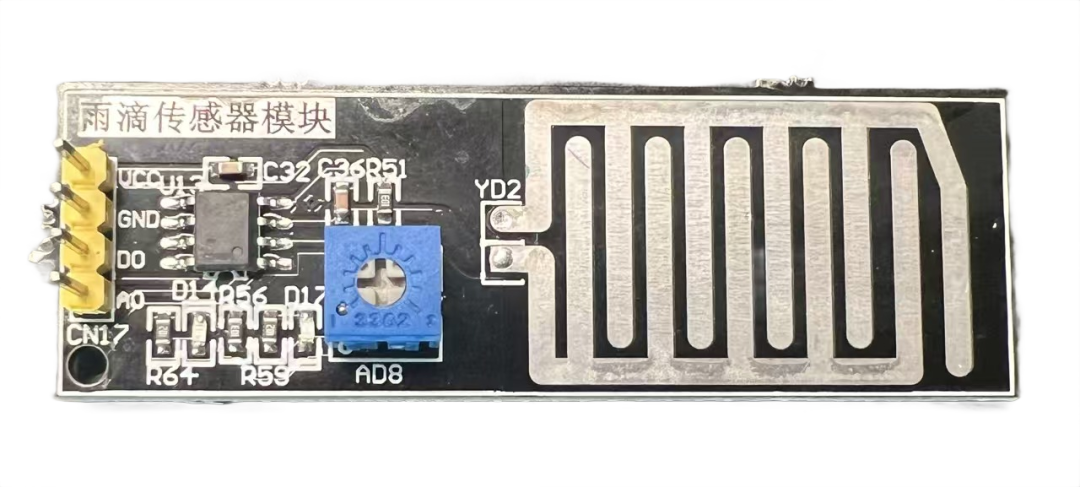
Basic Interface (Applicable to Most Microcontroller/Development Board Models)
The wiring interfaces of rain drop sensors vary by model and application scenario, but the core interfaces and wiring logic have commonalities. Below are the wiring instructions and precautions for different models:
VCC (Power Positive)
- • Connect to a 3.3V or 5V power supply, depending on the sensor’s operating voltage (commonly 3.3V-5V).
- • For example: Development boards like STM32 and Arduino can connect directly to the 5V pin.
GND (Power Negative/Ground)
- • Connect to the power negative or the GND pin of the development board to ensure the circuit is closed.
DO (Digital Output)
- • Outputs a switch signal (0 or 1) to detect whether it is raining.
- • Connect to the digital input pin of the microcontroller (e.g., Arduino’s D2, STM32’s PA0).
- • Outputs high level (DO=1) when there is no rain, and low level (DO=0) when it is raining.
AO (Analog Output)
- • Outputs a continuous voltage value of 0-5V, reflecting the amount of rainfall.
- • Connect to the analog input pin of the microcontroller (e.g., Arduino’s A0, STM32’s PA1).
- • Read the voltage value through ADC to calculate raindrop intensity or rainfall amount.
ESP32 Connection Diagram
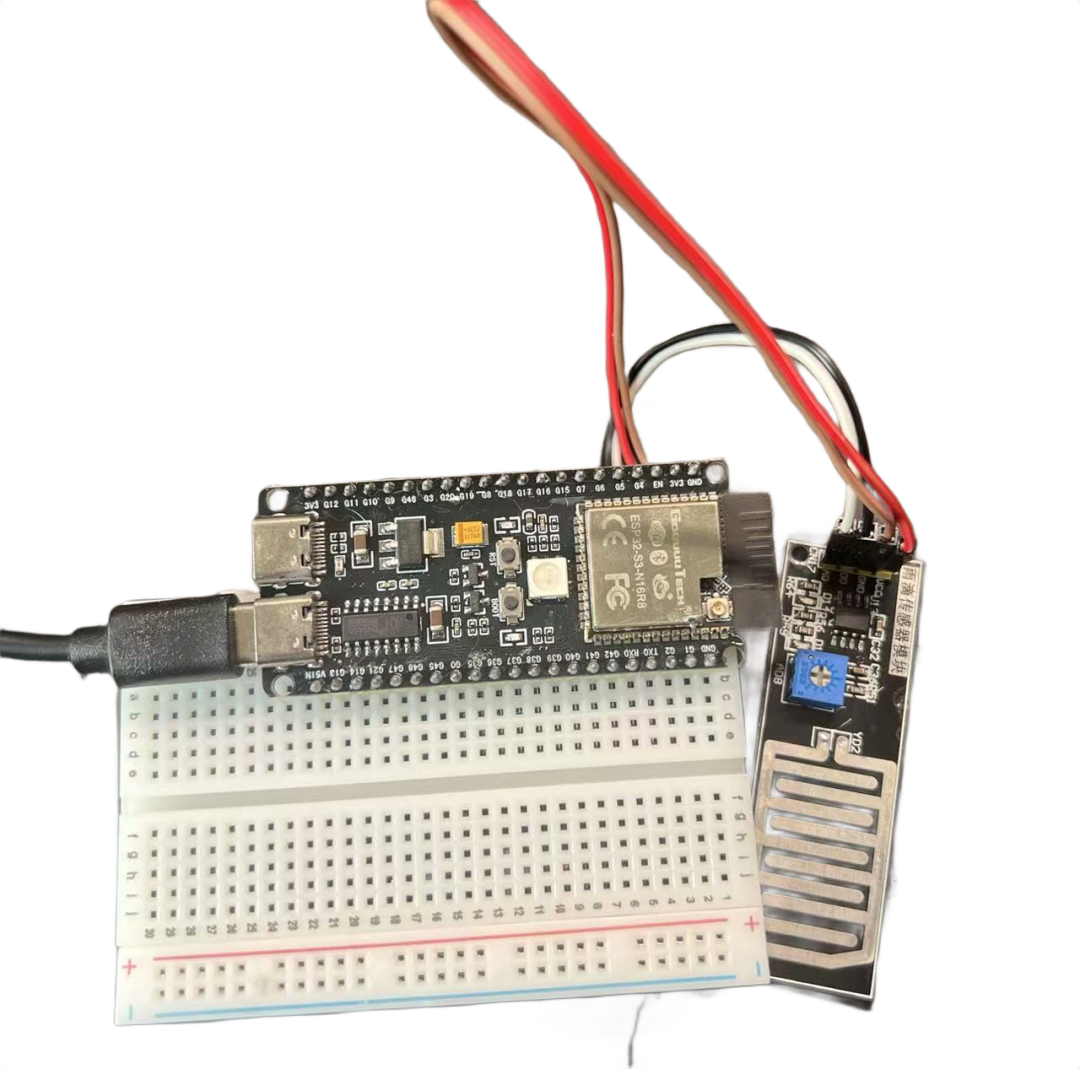
Wiring:VCC –>3V3GND –>GNDDO –>G5AO –>G4
Code Implementation
Modify the Cargo.toml file to add nb import
...
nb = "1.1.0"
...
Implement G5 pin information access
...
  let raindrop = Input::new(peripherals.GPIO5, InputConfig::default());
...
Implement G4 pin information access
...
    // Configure ADC
    let mut adc_config = AdcConfig::new();
    let mut adc_pin = adc_config.enable_pin(peripherals.GPIO4, Attenuation::_11dB); // Set attenuation to 0-3.3V
    let mut adc = Adc::new(peripherals.ADC1, adc_config);
...
Print information
...
let delay = Delay::new();
loop {
    let raw_value: u16 = nb::block!(adc.read_oneshot(&mut adc_pin)).unwrap();
    let voltage = (raw_value as f32 * 3.3) / 4095.0;
    println!("+++++++++++++++++++++++++++++++++++++++++++++++++++++++++++++++++++++");
    println!("adc_value: {}", raw_value);
    println!("voltage: {}", voltage);
    println!("raindrop: {}", raindrop.is_low());
    delay.delay_millis(1000);
}
...
Complete Code
#![no_std]
#![no_main]
#![deny(
    clippy::mem_forget,
    reason = "mem::forget is generally not safe to do with esp_hal types, especially those \
    holding buffers for the duration of a data transfer."
)]

use esp_hal::{
    analog::adc::{Adc, AdcConfig, Attenuation},
    clock::CpuClock,
    delay::Delay,
    gpio::{Input, InputConfig},
    main,
};
use esp_println::println;

#[panic_handler]
fn panic(_: &core::panic::PanicInfo) -> ! {
    loop {
        println!("Panic!");
    }
}

pub fn update_method(timestamp: u32) {
    println!("update_method: {}", timestamp);
}
esp_bootloader_esp_idf::esp_app_desc!();
#[main]
fn main() -> ! {
    // generator version: 0.5.0
    let config = esp_hal::Config::default().with_cpu_clock(CpuClock::max());
    let peripherals = esp_hal::init(config);
    let raindrop = Input::new(peripherals.GPIO5, InputConfig::default());
    // Configure ADC
    let mut adc_config = AdcConfig::new();
    let mut adc_pin = adc_config.enable_pin(peripherals.GPIO4, Attenuation::_11dB); // Set attenuation to 0-3.3V
    let mut adc = Adc::new(peripherals.ADC1, adc_config);
    let delay = Delay::new();
    loop {
        let raw_value: u16 = nb::block!(adc.read_oneshot(&mut adc_pin)).unwrap();
        let voltage = (raw_value as f32 * 3.3) / 4095.0;
        println!("+++++++++++++++++++++++++++++++++++++++++++++++++++++++++++++++++++++");
        println!("adc_value: {}", raw_value);
        println!("voltage: {}", voltage);
        println!("raindrop: {}", raindrop.is_low());
        delay.delay_millis(1000);
    }

    // for inspiration have a look at the examples at https://github.com/esp-rs/esp-hal/tree/esp-hal-v1.0.0-rc.0/examples/src/bin
}
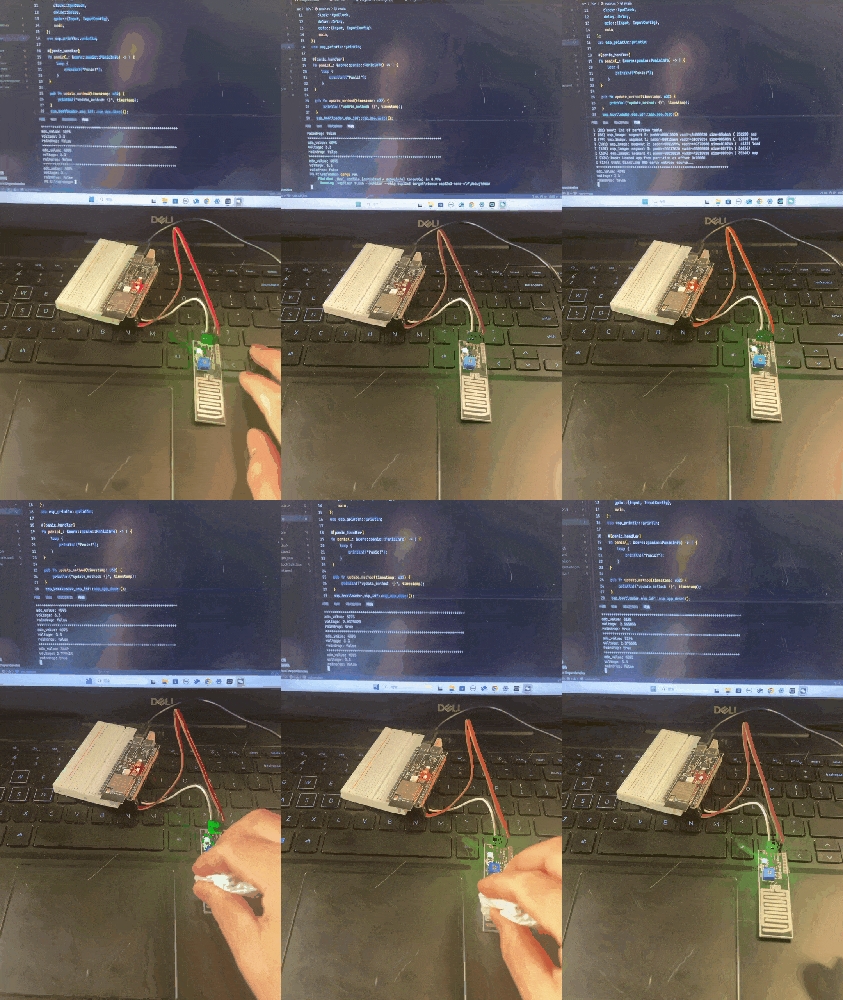
Effect Demonstration