This is a clean version of notes compiled from classroom/self-study, covering commonly used Linux commands, the minimal structure of C programs, input/output, and formatting placeholders, along with directly runnable example code.
1. Quick Reference for Common Linux Commands
-
Create Directory
mkdir lab -
Change Directory
cd lab -
View Current Path
pwd -
List Current Directory Contents
ls -
Create Empty File
touch list -
View File Contents
cat temp -
View First 10 Lines of a File
head -10 temp -
Rename / Move File
mv temp temp1 -
Delete File
rm temp -
Change Permissions (r=4, w=2, x=1)
chmod 744 filename -
Example:
<span><span>744</span></span>means the owner can read, write, and execute, while the group and others can read. -
Clear Screen
clear
2. Minimal Structure of a C Program
-
Header Files:
#include<stdio.h> -
Common standard header files are located in
<span><span>/usr/include/</span></span>. -
Main Function:
int main(void) {/* Program entry */return 0;}
// void indicates "no parameter list"; return 0; usually indicates normal program termination.
// \n is the newline character.
Example 1: Hello, World
#include<stdio.h>
int main(void) {printf("Hello, World!\n");  // \n is the newline
return 0;}
3. Standard Input / Output
Include <span><span>#include</span><span> <stdio.h></span></span>.
-
Input Functions:
<span><span>scanf()</span></span>,<span><span>fscanf()</span></span>,<span><span>getchar()</span></span>,<span><span>gets()</span></span>* -
Output Functions:
<span><span>printf()</span></span>,<span><span>fprintf()</span></span>,<span><span>putchar()</span></span>,<span><span>puts()</span></span>
*Note:
<span><span>gets()</span></span>is unsafe; it is recommended to use<span><span>fgets()</span></span>in actual programming.
Common Formatting Placeholders
-
<span><span>%d</span></span>: Read/PrintIntegerint radius; scanf("%d", &radius); // & gets the variable address -
<span><span>%f</span></span>: Float -
<span><span>%c</span></span>: Character -
<span><span>%s</span></span>: String
4. Example Code
Example 2: Find Maximum of Two Numbers
#include<stdio.h>
int main(void) {int val1, val2, max;
scanf("%d %d", &val1, &val2);
if (val1 > val2) max = val1;
else max = val2;
printf("Largest value is %d.\n", max);
return 0;}
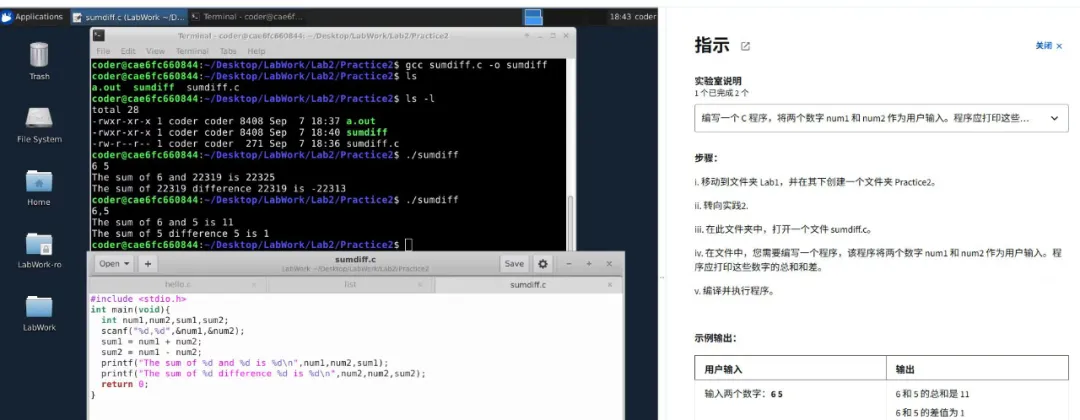
Example 3: Sum of Two Numbers
#include<stdio.h>
int main(void) {int num1, num2, sum;
scanf("%d %d", &num1, &num2); sum = num1 + num2;
printf("The sum of %d and %d is %d\n", num1, num2, sum);
return 0;}
5. Quickly Create and Edit C Files in Linux (Note Version)
-
Create Source File:
touch main.c -
Edit Using Terminal Editor (Example: nano):
nano main.c
Edit in nano, then press Ctrl+X → Y → Enter to save and exit.
(Optional) If you need to compile and run:
gcc main.c -o main
./main
 |
 |
|
Yufeng Research Team was established in August 2025, with core members from prestigious institutions such as the Indian Institute of Technology, Royal Holloway University of London, St. Petersburg State University, Tomsk State University, and Al-Farabi Kazakh National University. The team is dedicated to exploring and applying cutting-edge technologies, focusing on explainable AI, information security and privacy protection, and data science. With an interdisciplinary background and an international perspective, the Yufeng Research Team aims to promote the integrated development of intelligent technology and security systems, facilitating academic innovation and industrial practice. Contact us:[email protected] (Member Management) |