Table of Contents
Series Article Directory
Introduction
1. Topic Wildcards
1.1 Single-Level Wildcards
1.2 Multi-Level Wildcards
2. System Topics
3. Testing System Topics with MQTTX
3.1 Enable Access Permissions
3.2 EMQX Cluster Node List
3.3 Subscribe to EMQX Version Topic
3.4 Subscribe to Online/Offline Topics
Conclusion
Introduction
The MQTT topic is essentially a UTF-8 encoded string that serves as the basis for message routing in the MQTT protocol. MQTT topics are similar to URL paths, using slashes (/) for hierarchical separation:
chat/room/1test/10/temperaturetest/+/temperaturetest/#To avoid ambiguity and ensure clarity, it is generally not recommended for topics to start or end with a /, such as /chat or chat/.
MQTT topics do not need to be created in advance. MQTT clients automatically create topics when subscribing or publishing, so developers do not need to worry about creating topics or manually deleting them.
1. Topic Wildcards
MQTT topic wildcards include single-level wildcard + and multi-level wildcard #, primarily used for clients to subscribe to multiple topics at once.
1.1 Single-Level Wildcards
The plus sign (“+”) is a wildcard used for matching a single topic level. When using a single-level wildcard, it must occupy the entire level, for example:
+ validtest/+ validtest/+/temperature validtest+ invalid (does not occupy the entire level)If a client subscribes to the topic test/+/temperature, it will receive messages from the following topics:
test/1/temperaturetest/2/temperature...test/n/temperatureHowever, it will not match the following topic:
test/temperaturetest/bedroom/1/temperature1.2 Multi-Level Wildcards
The hash symbol (“#”) is a wildcard used to match any level in the topic hierarchy. The multi-level wildcard indicates its parent and any number of child levels. When using a multi-level wildcard, it must occupy the entire level and must be the last character of the topic, for example:
# valid, matches all topics test/# valid test/bedroom# invalid (does not occupy the entire level) test/#/temperature invalid (not the last character of the topic)If a client subscribes to the topic test/#, it will receive messages from the following topic:
testtest/temperaturetest/1/temperature2. System Topics
Topics that start with $SYS/ are system topics, primarily used to obtain the operational status of the MQTT server, message statistics, client online/offline events, and other data. Currently, the MQTT protocol does not explicitly define a standard for $SYS/ topics, but most MQTT servers adhere to this standard recommendation.
For example, the EMQX server supports obtaining cluster status through the following topics:
Topic Description
| Topic | Description |
| $SYS/brokers | EMQX Cluster Node List |
| $SYS/brokers/[email protected]/version | EMQX Version |
| $SYS/brokers/[email protected]/uptime | EMQX Uptime |
| $SYS/brokers/[email protected]/datetime | EMQX System Time |
EMQX also supports rich system topics for client online/offline events, traffic in/out, message sending/receiving, system monitoring, etc. Users can subscribe to the $SYS/# topic to receive all system topic messages.
System topic documentation: https://docs.emqx.com/zh/emqx/v5.0/observability/mqtt-system-topics.html#%E5%AE%A2%E6%88%B7%E7%AB%AF%E4%B8%8A%E4%B8%8B%E7%BA%BF%E4%BA%8B%E4%BB%B6
For example, to subscribe to client online/offline event topics:
$SYS/brokers/[email protected]/clients/+/connected # Subscribe to client online topic $SYS/brokers/[email protected]/clients/+/disconnected # Subscribe to client offline topic3. Testing System Topics with MQTTX
3.1 Enable Access Permissions
Note: Listening to system topics requires enabling the corresponding access permissions on the broker side.
Step 1:

Step 2:
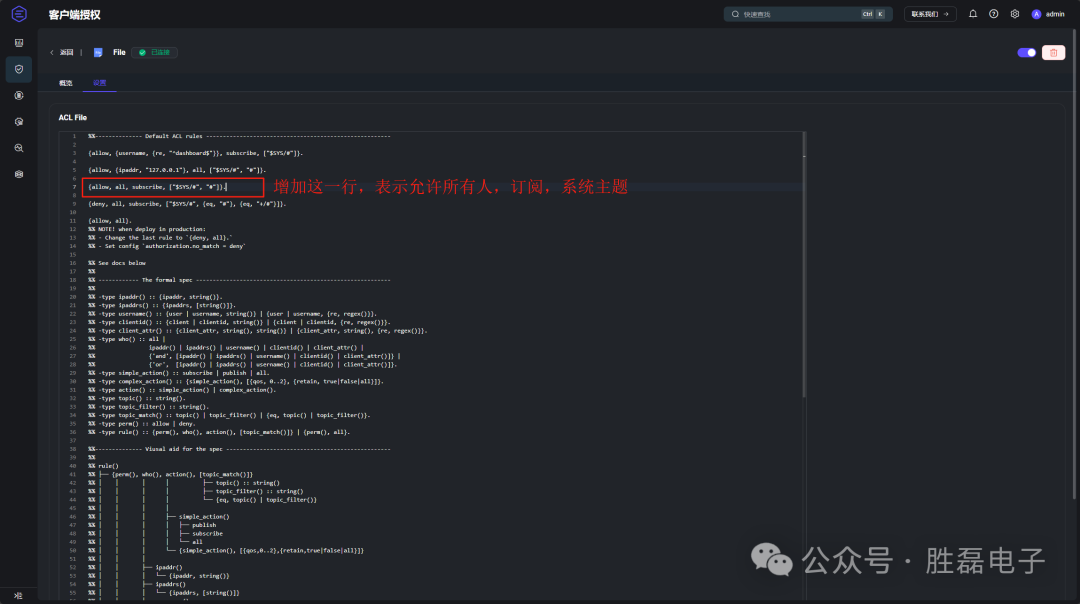
3.2 EMQX Cluster Node List
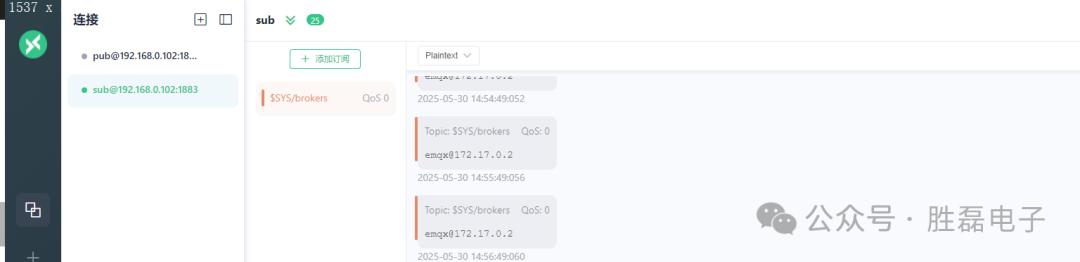
172.17.0.2: The Docker container IP address of the EMQX Broker.
1. View Docker Containers
docker ps -a
2. View Docker Information
docker inspect emqx-enterprise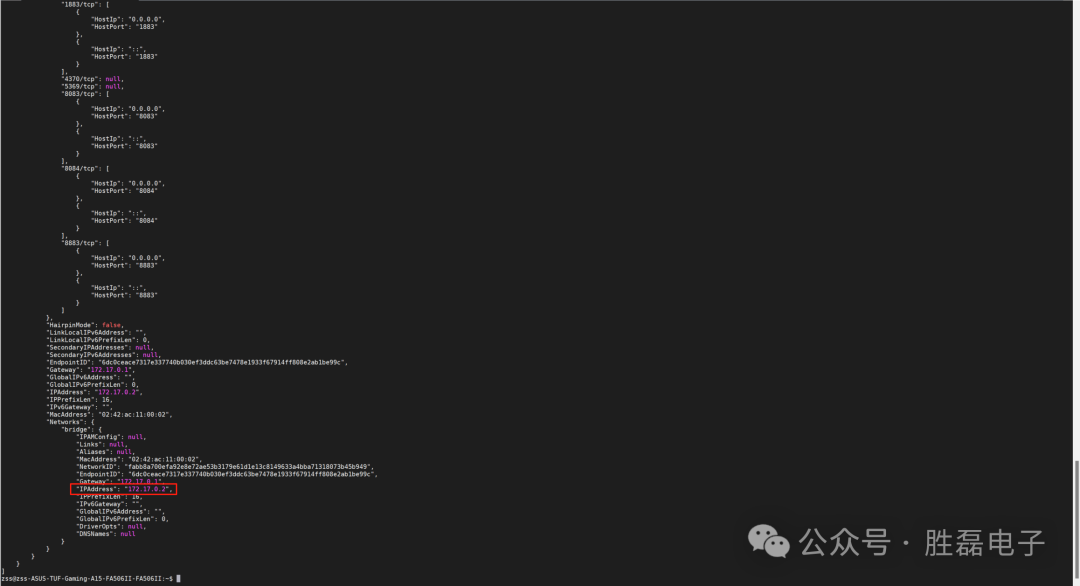
3. Subscribe to EMQX Version Topic
$SYS/brokers/[email protected]/version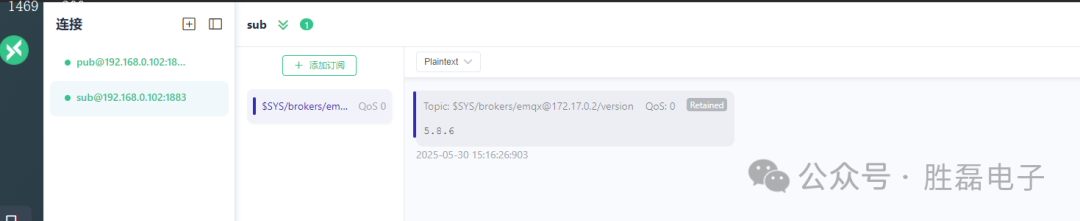
4. Subscribe to Online/Offline Topics
$SYS/brokers/[email protected]/clients/+/connected # Subscribe to client online topic $SYS/brokers/[email protected]/clients/+/disconnected # Subscribe to client offline topicHere, “+” indicates listening to any client.

Conclusion
In summary, this article introduced the system topics of MQTT and provided demonstrations.