The <span>formatted input and output in C language</span> is controlled through a format string that dictates how data is read or displayed. These format strings consist of ordinary characters and <span>conversion specifiers</span>, which begin with a percent sign (<span>%</span>).
Basic Structure of Format Strings
%[flags][width][.precision][length]type
1. Conversion Types (Type Specifiers)

This is the core part of the format specifier, specifying the data type to be processed:
1.1 Integer Types
<span>%d</span>or<span>%i</span>– signed decimal integer<span>%u</span>– unsigned decimal integer<span>%o</span>– unsigned octal integer<span>%x</span>– unsigned hexadecimal integer (lowercase letters)<span>%X</span>– unsigned hexadecimal integer (uppercase letters)
1.2 Floating Point Types
<span>%f</span>– decimal floating-point number (lowercase)<span>%F</span>– decimal floating-point number (uppercase)<span>%e</span>– scientific notation (lowercase e)<span>%E</span>– scientific notation (uppercase E)<span>%g</span>– automatically selects %f or %e based on value (lowercase)<span>%G</span>– automatically selects %f or %E based on value (uppercase)<span>%a</span>– hexadecimal floating-point number (lowercase)<span>%A</span>– hexadecimal floating-point number (uppercase)
1.3 Characters and Strings
<span>%c</span>– single character<span>%s</span>– string
1.4 Pointer Types
<span>%p</span>– pointer address
1.5 Special Types
<span>%n</span>– stores the number of characters written so far into the parameter<span>%%</span>– outputs a percent sign
2. Length Modifiers

Specifies the size of the parameter to distinguish between different sizes of data types:
-
<span>hh</span>– represents<span>signed char</span>or<span>unsigned char</span> <span>%hhd</span>– signed character<span>%hhu</span>– unsigned character<span>%hhx</span>– unsigned character hexadecimal-
<span>h</span>– represents<span>short int</span>or<span>unsigned short int</span> <span>%hd</span>– short integer<span>%hu</span>– unsigned short integer-
<span>l</span>– represents<span>long int</span>or<span>unsigned long int</span> <span>%ld</span>– long integer<span>%lu</span>– unsigned long integer<span>%lx</span>– long integer hexadecimal-
<span>ll</span>– represents<span>long long int</span>or<span>unsigned long long int</span> <span>%lld</span>– long long integer<span>%llu</span>– unsigned long long integer-
<span>L</span>– represents<span>long double</span> <span>%Lf</span>– long double floating-point number-
<span>z</span>– represents<span>size_t</span> <span>%zu</span>– size_t type-
<span>t</span>– represents<span>ptrdiff_t</span> <span>%td</span>– ptrdiff_t type-
<span>j</span>– represents<span>intmax_t</span>or<span>uintmax_t</span> <span>%jd</span>– intmax_t type
3. Flags

Controls the alignment, padding, sign, etc. of the output:
<span>-</span>– left-align (default is right-align)<span>+</span>– always show sign (even for positive numbers)- (space) – shows space before positive numbers, negative sign before negative numbers
<span>#</span>- – use alternative form:
- for
<span>%o</span>, add leading 0 - for
<span>%x</span>and<span>%X</span>, add leading 0x or 0X - for
<span>%f</span>,<span>%e</span>,<span>%E</span>,<span>%g</span>,<span>%G</span>, always show decimal point - for
<span>%g</span>and<span>%G</span>, keep trailing zeros <span>0</span>– use 0 padding (ignored if – flag is present or precision is specified)
4. Width

Specifies the minimum field width:
- number – minimum field width
<span>*</span>– width specified by the next argument
5. Precision

Specifies the precision of the output:
<span>.number</span>– precision value<span>.*</span>– precision specified by the next argument
The meaning of precision depends on the conversion type:
- for integers: minimum number of digits (padded with leading zeros if insufficient)
- for floating-point numbers: number of digits after the decimal point
- for strings: maximum number of characters
Example Code
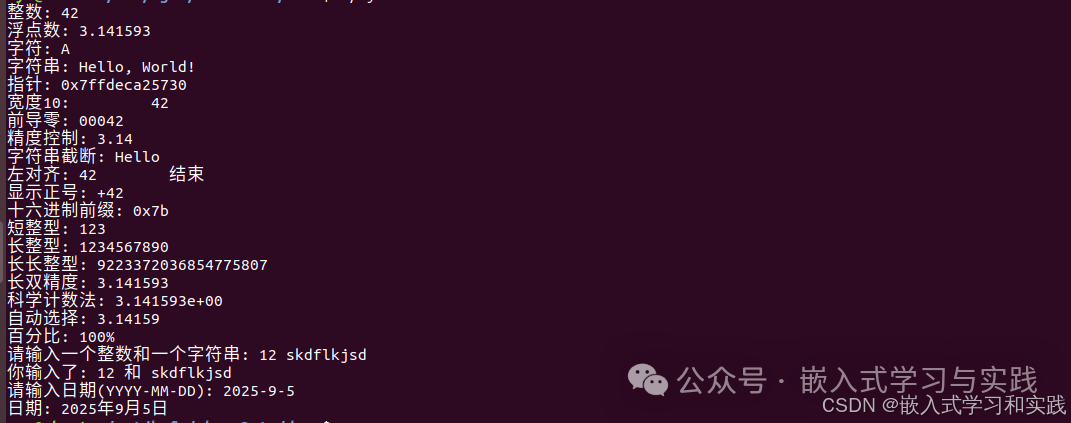
#include <stdio.h>#include <limits.h>
int main() {    int i = 42;    double d = 3.1415926535;    char c = 'A';    char s[] = "Hello, World!";    unsigned int u = 123;    void *p = &i;
    // Basic examples    printf("Integer: %d\n", i);    printf("Floating point: %f\n", d);    printf("Character: %c\n", c);    printf("String: %s\n", s);    printf("Pointer: %p\n", p);
    // Width and precision    printf("Width 10: %10d\n", i);    printf("Leading zeros: %05d\n", i);    printf("Precision control: %.2f\n", d);    printf("String truncation: %.5s\n", s);
    // Flags    printf("Left align: %-10d end\n", i);    printf("Show sign: %+d\n", i);    printf("Hexadecimal prefix: %#x\n", u);
    // Length modifiers    short si = 123;    long li = 1234567890L;    long double ld = 3.1415926535L;
    printf("Short int: %hd\n", si);    printf("Long int: %ld\n", li);    printf("Long long int: %lld\n", LLONG_MAX);    printf("Long double: %Lf\n", ld);
    // Special formats    printf("Scientific notation: %e\n", d);    printf("Auto select: %g\n", d);    printf("Percentage: 100%%\n");
    // scanf example    int input_int;    char input_str[100];
    printf("Please enter an integer and a string: ");    scanf("%d %s", &input_int, input_str);    printf("You entered: %d and %s\n", input_int, input_str);
    // Using * to skip input    printf("Please enter a date (YYYY-MM-DD): ");    int year, month, day;    scanf("%d-%d-%d", &year, &month, &day);    printf("Date: %d year %d month %d day\n", year, month, day);
    return 0;}
Formatted Input (scanf Series)
The scanf series functions use similar format specifiers, but there are some important differences:
- No precision specification is needed (except for
<span>%f</span>,<span>%lf</span>, etc. which can specify maximum field width) - For string input, precision does not need to be specified, but maximum width should be specified to prevent buffer overflow
- Whitespace characters in the format string match any number of whitespace characters (including zero)
- Non-whitespace characters (except for
<span>%</span>) must match the input exactly
scanf Format Specifier Example
#include <stdio.h>
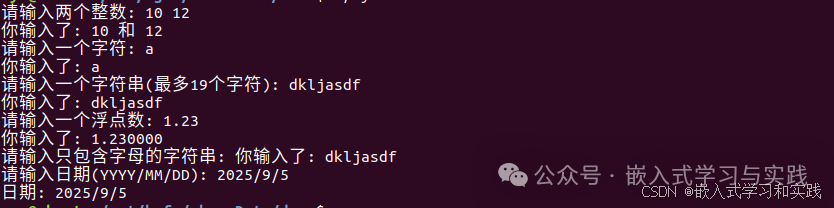
int main() {    int a, b;    char c;    char s[20];    float f;
    // Basic input    printf("Please enter two integers: ");    scanf("%d %d", &a, &b);    printf("You entered: %d and %d\n", a, b);
    // Character input    printf("Please enter a character: ");    scanf(" %c", &c); // Note the leading space to skip whitespace characters    printf("You entered: %c\n", c);
    // String input (limit length to prevent overflow)    printf("Please enter a string (up to 19 characters): ");    scanf("%19s", s);    printf("You entered: %s\n", s);
    // Floating point input    printf("Please enter a floating point number: ");    scanf("%f", &f);    printf("You entered: %f\n", f);
    // Using scan set    printf("Please enter a string containing only letters: ");    scanf("%[a-zA-Z]", s);    printf("You entered: %s\n", s);
    // Skipping specific characters    printf("Please enter a date (YYYY/MM/DD): ");    int year, month, day;    scanf("%d/%d/%d", &year, &month, &day);    printf("Date: %d/%d/%d\n", year, month, day);
    return 0;}
Notes
- Always limit the length of string input when using scanf to prevent buffer overflow
- Check the return value of scanf to ensure all expected inputs are successfully read
- For complex input parsing, consider using a combination of fgets and sscanf
- Avoid using deprecated functions like gets()
Advanced Usage
1. Positional Parameters
#include<stdio.h>
int main()
{
    // Using positional parameters (n$)
    printf("%2$d %1$d %3$d\n", 10, 20, 30); // Output: 20 10 30
    return 0;
}

2. Dynamic Width and Precision
#include<stdio.h>
int main()
{
    int value = 42;
    int width = 8;
    int precision = 4;
    double pi = 3.1415926535;

    printf("Dynamic width: %*d\n", width, value);
    printf("Dynamic precision: %.*f\n", precision, pi);
    printf("Dynamic width and precision: %*.*f\n", width, precision, pi);

    return 0;
}

3. Scan Sets
#include<stdio.h>
int main()
{
    char s[100];

    // Read a string containing spaces
    printf("Please enter a string containing spaces: ");
    scanf("%[^
]", s); // Read until newline
    printf("You entered: %s\n", s);

    // Clear input buffer
    while(getchar() != '\n');

    // Read specific character set
    printf("Please enter a string containing only numbers and letters: ");
    scanf("%[a-zA-Z0-9]", s);
    printf("You entered: %s\n", s);

    return 0;
}

References
C Library Function – sscanf()C Library Function – printf()Usage of sscanf function