

The compilation and linking process of C language converts the source code of a C program we write into executable code that can run on hardware, requiring compilation and linking.The process is illustrated as follows:
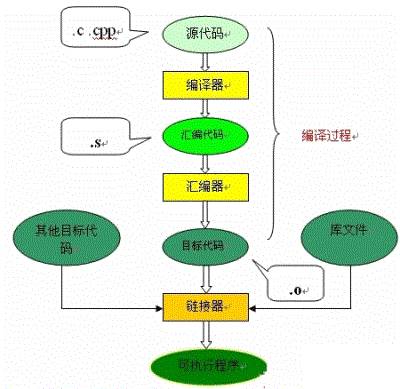
This article explains the work done during the C language compilation process, which is helpful for understanding the workings of header files, libraries, etc. Moreover, having a clear understanding of the compilation and linking process will greatly assist us in locating errors during programming and in leveraging the compiler’s error detection capabilities.
Compilation
Compilation involves reading the source program (character stream), performing lexical and syntactical analysis, and converting high-level language instructions into functionally equivalent assembly code.The compilation process of the source file includes two main stages: preprocessing and compilation optimization.
Preprocessing
The first stage is the preprocessing stage, which occurs before the formal compilation stage. The preprocessing stage modifies the content of the source file based on the preprocessing directives placed in the file. For example, the #include directive is a preprocessing directive that adds the content of the header file to the .cpp file. This method of modifying the source file before compilation provides great flexibility to accommodate the constraints of different computer and operating system environments. The code required for one environment may differ from that required for another, as the available hardware or operating system may vary. In many cases, code for different environments can be placed in the same file, and then modified during the preprocessing stage to adapt to the current environment.
The main processing aspects include:
-
Macro definition directives, such as #define a b
For such pseudo-directives, the preprocessor replaces all instances of a in the program with b, but a as a string constant is not replaced. The #undef directive cancels the definition of a macro, preventing future occurrences of that string from being replaced.
-
Conditional compilation directives, such as #ifdef, #ifndef, #else, #elif, #endif, etc.
The introduction of these pseudo-directives allows programmers to decide which code to process during compilation by defining different macros. The preprocessor filters out unnecessary code based on the relevant files.
-
Header file inclusion directives, such as #include “FileName” or #include , etc.
Header files generally define a large number of macros (most commonly character constants) using the pseudo-directive #define, and also contain declarations of various external symbols. The purpose of using header files is to make certain definitions available for multiple different C source programs. In the C source programs that require these definitions, only a single #include statement is needed, rather than repeating these definitions in the file. The preprocessor will include all definitions from the header file into its output file for the compiler to process. Header files included in C source programs can be system-provided, typically located in the /usr/include directory, and are included using angle brackets (< >). Additionally, developers can define their own header files, which are generally placed in the same directory as the C source program, and are included using double quotes (” “).
-
Special symbols that the preprocessor can recognize.
For example, the LINE identifier appearing in the source program will be interpreted as the current line number (in decimal), and FILE will be interpreted as the name of the currently compiled C source program. The preprocessor will replace these strings in the source program with appropriate values.
The preprocessor essentially performs a “substitution” of the source program. After this substitution, an output file is generated that does not contain macro definitions, conditional compilation directives, or special symbols. This file has the same meaning as the source file that has not been preprocessed, but its content differs. The next step is to use this output file as the input for the compiler to translate it into machine instructions.
Compilation and Optimization
The second stage, the compilation and optimization stage, processes the output file obtained from preprocessing, which contains only constants; such as numbers, strings, variable definitions, and C language keywords like main, if, else, for, while, {, }, +, -, *, /, etc.
The compiler’s task is to translate these into equivalent intermediate code representations or assembly code after confirming that all instructions conform to the syntax rules through lexical and syntactical analysis.
Optimization is a relatively complex technique within the compilation system. It involves not only issues related to compilation technology itself but also has a significant relationship with the hardware environment of the machine. One part of optimization focuses on optimizing intermediate code, which does not depend on specific computers. The other part mainly targets the generation of target code.
For the former type of optimization, the main tasks include eliminating common expressions, loop optimizations (code hoisting, strength reduction, transforming loop control conditions, merging known quantities, etc.), rewriting propagation, and deleting useless assignments, among others.
The latter type of optimization is closely related to the hardware structure of the machine, primarily considering how to make full use of the various hardware registers to store the values of related variables, thereby reducing memory access times. Additionally, adjusting instructions based on the characteristics of how the machine hardware executes instructions (such as pipelining, RISC, CISC, VLIW, etc.) to make the target code shorter and more efficient is also an important research topic.
Assembly
Assembly refers to the process of translating assembly language code into target machine instructions. Each C language source program processed by the translation system will ultimately undergo this process to obtain the corresponding target file. The target file contains the machine language code equivalent to the source program. Target files consist of segments. Typically, a target file contains at least two segments:
Code Segment:This segment mainly contains the instructions of the program.
This segment is generally readable and executable, but typically not writable.
Data Segment:This segment mainly stores various global variables or static data used in the program. Generally, the data segment is readable, writable, and executable.
In a UNIX environment, there are mainly three types of target files:
-
Relocatable Files
These contain code and data suitable for linking with other target files to create an executable or shared target file.
-
Shared Target Files
These files store code and data suitable for linking in two contexts. The first context is that the linker can process it with other relocatable files and shared target files to create another target file; the second context is that the dynamic linker will combine it with another executable file and other shared target files to create a process image.
-
Executable Files
This contains a file that can be executed by the operating system to create a process. The target file generated by the assembler is actually the first type of target file. The latter two require additional processing to obtain, which is the job of the linker.
Linking Process
The target file generated by the assembler cannot be executed immediately, as there may still be many unresolved issues.
For example, a function in one source file may reference a symbol defined in another source file (such as a variable or function call); the program may call a function from a library file, etc. All these issues need to be resolved through the linker.
The main task of the linker is to connect the relevant target files together, meaning linking the symbols referenced in one file with their definitions in another file, so that all these target files become a unified whole that can be loaded and executed by the operating system.
Depending on the linking method specified by the developer for library functions, linking can be divided into two types:
-
Static Linking
In this linking method, the function’s code is copied from its static library into the final executable program. Thus, when the program is executed, this code will be loaded into the virtual address space of the process. A static library is essentially a collection of target files, each containing the code for one or a group of related functions.
-
Dynamic Linking
In this method, the function’s code is placed in a target file known as a dynamic link library or shared object. The linker only records the name of the shared object and some minimal registration information in the final executable program. When this executable file is run, the entire content of the dynamic link library will be mapped into the virtual address space of the corresponding process at runtime. The dynamic linker will find the corresponding function code based on the information recorded in the executable program.
For function calls in the executable file, either dynamic linking or static linking methods can be used. Using dynamic linking can make the final executable file smaller and save some memory when the shared object is used by multiple processes, as only one copy of the shared object’s code needs to be kept in memory. However, using dynamic linking is not always superior to static linking. In some cases, dynamic linking may introduce performance penalties.