The queue function module implemented based on microcontrollers is mainly used for 8-bit, 16-bit, and 32-bit microcontroller applications that do not run RTOS, compatible with most microcontroller platforms. Open source code: https://github.com/xiaoxinpro/QueueForMcu
1. Features
- Dynamic creation of queue objects
- Dynamic setting of queue data buffer
- Static specification of queue element data length
- Value passing method to store queue data
2. Quick Start
#include "queue.h"
#define Q_UART_BUFFER_SIZE  1024
QUEUE_HandleTypeDef qUartTx;QUEUE_DATA_T BufferUartTx[Q_UART_BUFFER_SIZE];
int main(void){  QUEUE_DATA_T temp;    // Initialize queue  Queue_Init(&qUartTx, BufferUartTx, Q_UART_BUFFER_SIZE);    while(1)  {    // Enqueue    Queue_Push(&qUartTx, 'Q');    Queue_Push(&qUartTx, 'u');    Queue_Push(&qUartTx, 'e');    Queue_Push(&qUartTx, 'u');    Queue_Push(&qUartTx, 'e');        // Dequeue    Queue_Pop(&qUartTx, &temp);    Queue_Pop(&qUartTx, &temp);    Queue_Pop(&qUartTx, &temp);    Queue_Pop(&qUartTx, &temp);    Queue_Pop(&qUartTx, &temp);  }
3. Configuration Description
Currently, QueueForMcu has only one static configuration item, as follows: In the file queue.h, there is a macro definition QUEUE_DATA_T used to specify the data length of queue elements, which defaults to unsigned char and can be changed to other data types as needed.
4. Data Structure
The data structure of the queue is QUEUE_HandleTypeDef, which is used to save the state of the queue. The source code is as follows:
typedef struct QUEUE_HandleTypeDef{ unsigned int head; // Queue head pointer unsigned int tail; // Queue tail pointer unsigned int buffer_length; // Queue buffer length (assigned during initialization) QUEUE_DATA_T * buffer; // Queue buffer array (assigned during initialization)}QUEUE_HandleTypeDef;
Where QUEUE_DATA_T is the custom data type defined in the configuration item.
5. Creating a Queue
1. Create Queue Buffer
Since we use the value passing method to store queue data, we need to manually create a queue buffer before creating the queue to store the queue data.
QUEUE_DATA_T BufferUartTx[1024];
The above code creates a queue buffer of size 1024.
2. Create Queue Structure
Next, use QUEUE_HandleTypeDef to create a queue structure to save the state of the queue:
QUEUE_HandleTypeDef qUartTx;
3. Initialize Queue
After preparing the queue buffer and queue structure, call the Queue_Init function to create the queue. The function prototype is as follows:
void Queue_Init(QUEUE_HandleTypeDef * hqueue, QUEUE_DATA_T * buffer, unsigned int len) Parameter description:
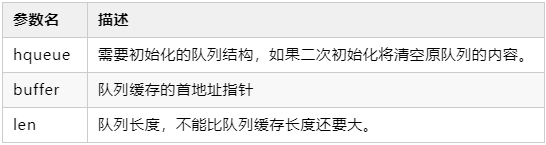
Reference code:
Queue_Init(&qUartTx, BufferUartTx, Q_UART_BUFFER_SIZE);
6. Push to Queue
1. Single Data Push
To push data to the tail of the queue, use the Queue_Push function. The function prototype is as follows:
QUEUE_StatusTypeDef Queue_Push(QUEUE_HandleTypeDef * hqueue, QUEUE_DATA_T data) Parameter description: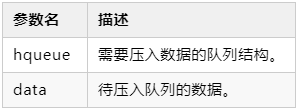 Return value description: This function will return a QUEUE_StatusTypeDef enumeration data type, and the return value will depend on the queue status, returning the following values: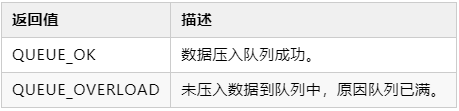
Reference code:
Queue_Push(&qUartTx, 'Q');Queue_Push(&qUartTx, 0x51);Queue_Push(&qUartTx, 81);2. Multiple Data Push
If you need to push multiple data (array) to the queue, you can use the Queue_Push_Array function, which is implemented by looping through the Queue_Push function. The function prototype is as follows:
unsigned int Queue_Push_Array(QUEUE_HandleTypeDef * hqueue, QUEUE_DATA_T * pdatas, unsigned int len)Parameter description:
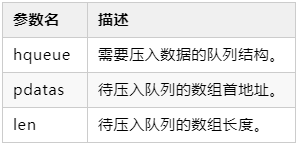
When the array length exceeds the remaining length of the queue, the excess data in the array will be ignored. Return value description:
- This function will return the actual length of data pushed into the queue.
- When the remaining length in the queue is sufficient, the return value will equal the parameter len.
- When the remaining length in the queue is insufficient, the return value will be the actual length of data pushed into the queue.
7. Pop from Queue
1. Single Data Pop
To pop data from the head of the queue, use the Queue_Pop function. Note that the popped data will be deleted from the queue. The function prototype is as follows:
QUEUE_StatusTypeDef Queue_Pop(QUEUE_HandleTypeDef * hqueue, QUEUE_DATA_T * pdata) Parameter description: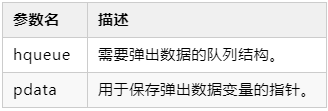 Return value description: This function will return a QUEUE_StatusTypeDef enumeration data type, and the return value will depend on the queue status, returning the following values: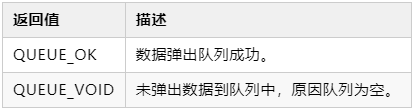
Reference code:
QUEUE_DATA_T temp;if(QUEUE_OK = Queue_Pop(&qUartTx, &temp)){ // temp is the data popped from the queue}else{ // Failed to pop data}
2. Multiple Data Pop
If you need to pop multiple data from the queue, you can use the Queue_Pop_Array function, which is implemented by looping through the Queue_Pop function. Note that successfully popped data will be deleted from the queue. The function prototype is as follows:
unsigned int Queue_Pop_Array(QUEUE_HandleTypeDef * hqueue, QUEUE_DATA_T * pdatas, unsigned int len) Parameter description: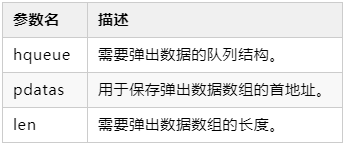 When the length of data to be popped exceeds the length of data in the queue, the excess space in the pop array will not be assigned. Return value description:
- This function will return the actual length of data popped from the queue.
- When the data length in the queue is sufficient, the return value will equal the parameter len.
- When the data length in the queue is insufficient, the return value will be the actual length of data popped from the queue.
3. Single Data Peek
When you need to get data from the head of the queue without deleting it from the queue, you can use the Queue_Peek function, which has the same parameters and return values as Queue_Pop. The difference between using Queue_Peek and Queue_Pop is:
- Queue_Pop deletes the data from the queue after retrieving it.
- Queue_Peek retains the data in the queue after retrieving it.
4. Multiple Data Peek
When you need to get multiple data from the head of the queue without deleting it from the queue, you can use the Queue_Peek_Array function, which has the same parameters and return values as Queue_Pop_Array. The difference between using Queue_Peek_Array and Queue_Pop_Array is:
- Queue_Pop_Array deletes the data from the queue after retrieving it.
- Queue_Peek_Array retains the data in the queue after retrieving it.
8. Other Functions
1. Clear Queue
When you need to clear the queue data, there is no need to pop all data; just call Queue_Clear to quickly clear the specified queue. This function is called during queue creation to initialize the queue, so there is no need to call the clear queue function for a newly created queue.
Function prototype:
void Queue_Clear(QUEUE_HandleTypeDef * hqueue) Parameter description: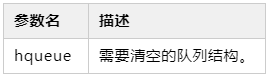
2. Get Queue Data Count
When you need to get the length of data in the queue, call the Queue_Count function. The function prototype is as follows:
unsigned int Queue_Count(QUEUE_HandleTypeDef * hqueue) Parameter description: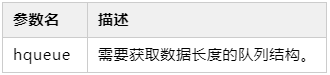 Return value description:
- This function will return the length of data in the queue.
- The return value ranges from 0 to the length specified during queue creation.
License
Copyright © 2020 QueueForMcu Released under the GPL-3.0 License.