About 20 years ago, the Internet of Things (IoT) was just starting in China. Wuxi vigorously developed IoT, bringing in several research institutions and companies from the Chinese Academy of Sciences engaged in IoT research, thus making Wuxi the national center for IoT research and development. The words “China IoT Research and Development Center” were inscribed on a building in the Micro-Nano Park. I personally joined the Wuxi branch of the Institute of Software, Chinese Academy of Sciences around 2010, engaging in IoT R&D for a period. Fast forward to today, 15 years later, due to product layout needs, the company is developing an IoT-based product, finally picking up the old profession that was abandoned for many years. Therefore, today I will write about the commonly used MQTT in IoT software and hardware.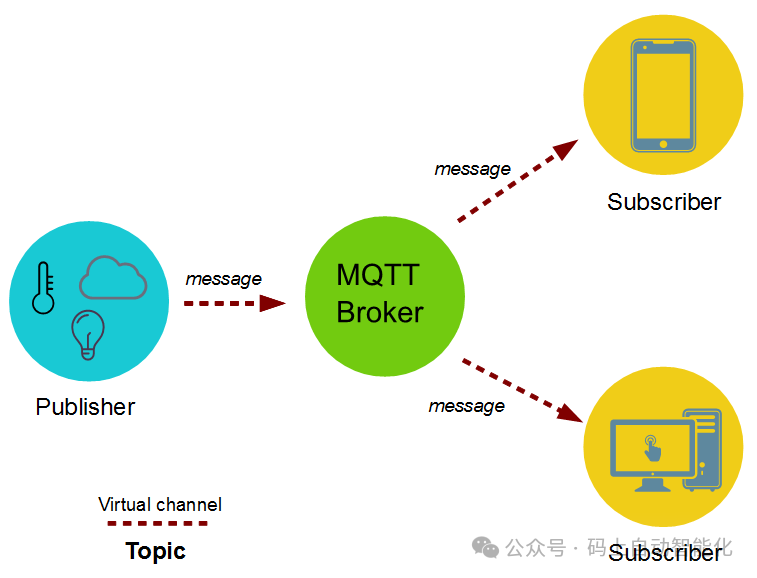 As usual, let’s first talk about what MQTT is:
MQTT (Message Queuing Telemetry Transport) is a “lightweight” communication protocol based on the <span>publish/subscribe</span> model, built on top of the TCP/IP protocol, released by IBM in 1999.
The biggest advantage of MQTT is that it provides real-time and reliable messaging services for connecting remote devices with very little code and limited bandwidth. As a low-overhead, low-bandwidth instant messaging protocol, it has a wide range of applications in IoT, small devices, mobile applications, etc. In smart buildings, smart logistics, food traceability, and smart factories and workshops based on Industry 4.0. In the pharmaceutical industry where I have worked for the past two years, MQTT protocol is also used to achieve fully automated production lines, smart production workshops, and monitoring platforms for nuclear medicine transportation.
There are many practical examples of MQTT available online, but I personally feel that they are not very straightforward. For those who have not been exposed to IoT, it may be a bit difficult to understand and somewhat convoluted, lacking simplicity. One must delve into research and study before realizing the essence of what is being said. Below, based on my understanding, I will clarify it in simple terms.First, look at the diagram: for example, if there is a temperature sensor at a certain location, how do we handle this temperature?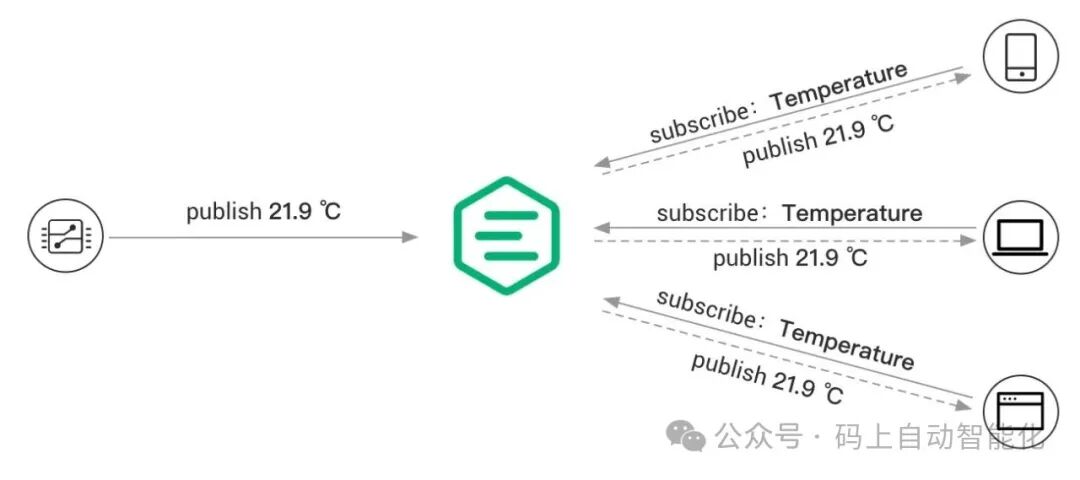 We have already mentioned that MQTT uses a publish-subscribe method. Here, the temperature sensor acts as a client at the data collection end, continuously publishing data on the temperature topic to the broker. Our mobile phones, computers, or backend servers act as data collection terminals, subscribing in real-time to the temperature topic data from the broker. Assuming the collected data is sent once per second, our software backend can receive each piece of data transmitted. It feels like being connected to a distant temperature sensor through a wire.To expand, if there are not only temperature readings but also humidity, speed, activity, GPS location, etc. For security, or due to data permissions, business needs, and various requirements, the data range, frequency, and the number of servers may vary, as well as different business scenarios. Therefore, we use “topics”; data is published under a topic, and received through the same topic. Each topic’s data is different, with varying publishing frequencies and backend services that can receive that topic, all constrained according to our actual needs, allowing us to flexibly and reasonably implement various business scenarios.In simple terms, as long as you understand four common phrases in MQTT, you basically understand how it works:1. Topic: Think of it as a channel or frequency announced by a radio/TV station, like a traffic broadcast network or Jiangsu Satellite TV. This is a constrained frequency/channel, where both the sender and receiver use the same frequency to communicate. (Channel)2. Broker: This is a transit station, which we can think of as a satellite! It pushes the published data to the subscribed clients receiving the data. In MQTT, both the publisher and subscriber are clients; a client can publish and subscribe.3. Publish: The client that sends data, usually various sensors, including temperature, GPS, etc. It connects to the broker to publish data on a specific topic. (Sender)4. Subscribe: The client that needs to receive data (in software platforms, this MQTT client may be referred to as a server/backend service, or directly as an app that retrieves data), connects to the broker and receives data through a specific topic. It can perform operations like storing in a database. Since the data collected by IoT can be very large, we generally do not use traditional databases like Oracle or MySQL, but rather time-series databases, which greatly improve throughput and query performance. (Receiver)
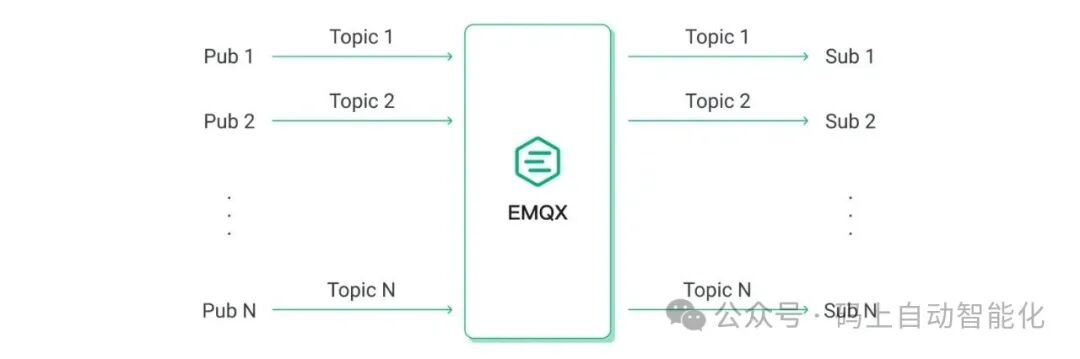 Once these four phrases are explained, do you understand it?When it comes to deployment and implementation, we use EMQX, which is installed on the server computer and configured. This creates a service that continuously detects data on the configured topics.
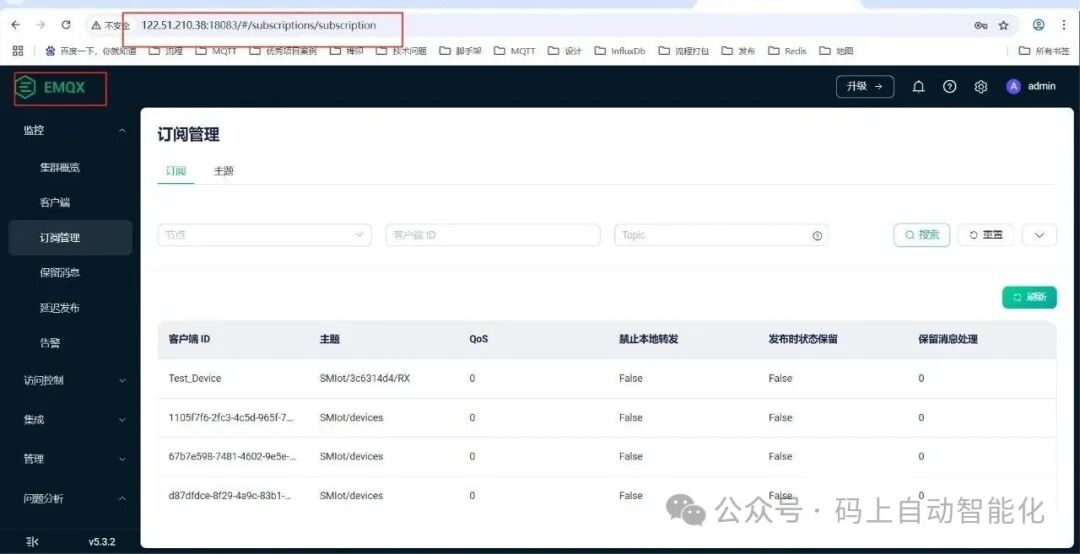 Additionally, debugging directly through code can be a bit cumbersome. Therefore, there is a testing and debugging tool that needs to be introduced: MQTTX, which allows you to publish and receive topics. This makes debugging, testing, and monitoring quite convenient.
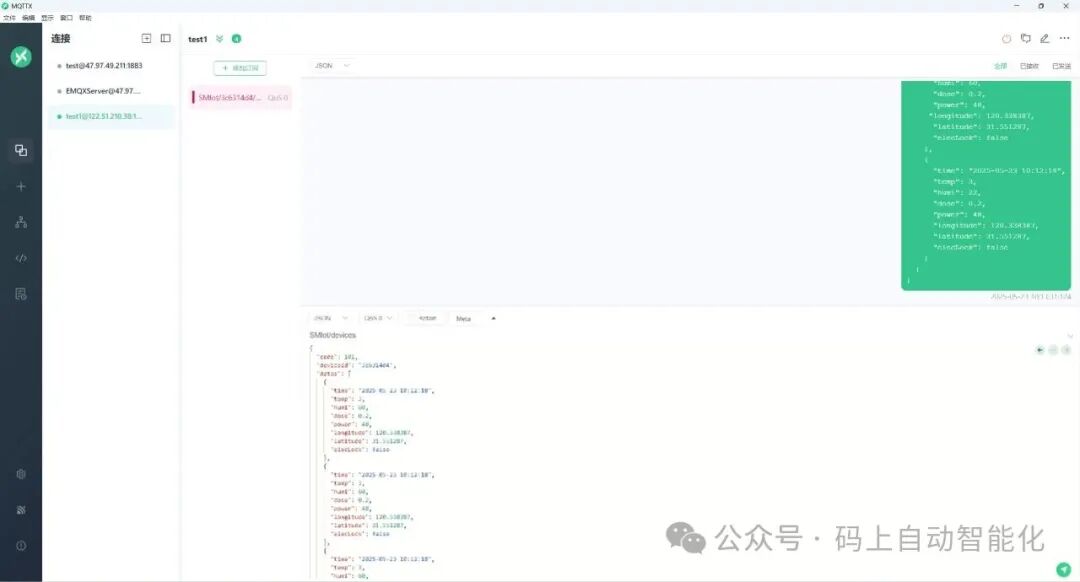 As for the code implementation part, I won’t elaborate much, as there are many related examples online, which involve connecting via IP and port, passing parameters according to specified usage, and then starting to publish and receive topics.
_mqttClient.ApplicationMessageReceivedAsync += HandleDeviceResponse;Next, let’s discuss some classic use cases of MQTT in IoT:
Typical application cases of the MQTT protocol
The low consumption and reliable characteristics of MQTT make it widely used in various fields of IoT. Here are four representative scenarios:
1. Industrial IoT (IIoT): Equipment monitoring and remote control
Scenario: In large factories, thousands of machine tools and sensors need to upload operational data (such as temperature, speed, fault codes) in real-time. Management personnel need to remotely monitor equipment status through a platform and even send control commands (such as adjusting parameters, emergency shutdown).
Role of MQTT: In industrial environments, networks are often subject to electromagnetic interference. The low bandwidth and reconnection characteristics of MQTT ensure stable data transmission; QoS level 1 guarantees that control commands are not lost, avoiding misoperation of equipment; at the same time, through “topic hierarchy” (e.g., “workshop1/machine23/speed”), precise filtering of data from individual devices can reduce the processing pressure on the platform.
Case: Siemens Industrial Cloud Platform (MindSphere) uses MQTT protocol to connect factory equipment, achieving global monitoring of equipment status and remote maintenance, reducing on-site operation and maintenance costs by more than 30%.
2. Smart Home: Multi-device interaction and user interaction
Scenario: Smart devices in the home, such as smart lights, air conditioners, door locks, and temperature and humidity sensors, need to interact through a mobile app or smart speaker (e.g., “turn on the light and start the air conditioning after opening the door”), while devices need to report their status in real-time (e.g., whether the door lock is secure, the current temperature of the air conditioner).
Role of MQTT: Smart home devices are mostly low-power products (e.g., battery-powered sensors). The low power consumption feature of MQTT can extend device battery life; through the “publish/subscribe” model, there is no need for the app to connect directly to the device; it only needs to subscribe to the same topic (e.g., “living room/device status”) to obtain real-time information from all devices, achieving quick interaction.
Case: Xiaomi’s smart home ecosystem uses MQTT protocol as the core communication standard, connecting over 50 million smart devices, supporting millisecond-level device status synchronization and interaction response.
3. Vehicle-to-Everything (V2X): Communication between vehicle devices and cloud platforms
Scenario: New energy vehicles need to upload vehicle data (such as battery level, range, speed, fault information) to the cloud in real-time, while the cloud platform needs to push navigation data, OTA upgrade packages to the vehicle, and even achieve remote control (e.g., scheduling charging, turning on air conditioning); at the same time, short-distance communication between vehicles (V2V) and between vehicles and roadside devices (V2R) also requires reliable protocol support.
Role of MQTT: Network signals are unstable during vehicle operation (e.g., in tunnels, rural areas). The persistent session of MQTT can cache upgrade packages or navigation data sent from the cloud, continuing transmission once the signal is restored; QoS level 2 ensures that fault information (e.g., battery anomalies) is not duplicated or lost, ensuring driving safety; in addition, MQTT-SN (a variant of MQTT designed for low-power wireless) can be used for short-distance communication between vehicles and roadside sensors, supporting low-rate data exchange.
Case: Tesla’s onboard system uses MQTT protocol to communicate with the cloud, achieving real-time monitoring of vehicle status, OTA upgrade push, and “remote control via mobile app” functionality, with millions of Teslas globally maintaining stable connections with the cloud through this protocol.
4. Agricultural IoT: Farmland environment monitoring and smart irrigation
Scenario: Soil moisture sensors and weather stations (monitoring wind speed, rainfall, light) deployed in farmland need to upload data in real-time, while the cloud platform automatically controls irrigation devices (e.g., starting drip irrigation when the soil is dry) and pushes farmland status reports to farmers’ apps.
Role of MQTT: Farmland is often located in remote areas, relying on narrowband communication such as 4G/LoRa. The low bandwidth characteristics of MQTT can reduce traffic consumption (a single environmental data point is only a few dozen bytes); reconnection after disconnection ensures that sensor data is not lost, avoiding irrigation decision errors due to data loss; in addition, MQTT supports low-power wide-area networks (LPWAN), extending sensor battery life to 1-2 years, reducing farmland maintenance frequency.
Case: Alibaba Cloud’s agricultural IoT platform uses MQTT protocol to connect millions of farmland sensors nationwide, combined with AI algorithms to achieve “on-demand irrigation,” saving an average of 40% of water resources for farmers and increasing crop yield by 15%.
The overall solution for smart buildings adopts the MQTT protocol as a unified communication standard, encapsulating the BACnet data of the air conditioning system, ONVIF video stream of the security system, and 485 signals of the fire protection system for upper-layer applications to call.
Additionally, there is the coal mine monitoring system developed by Baotong (since coal mines are underground, they use wired networks to transmit via MQTT), etc.
Next, let’s discuss how to implement MQTT in PLCs:
In the field of industrial automation and IoT, the MQTT protocol is widely used for lightweight communication between devices. Although traditional programmable logic controllers (PLCs) may not have the capability to run modern programming languages (such as C, Python, etc.), there are still ways to achieve MQTT communication. Here are several methods to implement communication between PLCs and MQTT servers:
1. Using Embedded Microcontrollers or Microprocessors
Although traditional PLCs may not directly support MQTT, you can integrate a microcontroller or microprocessor (such as Arduino, Raspberry Pi, etc.) into the PLC system to implement the MQTT protocol.
Steps:
- Select a suitable microcontroller or microprocessor: Choose appropriate hardware based on the PLC’s input and output interfaces.
- Programming: Write programs using a programming language that supports MQTT (such as C, C++, or Python).
- Connection and Communication: Connect the microcontroller to the PLC via serial communication (RS-232, RS-485, etc.) or Ethernet interface.
- Implement MQTT Client: Implement an MQTT client on the microcontroller to subscribe and publish messages.
2. Using Gateway Devices
Use a gateway device that supports MQTT as an intermediary to convert PLC data into MQTT messages.
Steps:
- Select an MQTT Gateway: Such as Modbus to MQTT Gateway, OPC UA to MQTT Gateway, etc.
- Configure the Gateway: Set up the gateway to connect to the PLC and configure the MQTT server information.
- Data Conversion and Forwarding: The gateway converts PLC data into MQTT messages and sends them to the MQTT server.
3. Using Software-Defined PLCs (SDPLC)
Some companies offer software-defined PLC solutions that can run on standard computers or servers and communicate with traditional hardware PLCs via network interfaces.
Steps:
- Select SDPLC Software: Such as Industruino, Beckhoff TwinCAT, etc.
- Integrate MQTT Library: Integrate the MQTT library into the SDPLC software.
- Implement MQTT Client: Write code to implement MQTT client functionality.
- Connection and Communication: Connect the SDPLC to the traditional PLC via Ethernet or other network interfaces.
4. Using Cloud Services
By uploading data to a cloud platform and then forwarding it to the MQTT server, this is also a feasible solution.
Steps:
- Select a Cloud Platform: Such as AWS IoT Core, Azure IoT Hub, etc.
- Device Registration and Authentication: Register your device on the cloud platform and configure the MQTT connection.
- Data Upload: Collect data from the PLC and upload it to the cloud platform.
- Message Forwarding: The cloud platform forwards the data to the configured MQTT server.
Implementing MQTT in embedded microcontrollers, such as STM32 development, can use STM32CubeIDE and Paho MQTT library.