Click the blue words
Follow us
Python Web Scraping
Beep beep beep, hello everyone!
It’s time for Python teaching again.
In this lesson, we will explain what Python web scraping is
and practice scraping web content!
Let’s get started!

1. Understanding Web Scraping
The search engines we are familiar with are all large-scale web scrapers, such as Baidu, Sogou, 360 Browser, Google Search, etc. Each search engine has its own scraper program, for example, the scraper of 360 Browser is called 360Spider, and Sogou’s scraper is called Sogouspider.
2.Types of Web Scrapers
Web scrapers can be divided into three main categories: General Web Scrapers, Focused Web Scrapers, and Incremental Web Scrapers.
(1) General Web Scrapers: These are an important part of search engines, as mentioned above, so I won’t elaborate further here. General web scrapers must comply with the robots.txt protocol, which tells search engines which pages can be crawled and which cannot.
Robots.txt protocol: This is a “conventional agreement” and does not have legal effect. It embodies the “contract spirit” of internet users. Industry practitioners will consciously comply with this protocol, so it is also known as the “gentlemen’s agreement”.
(2) Focused Web Scrapers: These are web scraping programs aimed at specific needs. The difference from general scrapers is that focused scrapers filter and process web content during the scraping process to ensure that only relevant web information is collected. Focused web scrapers greatly save hardware and network resources, as they store fewer pages, which allows for faster updates, thus meeting the needs of specific groups for information in specific fields.
(3) Incremental Web Scrapers: These refer to scrapers that perform incremental updates on already downloaded web pages. They only crawl newly generated or changed web pages, which can ensure that the pages crawled are the latest.
3. Applications of Web Scrapers
With the rapid development of the internet, the World Wide Web has become a carrier of vast amounts of information. Effectively extracting and utilizing this information has become a huge challenge, thus web scrapers have emerged. They can be used not only in the field of search engines but also in big data analysis and commercial applications.
(1) Data Analysis
In the field of data analysis, web scrapers are usually essential tools for collecting massive data. For data analysts, to perform data analysis, they first need a data source, and learning web scraping allows them to obtain more data sources. During the collection process, data analysts can collect more valuable data according to their objectives while filtering out ineffective data.
(2) Commercial Field
For companies, timely access to market dynamics and product information is crucial. Companies can purchase data through third-party platforms, such as Guiyang Big Data Exchange, Data Hall, etc. Of course, if your company has a web scraping engineer, you can obtain the desired information through web scraping.
4. Web Scraping Practice
Web scraping programs are different from other programs; their logical thinking is generally similar, so we do not need to spend a lot of time on logic.
For beginners doing Python web scraping, it can be a bit difficult. During the initial practice, you can directly use templates, which saves time and effort and is very convenient.
Here are a few examples of Python web scraping:
1. Use Python to scrape relevant data from a website and save it to an Excel file in the same directory.
import re
import urllib.error
import urllib.request
import xlwt
from bs4 import BeautifulSoup

def main():
    baseurl = "http://jshk.com.cn"
    datelist = getDate(baseurl)
    savepath = ".\jshk.xls"
    saveDate(datelist, savepath)
    # askURL("http://jshk.com.cn/")

findlink = re.compile(r'<a href="(.*?)">')
findimg = re.compile(r'<img.*src="(.*?)", re.S)')
findtitle = re.compile(r'<span class="title">(.*)</span')
findrating = re.compile(r'<span class="rating_num" property="v:average">(.*)</span')
findjudge = re.compile(r'<span>(*)人评价</span>')
findinq = re.compile(r'<span class="inq">(.*)</span>')

def getDate(baseurl):
    datalist = []
    for i in range(0, 10):
        url = baseurl + str(i * 25)
        html = askURL(url)
        soup = BeautifulSoup(html, "html.parser")
        for item in soup.find_all('div', class_="item"):
            data = []
            item = str(item)
            link = re.findall(findlink, item)[0]
            data.append(link)
            img = re.findall(findimg, item)[0]
            data.append(img)
            title = re.findall(findtitle, item)[0]
            rating = re.findall(findrating, item)[0]
            data.append(rating)
            judge = re.findall(findjudge, item)[0]
            data.append(judge)
            inq = re.findall(findinq, item)
            if len(inq) != 0:
                inq = inq[0].replace("。", "")
                data.append(inq)
            else:
                data.append(" ")
            print(data)
            datalist.append(data)
        print(datalist)
    return datalist

def askURL(url):
    head = {
        "User-Agent": "Mozilla/5.0 (Windows NT 10.0; Win64; x64) AppleWebKit/537.36 (KHTML, like Gecko) Chrome/78.0.3904.97 Safari/537.36"
    }
    request = urllib.request.Request(url, headers=head)
    html = ""
    try:
        response = urllib.request.urlopen(request)
        html = response.read().decode("utf-8")
        # print(html)
    except urllib.error.URLError as e:
        if hasattr(e, "code"):
            print(e.code)
        if hasattr(e, "reason"):
            print(e.reason)
    return html

def saveDate(datalist, savepath):
    workbook = xlwt.Workbook(encoding='utf-8')
    worksheet = workbook.add_sheet('电影', cell_overwrite_ok=True)
    col = ("电影详情", "图片", "影片", "评分", "评价数", "概况")
    for i in range(0, 5):
        worksheet.write(0, i, col[i])
    for i in range(0, 250):
        print("第%d条" % (i + 1))
        data = datalist[i]
        for j in range(0, 5):
            worksheet.write(i + 1, j, data[j])
    workbook.save(savepath)

if __name__ == '__main__':
    main()
    print("爬取完毕")
2. Use regular expressions and file operations to scrape and save all content of a post from “某吧” (at least 5 pages).
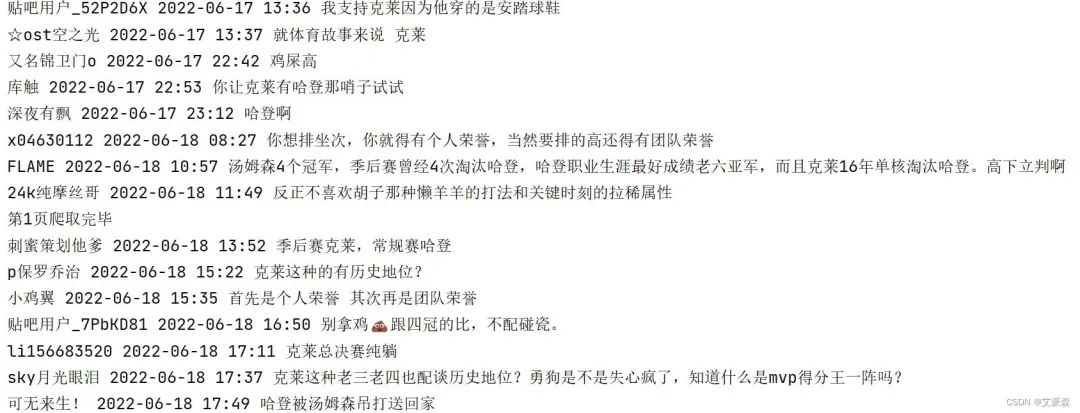
This time we selected a post from the NBA bar in “某吧”, with the title “Klay and Harden, Who Has a Higher Historical Status”. The target is the replies within the post.
import csv
import requests
import re
import time

def main(page):
    url = f'https://tieba.baidu.com/p/7882177660?pn={page}'
    headers = {
        'User-Agent': 'Mozilla/5.0 (Windows NT 10.0; Win64; x64) AppleWebKit/537.36 (KHTML, like Gecko) Chrome/106.0.0.0 Safari/537.36'
    }
    resp = requests.get(url, headers=headers)
    html = resp.text
    # Comment content
    comments = re.findall('style="display:;">                    (.*?)</div>', html)
    # Comment users
    users = re.findall('class="p_author_name j_user_card" href=".*?" target="_blank">(.*?)</a >', html)
    # Comment times
    comment_times = re.findall('楼</span><span class="tail-info">(.*?)</span><div', html)
    for u, c, t in zip(users, comments, comment_times):
        # Filter data, remove anomalies
        if 'img' in c or 'div' in c or len(u) > 50:
            continue
        csvwriter.writerow((u, t, c))
        print(u, t, c)
    print(f'第{page}页爬取完毕')

if __name__ == '__main__':
    with open('01.csv', 'a', encoding='utf-8') as f:
        csvwriter = csv.writer(f)
        csvwriter.writerow(('评论用户', '评论时间', '评论内容'))
        for page in range(1, 8):  # Scrape content from the first 7 pages
            main(page)
            time.sleep(2)
Running result is as follows:
3. Implement data scraping of product reviews from a certain e-commerce platform (at least 100 reviews, including review content, time, and rating).
First, analyze:
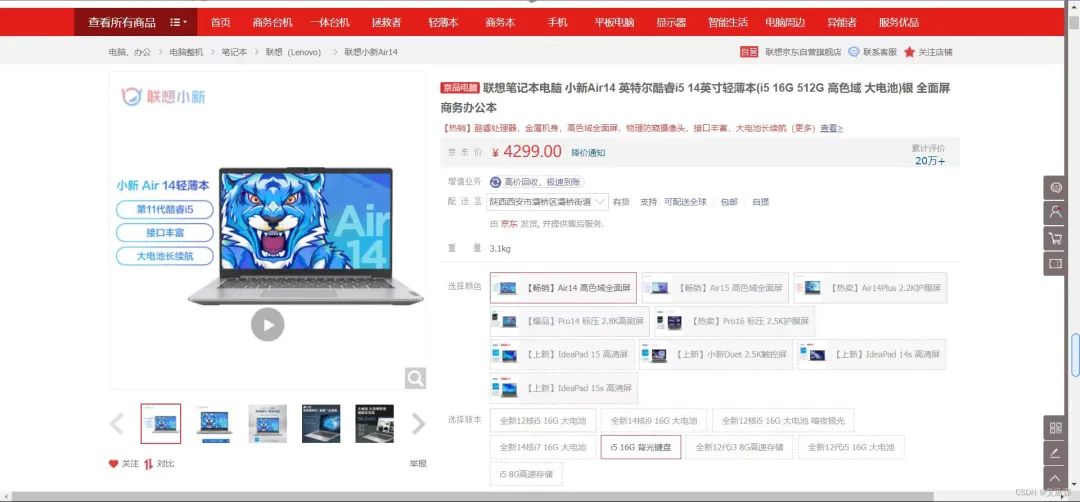
This time we selected a Lenovo laptop from a certain e-commerce platform, and the data is dynamically loaded, which can be analyzed through developer tools.
import requests
import csv
from time import sleep
import random

def main(page, f):
    url = 'https://club.jd.com/comment/productPageComments.action'
    params = {
        'productId': 100011483893,
        'score': 0,
        'sortType': 5,
        'page': page,
        'pageSize': 10,
        'isShadowSku': 0,
        'fold': 1
    }
    headers = {
        'user-agent': 'Mozilla/5.0 (Windows NT 10.0; Win64; x64) AppleWebKit/537.36 (KHTML, like Gecko) Chrome/99.0.4844.35 Safari/537.36',
        'referer': 'https://item.jd.com/'
    }
    resp = requests.get(url, params=params, headers=headers).json()
    comments = resp['comments']
    for comment in comments:
        content = comment['content']
        content = content.replace('\n', '')
        comment_time = comment['creationTime']
        score = comment['score']
        print(score, comment_time, content)
        csvwriter.writerow((score, comment_time, content))
    print(f'第{page + 1}页爬取完毕')

if __name__ == '__main__':
    with open('04.csv', 'a', encoding='utf-8', newline='') as f:
        csvwriter = csv.writer(f)
        csvwriter.writerow(('评分', '评论时间', '评论内容'))
        for page in range(15):
            main(page, f)
            sleep(5 + random.random())
python
This teaching session ends here!
Thank you all for watching.
I hope everyone gains something.
Please continue to follow our public account.
See you next time~
python

Graphics and text | Xiao Junyu
Typesetting | Xiao Junyu
Initial review | Xiao Junyu
Final review | Luo Yangqianzi
Huang Guojie
Final review | Huang Sheng