Previous answer
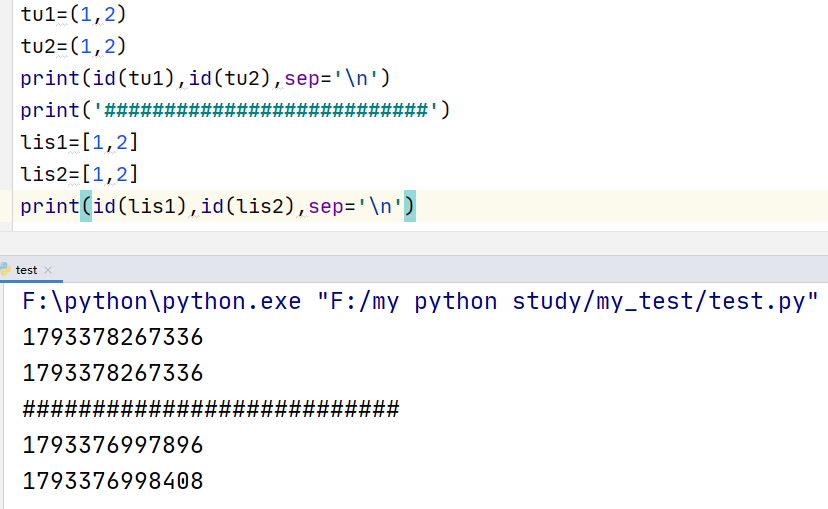
 1: From the above image, we can see that the memory addresses of tu1 and tu2 are the same. This is because tu1 and tu2 belong to immutable sequences. To optimize performance, Python can reuse the value of immutable objects when their values are the same.2: From the above image, we can see that the memory addresses of lis1 and lis2 are different. This is because lis1 and lis2 are mutable sequences, and subsequent modifications to the values in the sequence could lead to unpredictable issues if the same value is reused.3: Mutable sequences allow operations such as adding, deleting, and modifying values in the sequence, such as lists. Immutable sequences do not allow such operations on their values. For example: strings and tuples.4: Sets and dictionaries are not considered sequences, but elements in a set can be added, deleted, or modified. However, it is important to note that the elements in a set must be of immutable types, such as strings and tuples, but not lists. The elements in a dictionary consist of keys and their corresponding values. Here, it is important to note that keys must be of immutable types, while the values can be mutable types. You can try creating two dictionaries or sets with the same elements and see if their memory addresses are the same.5: Based on the analysis in point 4, we can summarize: for sequences (as well as sets and dictionaries) with mutable elements, two objects will have different memory addresses even if their elements are the same. For sequences with immutable elements, two objects will have the same memory address if their elements are the same.
 New Chapter – The if Statement1: The if statement is used for making decisions. If you have some options to choose from, you can use the if statement to write your code.For example: we need Python to randomly generate a number, and then we will guess that number. We can write it like this.
import random# Import the random module guess_num=random.randint(0,2)# Randomly generate an integer, the range of integers is 0~2 print(guess_num) you_guess=int(input(‘please input guess number:’)) if you_guess==guess_num:# The if condition statement is followed by a condition and ends with ‘:’ print(‘you are right’)# If the condition is true, execute this statementelse:# If the condition is false, execute the statement below. print(‘you are wrong’)
Explanation:**random.randint(0,2) calls the randint method from the random module, which randomly generates an integer. The content in the parentheses specifies the range of the random integer.**The format of the if statement is as follows:if condition expression : execute statement # The execute statement must be indented, usually 4 spaceselse : execute statement # The execute statement must be indented, usually 4 spaces**Python uses strict indentation to indicate the hierarchy or belonging of the code. For example, in the above case:
if you_guess==guess_num: print(‘you are right’)# Indented four spaces compared to the if statement, indicating it is the next level of the if statement, and whether it executes depends on whether the if condition is true.else: print(‘you are wrong’)# Indented four spaces compared to the else statement, indicating it is the next level of the else statement, and whether it executes depends on whether the else condition is true.
**The if and else statements are at the same level, and whether they are executed depends on the condition. If the condition in the if statement is true, the if statement executes, and the else statement will not execute. If the condition in the if statement is false, the else statement executes, and the code below the if statement will not execute.
2: if condition statement : execute statement elif condition statement : execute statement elif condition statement : execute statement The execution logic of this statement is: first check the if statement condition. If true, execute the statement below and then exit without executing the statements below. If false, execute the elif statement, then check the condition in the elif. If true, execute the statement in the elif and then exit. If false, continue checking the next elif, and so on.3: if condition statement: execute statement if condition statement: execute statement if condition statement: execute statementThis structure traverses all the if conditions, first checking the condition in the first if, regardless of whether it is true. It will check the condition in the second if, and so on.4: The if statement can also be nested.For example: if condition statement : if condition statement: execute statement else: execute statement 5: Of course, it can also be nested like this: if condition statement : execute statement elif condition statement : if condition statement: execute statement else: execute statement elif condition statement : execute statement  In the if statement, if, elif, and else can be used flexibly. You can use them in any combination and nesting according to the specific situation. However, there are three points to note:1: Be sure to pay attention to indentation. The execute statements and condition statements must conform to strict indentation, and the execute statements must be indented after the corresponding condition statement to belong to that condition.2: All same-level if statements in the condition statement will be executed. Be aware of the difference between it and elif. If used in conjunction with elif, and if and elif are at the same level, the execution of the subsequent elif statements depends on whether the previous if and elif statements have been executed. If they have been executed, the subsequent elif statements cannot be executed.3: An if statement can be followed by an else, but it can also not be followed. An if…elif statement can also be followed by an else, but it can also not be followed. The else statement will only execute if all previous conditions are false; otherwise, it cannot be executed.
 You can use if, elif, and else statements freely to write a small calculator program to try it out.