Read the Code | Simplifying Library Imports with CMake Configuration Files
0. Introduction
When writing CMake for our library, we ensure it compiles correctly. However, users of the library need to write some CMake code to find the included header files, shared/static libraries, and executables. This can be a cumbersome task for library users. As developers of the library, we can add a few lines of template code in the CMake script so that users can easily import everything with just one <span>find_package()</span> command.
In this article, I will demonstrate how to create version files and configuration files for the library, making it easy to import into other projects.
1. Example
The example code can be found on GitHub (https://github.com/sorush-khajepor/cmake-examples/tree/master/shared_library_config/geometry). It is a shared library with the following file structure:
--- geometry
    |
    ---- shape
    |      |
    |      --- shape.h, shape.cpp
    |      |
    |      --- CMakeLists.txt
    |
    ---- square
    |      |
    |      --- square.h, square.cpp, info.h
    |      |
    |      --- CMakeLists.txt
    |
    ---- example
    |      |
    |      --- app.cpp
    |
    ---- CMakeLists.txt
<span>CMakeLists.txt</span> file content is as follows:
cmake_minimum_required(VERSION 3.23)
project(geometry LANGUAGES CXX VERSION 5.4.3)

if (MSVC)
    set(CMAKE_WINDOWS_EXPORT_ALL_SYMBOLS ON)
endif()

add_library(geo SHARED)
target_include_directories(geo PRIVATE "${PROJECT_SOURCE_DIR}")
add_subdirectory("shape")
add_subdirectory("square")

install(TARGETS geo
    EXPORT geoTargets
    FILE_SET HEADERS
    LIBRARY DESTINATION lib
    ARCHIVE DESTINATION lib
    RUNTIME DESTINATION bin
    INCLUDES DESTINATION include)

install(EXPORT geoTargets
    FILE geoTargets.cmake
    NAMESPACE geo::
    DESTINATION lib/cmake/geo)

include(CMakePackageConfigHelpers)
write_basic_package_version_file(
    "geoConfigVersion.cmake"
    VERSION ${geo_VERSION}
    COMPATIBILITY AnyNewerVersion)

install(FILES "geoConfig.cmake" "${CMAKE_CURRENT_BINARY_DIR}/geoConfigVersion.cmake"
    DESTINATION lib/cmake/geo)
In this example, the explanation of targets and dependencies has been covered in previous articles, so I will continue with the explanation.
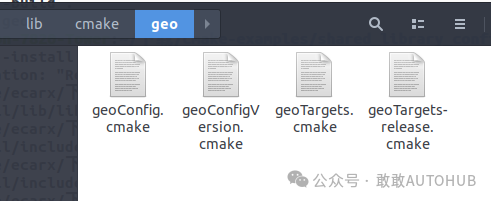
3. Key Command Analysis
- •
<span>install(TARGETS geo EXPORT geoTargets ...)</span>: Here, the EXPORT defines the<span>geoTargets</span>variable. It indicates that if you need to export the<span>geo</span>target, you should use<span>geoTargets</span>. - •
<span>install(EXPORT geoTargets)</span>: This is the pairing of the previous install command, where we define the name of the target file to export, the namespace, and the installation location. The namespace is a prefix added to the package name when loaded into other projects. Therefore, the<span>geo</span>target will be seen as<span>geo::geo</span>in other projects. - •
<span>include(CMakePackageConfigHelpers)</span>: This is a module loaded by CMake for creating configuration files. - •
<span>write_basic_package_version_file()</span>: This function creates the<span>geoConfigVersion.cmake</span>file, which stores the package version information and its compatibility.<span>AnyNewerVersion</span>indicates that if the package version is the same or higher than the requested version, CMake will import that package. For more details, refer to the CMake manual. - •
<span>install(FILES...)</span>: Copies the configuration and version files to the installation directory. The version file is created by this script, while the<span>geoConfig.cmake</span>is written by us.
<span>geometry/geoConfig.cmake</span> file is as follows:
include(CMakeFindDependencyMacro)
# find_dependency(xxx 2.0)
include(${CMAKE_CURRENT_LIST_DIR}/geoTargets.cmake)
I commented out the <span>find_dependency()</span> line because this example has no other dependencies. If your package has other dependencies, they need to be mentioned here..
4. Build and Install
Now we can compile and install the library. Open a terminal in the source directory and run the following commands:
mkdir build
cd build
For single-configuration generators (like make or Ninja):
cmake -DCMAKE_BUILD_TYPE=Release ..
cmake --build . # A command provided by CMake to invoke the generated build system (like Makefile, Ninja, etc.) to compile the project
cmake --install . --prefix ../../geo-install # Install the built project, --prefix ../../geo-install specifies the target installation directory
For multi-configuration generators (like VS C++ or Xcode):
cmake ..
cmake --build . --config release
cmake --install . --prefix ../../geo-install --config release
The corresponding geoTargets.cmake file primarily serves to define and manage an import target named geo::geo. This file is typically generated automatically during the build and installation of the library, with the purpose of facilitating the import and linking of this library in other projects.
# Generated by CMake

if("${CMAKE_MAJOR_VERSION}.${CMAKE_MINOR_VERSION}" LESS 2.8)
   message(FATAL_ERROR "CMake >= 2.8.0 required")
endif()
if(CMAKE_VERSION VERSION_LESS "2.8.3")
   message(FATAL_ERROR "CMake >= 2.8.3 required")
endif()
cmake_policy(PUSH)
cmake_policy(VERSION 2.8.3...3.25)
#----------------------------------------------------------------
# Generated CMake target import file.
#----------------------------------------------------------------

# Commands may need to know the format version.
set(CMAKE_IMPORT_FILE_VERSION 1)

# Protect against multiple inclusion, which would fail when already imported targets are added once more.
set(_cmake_targets_defined "")
set(_cmake_targets_not_defined "")
set(_cmake_expected_targets "")
foreach(_cmake_expected_target IN ITEMS geo::geo)
  list(APPEND _cmake_expected_targets "${_cmake_expected_target}")
if(TARGET "${_cmake_expected_target}")
    list(APPEND _cmake_targets_defined "${_cmake_expected_target}")
else()
    list(APPEND _cmake_targets_not_defined "${_cmake_expected_target}")
  endif()
endforeach()
unset(_cmake_expected_target)
if(_cmake_targets_defined STREQUAL _cmake_expected_targets)
unset(_cmake_targets_defined)
unset(_cmake_targets_not_defined)
unset(_cmake_expected_targets)
unset(CMAKE_IMPORT_FILE_VERSION)
  cmake_policy(POP)
return()
endif()
if(NOT _cmake_targets_defined STREQUAL "")
  string(REPLACE ";" " " _cmake_targets_defined_text "${_cmake_targets_defined}")
  string(REPLACE ";" " " _cmake_targets_not_defined_text "${_cmake_targets_not_defined}")
  message(FATAL_ERROR "Some (but not all) targets in this export set were already defined.\nTargets Defined: ${_cmake_targets_defined_text}\nTargets not yet defined: ${_cmake_targets_not_defined_text}\n")
endif()
unset(_cmake_targets_defined)
unset(_cmake_targets_not_defined)
unset(_cmake_expected_targets)

# Compute the installation prefix relative to this file.
get_filename_component(_IMPORT_PREFIX "${CMAKE_CURRENT_LIST_FILE}" PATH)
get_filename_component(_IMPORT_PREFIX "${_IMPORT_PREFIX}" PATH)
get_filename_component(_IMPORT_PREFIX "${_IMPORT_PREFIX}" PATH)
get_filename_component(_IMPORT_PREFIX "${_IMPORT_PREFIX}" PATH)
if(_IMPORT_PREFIX STREQUAL "/")
set(_IMPORT_PREFIX "")
endif()

# Create imported target geo::geo
add_library(geo::geo SHARED IMPORTED)

set_target_properties(geo::geo PROPERTIES
  INTERFACE_INCLUDE_DIRECTORIES "${_IMPORT_PREFIX}/include"
)

if(NOT CMAKE_VERSION VERSION_LESS "3.23.0")
  target_sources(geo::geo
    INTERFACE
      FILE_SET "HEADERS"
      TYPE "HEADERS"
      BASE_DIRS "${_IMPORT_PREFIX}/include"
      FILES "${_IMPORT_PREFIX}/include/shape/shape.h" "${_IMPORT_PREFIX}/include/square/square.h"
  )
else()
  set_property(TARGET geo::geo
    APPEND PROPERTY INTERFACE_INCLUDE_DIRECTORIES
      "${_IMPORT_PREFIX}/include"
  )
endif()

# Load information for each installed configuration.
file(GLOB _cmake_config_files "${CMAKE_CURRENT_LIST_DIR}/geoTargets-*.cmake")
foreach(_cmake_config_file IN LISTS _cmake_config_files)
  include("${_cmake_config_file}")
endforeach()
unset(_cmake_config_file)
unset(_cmake_config_files)

# Cleanup temporary variables.
set(_IMPORT_PREFIX)

# Loop over all imported files and verify that they actually exist
foreach(_cmake_target IN LISTS _cmake_import_check_targets)
  foreach(_cmake_file IN LISTS "_cmake_import_check_files_for_${_cmake_target}")
    if(NOT EXISTS "${_cmake_file}")
      message(FATAL_ERROR "The imported target \"${_cmake_target}\" references the file
   \"${_cmake_file}\"
but this file does not exist.  Possible reasons include:
* The file was deleted, renamed, or moved to another location.
* An install or uninstall procedure did not complete successfully.
* The installation package was faulty and contained
   \"${CMAKE_CURRENT_LIST_FILE}\"
but not all the files it references.
")
    endif()
  endforeach()
  unset(_cmake_file)
  unset("_cmake_import_check_files_for_${_cmake_target}")
endforeach()
unset(_cmake_target)
unset(_cmake_import_check_targets)

# This file does not depend on other imported targets which have
# been exported from the same project but in a separate export set.

# Commands beyond this point should not need to know the version.
set(CMAKE_IMPORT_FILE_VERSION)
cmake_policy(POP)
5. Finding Packages in Another Project
I created another example (code on GitHub (https://github.com/sorush-khajepor/cmake-examples/tree/master/shared_library_config/mesh)) called the `mesh` project, which uses the `geo` library. Its file structure is as follows:
--- mesh
    |
    ---- app.cpp
    |
    ---- CMakeLists.txt
<span>app.cpp</span> file content is as follows:
#include "square/square.h"
#include <iostream>
int main() {

    Square s;
    s.WriteInfo();
    PrintShape(s);

    return 0;
}
<span>mesh/CMakeLists.txt</span> file is as follows:
cmake_minimum_required(VERSION 3.23)
project(mesh LANGUAGES CXX)

set(geo_DIR "../geo-install/lib/cmake/geo")
find_package(geo)
add_executable(app)
target_sources(app PRIVATE "app.cpp")
target_link_libraries(app PRIVATE geo::geo)
if(MSVC)
    get_target_property(geo_dll geo::geo IMPORTED_LOCATION_RELEASE)
    add_custom_command(TARGET app POST_BUILD
        COMMAND "${CMAKE_COMMAND}" -E copy
        ${geo_dll}
        ${CMAKE_CURRENT_BINARY_DIR}/$<CONFIG> )
endif()
The key lines for importing the <span>geo</span> library are:
- •
<span>set(geo_DIR ...)</span>: The<span>(nameOfpackage)_DIR</span>is the location where CMake looks for the package. This is the address of the installed configuration file. - •
<span>find_package(geo)</span>: Requests CMake to include the package and its targets. - •
<span>target_link_libraries</span>: Remember to use the namespace you set for the package, which here is<span>geo::geo</span>. - •
<span>if(MSVC) ...</span>: This block is only applicable to Windows, used to copy the dll files from the installation directory to the executable directory. This is because, in Windows, the location of the shared libraries (dll files) used is not encoded into the executables that use them.
Now you can compile and run your program by executing the following in the source directory:
mkdir build
cmake ..
cmake --build .
./app
By using CMake’s configuration files, we can significantly simplify the usage of the library, making it easier for users to integrate the library into their projects. I hope this article helps you better understand the creation and use of CMake configuration files.

For more content related to ROS and embodied intelligence, please follow Gu Yue Ju.
👉 Follow us to discover more in-depth content on autonomous driving/embodied intelligence/GitHub!
🚀 Review of past content👀
🔥 Embodied Intelligence | ISAAC SIM Installation and Software Practice Learning (Part 2) — User Interface and Workflow🔥 Embodied Intelligence | ISAAC SIM Installation and Software Practice Learning (Part 1) — Installation and Structure Overview🔥 Business Trip Diary | United Nations in Geneva (Part 2)