
Big Data Digest article, please see the end of the article for reprint requirements.
Author | Zhang Yuanyuan
Reviewed by | Aileen
Selene also contributed to this article.
In today’s data science field, Python is undoubtedly one of the most important tools for data scientists. As the new year begins, if you want to enter the field of data science, then starting to learn Python should be one of your new year plans. This article introduces three steps for beginners to quickly get started with Python, including common installation methods.
Happy New Year! As a beginner in the data field, what are your plans for the new year?
Beginner:With the new year comes new aspirations. I have always been very interested in the data industry, and I want to better prepare myself to enter this field this year, but I don’t know where to start.
Beginner, do you know which position in the big data field is the most lucrative? Of course, it’s the data scientist, data scientist, data scientist! Important things must be said three times.
Beginner:Just because you say it’s lucrative, I don’t believe it!
Answer:OK. Please refer to the Big Data Digest article from December 21, 2015, “Eight Key Roles in the Data Science Industry: Responsibilities and Skills.” We let the data speak!
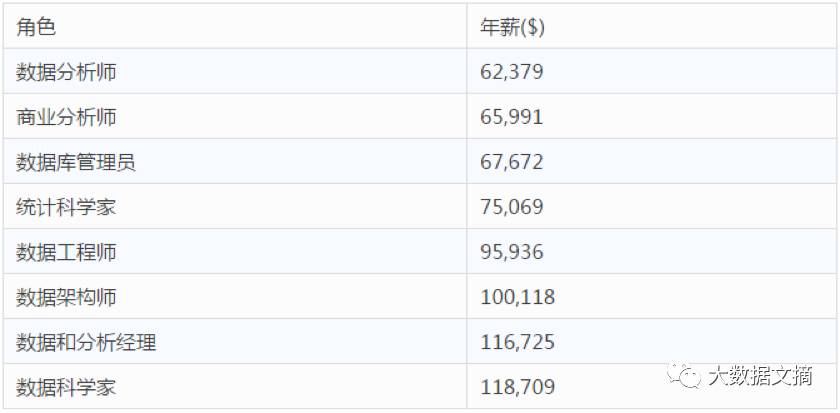
Beginner:Wow! That’s amazing! I want to be a data scientist! Quickly tell me how I can become a data scientist?!
Answer:Also, please refer to the Big Data Digest article from December 21, 2015, “Eight Key Roles in the Data Science Industry: Responsibilities and Skills.” As one of the highest earners in the data science industry, a data scientist needs to utilize the latest technological means to process raw data, conduct necessary analyses, and present the acquired knowledge to colleagues in an informative manner. Data scientists can come from various backgrounds, but because they need to analyze large amounts of data, programming skills are essential.
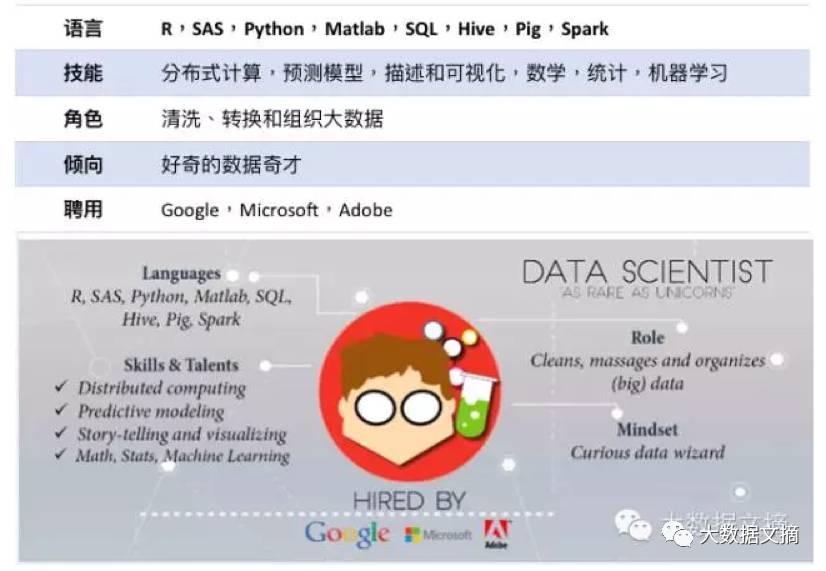
Beginner:Uh, to be a data scientist, I have to learn so many languages, I think I’ll just give up…
Answer:Don’t! Actually, you don’t need to learn that many…
Beginner:So?
Answer:While mastering multiple languages can be very useful, it is only necessary when required. We choose to use the same language for most projects so that data scientists can collaborate on projects; and the chosen language must be very easy to learn!
Beginner:So what is this language? I’m dying to know!
Answer:Python. With the support of the open-source community, Python has become a powerful tool in data science. Python has a simple and easy-to-learn syntax, powerful data processing capabilities, and a plethora of open-source libraries such as Numpy, Pandas, Scikit-learn, and Statsmodels; all of these allow Python to perform exploratory analysis as well as build scalable big data pipelines and machine learning algorithms. Only for some unconventional models do we sometimes combine Python and R, using Python for heavy data processing and R for statistical modeling.
Beginner:That’s great! I only need to learn one language! So how do I learn it?
Answer:I believe the best way to learn is by “learning by doing.” There are too many Python learning books on the market, and there are various Python learning websites online, but I strongly recommend Codecademy’s Python course for beginners (https://www.codecademy.com/learn/python). Codecademy provides visitors with an interactive webpage where they can practice Python directly on the webpage, and the results and progress can be accurately tracked. So, even without installing software, you can practice directly on the webpage! Similar courses for learning Python online include the “Python for Everybody” specialization from the University of Michigan on Coursera (https://www.coursera.org/specializations/python).
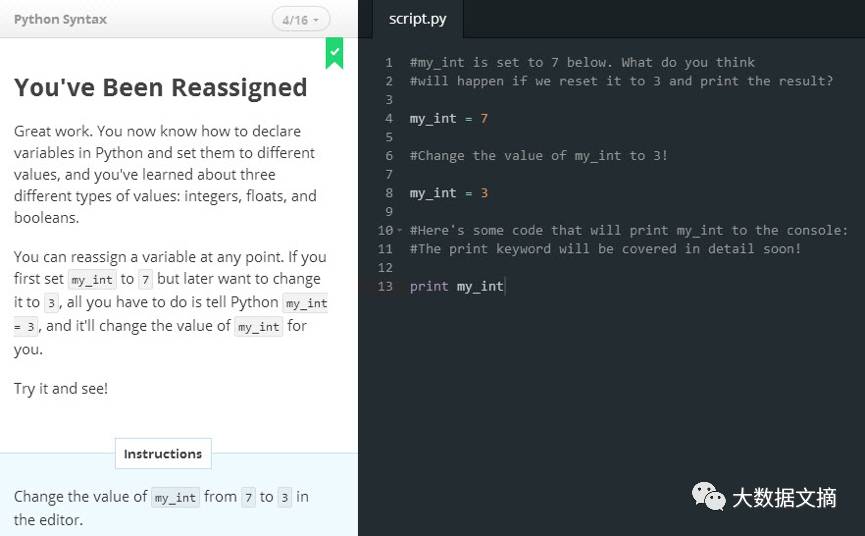
Beginner:I’m really excited! So after I finish the Python course, I don’t need to install software, and I can code directly on Codecademy or Coursera!
Answer:Not quite! After completing the course, we need to install Python on our own computer to implement our projects. Python is open-source and can be downloaded for free from the official website.
Download Python:
◇ Go to https://www.python.org/downloads/windows/;
◇ Click on Latest Python 3 Release – Python 3.6.0
◇ Scroll to the bottom of the Files table, find the Windows x86 executable installer; you can also download other versions if you wish;
◇ Double-click the .exe file and follow the on-screen instructions. If you are unsure about the settings, choose the default values, as all settings can be modified later;
◇ You will notice that a command prompt window will pop up during the installation and install Pip (Pip is a package management tool). Pip allows you to download any Python library through PiPI (Python Package Index);
◇ Now you can start programming in Python through the terminal or IDLE. Just search for Python in your computer programs, open the IDE or command line to execute a line of code.
However, this official version on the website only includes the standard Python library. The standard Python library is not complex enough to complete all data science analyses; but fortunately, the open-source community has powerful libraries that are sufficient to support Python in data science.
Beginner:So I have to go to the official website to download Python, and also go to the open-source community to download various libraries. Is there a way to download everything I want at once?
Answer:There really is! And there are two methods!
Method 1 (Recommended):

The quickest way to start Python is to download the free application Rodeo. This application not only provides a text editor for Python coding and execution but also offers options for history operations, file navigation, and plotting.
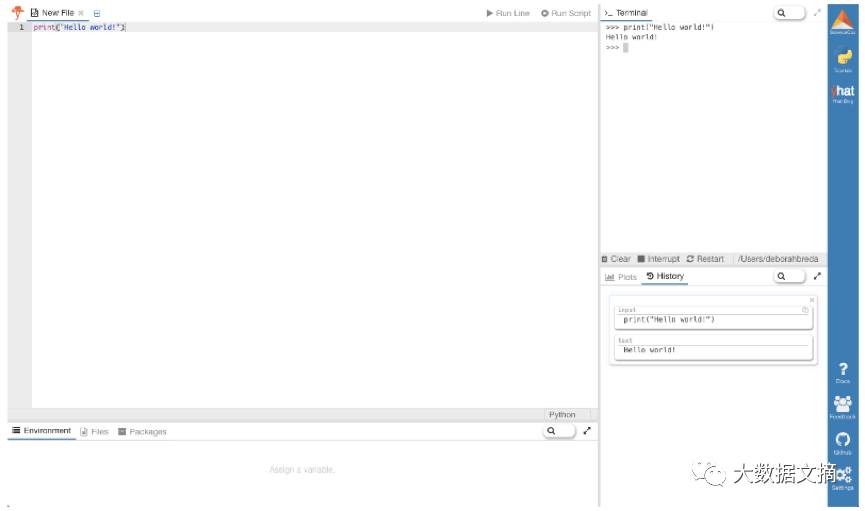
Python is part of Rodeo, and after installing Rodeo, you can use Python directly without any additional steps.
How to download Rodeo:
◇ Go to the website https://www.yhat.com/products/rodeo;
◇ Click the blue DOWNLOAD button, or you can choose the platform version you need from the two lines below;
◇ A file with the .exe extension will start downloading;
◇ Double-click the downloaded .exe file and follow the on-screen instructions. If you are unsure about the settings, choose the default values, as all settings can be modified later;
◇ After completing the above steps, Rodeo will automatically open. Python is already installed inside, and you can directly code in the upper left editing window!
Method 2:

Anaconda includes many of the most commonly used databases (a total of 150, with another 250 that can be installed using the conda install command).
Unlike Rodeo, when you download Anaconda, you do not get an “environment” for Python data mining and analysis (IDE environment refers to the interactive development environment).
How to download Anaconda (including Python):
◇ Go to the website https://www.continuum.io/downloads;
◇ Click the green “64-bit Installer” button;
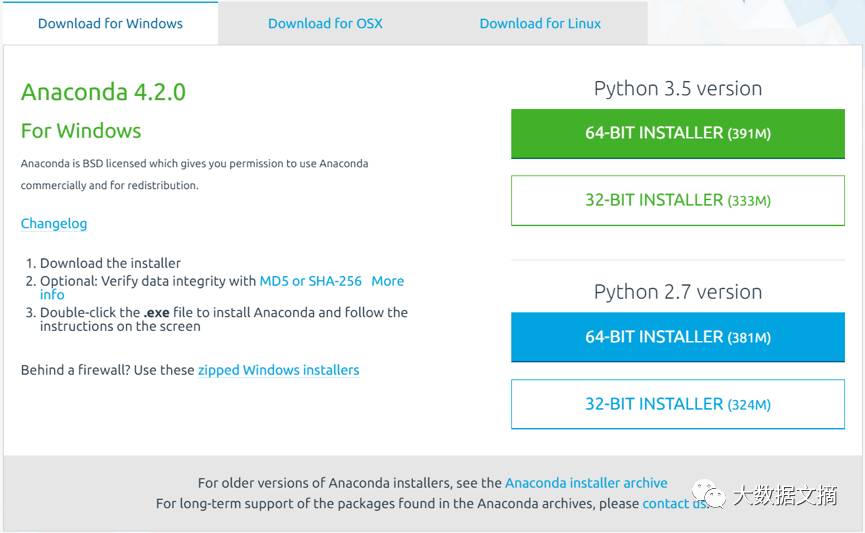
◇ A file with the .exe extension will start downloading;
◇ Double-click the downloaded .exe file and follow the on-screen instructions. If you are unsure about the settings, choose the default values, as all settings can be modified later;
◇ After completing the above steps, a new terminal window will open; if no new window appears, click Start -> Run -> Command -> Prompt;
◇ You can start writing code in the terminal window!
Beginner:Okay, I will install it. Then do I start writing code? Before, I was only operating on the Codecademy webpage, how do I write code on my PC now?
Answer:Just open Notepad, write your Python code (address C:\Users\thom\new_file.py), open the cmd command line window, and run the Python file you just wrote: python C:\Users\thom\new_file.py
Beginner:This doesn’t seem too complicated…
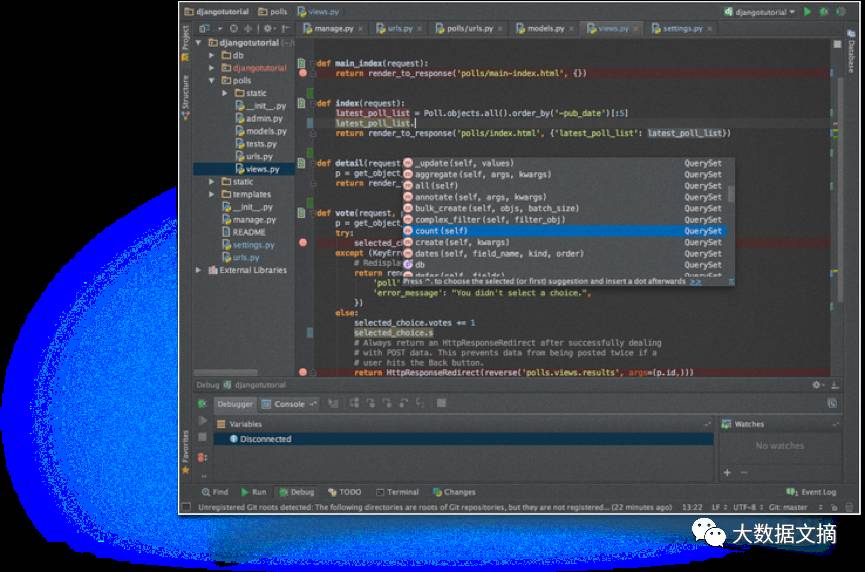
Answer:You really know how to get to the point, but we do have a solution. To have a better Python experience, we can develop in Pycharm (https://www.jetbrains.com/pycharm/?fromMenu). Pycharm is an integrated development environment that supports developers in the provided environment. You can run the program by simply clicking the “run script” button in the development environment. Additionally, this integrated development environment allows data scientists to be more efficient because it provides features like auto-completion and error checking during execution. If you forget a space or use a function name that has already been defined, it will automatically remind you; it can also help you insert version control systems like Git. (Many people consider this to be the best Python IDE, and if you are familiar with R language, Pycharm is similar to Rstudio.)
Beginner:Wow, it really seems simple!
Answer:Yes! Very quickly, you can start your journey as a data scientist! The hardest part is getting started — you just need to choose a Python course for beginners, learn step by step, follow the provided assignments for practice, and within a few months, you will master the main skills of Python. Once Python is installed, if you want to learn more in-depth content beyond online courses, you can choose textbooks like “Data Analysis with Python”.
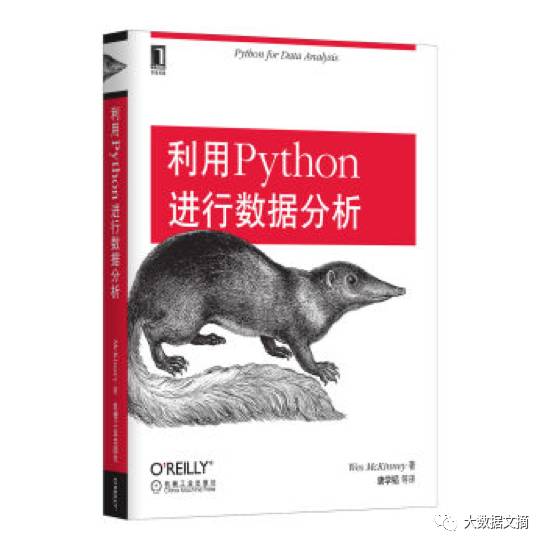
In fact, various tutorials and books are quite similar, so it doesn’t matter much which one you choose.
Beginner:Yes! The most important thing is to choose one and stick with it! Going from a beginner to a Python expert is my New Year plan for 2017, and I’m going to start right now!
Source
https://www.themarketingtechnologist.co/helping-our-new-data-scientists-start-in-python-a-guide-to-learning-by-doing/
http://blog.yhat.com/posts/installing-python-on-windows.html

Regarding Reprints

If you need to reprint, please prominently indicate the author and source at the beginning of the article (Reprinted from: Big Data Digest | bigdatadigest), and place a prominent QR code for Big Data Digest at the end of the article. For articles without original identification, please edit according to the reprint requirements and can be directly reprinted. After reprinting, please send the reprint link to us; for articles with original identification, please send [Article Name - Pending Authorized Public Account Name and ID] to us to apply for whitelist authorization. Unauthorized reprints and adaptations will be pursued legally. Contact email: [email protected].
Volunteer Introduction
Reply “Volunteer” to learn how to join us


Previous Exciting Articles
Click the image to read the article
Beginners in Data: The Big World in Small World Networks