IntroductionIn our daily research work, we often need to handle massive datasets, especially in data-intensive fields such as deep learning, meteorology, and bioinformatics. This demand is particularly prominent. These datasets typically have highly structured naming conventions, a large number of files, and considerable individual file sizes—such as remote sensing images stored in time series, large-scale image classification datasets, or sharded samples in distributed training. Faced with such complex file organization and frequent read/write operations, manual management is not only inefficient but also prone to errors.Therefore, efficiently and automatically traversing, filtering, moving, copying, and managing file paths has become a fundamental skill in scientific programming. As a mainstream language in the research field, Python’s standard library provides powerful and flexible file operation tools, such as os, shutil, glob, and pathlib. Each of these modules has its own characteristics, capable of independently handling common I/O tasks while also collaborating to build robust file processing workflows. Mastering the use of these modules can significantly enhance the efficiency of data preprocessing and lay a solid foundation for constructing reproducible and scalable research workflows.This article takes the CMIP6 files stored in the /filepath directory as an example to demonstrate the complete process of traversing, querying, and moving files that conform to the CMIP6 naming convention. The naming convention and file style of CMIP6 files are as follows:<variable_id>_<table_id>_<source_id>_<experiment_id>_<variant_label>_<grid_label>_<time_range>.nc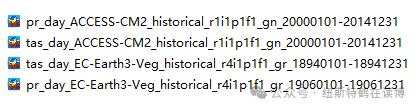 File TraversalIf you want to query the list of files in a directory for subsequent processing, you can use os.listdir():
import os
filelist = os.listdir('/filepath')
Using the recursive matching feature of the glob module, you can query all .nc files in the /filepath directory and its subdirectories at once, returning the path of each .nc file:
import glob
file_path_list = glob.glob('/filepath/**/*.nc', recursive=True)
File Query
The core objectives of file querying can be summarized in two points: confirming whether a file exists and querying files that meet specified conditions. For these two objectives, there are corresponding technical methods available. For the former, we can use the following method:
import os
filename = 'pr.nc'
file_path = os.path.join('/filepath', filename)
os.path.exists(file_path)
Taking CMIP6 files as an example, if you want to find the paths of all precipitation files under the ACCESS-CM2 model in the /filepath directory:
import os
import glob
filename = 'pr_*_ACCESS-CM2_*.nc'
file_path = os.path.join('/filepath', filename)
file_path_list = glob.glob(file_path)
If you want to perform a recursive search in the above directory, you need to make the following adjustments:
file_path = os.path.join('/filepath', '**', filename)
file_path_list = glob.glob(file_path, recursive=True)