Background of ComfyUI
ComfyUI is the “Lego block” in the Stable Diffusion ecosystem. It transforms AI-generated images into a visual programming game. Unlike the “dumb camera” operation of WebUI, every function here is an assemblable node: drag and drop the “prompt” node to connect to the “sampler”, then attach “ControlNet” to adjust poses… It builds a dedicated image generation pipeline just like assembling a circuit board.
Developers use it to debug new animation architectures, digital artists rely on it for precise control over hair gloss, and AIGC researchers can observe the magical changes in latent space in real-time. All computations run on your local GPU (requiring at least 8GB of VRAM), supporting the free loading of plugin models developed by community experts. When you see parameters flowing like electric currents between nodes, ultimately converging into stunning images, you suddenly understand why some say: “Once you get used to ComfyUI, you can never go back to WebUI.” But, dear ComfyUI alchemists, do you often feel:
-
Error messages look like Morse code? If you can understand them, you win; if not… just restart!
-
Node connections are more complex than the Spring Festival railway map? One wrong drag, and three hours of work go to waste!
-
Tuning parameters relies on mysticism? One extra zero after the decimal point, and the GPU goes on strike!
-
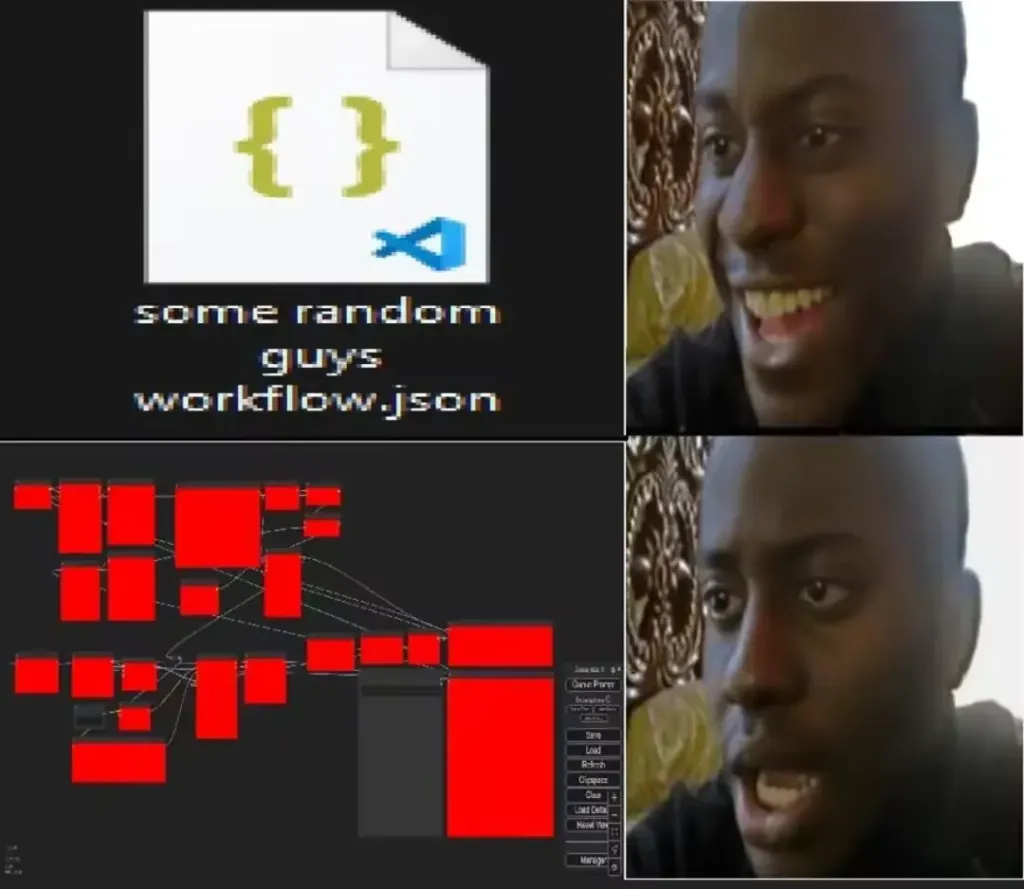
The workflow.json you painstakingly obtained? Opening it instantly teaches you what “the ideal is full, but reality is thin” means…
Don’t panic! ComfyUI-Copilot V2.0 is here! It allows you to complete AI image generation development through natural language dialogue, guiding ComfyUI users through every step of building the image generation workflow. New users can get started in 5 minutes, while experienced users can double their efficiency!
What Can ComfyUI-Copilot Do?
From “blank canvas” to “generate a high-quality image that meets user requirements”, we break down the real path users take in ComfyUI into four main steps, providing actionable intelligent support at each step.
- Conversation-First Development: Describe your intent in natural language, and the system will translate it into executable workflows and operational suggestions.
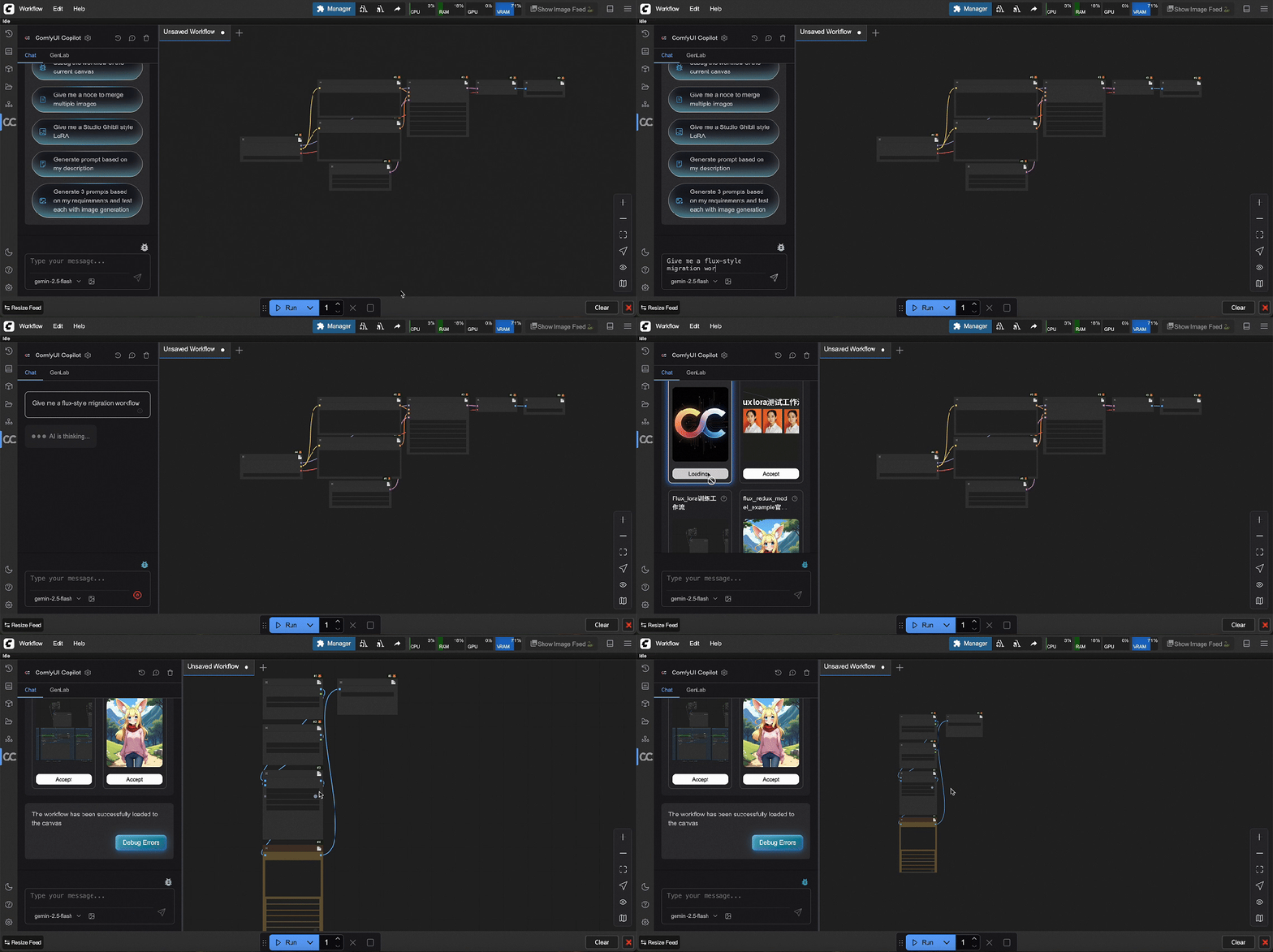
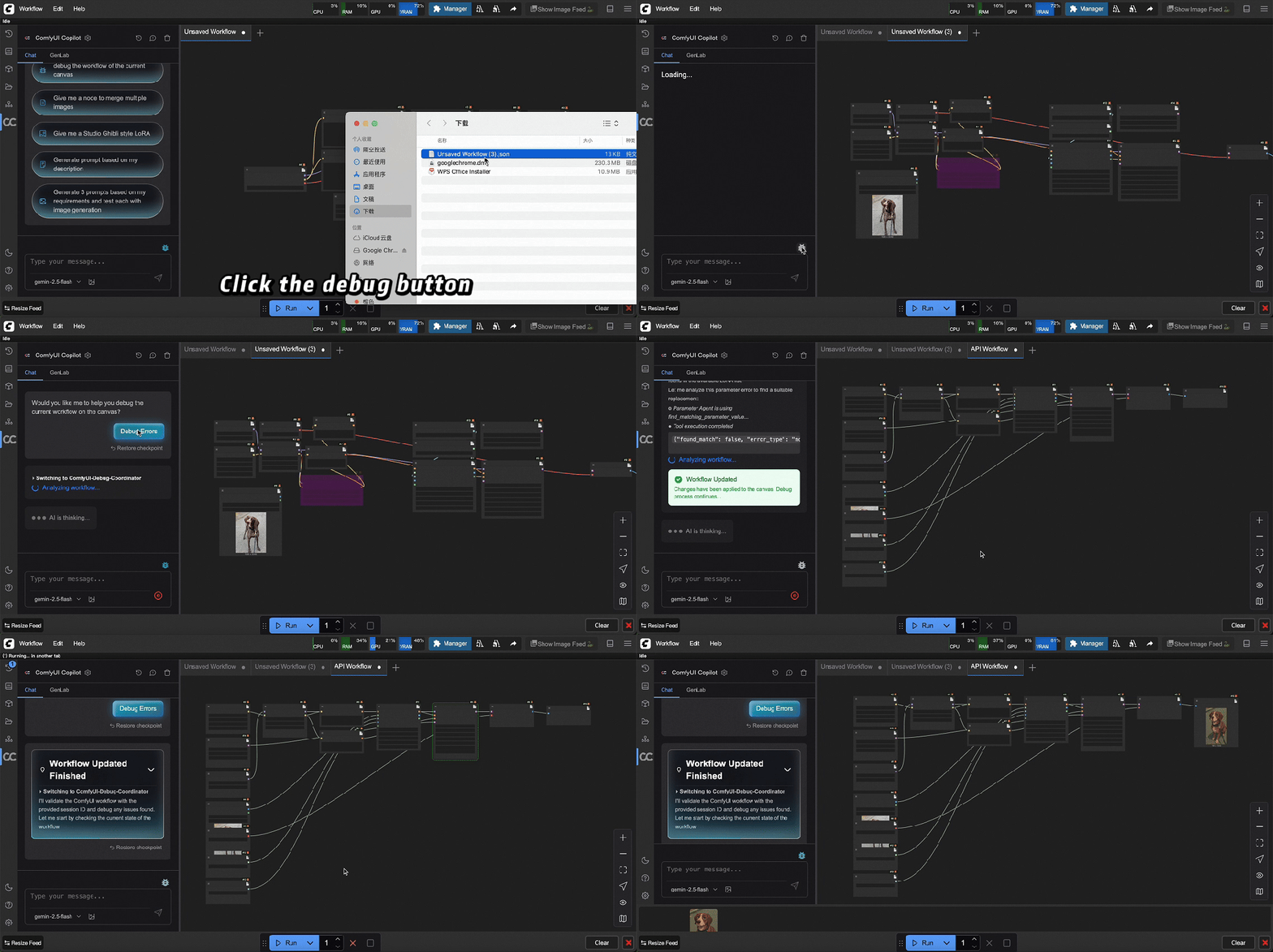
- Debugging and Fixing: Automatically detect erroneous connections, abnormal parameters, and missing dependencies, outputting repair suggestions and executable plans, supporting direct debugging on the current canvas.
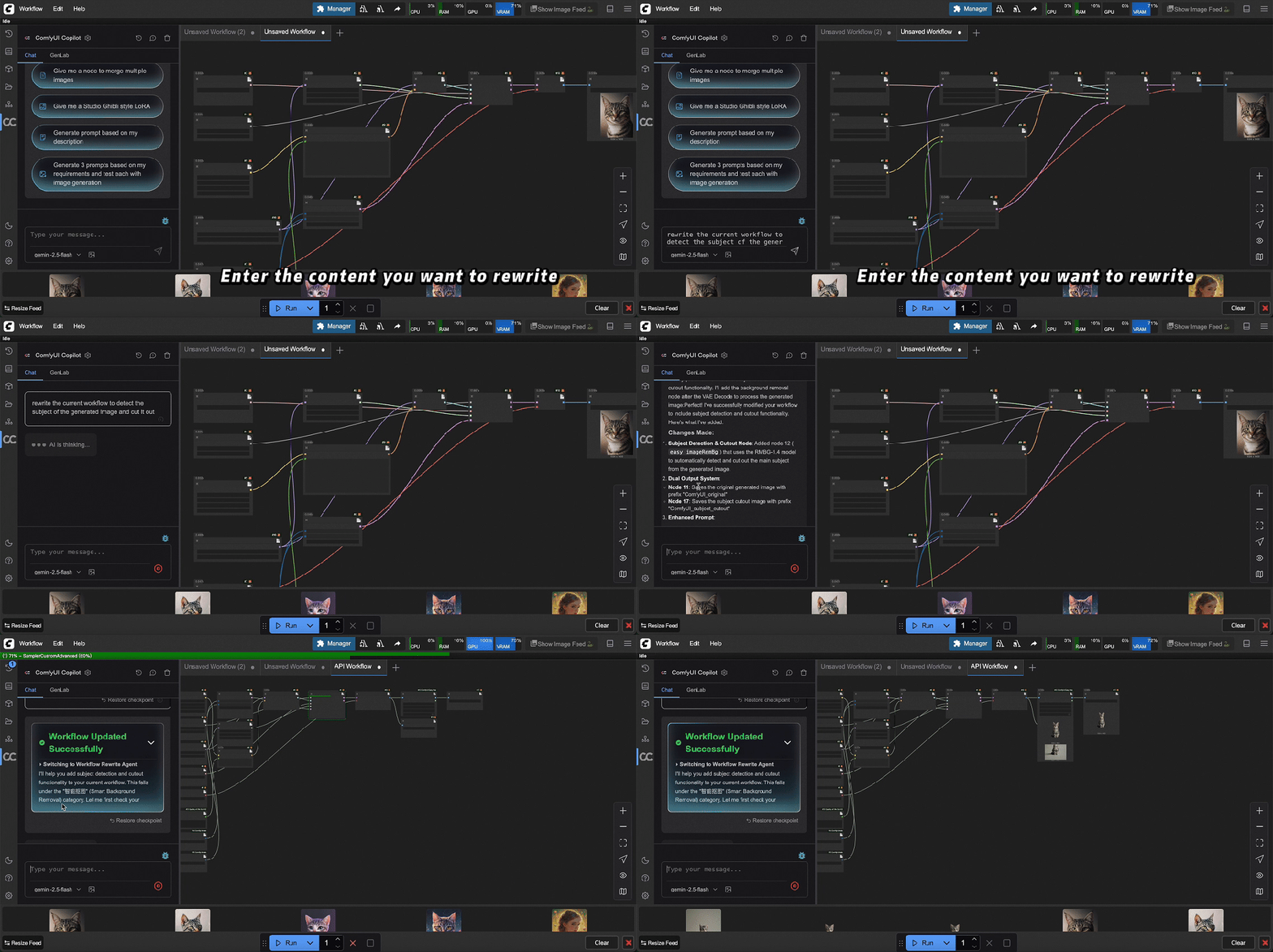
- Workflow Rewriting: Directly describe unsatisfactory aspects and new requirements, and Copilot will automatically rearrange the workflow structure, replace/add key nodes, and recommend optimal parameter ranges based on your environment.
- Measurable Improvements: Use GenLab to turn “mystical parameter tuning” into comparative visualizations and reproducible experiments.
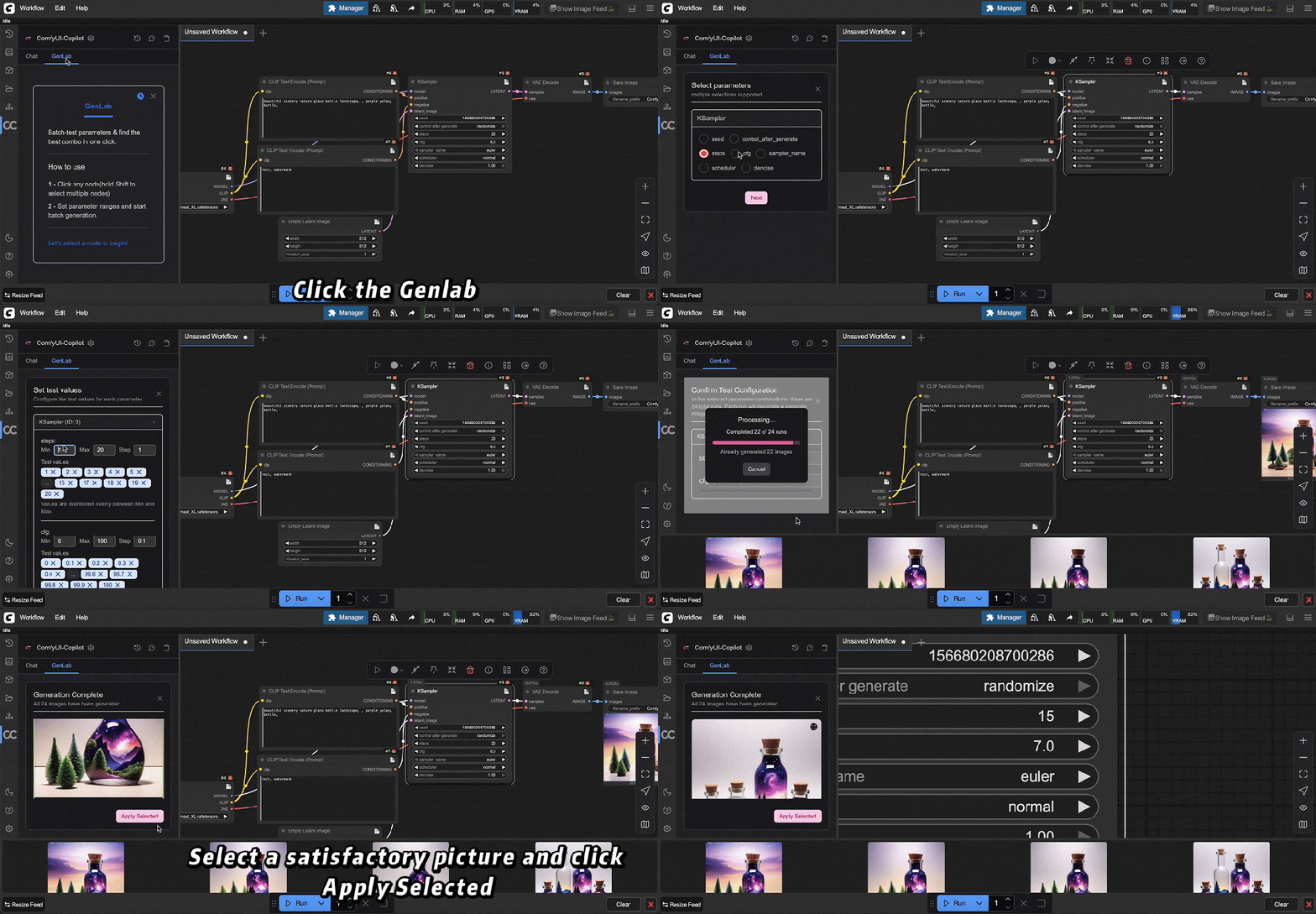
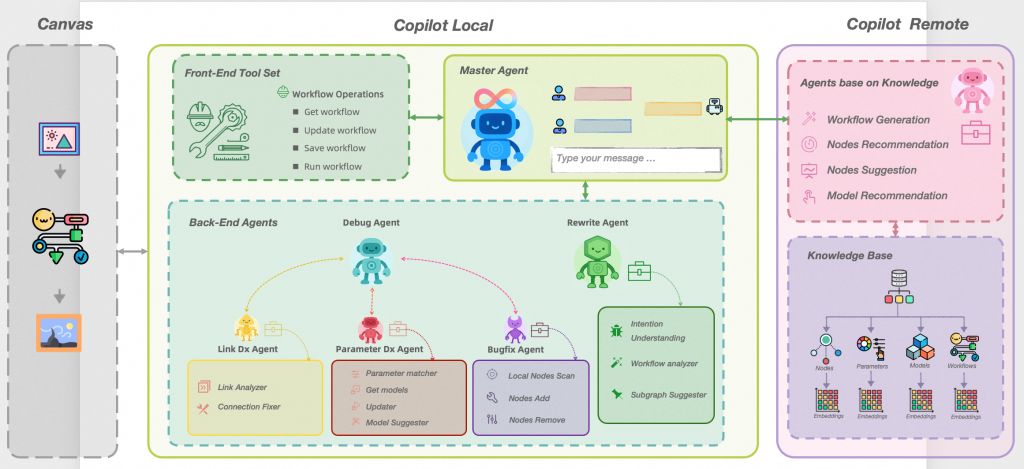
ComfyUI-Copilot V2.0 is built on a multi-agent collaboration framework and connects to local services and the official ComfyUI ecosystem’s tools through MCP.
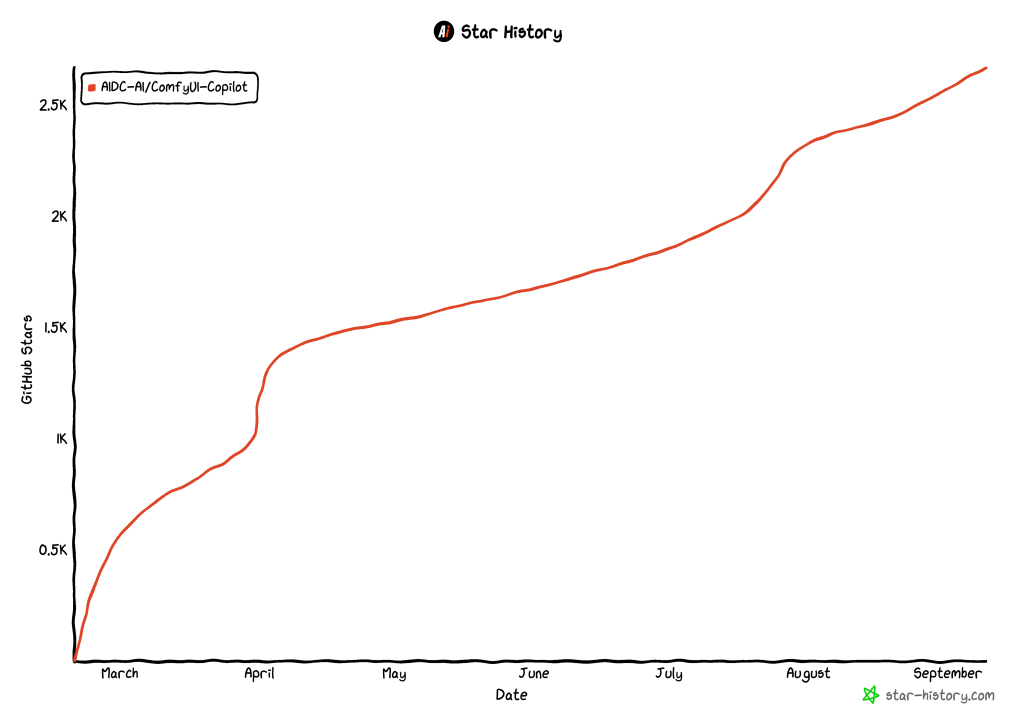
⭐ Star History
Refined Controllable Generation
As a UI plugin for ComfyUI, Copilot emphasizes “visible results, controllable processes, and reproducible engineering” in the dimensions of “high quality” and “controllable generation”. Relying on multi-agent and structured toolchains, Copilot implements “controllability” at three levels: intent → structure → parameters, and provides comparison and reproducibility capabilities through GenLab.
High Quality and Controllability: Practical Cases
-
Consistency of Characters and Styles
- Ensure that the same character maintains consistent facial features and makeup across multiple shots and styles through “workflow rewriting + model/LoRA recommendations + parameter mapping”; supports a one-click strategy to “lock composition/character, only replace style”.
-
Controllable Composition/Posture/Lighting
- Integrate common control nodes (such as posture/edges/depth, etc.) and provide “intelligent node completion + downstream subgraph recommendations”, allowing controlled composition while maintaining detail quality; supports a combination of soft and hard constraints to “lock layout, open texture details”.
-
Product-Level Detail Quality
- Targeting e-commerce/material scenarios, provide “high-resolution reconstruction links + anti-aliasing parameter templates” to reduce edge jaggedness and texture stretching; supports multiple A/B comparison schemes (subjective scoring + objective metrics like SSIM/LPIPS) and one-click rollback to the optimal snapshot.
-
Reproducibility and Traceability of Processes
- Full-process snapshots (workflow structure, model versions, key parameters, seeds) and experimental records ensure results are reproducible and auditable under team collaboration; automatic rollback on failure and parameter range protection reduce the probability of crashes caused by “mystical parameter tuning”.
-
Ability to reuse all end-to-end models, below is a case demonstration in the e-commerce scenario
-
I want to change the model in the following Taobao women’s clothing image to a Black model and add marketing copy.
-
nano banana can ensure the clothing remains unchanged, but the text addition effect is poor.
-
qwen image can add marketing copy, but the main subject does not remain well.
-
ComfyUI can combine the advantages of all end-to-end models and all controllable components, such as ControlNet, to generate more controllable production images.
The original e-commerce image has a messy background.

nano banana changes the model to a Black person, alters the facing direction, and adds a background.

qwen image edit + controlnet adds marketing copy.

Differences in advantages compared to baseline models (comparison of Nano Banana / Qwen Image Edit).
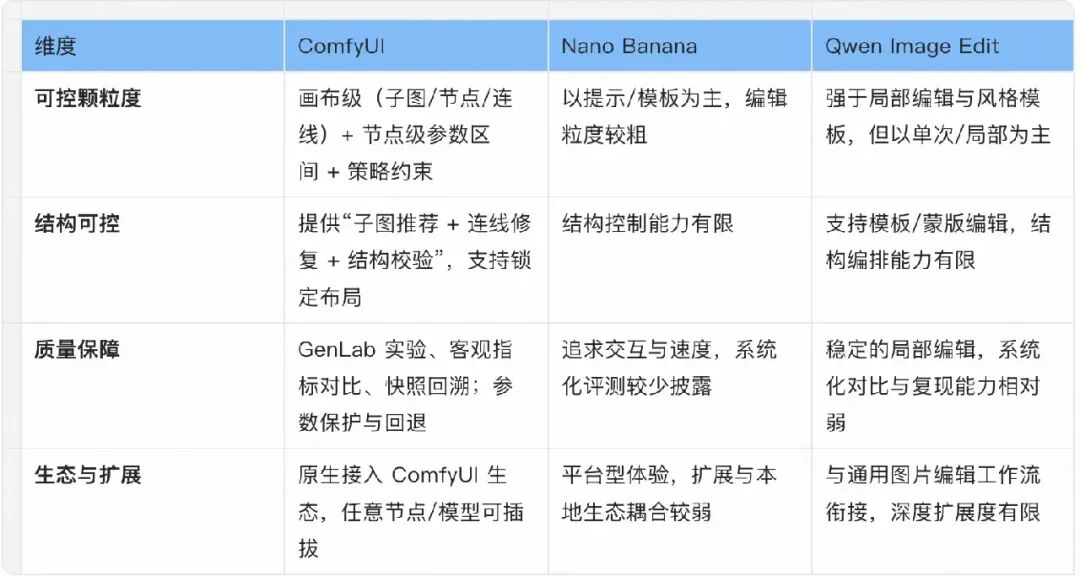
In summary: The differentiation of Copilot lies in “engineering-structured controllability supporting high-quality generation and team-level reproducibility”. Baseline solutions are more inclined towards “single edits/quick outputs”, while Copilot is more suitable for “controllable, comparable, and reusable” production scenarios.
Architecture and Design Ideas
Choice of Canvas Plugin Form:
-
Considering the acquisition of ecological traffic: We decided to adopt the ComfyUI plugin form rather than developing a standalone application. This choice not only allows direct access to ComfyUI’s core user base but also fully utilizes ComfyUI’s ecological traffic, reducing user acquisition costs.
-
Implementation methods of plugins in the ComfyUI ecosystem: There are mainly two common implementation methods for plugins in the ComfyUI ecosystem:
-
Custom Nodes: Extend functionality through custom nodes, suitable for technical users. This method offers high flexibility but requires users to have a certain technical background.
-
UI Plugins: Provide a visual interface, more suitable for novice users. This method significantly lowers the usage threshold and enhances the interactive experience.
-
User Group Analysis: After in-depth analysis of the target user group, we found that most users prefer simple and easy-to-use tools. Therefore, we ultimately chose to develop UI Plugins to maximize the reduction of usage barriers while enhancing the interactive experience.
Core Architecture Design:
-
The limitations of V1.0: ComfyUI-Copilot V1.0 only implemented front-end interaction capabilities on the plugin side, with all logic placed on the back end. As product functionality expanded, this architecture gradually exposed the following issues:
-
Unable to perceive the local ComfyUI environment.
-
Difficulty in directly calling local models (such as Llama3).
-
Inability to efficiently manage local services (such as node installation, model downloading).
-
Improvements in V2.0: To address these issues, V2.0 evolved into the following architecture:
-
Plugin Side: Place MCP-Client in Canvas and Copilot-Local, supporting calls to remote tools (SSE) and local services (stdio).
Remote Calls: Including workflow generators (SD/Flux/API Node), node recommendations, model recommendations, intelligent node completion, image evaluation, etc.
Local Services: Including workflow execution, one-click node installation, one-click model installation, parameter modification/local mapping, etc.
-
Server Side: Open MCP-Server, providing SSE Tools, supporting workflow generation, node recommendations, model recommendations, etc.
-
Local Model Support: Some users can directly call locally installed open-source models (such as Llama3) to meet personalized needs.
Copilot-Local | MultiAgent
-
Problem Background: Relying solely on a single Agent-Tools capability to achieve complex functions (such as workflow modification and debugging) can lead to the Agent mounting too many Tools, resulting in performance degradation and maintenance difficulties.
-
Solution: Adopt a layered architecture, breaking complex scenarios into multiple subtasks handled by different Agents, with each Agent only binding the necessary Tools.
-
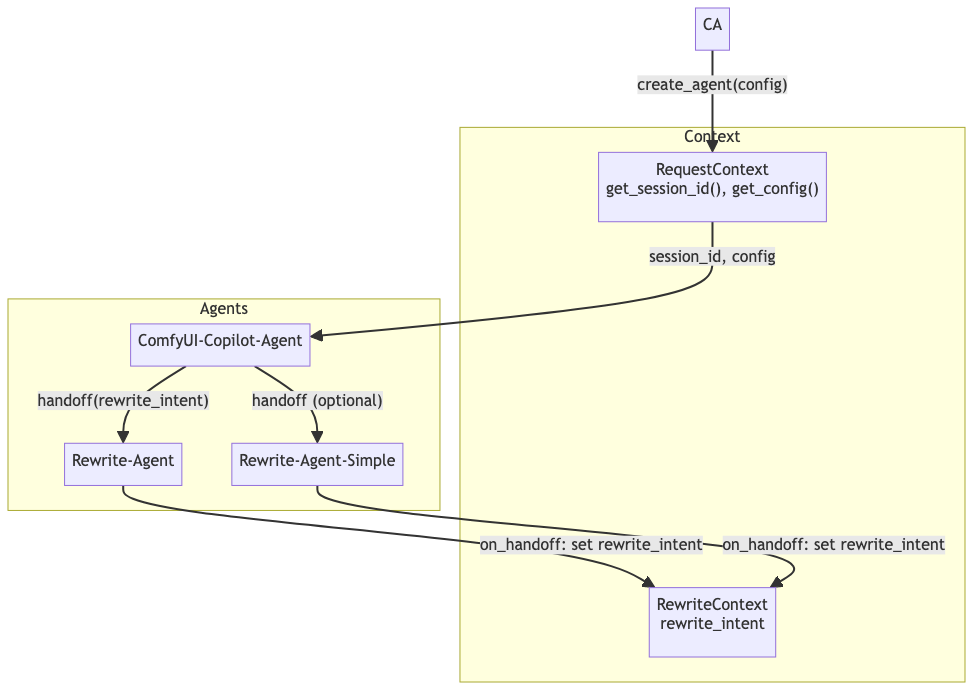
Master Agent: Responsible for overall coordination and decision-making, interacting with users, and collaborating with RewriteAgent. It passes context information through the Handoff mechanism to ensure seamless task transitions.
-
Debug Agent: Responsible for debugging workflows, identifying error types, and calling LinkAgent, ParameterAgent, and WorkflowBugfixAgent for repairs.
-
Rewrite Agent: Responsible for rewriting workflows, calling the RAG system based on user needs, recalling relevant experiences and node information, and generating optimized workflows.
Copilot-Remote | RAG
-
Server Capabilities: MCP-Server provides SSE Tools, supporting calls from the plugin-side MCP-Client. Core functions include:
-
Workflow recall and generation.
-
Node recommendations and model recommendations.
Technology Stack Selection
-
OpenAI Agents (Python):
a. Native support for multi-agent collaboration: perfectly fits the design needs of MasterAgent coordinating multiple sub-Agents.
b. Standardized Tool registration/discovery mechanism: facilitates layered management of different Agents’ exclusive toolsets while supporting convenient MCP configuration.
c. Built-in Context management: supports maintaining complex workflow debugging session states and seamlessly passing context information through the Handoff mechanism.
MasterAgent
MCP Client & MCP Server
In ComfyUI-Copilot V2.0, MasterAgent mounts four core tools (Tools) through the SSE (Server-Sent Events) method of MCP (Multi-Agent Control Protocol) to achieve efficient interaction with back-end services. The specific implementation code is as follows:
async with MCPServerSse(
    params= {
        "url": BACKEND_BASE_URL + "/mcp-server/mcp",
        "timeout": 300.0,
    },
    cache_tools_list=True,
    client_session_timeout_seconds=300.0
) as server:
  triage_agent = Agent(
      name="ComfyUI-Copilot",
      instructions="...",
      mcp_servers=[server],
      handoffs=[rewrite_agent],
  )
Technical Details Supplement: – The role of MCP-SSE: SSE is a lightweight real-time communication protocol suitable for unidirectional data push scenarios. Here, it is used for efficient communication between MasterAgent and back-end services, ensuring real-time updates of the tool list and synchronization of task statuses. – Design of triage_agent: As the core component of MasterAgent, triage_agent is responsible for coordinating task distribution and passing specific tasks (such as workflow rewriting) to rewrite_agent through the handoffs mechanism. To be compatible with the existing FASTAPI system while supporting both MCP and traditional API calls, we adopted the following architectural design:
async with MCPServerSse(
    params= {
        "url": BACKEND_BASE_URL + "/mcp-server/mcp",
        "timeout": 300.0,
    },
    cache_tools_list=True,
    client_session_timeout_seconds=300.0
) as server:
  triage_agent = Agent(
      name="ComfyUI-Copilot",
      instructions="...",
      mcp_servers=[server],
      handoffs=[rewrite_agent],
)-
The role of FastMCP: It is a lightweight framework for integrating the MCP protocol into FASTAPI, supporting a mixed mode of SSE and traditional HTTP requests.
-
Tool Registration: By using the @mcp.tool() decorator, functions can be registered as MCP tools for MasterAgent to call. For example, the recall_workflow tool is used to recall workflow data.
RAG & Benchmark System
To accurately match user needs from a vast amount of information, we designed a complete RAG (Retrieval-Augmented Generation) system, supplemented by a Benchmark evaluation mechanism.
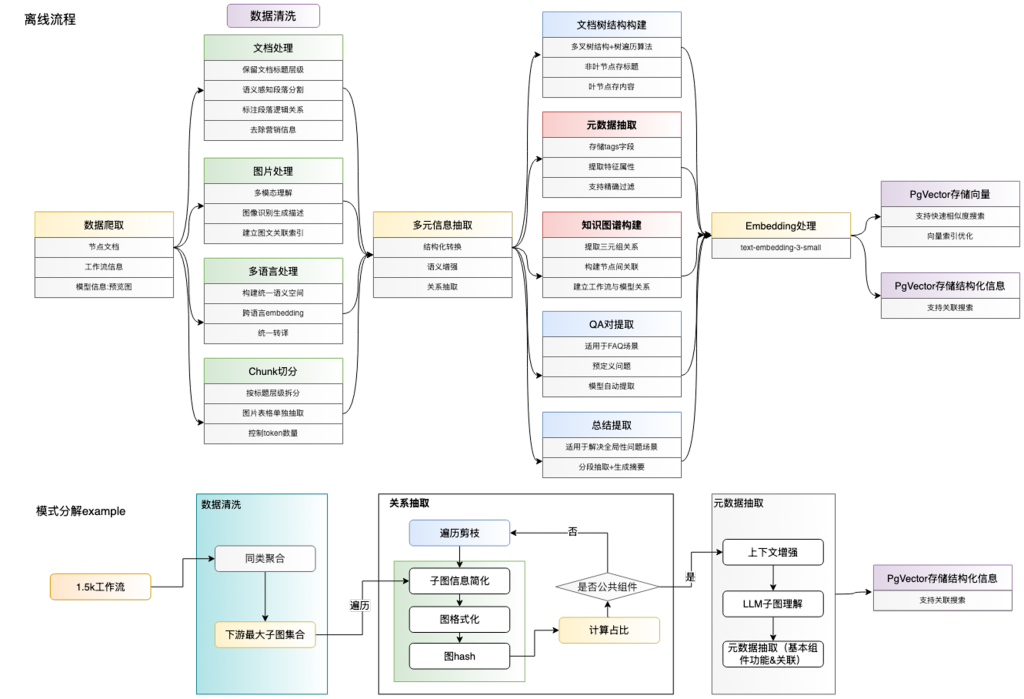
The offline processing stage undertakes a heavy computational task, with all complex and time-consuming calculations completed and stored in the database in advance. The online service maintains a lightweight design to ensure quick responses and enhance user experience. Offline processing is mainly divided into four steps:
-
Information Collection: Scraping ComfyUI-related data through a crawler system.
-
Data Cleaning: Classifying different types of data, focusing on solving the structural issues of documents, images, and multilingual content. For example, segmenting titles in node documents, storing Lora information mainly in images, integrating text and image information through multimodal models, and unifying translations for multilingual content.
-
Information Structuring: Converting node documents into structured data; extracting Lora base models as filtering tags; constructing a knowledge graph of node associations.
-
Vectorization: Generating vector data through embedding technology, storing it along with structured data.
To achieve workflow completion functionality similar to Cursor code completion, the system will recommend multiple downstream subgraphs after the user selects a node. By deconstructing complex workflows into several simplified subgraphs, it helps large models better understand workflow structures. Using graph algorithms to extract frequently occurring subgraph patterns, these are solidified into reusable public components.
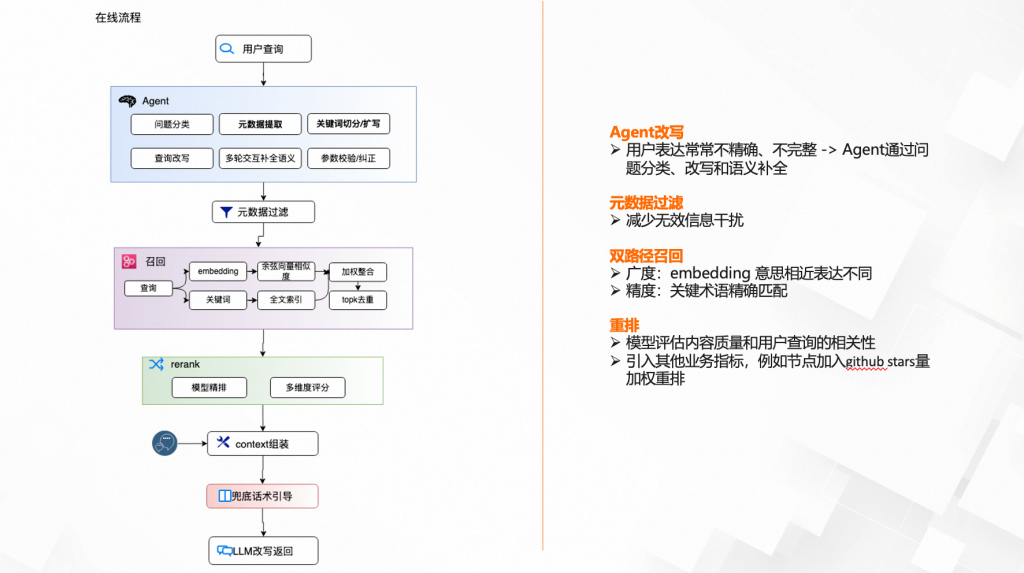
The online process fully utilizes the structured data generated by offline processing:
-
User input often contains incomplete or vague expressions, requiring Agents to perform semantic rewriting and completion, followed by filtering through metadata to eliminate interference items.
-
A dual-path recall strategy balances recall breadth and result accuracy: vector recall covers semantically similar cases, while keyword matching ensures result relevance, with both weighted fusion sorting.
-
Evaluating the relevance of recall results, in some scenarios, business metrics (such as incorporating GitHub stars weight in node recalls) are introduced for final sorting.
Debug Agent
Design Ideas
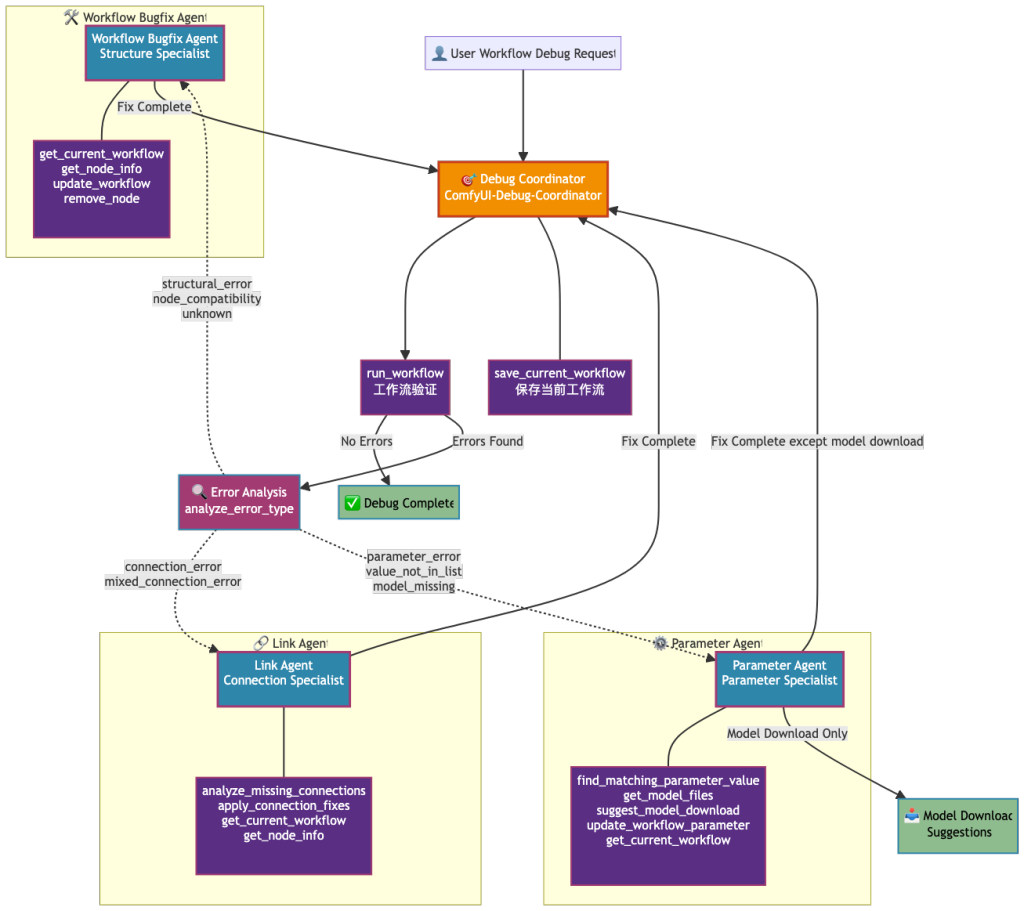
Referring to Cursor’s debugging process, after running the script and obtaining error messages, it will attempt a rewrite, and then run the test script again based on the rewritten code. After multiple error feedback and modifications, the error issue is ultimately resolved. The core of this process lies in error capture, intelligent analysis, iterative repair, and validation closure.
-
Error Capture Stage: Automatically run the current workflow through the workflow validation tool to capture structured error logs. The key here is to ensure the completeness and parseability of error messages, providing a foundation for subsequent analysis.
-
Intelligent Analysis Stage: The error classifier routes errors to the corresponding domain Agents (connection/parameter/structure). For example:
-
Connection errors (connection_error) are handled by the Link Agent.
-
Parameter anomalies (value_not_in_list) are handled by the Parameter Agent.
-
Structural issues (node_compatibility) are handled by the Workflow Bugfix Agent.
Iterative Repair Stage: Each Agent uses dedicated tools for repairs, automatically saving workflow snapshots after each modification. For example:
-
The Link Agent is responsible for fixing missing connections.
-
The Parameter Agent is responsible for adjusting parameter values or suggesting model downloads.
-
The Workflow Bugfix Agent is responsible for handling node compatibility issues or removing invalid nodes.
Validation Closure: After repairs, a secondary validation is automatically triggered, forming a debugging closure (up to 6 iterations). If validation passes, it outputs success; otherwise, it continues analysis and repair.
Multi-Agent Structure
debug_agent = Agent(
    name="Debug Agent",
    instructions="You determine which agent to use based on the user's homework question",
    tools=[run_workflow, analyze_error_type, save_current_workflow],
)

parameter_agent = Agent(
    name="Parameter Agent",
    handoff_description="",
    tools=[find_matching_parameter_value, get_model_files,
        suggest_model_download, update_workflow_parameter, get_current_workflow],
    handoffs=[debug_agent],
)

link_agent = Agent(
    name="Link Agent",
    handoff_description="",
    tools=[analyze_missing_connections, apply_connection_fixes, get_current_workflow, get_node_info],
    handoffs=[debug_agent],
)

workflow_bugfix_default_agent = Agent(
    name="Workflow Bugfix Agent",
    handoff_description="",
    tools=[get_current_workflow, get_node_info, update_workflow],
    handoffs=[debug_agent],
)

debug_agent.handoffs = [link_agent, workflow_bugfix_default_agent, parameter_agent]
Each Agent focuses on specific tasks and achieves efficient collaboration through context routing protocols. Here are the key design points:
-
Context Routing Protocol:
-
Connection errors (connection_error) ➔ Link Agent
-
Parameter anomalies (value_not_in_list) ➔ Parameter Agent
-
Structural issues (node_compatibility) ➔ Workflow Bugfix Agent
Tool Reuse Strategy:
-
Basic tools (such as get_current_workflow) are shared across Agents to avoid redundant implementations.
-
Dedicated tools (such as apply_connection_fixes) are mounted as needed to ensure functional focus.
-
Tool outputs are automatically cached to avoid redundant calculations.
Shared Context Control:
-
Each Agent automatically inherits the preceding context during processing.
-
Tool outputs are automatically merged into the global context (such as connection repair records from the Link Agent).
-
Structured data is returned to the front end through tools, reducing the burden on LLM.
Processing results are returned, and structured data is returned to the front end through tools. The returns of all tools in the entire Multi-Agent system can be uniformly processed through Events. This implementation allows LLM to focus on core functions, enabling the Multi-Agent system to return various complex formats of JSON data without putting pressure on LLM.
debug_agent = Agent(
    name="Debug Agent",
    instructions="You determine which agent to use based on the user's homework question",
    tools=[run_workflow, analyze_error_type, save_current_workflow],
)

parameter_agent = Agent(
    name="Parameter Agent",
    handoff_description="",
    tools=[find_matching_parameter_value, get_model_files,
        suggest_model_download, update_workflow_parameter, get_current_workflow],
    handoffs=[debug_agent],
)

link_agent = Agent(
    name="Link Agent",
    handoff_description="",
    tools=[analyze_missing_connections, apply_connection_fixes, get_current_workflow, get_node_info],
    handoffs=[debug_agent],
)

workflow_bugfix_default_agent = Agent(
    name="Workflow Bugfix Agent",
    handoff_description="",
    tools=[get_current_workflow, get_node_info, update_workflow],
    handoffs=[debug_agent],
)

debug_agent.handoffs = [link_agent, workflow_bugfix_default_agent, parameter_agent]
Implementing this entire Multi-Agent structure is quick, but we soon encountered many issues. Multi-Agent is very difficult to debug, and we used the OpenAI Agents framework, which has many technical details to handle, presenting a black box form to us. The subsequent work is the most time-consuming, which is to make Multi-Agent more stable, controllable, and intelligent.
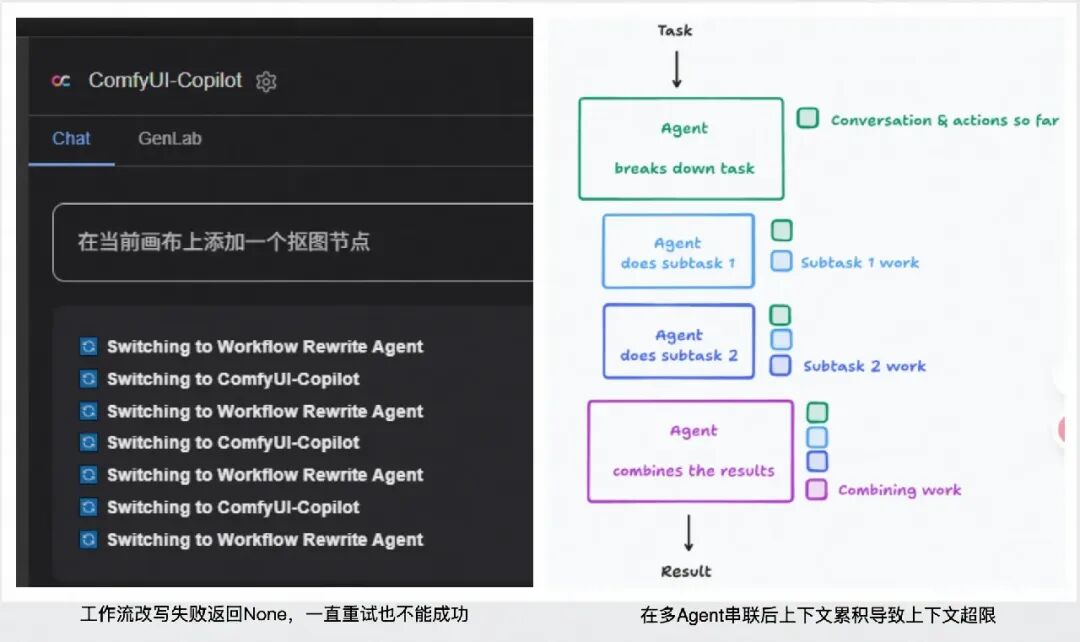
Smart Idea: Context Control, Provide Necessary Information Only
Letting a single LLM in the Multi-Agent focus on a specific task, without any configuration, defaults to passing the complete context during handoff.
- Filter: When Agent handover occurs, the complete context is passed by default. However, the amount of information passed can be limited through input_filter, such as removing all tool call history, ensuring the new Agent only focuses on necessary information.
from agents import Agent, handoff
from agents.extensions import handoff_filters

agent = Agent(name="FAQ agent")

handoff_obj = handoff(
    agent=agent,
    input_filter=handoff_filters.remove_all_tools,
)
InputData: In some cases, when a large model is handed over, you may want it to provide some data and only that data, without passing lengthy complete context. For example, if handing over to an “escalation agent”, you might want to provide a reason for record-keeping.
from pydantic import BaseModel

from agents import Agent, handoff, RunContextWrapper

class EscalationData(BaseModel):
    reason: str

async def on_handoff(ctx: RunContextWrapper[None], input_data: EscalationData):
    print(f"Escalation agent called with reason: {input_data.reason}")

agent = Agent(name="Escalation agent")

handoff_obj = handoff(
    agent=agent,
    on_handoff=on_handoff,
    input_type=EscalationData,
)
Smart Idea: “Artificial Intelligence”, Enhance Certainty
-
The amount of artificial intelligence corresponds to the amount of intelligence. Separate deterministic tasks from those that require LLM decision-making; implement deterministic tasks through coding to minimize the difficulty and length of LLM outputs, allowing LLM to focus solely on decision-making.
-
The Param Agent modifies parameters to normal values when parameter anomalies occur; in this case, if LLM is also asked to return a large workflow, it would modify a few parameter fields, similar scenarios would unnecessarily burden LLM, easily leading to hallucinations.
-
Similarly, in the scenario of connecting workflows, if LLM is entirely responsible, it becomes very passive, inputting a large workflow, connecting several lines, and then outputting several large workflows. Below is an example with the Link Agent:
-
# Tool enumerates all nodes to be connected and corresponding parameters
@function_tool
async def analyze_missing_connections() -> str:
    """
    Analyze missing connections in the workflow, enumerate all possible connection options and required new nodes.

    Return format description:
    - missing_connections: Detailed list of missing connections, including node ID, input name, required data types, etc. (only includes required inputs)
    - possible_connections: Existing nodes can provide connection options
    - universal_inputs: General input ports that can accept any output type
    - optional_unconnected_inputs: List of optional unconnected inputs, including node ID, input name, configuration information, etc.
    - required_new_nodes: List of new node types that need to be created
    - connection_summary: Statistical summary of connection analysis (including statistics of optional inputs)
    """
    try:
        # Get session_id from context, retrieve workflow from db using session_id
        session_id = get_session_id()
        workflow_data = get_workflow_data(session_id)
        if not workflow_data:
            return json.dumps({"error": "No workflow data found for this session"})
        # Get current node information
        object_info = await get_object_info()

------------------------------------------------------------------------

# Guide LLM to return the nodes to be added and the lines to be connected
# Tool modifies the workflow and provides feedback to the front end through Event
@function_tool
def apply_connection_fixes(fixes_json: str) -> str:
    """Apply connection fixes in bulk; fixes_json should be a JSON string containing repair instructions"""
    ...
    return  json.dumps([{
            "type": "workflow_update",
            "data": {
                "workflow_data": workflow_data,
                "changes": {
                    "applied_fixes": applied_fixes,
                    "failed_fixes": failed_fixes
                }
            }
        }])
Smart Tool Management Tips: Prevent AI from Being Flustered
When the system is filled with over 30 functional tools, it is like asking a novice chef to operate ten stoves simultaneously, making it easy to become flustered.
-
Ambiguous task role boundaries: unclear responsibilities of each Agent
-
In version V1, multiple sub-Agents mounted a large number of common tools, leading to overlapping responsibilities and chaotic decision-making.
-
How to allocate roles to fully utilize the expertise of different agents and break down tasks to each agent is key to improving collaboration efficiency.
During the development of ComfyUI-Copilot V2.0, we summarized two management secrets:
First Secret: Tool Classification and Packaging Technique
-
Choosing good names is important
-
Each tool is like a spice bottle in the kitchen; the name should be easily understood (e.g., “Parameter Validator”, “Connection Assistant”).
-
Input and output should be standardized, just like the opening sizes of spice bottles should be uniform (enforced type annotations and fixed return formats).
Fixed combinations save time and effort
-
Discover golden partners: Fixed processes like “washing vegetables → cutting vegetables” can be packaged into pre-made dishes.
-
Refer to the connection repair function of the Link Agent to solidify common operational processes.
Second Secret: AI Team Division Method
-
Three-tier management structure
-
Grassroots employees (L1): Specialize in 3-5 tools, like the Param Agent only handling parameter issues.
-
Team leaders (L2): Coordinate multiple tools, like the Link Agent responsible for the entire workflow connection.
-
General manager (L3): Oversees the overall situation, dispatching different teams as needed.
Smart scheduling tips
-
Label each tool with “feature tags” (e.g., “parameter processing”, “graph connection”).
-
When a problem arises, first match the tags, like an automatic sorting station for packages.
-
Change personnel after three consecutive failures to avoid deadlock.
Tracing Assistant – Langsmith
In the Multi-Agent scenario, debugging becomes very painful, with error messages being very deep and difficult to troubleshoot. In this case, it is necessary to integrate Tracing to assist in troubleshooting and debugging. OpenAI Agents recommend using Langfuse, but currently, Langsmith is the most user-friendly. The method to integrate Langsmith is as follows:
import os

os.environ['LANGCHAIN_TRACING_V2'] = "true"
os.environ['LANGCHAIN_API_KEY'] = "xxx"

import asyncio
from agents import Agent, Runner, set_trace_processors, set_tracing_disabled, set_default_openai_api
from langsmith.wrappers import OpenAIAgentsTracingProcessor

set_tracing_disabled(False)
set_default_openai_api("chat_completions")

async def main():
    agent = Agent(
        name="Captain Obvious",
        instructions="You are Captain Obvious...",
        model="gpt-4.1-2025-04-14-GlobalStandard",
    )
    question = "hello"
    result = await Runner.run(agent, question)
    print(result.final_output)

if __name__ == "__main__":
    set_trace_processors([OpenAIAgentsTracingProcessor()])
    asyncio.run(main())
RewriteAgent
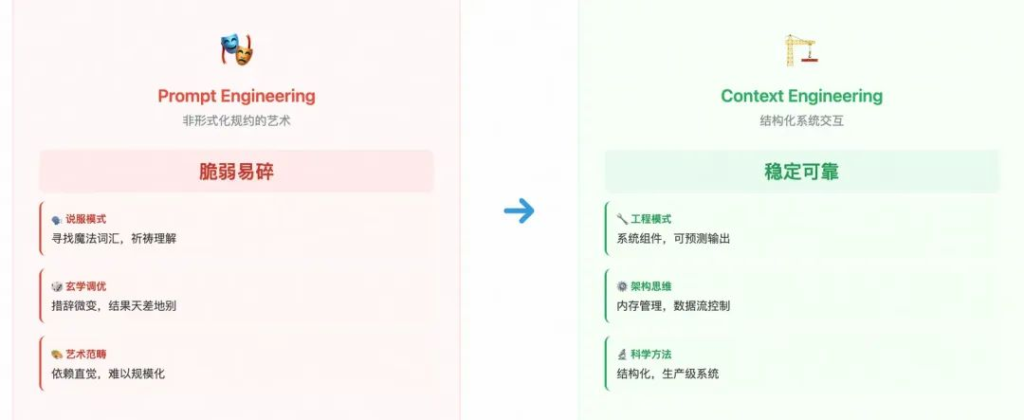
Smart Idea: From Prompt Engineering to Context Engineering
Context Engineering is a systematic discipline focused on designing, building, and maintaining a dynamic system that intelligently assembles the optimal context combination for each step of the Agent’s task execution, ensuring tasks can be reliably and efficiently completed.
Long contexts bring costs and collaborative pressure, more easily exposing four types of context failures: pollution, interference, confusion, and conflict. These often couple with each other and directly damage reasoning stability and cross-agent transmission. Context Engineering can avoid the above risks by intelligently managing and compressing context, injecting only high-value conclusions and information into the context (a significant portion of tokens are worthless analyses).
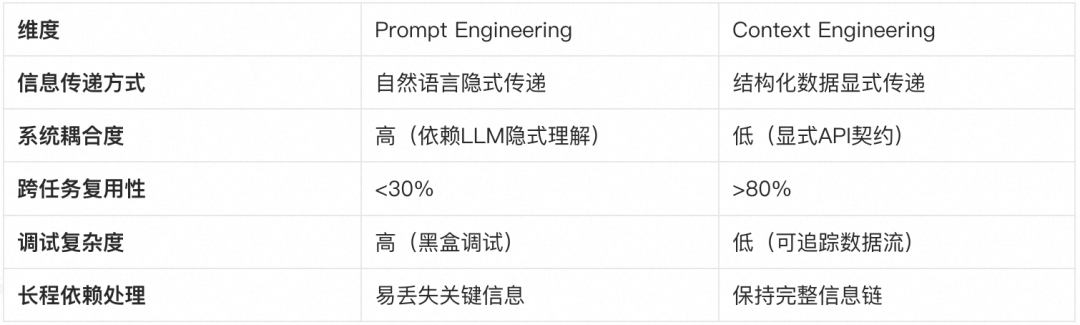
Example of data flow direction:
-
A Agent collects raw data through the toolset.
-
The cleaned structured data is stored in Context.
-
When tasks are handed over, the Context fingerprint is carried.
-
B Agent directly reads the Context data.
-
LLM only processes core decision logic.
# Context-driven architecture example
import asyncio
from dataclasses import dataclass

from agents import Agent, RunContextWrapper, Runner, function_tool

@dataclass
class UserInfo:
    name: str
    uid: int

@function_tool
async def fetch_user_age(wrapper: RunContextWrapper[UserInfo]) -> str:
    """Fetch the age of the user. Call this function to get user's age information."""
    return f"The user {wrapper.context.name} is 47 years old"

async def main():
    user_info = UserInfo(name="John", uid=123)

    agent = Agent[UserInfo](
        name="Assistant",
        handoff=[agentB],
    )

    agentB = Agent(
        name="B Agent",
        tools=[fetch_user_age],
    )

    result = await Runner.run(
        starting_agent=agent,
        input="What is the age of the user?",
        context=user_info,
    )

    print(result.final_output)
    # The user John is 47 years old.

if __name__ == "__main__":
    asyncio.run(main())
Smart Idea: Five Fingers Do Not Touch the Spring Water
Any Agent design that mounts multiple tools will impose more requirements and context information on LLM. For particularly complex tasks, when model capabilities are limited, we should return to simplicity, letting LLM do nothing else, with all information collection done in advance, stored in structured data format in the context, and then allowing LLM to focus on processing this complex task with all prepared context.
# RewriteAgent collects all information in advance and stores it in the context
@function_tool
async def get_node_info(node_class: str) -> str:
    """Node metadata collector"""
    try:
        object_info = await get_object_info()
        if node_class in object_info:
            node_data = json.dumps(object_info[node_class], ensure_ascii=False)
            # Persist context storage
            get_rewrite_context().node_infos[node_class] = node_data
            return node_data
    except Exception as e:
        return json.dumps({"error": f"Metadata retrieval failed: {str(e)}"})

# Context-driven workflow generator
def build_llm_context(rewrite_context) -> str:
    """Structured context builder"""
    return f"""
## Core Elements
* Business Intent: {rewrite_context.rewrite_intent}
* Current Status: {rewrite_context.current_workflow}
* Environmental Data: {json.dumps(rewrite_context.node_infos, ensure_ascii=False)}
* Domain Knowledge: {rewrite_context.rewrite_expert or 'Basic Rules'}
"""

# Streamlined LLM interaction interface
def generate_workflow(context_str: str) -> dict:
    """Context-driven workflow generation"""
    return client.chat.completions.create(
        model=WORKFLOW_MODEL_NAME,
        messages=[{
            "role": "system",
            "content": "You are a workflow generation expert, please generate a plan based on the following structured context:"
        }, {
            "role": "user",
            "content": context_str
        }],
        response_format=RewriteResponse  # Strongly typed response constraints
    )
Come Try ComfyUI-Copilot Now!
Github: https://github.com/AIDC-AI/ComfyUI-Copilot
How to download and install? Any suggestions or questions are welcome!