# Configure Router HTTP Server Address # Configure Router Web Server Timeout
HuaweiNetEngine AR600, AR6100, AR6200, AR6300 Series Routers—Basic Configuration Commands
Routers, Switches, FirewallsDetailed Configuration Document Knowledge Base has been established, and can be queried in the dialog box!
HTTP Server Commands
● Configure HTTP Server Source AddressCommandhttp server-source
● Configure Web Server TimeoutCommandhttp timeout
1.Configure HTTP Server Source AddressCommandhttp server-source
1、Command Function
http server-source command is used to configure the HTTP server’s source address.
undo http server-source command is used to delete the HTTP server’s source address.
● By default, the HTTP server does not have a configured source address.
2、Command Format
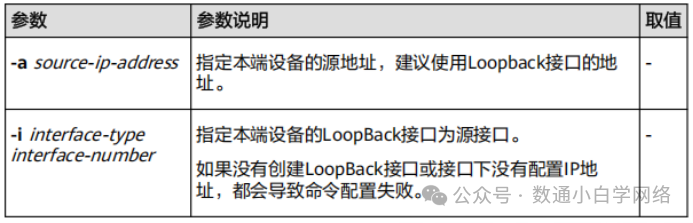
http server-source { -a source-ip-address | -i interface-type interface-number }
undo http server-source
3、Parameter Description
4、Usage Guide
4.1 Application Scenarios
● If the source address for sending messages from the server is not specified, the device will use the source address determined by routing for communication. Configuring the source address requires selecting a stable interface on the device, such as the Loopback interface. This configuration simplifies the ACL rules and security policy configuration; as long as the source or destination address of the ACL rules is specified as this address, it can mask the differences in interface IP addresses and the impact of interface status, achieving filtering of incoming and outgoing messages for security verification purposes.
4.2 Precautions
4.2.1 After configuring the source address of the server, the server address entered during login must match the one configured in this command; otherwise, login will fail.
4.2.2 If the HTTP service has already been enabled, executing this command will restart the HTTP service.
5、Example Configuration
# Set the source interface of the HTTP server to LoopBack0.
<Huawei> system-view
[Huawei] http server-source -i loopback 0
Warning: To make the server source configuration take effect, the HTTP server will be restarted. Continue?
(y/n)[n]:y
Info: Succeeded in setting the source IP or interface of the HTTP server
2.Configure Web Server TimeoutCommandhttp timeout
1、Command Function
http timeout command is used to configure the Web server’s timeout.
undo http timeout command is used to restore the Web server’s timeout to the default value.
● By default, the HTTP server’s timeout is 10 minutes.
2、Command Format
http timeout timeout
undo http timeout
3、Parameter Description

4、Usage Guide
4.1 Application Scenarios
● If Web users are logged into the device for a long time without operation, it will occupy Web channel resources (currently only supports logging in 5 Web users), preventing other users from logging into the device. Setting an appropriate timeout can timely release Web channel resources. If a longer time is needed to occupy the Web channel, the timeout can be set to the maximum value.
4.2 Precautions
4.2.1 After executing this command, all logged-in Web users will have the same timeout. If a user times out, they will be automatically logged out.
4.2.2 This command is an overriding command, with the last configuration taking precedence.
5、Usage Example
# Configure Web server’s timeout to 6 minutes.
<Huawei> system-view
[Huawei] http timeout 6