In previous articles, we learned how to use AgentScope to build a conversation with @ functionality, as well as how to set up a simple Go game. A commonality in these applications is that large models generate responses directly based on prompts; for simple tasks, perhaps the large model can handle them. However, when faced with more complex tasks, we expect the large model to become “smarter,” capable of handling more diverse scenarios and solving more complex problems. In this article, we will show you how to use the built-in ReAct agent in AgentScope to tackle more complex issues. The complete code and results can be found at the link (https://github.com/modelscope/agentscope/tree/main/examples/conversation_with_react_agent).
Welcome to follow AgentScope on GitHub (https://github.com/modelscope/agentscope) and give us a star 🌟. In the coming days, we will continue to release a series of tutorials, allowing everyone to build interesting multi-agent applications with simple code!
02Background: ReAct Algorithm
The ReAct algorithm comes from the paper “ReAct: Synergizing Reasoning and Acting in Language Models,” published at the ICLR conference in 2023. The core of the ReAct algorithm is to help agents better respond to and solve complex problems by alternating between reasoning and acting. Compared to general reasoning methods, it can analyze the current scenario and make more targeted actions, providing better interpretability and higher fault tolerance.
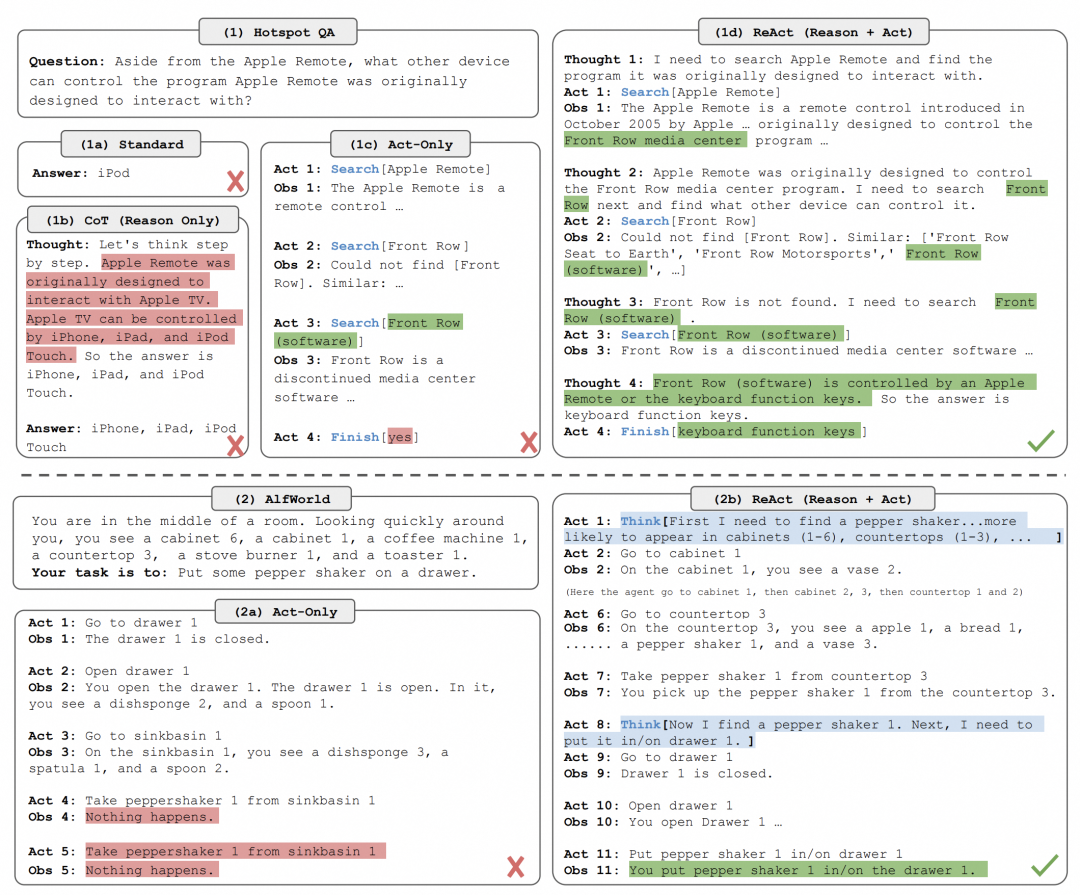
Comparison of ReAct with other reasoning algorithms
03Preparation Work
-
First, please install the agentscope library according to the instructions on GitHub (https://github.com/modelscope/agentscope).
-
Similar to previous articles, we need to prepare the corresponding model configuration file based on the model type. AgentScope supports various model API calling methods, including local deployment and third-party libraries. Please refer to our tutorial for deployment and usage methods (https://modelscope.github.io/agentscope/en/tutorial/203-model.html). Here we take the Tongyi Qwen API provided by DashScope as an example.
// model_configs.json[ { "model_type": "dashscope_chat", "config_name": "tongyi_qwen_config", "model_name": "qwen-max", "api_key": "************" // Fill in your DashScope API-KEY here }]04Calling ReActAgent
In the ReAct algorithm, acting is generally done by calling tool functions. Therefore, we first need to prepare tool functions for the agent and then use these tool functions to solve our specific problems.
Step 1: Prepare Tool Functions
In order for the large model to be able to use the tool functions, we first need to process the tool functions. This processing involves two aspects:
-
Handling parameters that need to be filled in by developers, such as API keys, accounts, passwords, etc., so that the large model can directly call the function.
-
Generating function descriptions that the large model can understand, such as the JSON schema format required by many model APIs.
To reduce the development difficulty for users, AgentScope provides the ServiceFactory module, which can easily handle tool functions. Taking the bing_search function as an example, this function requires the following parameters:
-
query: The question to query
-
api_key: The API key for Bing search
-
num_results: The number of search results to return
Developers can specify the api_key and num_results parameters in ServiceFactory.get for bing_search, thus generating a function that only requires the user to input the query, along with a function description in JSON schema format.
from agentscope.service import bing_search
func_for_llm, func_desc = ServiceFactory.get(  bing_search,   api_key=BING_API_KEY,   num_results=3)
The JSON schema format variable func_desc value is as follows:
{ "type": "function", "function": { "name": "bing_search", "description": "Search question in Bing Search API and return the searching results", "parameters": { "type": "object", "properties": { "question": { "type": "string", "description": "The search query string." } }, "required": [ "question" ] } }}Using a similar method, we can convert different tool functions into a callable mode for the large model. Here we prepare the following tool functions:
from agentscope.service import (    bing_search, # or google_search,    read_text_file,    write_text_file,     ServiceFactory)
# Deal with arguments that need to be input by developers
tools = [    ServiceFactory.get(bing_search, api_key=BING_API_KEY, num_results=3),    ServiceFactory.get(execute_python_code),    ServiceFactory.get(read_text_file),    ServiceFactory.get(write_text_file),]
Step 2: Create the Agent
After preparing the tool functions, we can create the ReAct agent. The creation process is very simple: initialize agentscope, then create ReActAgent and input the corresponding parameters.
from agentscope.agents import ReActAgent
import agentscope
agentscope.init(model_configs=YOUR_MODEL_CONFIGURATION)
agent = ReActAgent(    name="assistant",    model_config_name=YOUR_MODEL_CONFIGURATION_NAME,    tools=tools,    sys_prompt="You are a helpful assistant.",    verbose=True, # set verbose to True to show the reasoning process)
To make it clearer how the ReActAgent operates, we will first show the system prompt of this agent, which includes three parts: identity description, tool function description, and prompt.
You are a helpful assistant.
The following tool functions are available in the format of```{index}. {function name}: {function description}    {argument name} ({argument type}): {argument description}    ...```
Tool Functions:1. bing_search: Search question in Bing Search API and return the searching results  question (string): The search query string.2. execute_python_code: Execute Python code and capture the output. Note you must `print` the output to get the result.  code (string): The Python code to be executed.3. read_text_file: Read the content of the text file.  file_path (string): The path to the text file to be read.4. write_text_file: Write content to a text file.  overwrite (boolean): Whether to overwrite the file if it already exists.  file_path (string): The path to the file where content will be written.  content (string): Content to write into the file.
Notice:1. Fully understand the tool function and its arguments before using it.2. Only use the tool function when it's necessary.3. Check if the arguments you provided to the tool function is correct in type and value.4. You can't take some problems for granted. For example, where you are, what's the time now, etc. But you can try to use the tool function to solve the problem.5. If the function execution fails, you should analyze the error and try to solve it.
Step 3: Test the ReAct Agent’s Capabilities
At this point, we use a classic example question from the ReAct paper: “Aside from the Apple Remote, what other device can control the program Apple Remote was originally designed to interact with?” to test its performance.
from agentscope.message import Msg
msg_question = Msg(    name="user",     content="Aside from the Apple Remote, what other device can control the program Apple Remote was originally designed to interact with?",     role="user")    res = agent(msg_question)
Next, we will analyze the reasoning process printed by the agent round by round.
-
First Round
-
reasoning: We first see that the agent analyzed the user input question and decided to use the bing_search tool function for the call.
-
acting: The bing_search returned search results, but we note that the returned information is not related to the answer to the question. Due to the widespread attention on the ReAct algorithm, the sample question we used here returned results related to the ReAct algorithm itself! This is a very interesting search result and surprised us; let’s see how the agent will handle this issue.
##################### ITER 1, STEP 1: REASONING ######################
assistant: { "thought": "I need to search for information about what other devices can control the program that the Apple Remote was originally designed to interact with.", "speak": "Let me find that information for you.", "function": [ { "name": "bing_search", "arguments": { "question": "What devices can control Apple TV other than Apple Remote?" } } ]}####################### ITER 1, STEP 2: ACTION #######################>>> Executing function bing_search ...>>> END system: Execution Results:1. bing_search: [EXECUTE STATUS]: SUCCESS [EXECUTE RESULT]: [{'title': '《ReAct: SYNERGIZING REASONING AND ACTING IN ...', 'link': 'https://www.cnblogs.com/LittleHann/p/17541295.html', 'snippet': 'Aside from the Apple Remote, what other devices can control the program Apple Remote was originally designed to interact with? 我们可以看到该模型生成了任务解决轨迹(思考、行动)。'}, {'title': 'REACT:在大模型中协同推理与行动,使其能够解决推理和 ...', 'link': 'https://baijiahao.baidu.com/s?id=1775590643651365661', 'snippet': 'Q:Aside from the Apple Remote, what other device can control the program Apple Remote was originally designed to intect with? 除了苹果遥控器之外,还有哪些设备可以控制最初设计用于连接的苹果遥控器所配合的程序?'}, {'title': 'ReAct Prompting | Prompt Engineering Guide', 'link': 'https://www.promptingguide.ai/techniques/react', 'snippet': 'Aside from the Apple Remote, what other devices can control the program Apple Remote was originally designed to interact with? Note that in-context examples are also added to the prompt but we exclude that here for simplicity.'}]-
Second Round
-
reasoning: At this point, the agent realized the issue, explicitly stating it in the thought field and attempted to rewrite the search question to “What devices can control Apple TV other than Apple Remote?”.
-
acting: In this search, the agent received relevant search information.
##################### ITER 2, STEP 1: REASONING ######################
-
Third Round
-
reasoning: In this round, the agent summarized the results from the previous bing_search and formed the final reply in the “speak” field.
##################### ITER 3, STEP 1: REASONING ######################
The search results provided a clear answer to the question. Other than the Apple Remote, you can use a supported TV or receiver remote, a network-based remote for home-control systems, an infrared remote (commonly known as a universal remote), or other Apple devices like an iPhone or iPad to control the Apple TV.
This example is very interesting; we see how the ReAct algorithm processes erroneous information, generates correct replies, and how to conveniently use ReActAgent in AgentScope to solve our problems.
Conclusion
Here, we have completed the task of creating a ReAct agent using AgentScope and conducted preliminary trials. The complete code and results from this trial can be found at the link (https://github.com/modelscope/agentscope/tree/main/examples/conversation_with_react_agent). In the future, AgentScope will continue to add new algorithms and examples. We welcome everyone to keep following us~
Further Reading and Resources
-
Complete Chinese documentation and tutorials:https://modelscope.github.io/agentscope/zh_CN/index.html
-
AgentScope GitHub example repository:https://github.com/modelscope/agentscope/tree/main/examples
-
Research papers and materials:https://arxiv.org/abs/2402.14034
-
Join our discussion group: Scan the QR code on the GitHub project homepage (https://github.com/modelscope/agentscope/blob/main/README_ZH.md).
05Competition
If you have interesting ideas after reading this, why not practice them and also participate in the competition below~

Click Read the Original Text to jump~