 1. Control Requirements
Communication between Mitsubishi Touch Screen and Mitsubishi FX3U
2. Hardware Equipment
1. Mitsubishi Touch Screen
2. Mitsubishi FX3U PLC
3. Software
1. GX Work2
2. GT Work3
4. Wiring
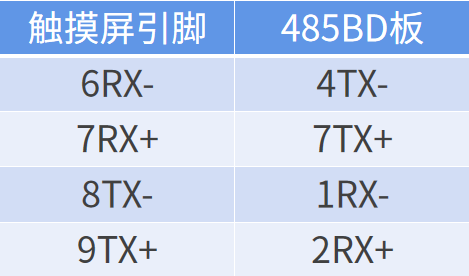
1. Pin Arrangement Diagram
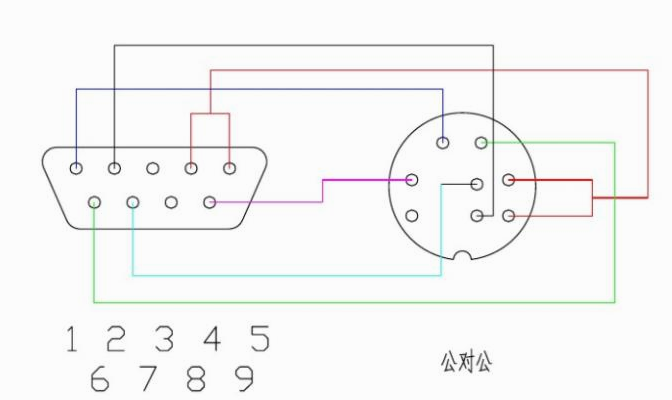
2. Wiring Diagram
5. Mitsubishi Touch Screen Settings
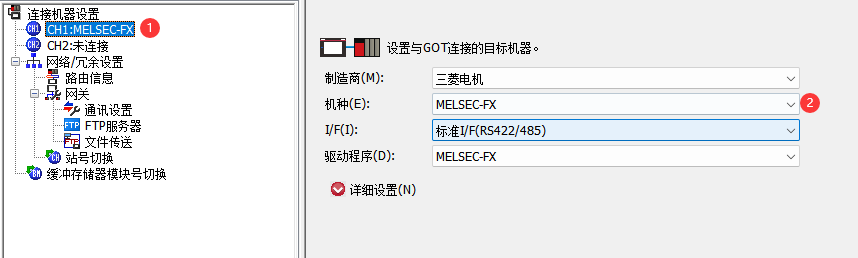
The settings for the Mitsubishi Touch Screen are as follows:
Device Channel/Model Selection:CH1:MELSEC-FX
I/F:RS-485
Driver:MELSEC-FX
Source: Jicheng Training Network, Author: Jicheng – Yu Bingyu, unauthorized reproduction is prohibited!
Advanced Material Collection
CollectClassic PLC Cases and Source Programs,scan the code to receive materials for free!

Previous Recommendations
The electrician laid the wires crookedly, but the owner was very satisfied and gave an extra 500 yuan!
This article will help you easily learn various base conversions
Electrical automation control terminology, saved it!
How to achieve OPC communication between King of Configuration and WinCC (2)
Does the emergency stop stop all output power or the entire device’s power? At least 90% of electricians do not know this principle
How to achieve OPC communication between King of Configuration and WinCC (1)
The distribution box connected by the electrician can find more than 5 errors, all of them are old electricians!
Solidworks modeling case 2 — Spiral Dragon Blade