Welcome to like and bookmark
Introduction: An Avoidable “Midnight Alarm”
Last Wednesday at 2 AM, I was woken up by a phone call:“Web server CPU at 100%, users can’t access the website!”
Logging in urgently, I found:One application server’s disk space had reached100%, log files were growing uncontrollably, causing MySQL to be unable to write, and the entire service was down.
What’s more embarrassing is—
Actually, the monitoring system had sent a“Disk usage > 90%” alert the previous afternoon, but no one acted on it.
This made me realize: No matter how good the monitoring is, it cannot replaceproactive inspections.Many “sudden failures” actually have early signs.
Today, I am sharing my“Linux System Inspection Checklist” that I have used for ten years without reservation, so that beginners can follow it, and experienced professionals can fill in the gaps. It’s all in plain language, with commands + explanations, ensuring you can understand and use it.
1. Why Perform System Inspections?
Many people think: “Monitoring is enough, why check every day?”
But the reality is:
-
Monitoring may miss alerts
-
Too many alerts become “the wolf is coming”
-
Some issues need to be identified by “trends”
System inspections are like regular health check-ups:
Don’t wait until you have a “heart attack” to go to the hospital, but rather detect the signs of “three highs” in advance.
Recommended frequency:
-
Core servers: once a day
-
Regular servers: once a week
-
Automated inspections: future goal
2. Five Dimensions of Linux System Inspection (with Commands + Interpretations)
We will check in the order ofCPU → Memory → Disk → Network → Logs across five dimensions.
✅ Dimension 1: CPU Usage and System Load
Inspection Goals:
-
Is the CPU overloaded?
-
Is the system “too busy”?
Common Commands: top
%Cpu(s) Line:
-
<span><span>us</span></span>(user mode) > 80%? → Application is CPU intensive -
<span><span>sy</span></span>(kernel mode) > 30%? → Too many system calls -
<span><span>id</span></span>(idle) < 10%? → CPU is nearing its limit
Load Average:
- 1-minute load > CPU cores × 0.7? → Warning
-
Consistently above the number of cores? → Severe overload
💡 Example: For a 4-core server, load average > 3 should raise a flag.
✅ Dimension 2: Memory and Swap Usage
Inspection Goals:
-
Is memory running low?
-
Is Swap (virtual memory) being used frequently?
Common Commands: free -h
Mem Line:
- used close to
<span><span>total</span></span>? → High memory pressure
Swap Line::
- used > 10%? → Risk signal
-
<span><span>si/so</span></span>(swap in/out) consistently > 0? → Performance may slow down
⚠️Golden Rule: Avoid using Swap in production environments, otherwise the system will “lag like a PowerPoint presentation”.
✅ Dimension 3: Disk Space and I/O Performance
Inspection Goals:
-
Is the disk nearly full?
-
Is read/write slowing down?
Common Commands: df -h & iostat -x 1 3
<span><span>df -h</span></span>:
- Any partition > 90%? → Must be addressed
- Pay special attention to
<span><span>/</span></span>,<span><span>/var</span></span>, and<span><span>/home</span></span>
<span><span>iostat -x</span></span>:
- %util > 80%? → Disk I/O bottleneck
-
<span><span>await</span></span>> 20ms? → High latency (SSD should be < 1ms)
💡Recommendation: Clean logs and temporary files daily to avoid “log explosions”.
✅ Dimension 4: Network Connections and Port Status
Inspection Goals:
-
Is the network functioning normally?
-
Are there any abnormal connections?
Common Commands: netstat -tulnp & ss -s
<span><span>netstat -tulnp</span></span>:
- Are critical service ports listening? (e.g., 80, 443, 3306)
-
Are there any suspicious external connections? (e.g., unknown IPs, unusual ports)
<span><span>ss -s</span></span>:
- Check total TCP connections; a sudden increase may indicate DDoS or connection leaks
🔐Security Recommendation: Close unnecessary ports and use firewalls to restrict access.
✅ Dimension 5: System Logs and Security Audits
Inspection Goals:
-
Are there any errors or warnings?
-
Are there any illegal login attempts?
Common Commands:

What to Focus On:
-
Are there continuous occurrences of
<span><span>Out of memory</span></span>,<span><span>Timeout</span></span>, or<span><span>Connection refused</span></span>? -
More than 10 failed SSH login attempts? → Possible brute force attack
🛡️Recommendation: Use
<span><span>fail2ban</span></span>to automatically block IPs, or switch to key-based login.
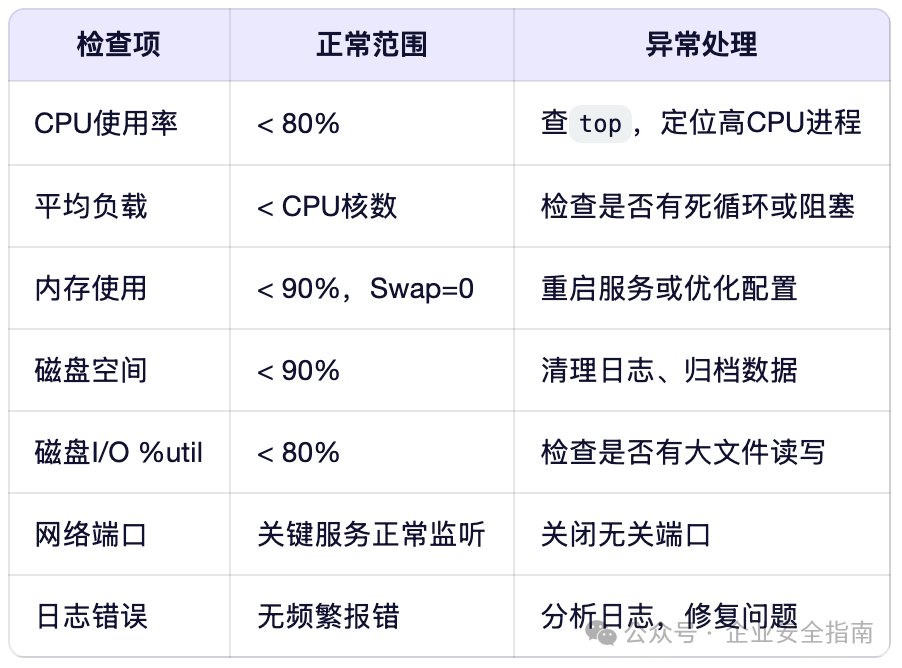
3. Linux System Inspection Checklist
4. Conclusion: The Best Operations and Maintenance is “No Incidents”
Servers do not crash suddenly; they will “run a fever”, “cough”, or “struggle to breathe”.
True experts are not those who fix issues quickly, but those who detect problems in advance.
Starting today,
spend 5 minutes to perform a system inspection,
which may help avoid a “midnight fire-fighting” situation.
📬 Follow【Enterprise Security Guide】
One article every week in layman’s terms for technical popularization,
Aid you in avoiding IT pitfalls and improving work efficiency.
Next issue preview: Linux automated inspection shell script