Introduction to Arm v8 Architecture and Virtualization
Related Reading: Differences Between X86 Architecture and Arm Architecture
0. ARMv8 Architecture
1) Basic Concepts of ARMv8
(1) Execution State: The environment in which the processor operates, including register width, supported instruction set, exception model, memory management, and programming model. The ARMv8 architecture defines two execution states:
AArch64: 64-bit execution state
Provides 31 general-purpose registers of 64 bits.
Provides a 64-bit Program Counter (PC), Stack Pointer (SP), and Exception Link Register (ELR).
Offers A64 reduced instruction set.
Defines the ARMv8 exception model, supporting four exception levels: EL0~EL3.
Provides a 64-bit memory model.
Defines a set of processor states (PSTATE) to save the state of the Processing Element (PE).
AArch32: 32-bit execution state
Provides 13 general-purpose registers of 32 bits, PC, SP, and link register.
Supports both A32 and T32 instruction sets.
Supports ARMv7-A exception model.
Provides a 32-bit virtual memory access mechanism.
Defines a set of processor states (PSTATE) to save the state of the PE.
Exception levels in AArch64 state
ARMv8 processors support two execution states: AArch64 and AArch32. AArch64 is the new 64-bit execution state introduced in ARMv8, running the A64 instruction set. AArch32 is for compatibility with the ARMv7 32-bit execution state, running either the A32 or T32 instruction sets.
The exception levels in AArch64 state determine the processor’s current privilege level, similar to the privilege levels in ARMv7.
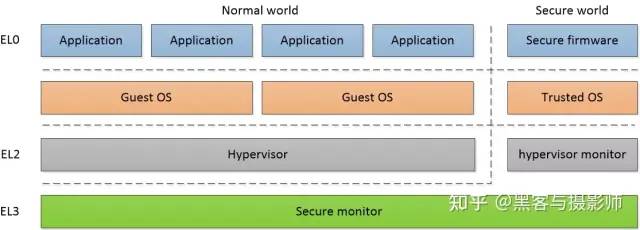
EL0: User privilege, used for running normal user programs.
EL1: System privilege, usually for the operating system kernel, such as Linux or RTOS. If virtualization extensions are enabled, it runs the virtual machine operating system kernel.
EL2: Runs the virtual machine monitor (hypervisor) with virtualization extensions.
EL3: Runs the secure monitor in the secure world.
ARMv8 allows switching application running modes. On an ARMv8 processor with a 64-bit operating system, we can run applications using both A64 and A32 instruction sets simultaneously. However, on a 32-bit operating system ARMv8 processor, applications using the A64 instruction set cannot run.
ARMv8 architecture provides two security states: Secure and Non-secure. The Secure state and Non-secure state divide the running environment into Normal world and Secure world, with EL3 only existing in the Secure state. Each security state has its own independent physical address space range. In the Secure state, the processor can access both Secure and Non-secure physical address space. In the Non-secure state, the processor can only access Non-secure physical address space.
Switching between exception levels:
Supervisor Call (SVC) instruction: Software at EL0 requests services from EL1 (OS service).
Hypervisor Call (HVC) instruction: Mainly requested by EL1 (guest OS) to the hypervisor (EL2).
Secure Monitor Call (SMC) instruction: Used by EL3 to switch between secure and non-secure worlds.
ERET instruction for returning from exceptions, restoring the return address and processor state from the ELR and SPSR registers of the current EL (exception level). The ERET instruction can be used to return to the same or any lower exception level supported by the CPU. If the saved mode field stored in SPSR_EL3.M[4:0] is set to 0b00101 or 0b00100, where bits M[3:2] encode the exception level as 1, then the ERET instruction executed in EL3 will return to EL1.
(2) ARMv8 Instruction Set: Provides different instruction set support based on the execution state, supporting the following instruction sets.
A64 Instruction Set: Runs in AArch64 state, providing 64-bit instruction set support. The A64 instruction set is new in ARMv8 and has a different instruction encoding than A32, making it incompatible with A32. A64 can handle 64-bit wide registers and data, using 64-bit pointers for memory access, but the instruction width of the A64 instruction set is 32 bits.
A32 Instruction Set: Runs in AArch32 state, providing 32-bit A32 instruction set support.
T32 Instruction Set: Runs in AArch32 state, providing 16-bit and 32-bit Thumb instruction set support.
2) Features of ARMv8
Uses a 64-bit architecture, allowing the processor to access physical address space far exceeding 4GB. Although it is a 64-bit architecture, it generally does not use a 64-bit address bus, for example, using 48 bits allows access to 256TB of physical address space. In the 32-bit ARM architecture, if the LPAE (Large Physical Address Extension) feature is not enabled, it can access a maximum of 4GB of physical address space. Even if LPAE is enabled, it only extends the addressing capability of physical address space to 40 bits, which is 1TB.
Provides 64-bit virtual address addressing, thereby expanding the virtual address space of processes. In the 32-bit ARM architecture, even if LPAE is enabled, it only extends physical address space, but the virtual address space of processes remains at 4GB. After expanding the virtual address space, larger files can be mapped into the process’s virtual address space using memory mapping, thus improving I/O efficiency.
Achieves high-performance low-power spinlock through the automatic event signaling mechanism.
Provides 31 general-purpose 64-bit registers, reducing stack usage and memory access frequency, thereby improving performance. In the ARMv7 architecture’s AAPCS (ARM Architecture Procedure Call Standard), the first four parameters are passed using registers, while more than four parameters need to be passed using the stack, which requires memory access. In the ARMv8 architecture, the first eight parameters can be passed using registers, thus reducing stack usage.
Provides relative addressing range based on the PC register ±4GB, improving relative addressing efficiency, which can enhance the execution efficiency of dynamic libraries and position-independent code.
Supports 16KB & 64KB page granularity, which can reduce the number of page table levels while increasing TLB hit rates.
A brand new exception handling model, more conducive to operating system and virtualization implementation.
Designed new Load-Acquire and Store-Release instructions, eliminating the need for explicit memory barrier instructions in thread-safe code, thereby enhancing performance.
3) ARMv8 Registers
(1) General-purpose registers
AArch64 execution state supports 31 general-purpose registers (X0~X30), while AArch32 state supports 16 general-purpose registers.
General-purpose registers
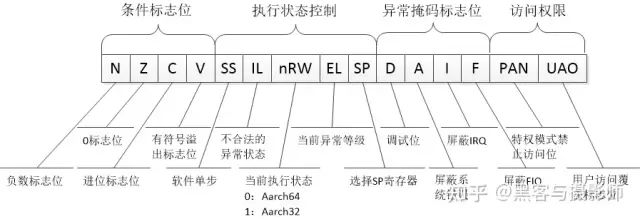
(2) Status registers
Status registers
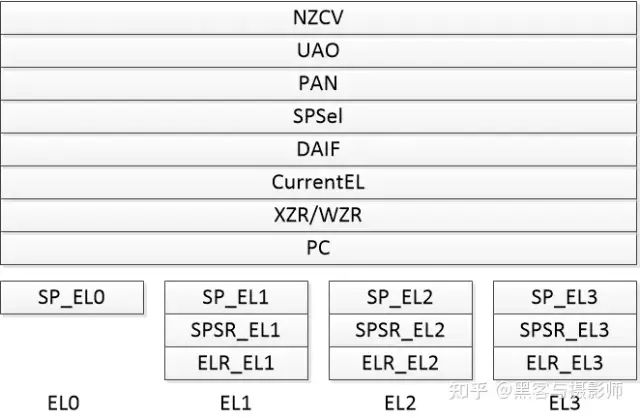
(3) Special registers
Special registers
When running an exception handler, the processor temporarily saves the value of the PSTATE register in the SPSR (Saved Program Status Register). When the exception handling is complete, the value of SPSR is restored to the PSTATE register.
(4) System registers
By accessing and setting these system registers, various processor functions can be configured. ARMv8 supports seven types of system registers:
General system control registers
Debug registers
Performance monitoring registers
Active monitoring registers
Statistical extension registers
RAS registers
General timer registers
System registers support access at different exception levels, with the following access rules:
Reg_EL1: The processor can access this register when in EL1, EL2, or EL3.
Reg_EL2: The processor can access this register when in EL2 or EL3.
Most system registers do not support access when the processor is in EL0, but there are exceptions, such as CTR_EL0.
System registers are accessed via MSR and MRS instructions.
1 Overview
This article describes the virtualization support of Armv8-A AArch64. It includes stage 2 page table translation, virtual exceptions, and traps. This article introduces some basic hardware-assisted virtualization theories and examples of how some Hypervisors utilize these virtualization features. The text will not discuss how a specific Hypervisor software works or how to develop a Hypervisor software. By reading this article, you will learn about the two types of Hypervisors and how they map to Arm’s exception levels. You will be able to explain how traps work and how they are used for various emulation operations. You will be able to describe what virtual exceptions a Hypervisor can generate and the mechanisms that produce these virtual exceptions. A certain foundation is required to understand this article, which assumes you are familiar with the ARMv8 architecture’s exception model and memory management.1.1 Introduction to VirtualizationHere we will introduce some basic theoretical knowledge about Hypervisors and virtualization. If you already have some foundation or are familiar with these concepts, you can skip this part. We use the term Hypervisor to define software responsible for creating, managing, and scheduling Virtual Machines (VMs).
Why Virtualization is Important
Virtualization is a widely used technology in modern cloud computing and enterprise infrastructures. Developers use virtual machines to run multiple different operating systems on a single hardware platform to develop and test software, avoiding potential damage to the main computing environment. Virtualization technology is very popular on servers, and most server-oriented processors need to support virtualization features because virtualization can bring several needed characteristics to data center servers:
Isolation: Virtualization allows isolation of virtual machines running on the same physical core. This enables untrusted computing environments to share the same hardware environment. For example, two competitors can share the same physical machine without accessing each other’s data.
High Availability: Virtualization can seamlessly and transparently migrate loads between different physical machines. This technology is widely used to migrate loads from faulty hardware platforms to other available platforms for maintenance and replacement of faulty hardware without affecting services.
Load Balancing: To reduce data center hardware and power costs, it is necessary to make the most efficient use of hardware platform resources. Migrating loads evenly across different physical machines helps utilize physical machine resources effectively, reduce power consumption, and provide optimal performance for tenants.
Sandboxing: Virtual machines can serve as a sandbox to shield applications running within them from interference by other software, or to prevent them from interfering with other software. For example, running specific software in a virtual machine can prevent bugs or viruses from damaging other software on the physical machine.
1.2 Two Types of Hypervisors
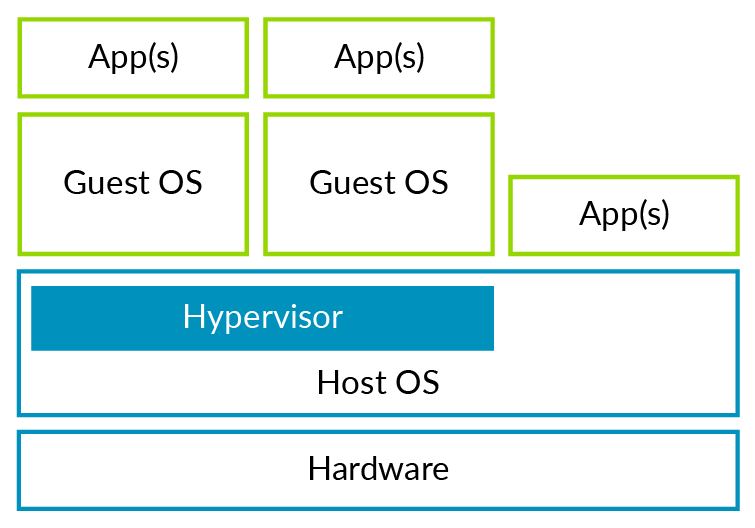
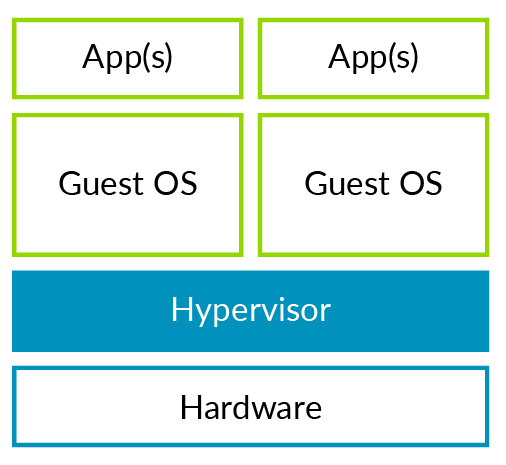
Hypervisors are typically divided into two types: Type 1 (bare-metal) and Type 2 (hosted). First, let’s look at Type 2 Hypervisors. For Type 2 Hypervisors, the hosted operating system has full control over the hardware platform and resources (including CPU and physical memory…). The diagram below illustrates a Type 2 Hypervisor.Figure 1: Type 2 HypervisorThe host operating system refers to the operating system that runs directly on the hardware platform and provides an environment for the Type 2 Hypervisor. This type of Hypervisor can fully utilize the host operating system’s management capabilities over physical hardware, while the Hypervisor only needs to provide virtualization-related functionalities. You may have used Virtual Box or VMware Workstation; these are examples of Type 2 Hypervisors.Next, let’s look at Type 1 Hypervisors, as shown in Figure 2. This type of Hypervisor runs directly on physical hardware, managing various physical resources while managing and running guest operating systems.Figure 2: Type 1 HypervisorCommon open-source Hypervisors, Xen (Type 1) and KVM (Type 2), belong to these two different types. Other open-source or proprietary Hypervisors can be found in Wiki.
1.3 Full Virtualization and Para-Virtualization
A classic definition of a virtual machine is: a virtual machine is an independent, isolated computing environment that allows users to feel as if they are using a real physical machine. Although we can simulate real hardware on ARM-based hardware platforms, this is often not the most efficient approach, so we often do not do so. For example, simulating a real Ethernet device is very slow because accessing any simulated register will trap into the Hypervisor for simulation. This operation is much more costly than directly accessing physical registers. An alternative solution is to modify the guest operating system to make it aware that it is running in a virtual machine, simulating a virtual device in the Hypervisor for the guest to use. This leads to better I/O performance. Strictly speaking, full virtualization requires complete simulation of real hardware, which results in poorer performance. The open-source project Xen has promoted para-virtualization by modifying key parts of the guest operating system to make it more suitable for running in a virtual environment, thus improving performance.Another reason for using para-virtualization is that early architectures were not designed for virtualization and had virtualization holes. Virtualization requires that all sensitive instructions or instructions accessing sensitive resources can be intercepted and simulated. For architectures with virtualization holes, para-virtualization is needed to fill the gaps. Today, most architectures support hardware-assisted virtualization, including Arm. This allows the core parts of the operating system to achieve good performance without modification. Only a few storage and network-related I/O devices still use para-virtualization schemes to improve performance, such as virtio and Xen PV Bus.
1.4 Virtual Machines (VM) and Virtual CPUs (vCPU)
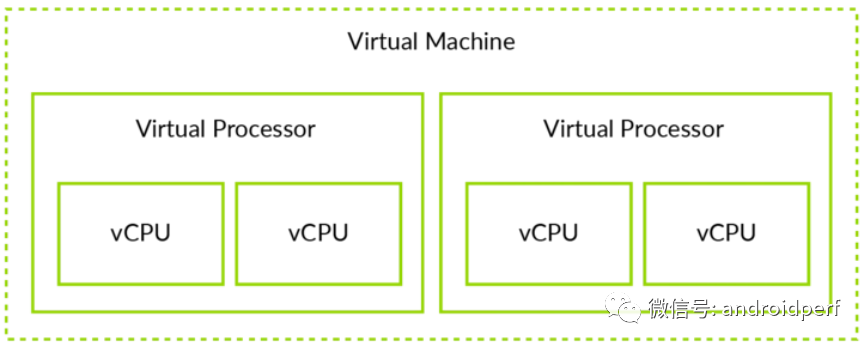
It is necessary to distinguish between virtual machines (VM) and virtual CPUs (vCPU). This distinction helps to understand the subsequent parts of this article. For example, a memory page can be allocated to a virtual machine, so all vCPUs belonging to that VM can access it. A virtual interrupt, however, is specific to a vCPU, meaning only that vCPU can receive it. The relationship between virtual machines (VM) and virtual CPUs (vCPU) is illustrated in Figure 3.
Figure 3: VM vs vCPUNote: The ARM architecture defines the term Processing Element (PE), and modern CPUs may contain multiple cores or threads; PE refers to a single execution unit. Similarly, the vCPU here should strictly be referred to as vPE.
2 Virtualization of AArch64
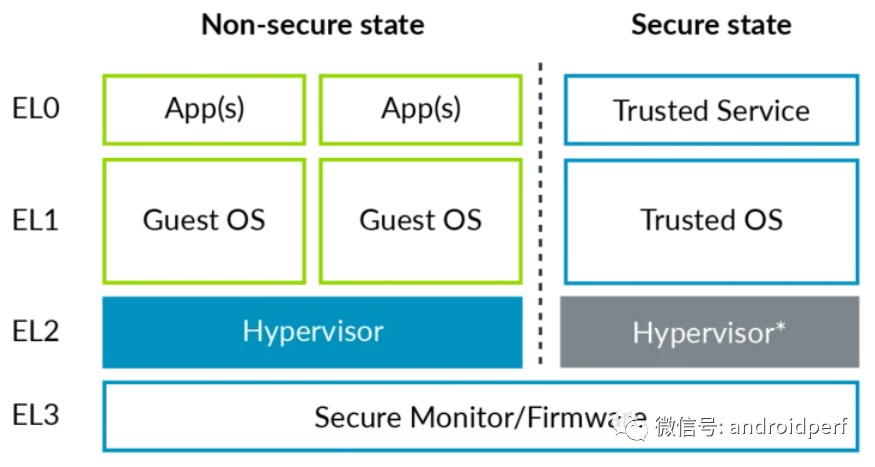
For ARMv8, the Hypervisor runs at EL2 exception level. Only software running at EL2 or higher exception levels can access and configure various virtualization features.
Stage 2 Translation
EL1/0 Instruction and Register Access
Injecting Virtual Exceptions
The exception levels and runnable software in secure and non-secure states are shown in Figure 4.Figure 4: Virtualization of AArch64Note: The EL2 in the secure state is shown in gray because EL2 in the secure state is not always available; this is a feature introduced in Armv8.4-A.
2.1 Stage 2 Translation
What is Stage 2 Translation
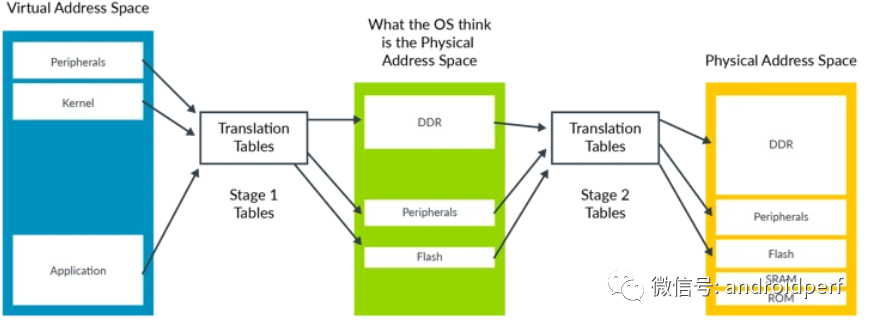
Stage 2 translation allows the Hypervisor to control the memory view of virtual machines. Specifically, it can control whether a virtual machine can access a specific physical memory block and the position of that memory block in the virtual machine’s memory space. This capability is crucial for the isolation and sandboxing functions of virtual machines. It ensures that virtual machines can only see the physical memory allocated to them. To support Stage 2 translation, an additional page table is needed, called the Stage 2 page table. The page table controlled by the operating system is referred to as stage 1 translation, responsible for translating virtual addresses from the perspective of the virtual machine into physical addresses from the perspective of the virtual machine. The stage 2 page table is controlled by the Hypervisor, responsible for translating physical addresses from the perspective of the virtual machine into real physical addresses. The physical addresses from the perspective of the virtual machine in Armv8 are specifically referred to as Intermediate Physical Addresses (IPA).The format of the stage 2 translation table is similar to that of stage 1, but some properties are handled differently. For example, the information to determine whether the memory type is normal or device is directly encoded into the table instead of being queried from the MAIR_ELx register.Figure 5: Address Translation, VA to IPA to PA
VMID
Each virtual machine is assigned an ID number called VMID. This ID is used to mark which specific TLB entry belongs to which VM. VMID allows different VMs to share the same TLB cache. VMID is stored in the VTTBR_EL2 register and can be 8 or 16 bits, controlled by the VTCR_EL2.vs bit. The 16-bit VMID support was introduced in armv8.1-A and is optional. Note that address translation for EL2 and EL3 does not require VMID tagging because they do not need stage 2 translation.
VMID vs ASID
TLB entries can also be marked with ASID (Address Space Identifier). Each application is assigned an ASID by the operating system, and all TLB entries belonging to the same application share the same ASID. This allows different applications to share the same TLB cache. Each VM has its own ASID space. For example, two different VMs can simultaneously use ASID 5, but they refer to different things. For virtual machines, VMID is typically used in conjunction with ASID.
Attribute Integration and Overriding
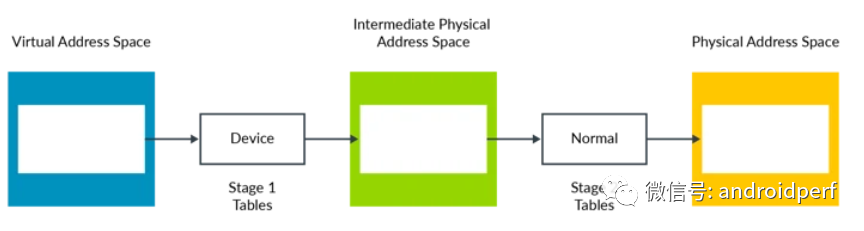
Both stage 1 and stage 2 mappings include attributes such as storage type and access permissions. The Memory Management Unit (MMU) integrates the attributes of the two stages into a final attribute, with the principle of selecting the more restrictive attribute. See the example below:Figure 6: Attribute Mapping IntegrationIn the above example, the Device attribute is more restrictive than the Normal attribute, so the final result is the Device attribute. The same principle applies; reversing the order does not change the final attribute.Attribute integration can work in most cases. However, sometimes, for example, during the early startup phase of a VM, the Hypervisor may want to change the default behavior. This can be achieved through the following register bits:
HCR_EL2.CD: Controls all stage 1 attributes to be Non-cacheable.
HCR_EL2.DC: Forces all stage 1 attributes to be Normal, Write-Back Cacheable.
HCR_EL2.FWB (introduced in Armv8.4-A): Uses stage 2 attributes to override stage 1 attributes, instead of using the default restrictive integration principle.
Simulating MMIO
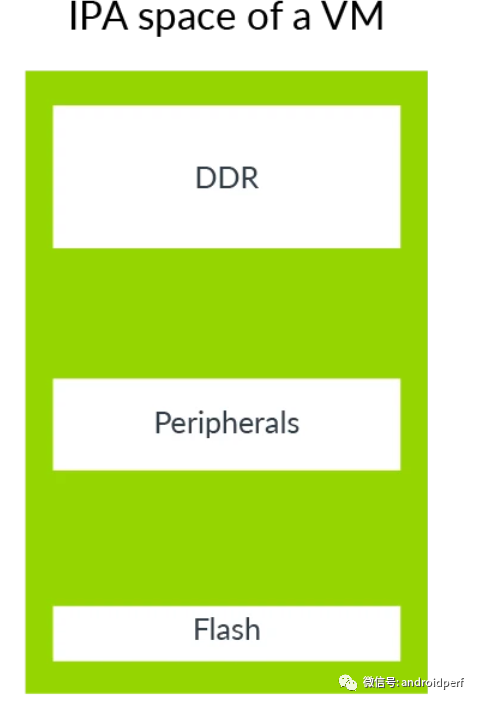
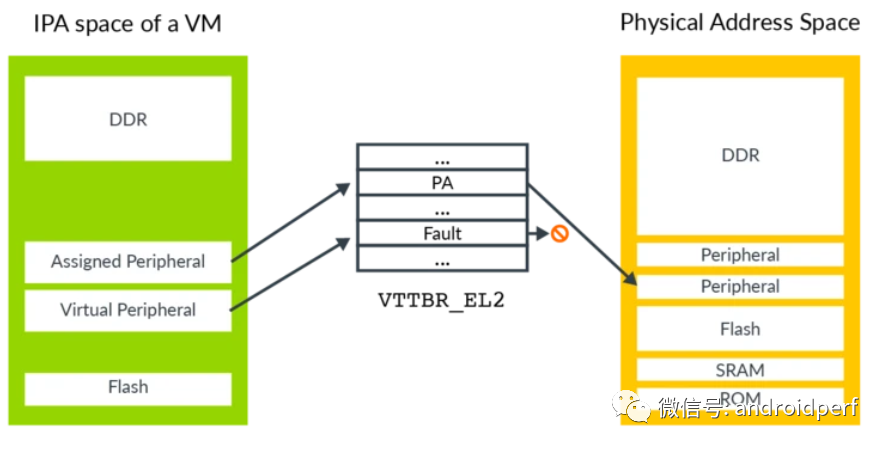
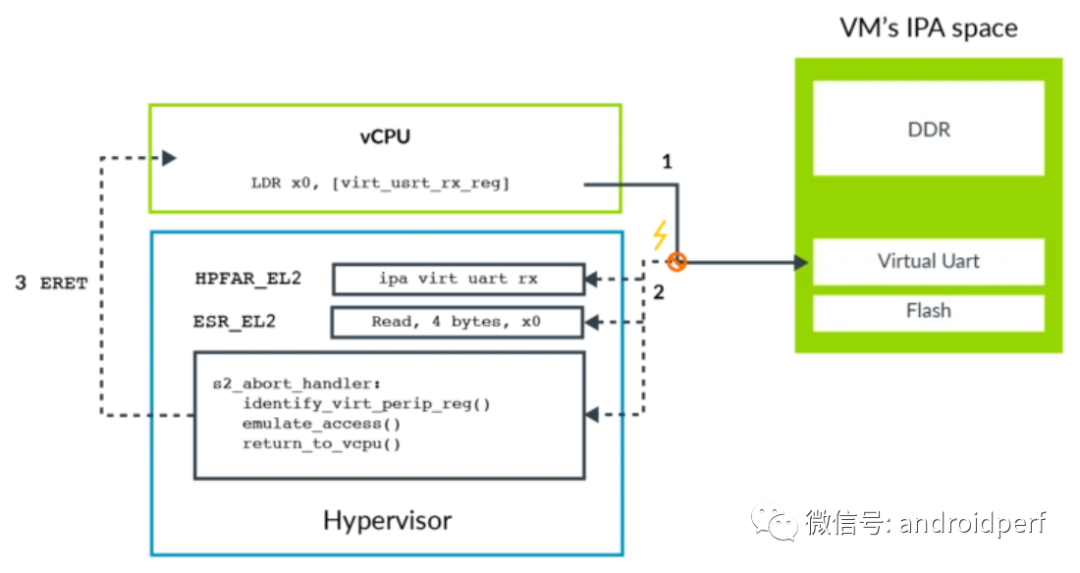
Similar to the physical address space of a physical machine, the IPA address space of a VM includes both memory and peripheral device areas. As shown in the figure below:Figure 7: Simulating MMIOThe VM uses the peripheral device area to access the physical peripheral devices it sees, which includes both passthrough devices and virtual peripheral devices. Virtual devices are fully simulated by the Hypervisor, as shown in the figure below:Figure 8: Stage 2 MappingA passthrough device is directly assigned to a VM and mapped to the IPA address space, allowing software within the VM to directly access real physical hardware. A virtual peripheral device is simulated by the Hypervisor, and its stage 2 translation entry is marked as fault. Although software within the VM appears to interact directly with the physical device, this access actually leads to a stage 2 translation fault, triggering the corresponding exception handler to be simulated by the Hypervisor.To simulate a peripheral device, the Hypervisor needs to know which peripheral device is being accessed, which register of the peripheral device is being accessed, whether the access is read or write, the length of the access, and which registers are used to transfer data.When handling stage 1 faults, the FAR_ELx register contains the virtual address that triggered the exception. However, the virtual address is not for the Hypervisor; it usually does not know how the guest operating system configures the virtual address space mapping. For stage 2 faults, there is a dedicated register HPFAR_EL2, which reports the IPA address where the fault occurred. The IPA address space is controlled by the Hypervisor, so this information can be used for necessary simulation.The ESR_ELx register is used to report information related to the exception that occurred. When loads or stores to a general-purpose register trigger a stage 2 fault, this information is provided by these registers. This information includes the length of the access and the original address or destination address of the access. The Hypervisor can use this to determine access permissions for virtual peripheral devices. The following diagram illustrates a trapping – simulating access process.Figure 9: Peripheral Device Simulation
The software in the VM attempts to access a virtual peripheral device, in this case, the receive FIFO of a virtual UART.
This access is blocked by the stage 2 translation, resulting in an abort exception routed to EL2.
The exception handler queries ESR_EL2 for information about the exception, such as access length, destination register, and whether it is a load or store operation.
The exception handler queries HPFAR_EL2 to obtain the IPA address where the abort occurred.
The Hypervisor simulates the relevant virtual peripheral device based on the information in ESR_EL2 and HPFAR_EL2. After simulation, it returns to the vCPU using the ERET instruction and continues execution from the next instruction after the exception occurred.
System Memory Management Units (SMMUs)
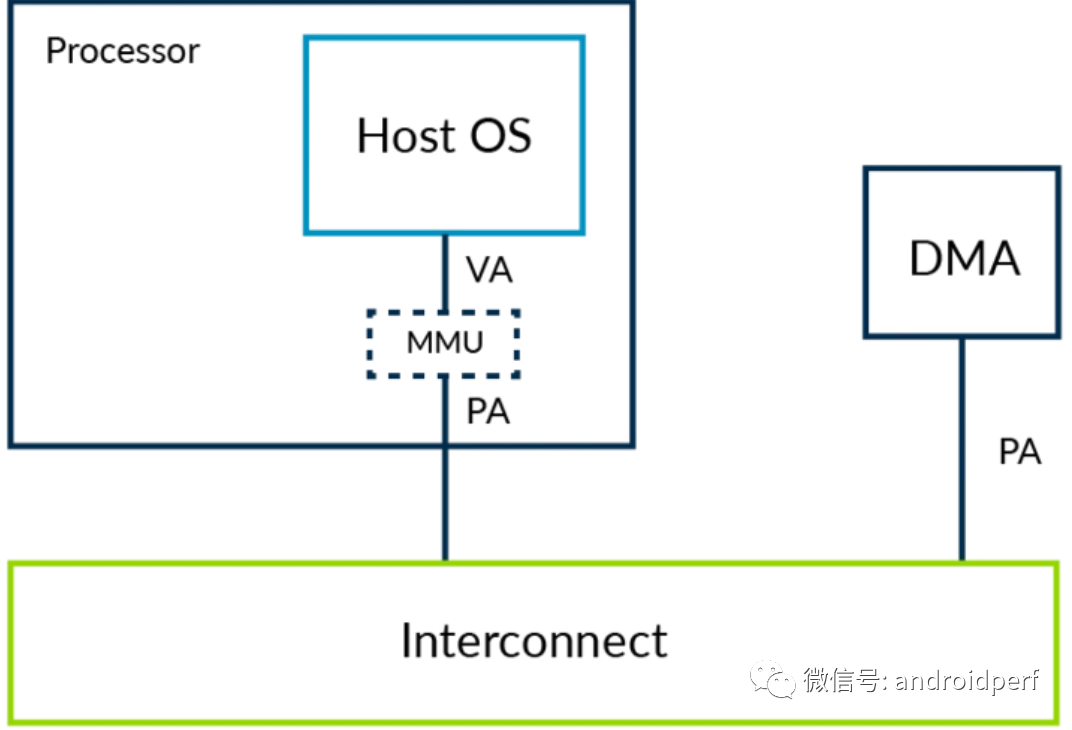
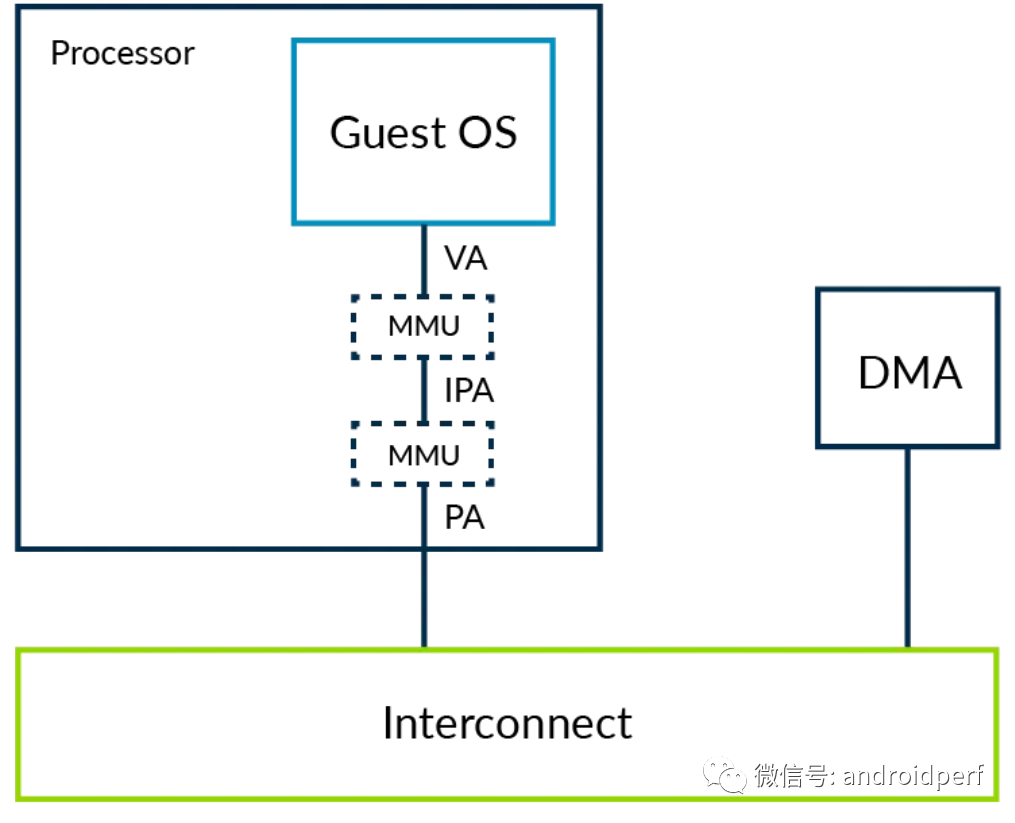
So far, we have only considered accesses initiated by the processor. We also need to consider accesses initiated by other master devices, such as DMA controllers. We need a way to extend stage 2 mapping to protect the address space of these master devices. If a DMA controller is not using virtualization, it should look like the diagram below:Figure 10: DMA Access Without VirtualizationDMA controllers are typically programmed and controlled by kernel drivers. Kernel drivers ensure that the principles of memory protection at the operating system level are not violated, meaning that an application cannot use DMA to access the memory of other applications that it does not have permission to access.Now let’s consider the scenario where the operating system runs in a virtual machine.Figure 11: DMA Access Without SMMU Under VirtualizationIn this system, the Hypervisor isolates the address space of different VMs through stage 2 mapping. This is implemented based on the stage 2 mapping table controlled by the Hypervisor. The driver interacts directly with the DMA controller, which leads to two issues:
Isolation: The DMA controller access lacks isolation between virtual machines, undermining the sandboxing function of virtual machines.
Address Space: Utilizing two-level mapping conversion, the physical addresses seen by the kernel are actually IPAs. However, the DMA controller still sees PAs. Therefore, the DMA controller and the kernel see different address spaces. To solve this problem, every time a VM interacts with a DMA controller, it needs to trap into the Hypervisor for necessary conversion. This approach is extremely inefficient and prone to errors.
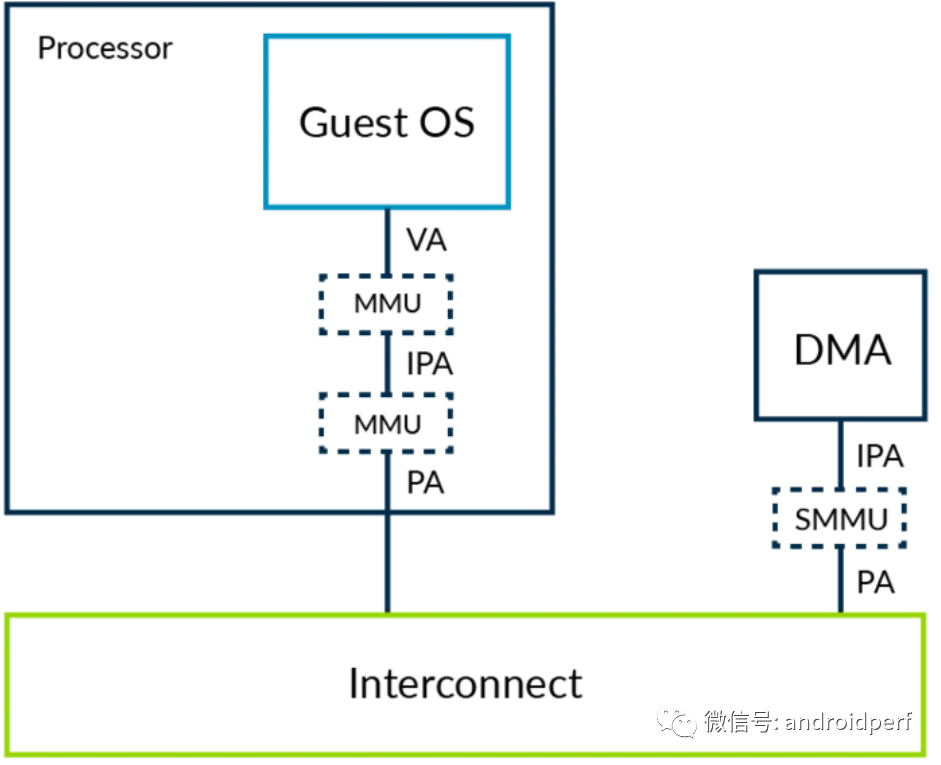
The solution is to extend the stage 2 mechanism to DMA controllers. This means that these master device controllers also need an MMU, referred to as SMMU (System Memory Management Unit) by Arm.Figure 12: DMA Access Through SMMU Under VirtualizationThe Hypervisor is responsible for configuring the SMMU to ensure that the physical address space seen by the DMA controller is the same as that seen by the kernel. This solves the aforementioned two problems.Source: https://calinyara.github.io/technology/2019/11/03/armv8-virtualization.htmlRelated Articles:
Prospects of ARM Instructions in HPC Field
GPU Research Framework (2023)In-depth Report: ARM Architecture and Framework Revealed (Download Included)Latest Progress in Cloud Computing Based on ARM ArchitectureKey Insights: Differences Between ARM and RISC-V ArchitecturesRise of ARM Ecosystem, Upgrading Domestic SubstitutesDifferences Between X86 and ARM on Linux Platform?Collection: ARM Technology and Market Analysis (High Definition PPT)Analysis of ARM Processor Architecture and Ladder ChartCollection of ARM CPU Processor Information (1)Collection of ARM CPU Processor Information (2)Complete Manual of ARM Series Processor Application TechnologyCollection of CPU and GPU Research Frameworks1. Industry In-depth Report: GPU Research Framework2. Research Framework of Xinchuang Industry3. ARM Industry Research Framework4. CPU Research Framework5. Domestic CPU Research Framework6. Industry In-depth Report: GPU Research FrameworkOpen Source Applications of Arm Architecture ServersArm Architecture Servers and StorageAnalysis of Server Hardware ArchitectureResearch on the Current State of the Server MarketRecommended Reading:Comprehensive Explanation of High-Performance Computing Technologies, Solutions, and Industries (Second Edition)Summary of InfiniBand Architecture and Technology Practice (Second Edition)Analysis, Comparison, and Technical Implementation of RDMA PrinciplesOr get a complete package of all store materials and receive all future additions and updates for free.Complete Technical Data Package (All)Reprint Statement: ReprintThis article must indicate the author and source. If there are copyright issues or others with the articles published by this account, please leave a message for processing. Thank you.Recommended ReadingFor more architecture-related technology knowledge summaries, please refer to the “Architect’s Complete Technical Data Package” related e-books (37 books technical data package summary details can be obtained through “Read the Original Text” link).All store content is continuously updated. By ordering the “Architect’s Complete Technical Data Package Summary (All)“, you can enjoy free updates for all store content. The price is only 198 yuan (original total price 350 yuan).Warm Reminder:Scan the QR code to follow the public account, click the Read the Original Text link to obtain the details of the “IT Technical Complete Data Package Summary (All)” e-book materials.