1. Declaration and Introduction
As a frontline MCU system application engineer, I am engaged in both low-level driver development and application layer development for MCUs. I started experimenting with OpenAI’s ChatGPT-3.5 to assist in programming as early as 2022. With the exponential development of AI large models in recent years, I deeply feel that the era of AI-assisted MCU program development has arrived and is irreversible. Whether we choose to embrace, ignore, or even reject it, we cannot change the fact that AI-assisted programming is sweeping across the entire programming field. Instead of passively responding, it is better to actively master this powerful tool.
2. What is Generative AI? A Perspective from an MCU Software Developer
In simple terms, it is a “chatbot that helps you write code.” Imagine you have a seasoned colleague:
-
He has seen countless codes and technical documents, is familiar with various software technology stacks, and understands common embedded development patterns and best practices.
-
Available 24/7, ready to help you write code, explain problems, and provide suggestions.
Before having “him,” we might have worked like this:

Now with AI:

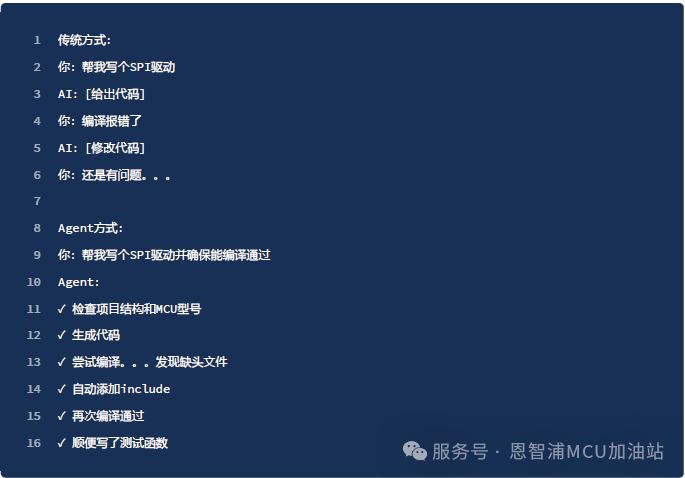
For example, traditionally, you would need to write an SPI driver for a new MCU:

Using AI, it would look like this:

If you have never used generative AI (hereinafter referred to as AI) to assist in programming, you might be thrilled to see this, but I must pour a bucket of cold water: remember, AI is not omnipotent.
-
The answers from AI cannot guarantee correctness: it cannot even guarantee that the generated code will compile successfully. The answers provided by AI can be erroneous, and one should never trust them 100%. This is especially prominent in the field of embedded programming.
-
AI does not understand your specific hardware environment: Embedded programs differ significantly from general high-level language programs running on PCs, as they are greatly constrained by hardware resources—different MCU models have different Flash, RAM, and peripherals. If you cannot accurately convey this information to AI, you cannot expect it to generate usable code in one go.
-
AI cannot replace testing: Because it is closely related to hardware, the embedded code generated by AI often still needs to be tested and debugged on the hardware platform set up by human developers.
AI is like a very knowledgeable but often error-prone programming assistant. When used correctly, it can significantly enhance efficiency, but ultimately, the quality control of the code still relies on us.
As a side note: I think Microsoft’s AI programming assistant Copilot has a good name: AI is like your co-pilot; it can help you accomplish many tasks but can never replace you.
3. Background of Large Models and Introduction to Mainstream Tools
3.1 Introduction to Mainstream Large Models
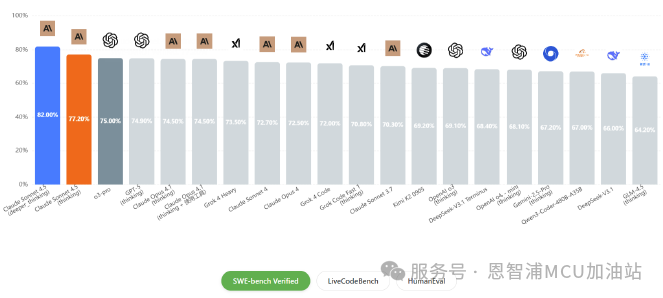
Based on my actual usage experience, the following large models have performed outstandingly in assisting programming development scenarios:
1. Claude 4.5 Sonnet (Anthropic): A next-generation hybrid reasoning model that significantly improves long-term autonomous operation, tool usage, and complex task handling, with stronger code generation and multi-step reasoning capabilities, supporting ultra-large-scale context.
2. Claude Opus (Anthropic): Currently the most powerful model. It excels in solving complex problems and is particularly suitable for driving cutting-edge AI Agent systems.
3. GPT-5 (OpenAI): OpenAI’s powerful model, achieving significant improvements in reasoning ability and processing speed.
4. Grok 4 (xAI): Features a multi-agent reasoning architecture and PhD-level expertise across various fields.
There are also other excellent large models, such as DeepSeek, Llama, Kimi, etc., but based on practical usage experience and development efficiency considerations, the above four models stand out more in MCU development scenarios. However, the performance of AI models is rapidly evolving with each iteration, so developers are advised to stay updated and adjust their tool choices accordingly. Additionally, there are many benchmark tests for evaluating large models’ capabilities in various professional fields, such as HumanEval, MBPP, etc. Some third-party websites, such as DataLearnerAI, also provide the latest rankings of large models based on various testing standards:

3.2 Agent: AI that Works on Its Own
The large models described in the previous section are essentially “engines” that provide core understanding and generation capabilities. However, when faced with complex programming development environments, using them alone is inefficient: you ask questions in the web version of ChatGPT, manually copy code, paste it, wait for a reply, then copy it back to the editor, check for compilation and debugging… Agents are designed to solve this problem—they are AIs that can work on their own.
3.3 Mainstream AI-Assisted Programming Tools
Currently, AI-assisted programming has developed various Agent tools and integration solutions, which are no longer limited to the direct “chatting” mode with large models. These tools are mainly divided into two camps:
First Camp: VS Code Plugin Faction
-
Representatives: GitHub Copilot, Cody, Continue, Augment, which are plugins for VS Code. They can be used after installation from the plugin market.
-
Advantages: Retain your VS Code configuration, shortcuts, and other plugins, allowing for multiple installations and on-demand switching.
Second Camp: Independent IDE Faction (VS Code Derivatives)
-
Representatives: Cursor, TRAE: Deeply customized based on VS Code source code, providing a complete IDE experience environment parallel to VS Code.
-
Advantages: Exclusive AI assistant features are deeply integrated, user interface is highly optimized, AI interface is more personalized, and user experience is better.
3.4 How to Choose
Currently, AI-assisted programming tools mainly support the VS Code ecosystem and have not yet been directly integrated into traditional embedded IDEs like MCUXpresso, Keil, or IAR. This reflects a reality: the development speed of general programming tools often outpaces that of specialized programming tools.
Option 1: Fully migrate to VS Code: With its powerful plugin system, VS Code can now handle almost all functions of NXP MCU programming IDEs. Currently, the MCUXpresso for VSCode plugin developed by NXP essentially “moves” the MCUXpresso IDE to VS Code. The MCUXpresso for VS Code plugin provides complete editing, compiling, downloading, and debugging functions.
Option 2: If you do not want to fully migrate for the time being, you can continue using your original IDE, just treat VS Code as a super editor with AI capabilities.
Option 3: If you do not use VS Code or its derivatives, you can directly use AI for “chatting” style programming assistance, or use independent app products (such as Monica, Kimi), or directly use the web pages provided by major AI platforms, which is also a good choice.
4. Experience – Based on NXP FRDM-MCXA346 + VS Code Copilot Plugin
This section will use the NXP FRDM-MCXA346 hardware platform and the VS Code + GitHub Copilot plugin as the development environment to guide you through an initial experience of AI-assisted programming.
4.1 Preparation
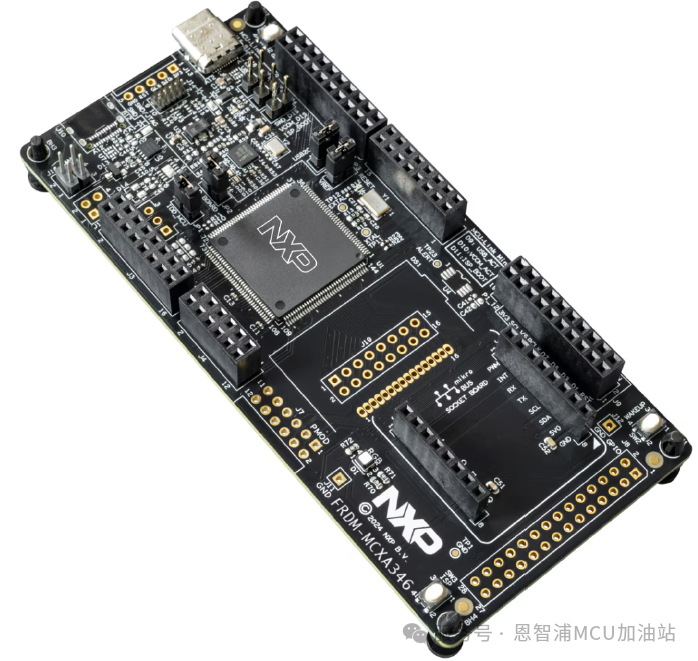
Hardware Platform: FRDM-MCXA346 Development Board
Development Environment: VS Code + GitHub Copilot Plugin
SDK Acquisition: For the getting started guide and SDK download for FRDM-MCXA346, please refer to: Getting Started with FRDM-MCXA346 | NXP Semiconductors.
This section is not tied to a specific IDE. Whether you use Keil, IAR, or MCUXpresso, you can follow this tutorial—we are just using VS Code as a “super editor” with AI assistant capabilities. The functions of compiling, downloading, debugging, etc., during the development process can still be completed using your familiar toolchain.
4.2 Quick Start
Assuming you have:
-
Downloaded the SDK for FRDM-MCXA346 and run the HelloWorld example in the SDK, familiarizing yourself with the basic hardware connections.
-
Downloaded and used VS Code.
4.2.1 Step One: Install GitHub Copilot Plugin
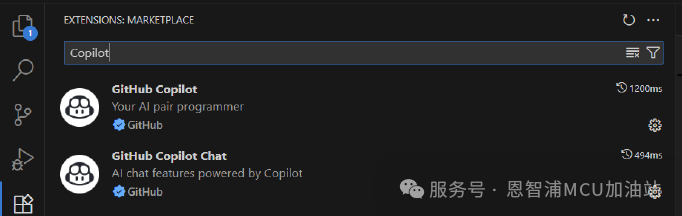
Search for and install the following two plugins in the VS Code extension market:
-
GitHub Copilot – Core code generation engine
-
GitHub Copilot Chat – Conversational interactive interface
4.2.2 Step Two: Import Project
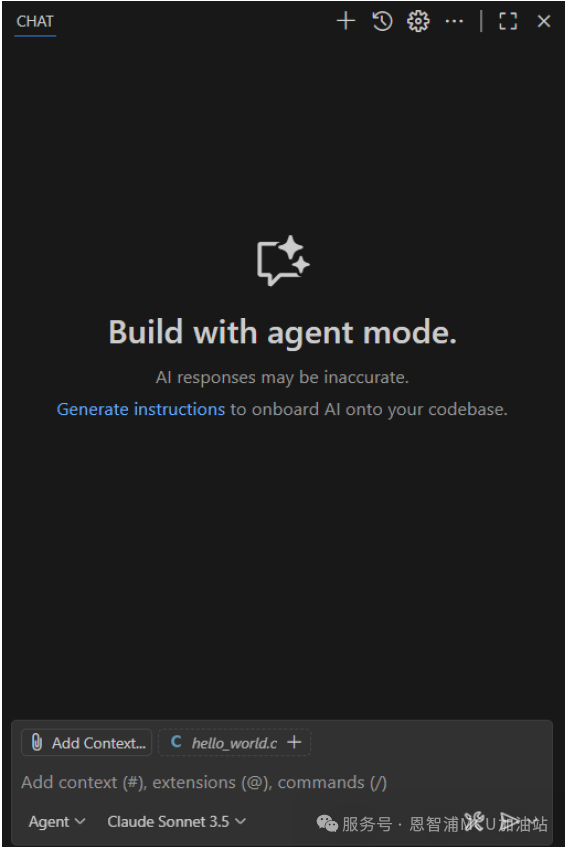
Drag the project source code directory generated by the MCUXpresso Config Tool directly into VS Code, and use the shortcut Ctrl+Alt+I to bring up the Copilot chat box.
4.2.3 Step Three: Start Using
It’s that simple; you have completed all the setup. Now you can freely use AI-assisted programming. For a detailed user guide for the Copilot plugin, you can refer to the official tutorial documentation: Getting started with GitHub Copilot · GitHub
4.3 Practical Demonstration
Let’s try a simple task and see how Copilot responds. Using the default Agent mode (Auto Mode automatically selects the large model).
Ask AI:
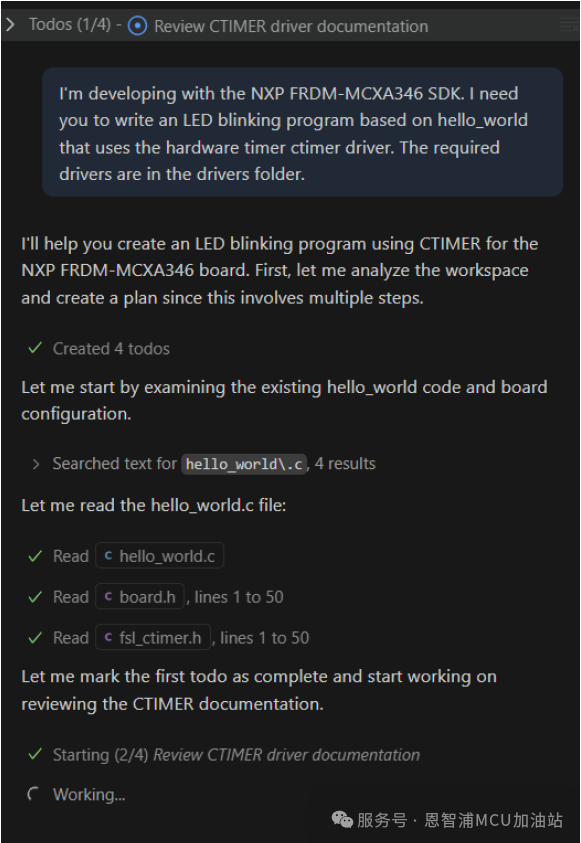
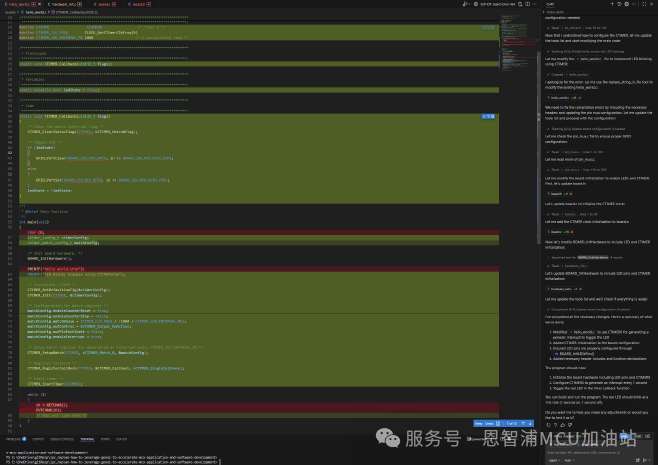
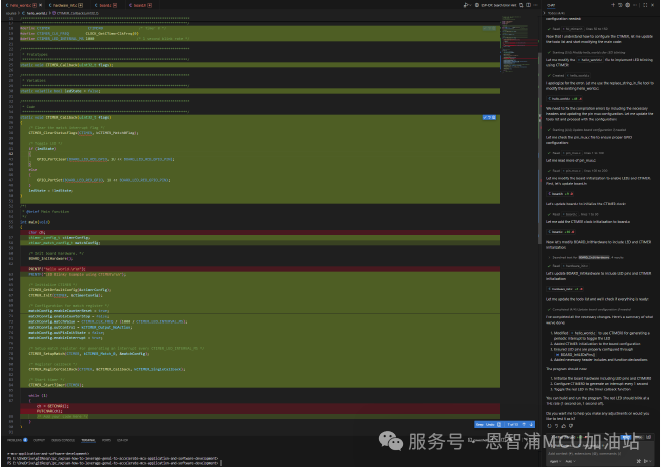
You can see that Copilot has basically completed the task. Although it may not compile and run perfectly in one go, AI has provided a fairly accurate answer—just a little manual checking or minor modifications are needed, and the code is basically usable. This saves a lot of time in program development.
Copilot supports various working modes and can interface with multiple large models. You can explore these features gradually:
-
Chat Mode: Conversational Q&A, suitable for consultation and learning.
-
Agent Mode: Completes complex tasks autonomously and can automatically call local tools to rewrite code.
-
Edit Mode: Directly perform AI-assisted editing in the code.
-
Inline Mode: Real-time code completion, like a super version of “smart hints.”
Through this simple experience, you may have already felt the power of AI-assisted programming. In the following chapters, we will share some practical experiences to help you use AI for MCU development more efficiently.
5. Experience Sharing
In my experience with AI programming development, I have summarized a few points to share with everyone.
5.1 Iterative Verification Thinking: Use AI Programming Like Debugging a Circuit
Why can’t we throw a problem at AI all at once and expect it to give a relatively perfect answer, solving the entire problem in one go? Imagine you are debugging a complex circuit: if the entire circuit does not work, what would you do?
-
Incorrect Approach: Staring at the entire circuit diagram, trying to spot all the problems at a glance.
-
Correct Approach: Testing step by step with an oscilloscope, starting from the power supply, gradually verifying each module.
AI programming follows the same principle. Do not expect AI to generate a 100% perfect solution in one go; this is impossible. You need to complete it iteratively step by step.
5.1.1 Example
UART + DMA for variable-length serial data reception: This is a common business scenario in MCU programming, and almost all products using serial ports require this functionality. If you let AI handle this task all at once, you are unlikely to get a good result.

You need to break down the task: For example, the above task can be decomposed into:
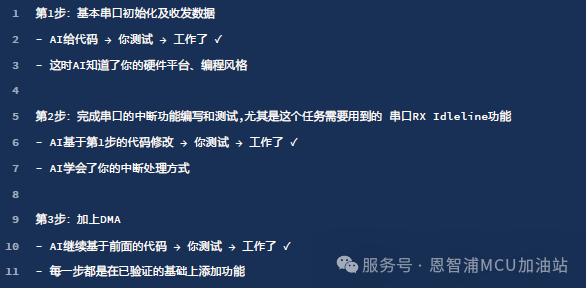
If you can decompose the task and hand it to AI step by step, and you verify the output of each step, the success rate will be much higher than letting AI complete it all at once.
A good step-by-step strategy should be:

5.1.2 Why is this more effective?
1) Reducing Complexity: Complex problems = combinations of multiple simple problems, allowing AI to handle simple problems has a much higher success rate than complex problems.
2) Indirectly Establishing Context: Each successful code becomes a “reference answer” for the next time, and AI gradually understands your programming habits and project characteristics, like developing a tacit understanding, making it easier to work with.
3) Quickly Locating Problems: If an error occurs at a certain step, you immediately know where the problem is, without having to search for bugs in a large amount of code. The modification cost is low, and the amount of code that AI regenerates is small, thus avoiding AI completely overturning its previous results.
5.2 Using AI to Discover Possible “Wheels”
A qualified software engineer should know to use source code that has already been written and proven to run correctly as tools for developing new products, rather than implementing every function from scratch. This way, you can focus your energy on solving problems that have not been addressed by others, rather than doing low-level repetitions. A significant portion of the programming tasks we encounter in our daily work may already have standard and efficient solutions. Therefore, when faced with a problem, you can ask yourself whether the functionality (component/function) you need already has a relatively mature solution, and try asking AI similar questions; you may discover unexpected new findings.
5.2.1 Example
Suppose you need to receive and parse user commands via serial port in an MCU project:
Traditional Approach:

Instead, consider a different approach:
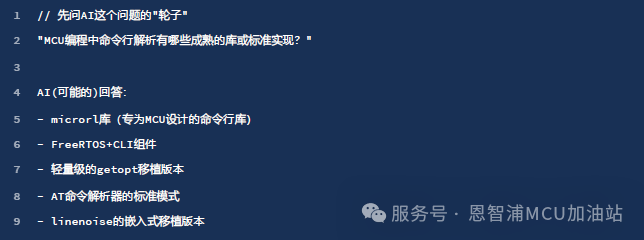
This way, you discover some mature components to accomplish this task, and there is no need to write a command line parsing component from scratch.
5.2.2 Why is this more effective?
1. More Robust Code: The code has been validated through numerous practical projects, with comprehensive handling of boundary conditions.
2. Low Maintenance Cost: Based on standard interfaces and rich documentation, subsequent expansions are easy.
By using AI to discover these “wheels,” you not only save development time but also obtain higher quality and safer solutions.
5.3 Emphasizing Prompt Words and Contextual Corpus
Prompt words (Prompt) are the task instructions you give to AI, while contextual corpus refers to the project background and reference materials you provide. The clearer the instructions and the more complete the background information, the better AI can provide code that meets the requirements. The quality of the prompt directly determines the quality of the AI output.
5.3.1 Example 1
Suppose you need to implement a button debounce function for an MCU. Let’s look at the differences brought by different prompts:
Poor Prompt:

AI might give you a “generic” but impractical code framework: not knowing what platform it is for, unclear whether it is polling or interrupt-based, what the debounce time is, or how many buttons need to be supported…
Better Prompt:
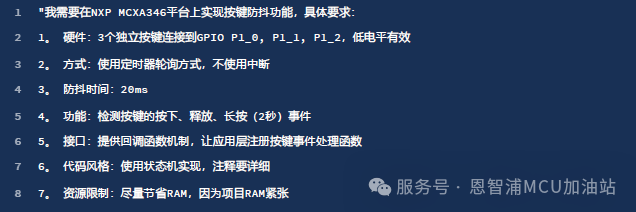
Good prompts need to describe all constraint information of the task requirements as clearly and normatively as possible. There are rules for writing AI prompts. Here are several important elements of a good prompt:

Additionally, most mainstream AI-assisted programming software currently has prompt optimization options that can help you optimize your prompts.
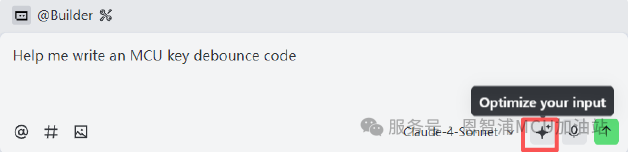
Context can be seen as an extension and reference material for the prompt. It provides richer reference information. In embedded development, contextual corpus can include: key chapters of chip data sheets, schematics, pin configuration tables, clock tree configurations, SDK API documentation, related source files, header files, etc.
5.3.2 Example 2
Without Contextual Corpus:

Providing sufficient contextual corpus:
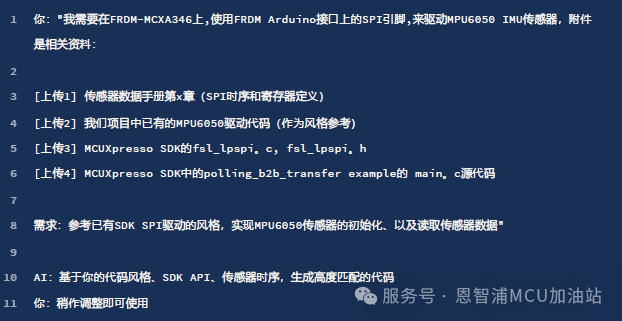
Moreover, it can also be combined with the previously mentioned “iterative verification” concept, providing information incrementally, meaning do not throw a bunch of files at AI all at once, but rather provide them step by step and layer by layer:

At the same time, remember that AI is very good at “copying”; if you have similar code, provide it to AI as a reference:

This way, AI will use the same naming conventions, maintain consistent error handling, follow the same commenting style, and match existing architectural patterns.
5.3.3 Why is this more effective?
AI is not a “search engine” but a “probability predictor.” Many people mistakenly believe that AI searches for answers in a vast codebase like a search engine. In reality, AI predicts the next most likely word (token) based on probabilities.
Imagine a fill-in-the-blank question:

A human engineer would fill in “debounce” or “anti-bounce” because we understand the context. AI operates on a similar principle, but it learns from the vast amounts of code and documentation it has seen during training, understanding “in what context, what code is most likely to appear.” Every character generated by AI depends on all previous content (prompt + contextual corpus + previous AI output text). The more precise the information you provide, the higher the probability that AI will predict the “correct answer.”
The role of prompt words and contextual corpus is to narrow down the “solution space.” There are countless solutions to programming problems. For example, “implementing a delay function” can be:
-
Busy-wait delay
-
Timer delay
-
System tick delay
-
DMA + timer delay with zero CPU usage
When you simply say “write a delay function,” AI faces a huge “solution space,” and it can only provide the most generic (and often the least applicable) answer.
But when you say:

You have actually accomplished three things:
1. Narrowing the solution space: Specifying that you want to use the FreeRTOS API excludes other solutions.
2. Providing constraint conditions: Precise to ms, non-blocking, low power consumption, these are all “filters.”
3. Giving application scenarios: Periodic sampling, AI will consider relevant best practices.
At this point, AI faces a much smaller “solution space,” greatly increasing the probability of predicting the correct answer. Investing time in writing good prompts and preparing context can save you several times the debugging time.
5.4 Code Snippets are More Effective than Text Descriptions
AI’s ability to understand code generally exceeds that of natural language. This is based on the inherent advantages of programming languages—they are more precise and unambiguous than human languages.
5.4.1 Example
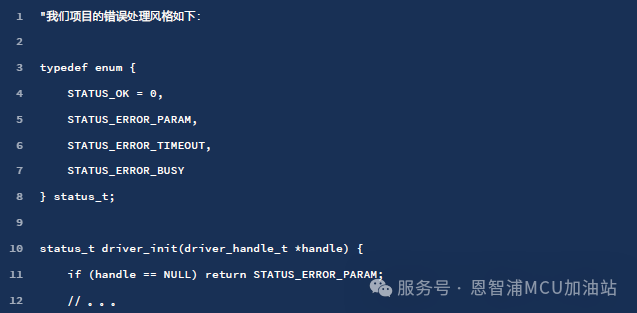

In conversations with AI, a 5-line code snippet is often more valuable than a 500-word text description.
5.5 Work Suitable for AI Completion
Understanding the boundaries of AI’s capabilities—knowing what it can and cannot do—maximizes the value of the tool.
5.5.1 General Algorithm Implementation
-
Standard communication protocols (Modbus, CAN parsing, JSON processing)
-
Classic algorithms (CRC/checksum, filters, PID control)
-
Data structures (circular buffers, linked lists, state machines)
-
String processing (command parsing, format conversion)
Why? These are all “public knowledge” with a vast number of samples in AI’s training set.
For example:
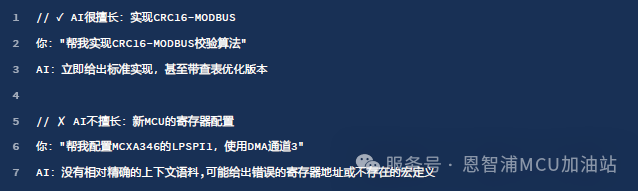
If you can find 100+ similar implementations on GitHub, AI can do it well; if you can only find it in the chip manual, you need to provide detailed context.
5.5.2 Code Review and Optimization
AI’s ability to analyze existing code often exceeds its generation ability. This is because “understanding” is much easier than “creating” when you have already provided a wealth of contextual corpus.
Typical issues that AI can discover (which may not necessarily be reasonable and need manual checking):
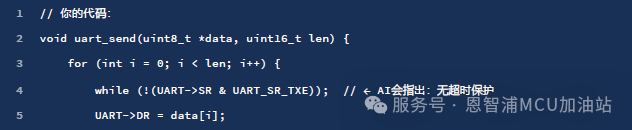
AI will provide an analysis report item by item, like an experienced code reviewer.
5.5.3 Document Generation
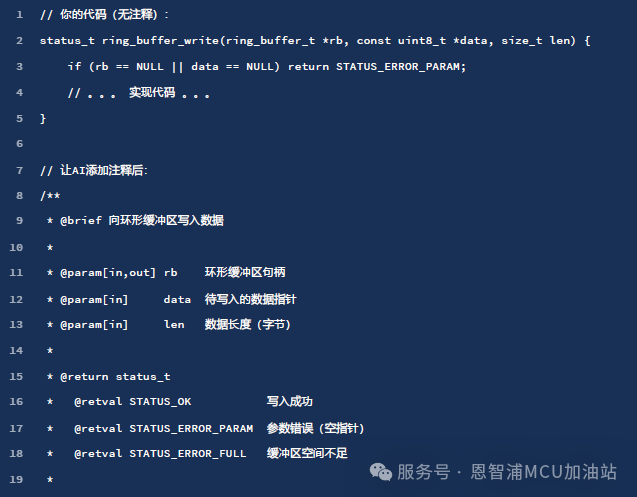
AI is also very good at handling many “dirty and tedious tasks,” such as document generation:
Example 1: Automatically generating Doxygen comments:

Example 2: Generating module-level documentation:

The core principle is: AI performs excellently in areas with “sufficient information” but requires human expertise and oversight in “hardware-specific” areas. Use AI as a combination of “junior engineer + senior reviewer” rather than expecting it to become an “embedded low-level expert.”
-
Functionally, AI is more suitable for upper-level applications, “general knowledge (such as implementing a common protocol, software calculation of CRC checks, etc.),” and is not very good at writing very low-level MCU driver code, especially for new MCU register-level code generation. This is easy to understand; the training set used to train AI is certainly more derived from “public code,” while low-level MCU drivers are rarely included in training.
-
Optimizing existing code: AI is better at checking, optimizing, and error-checking already existing code (the context you provide to AI). This is similar to what was mentioned earlier, where you have already provided highly relevant contextual corpus.
-
Assisting in debugging: AI excels at analyzing error logs, checking compilation errors, provided that you feed the error code snippets and error logs to AI.
-
Document generation: AI is good at adding comments to existing code and generating documentation. This can save a lot of time on some “dirty and tedious work.”
6. Conclusion
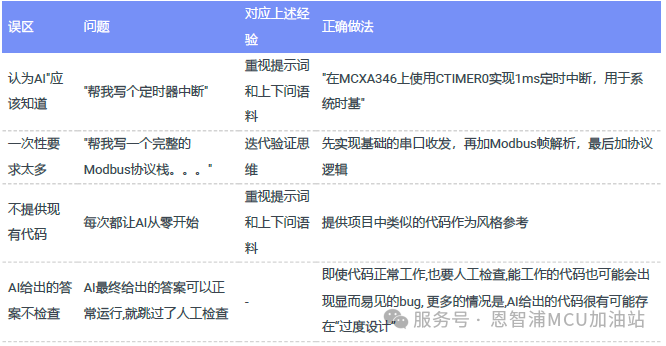
The table below lists points to pay attention to when providing prompt words and contextual corpus:
AI’s capability boundaries:
What AI excels at:
-
Implementing things you have already thought through (algorithms, protocols, data structures).
-
Discovering problems you may not have noticed (code review, boundary conditions, syntax, spelling checks, etc.).
-
Completing “dirty and tedious work” (comments, documentation, repetitive tasks).
What AI is not good at:
-
Thinking through system architecture for you.
-
Understanding the physical (hardware) world: circuit debugging, architectural power optimization, system-level performance constraints, etc., because these tasks often cannot be described with precise code.
-
For embedded systems, adapting to local conditions or very personalized memory management patterns, AI is still better at the memory “routines” commonly seen on PCs.
It is foreseeable that the future development trend of AI in the field of embedded programming assistance will be:
-
AI will understand embedded systems better: able to comprehend chip manuals, recognize hardware schematics, and analyze oscilloscope waveforms.
-
Tools will become smarter: evolving from “code completion” to “requirement implementation,” where you specify what functionality you want, and AI plans, codes, and tests it on its own (this is already beginning to emerge).
-
Costs will be lower: Currently, a subscription fee is required, but in the future, it may become a basic infrastructure like search engines.
-
Specialized AI models targeting embedded systems may emerge, with training sets containing a wealth of chip manuals, application notes, and hardware designs.
-
Multimodal interaction will become a reality: you draw a timing diagram or take a photo of a circuit board, and AI can generate driver code.
However, tasks such as hardware debugging, performance optimization, and power consumption optimization—these require a deep understanding of the physical world—AI will not be able to fully replace humans in the short term. AI merely allows us to turn our ideas into code faster. The real value lies in your understanding of what you want to do and why, as well as your ability to grasp the essence of the problem, which is the most valuable asset of an engineer.