Follow+Star PublicAccount, don’t miss out on exciting content
Source | Network
1. Introduction
Embedded firmware is generally divided into BootLoader and App. The BootLoader is used for startup verification, App upgrades, and App version rollbacks. The BootLoader runs during the first phase of CPU power-up and then jumps to the App address to execute the application program.
Therefore, when releasing firmware, there will be BootLoader firmware and App firmware; at this point, we hope to merge the BootLoader firmware and App firmware into a single firmware, so that it only needs to be programmed once during mass production.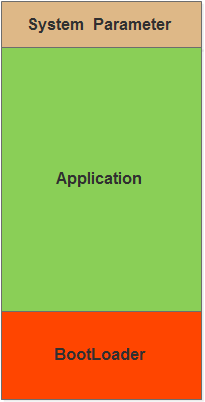
2. Traditional Methods
Some traditional methods are “makeshift solutions”; they are not wrong but are quite cumbersome. As the variety of projects increases or version releases become more frequent, the cumbersome nature becomes more apparent, and errors are easy to occur. A slight operational mistake may lead to incomplete firmware; programming incomplete firmware can turn the device into a “brick”.
- Program twice, once for BootLoader and once for App firmware
- After programming the firmware to the chip, read the firmware from the chip and save it as a hex file
- Manually copy and merge firmware
- BootLoader supports App firmware transfer function, only program BootLoader, and later upgrade App
3. Efficient Methods
Our goal is to merge and generate a release firmware through an automated script, improving efficiency and ensuring the integrity of the firmware.
3.1 Merging Files
We often use scripts in Linux, but Windows scripts are also very powerful. Using Windows scripts can quickly implement file addition, deletion, querying, and modification. Common Windows script commands are as follows.
- Merge two files: copy /b
- Rename file: ren <source_file> <dest_file>
- Delete file: del
Clearly, we can use the merge command, and with just one command, we can merge the BootLoader and App files.
Example:
Assuming the current directory contains Boot.bin and App.bin files, the merged file will be named Firmware.bin.
copy /b .\Boot.bin + .\App.bin Firmware.bin
Note: The directory path in Windows uses backslashes, which is different from Linux.
3.2 bin to hex
We know that binary (bin) files do not contain address information, and the CPU does not necessarily execute code starting from address 0. For example, the starting execution address for STM32 chips is 0x8000000.
Therefore, it is necessary to convert the bin file to a hex file, as it cannot be programmed using serial tools; it can only be programmed using J-link or ST-link, and the starting storage address must be specified before programming.
Methods for bin to hex conversion:
-
Use the jflash tool to open the merged bin file and save it as a hex format file
-
Program the bin file to the chip, read it out, and save it as a hex file
-
Write a bin to hex conversion tool yourself
-
Use a third-party bin to hex conversion tool
The first two methods are too cumbersome and inefficient; the third is flexible but requires some time; using an excellent ready-made tool is the quickest way. It is recommended to use the “srec_cat.exe” tool, which can be combined with Windows scripts.
3.2.1 srec_cat Tool
srec_cat is a very powerful file merging and conversion tool that supports many functions, including:
- File merging
- File splitting
- bin to hex conversion
- hex to bin conversion
- Data padding
- CRC verification
Additionally, there are a series of srec tools, including the file comparison tool srec_cmp.exe and the file information viewing tool srec_info.exe, which can be downloaded from the official website at the end of the article.
File Merging
Command format:
srec_cat.exe <source_file0> <file_type> <source_file1> <file_type> <target_file> <file_type>
Example:
srec_cat.exe source0.bin -Binary source1.bin -Binary -o merge.bin -Binary
srec_cat.exe source0.hex -Intel source1.hex -Intel -o merge.hex -Intel
If the files produced by BootLoader and App are in hex format, this command can be used to merge them into a single hex file, paying attention to address continuity.
bin to hex
Command format: srec_cat.exe <bin source file> <-Binary> <-offset> <offset address> <-Output> <hex target file> <-Intel>
Example:
Convert the merged Firmware.bin from Boot.bin and App.bin to a hex format file.
srec_cat.exe Firmware.bin -Binary -offset 0x8000000 -o Firmware.hex -Intel
0x8000000 is the starting execution address for STM32
For more srec applications and tool downloads, please refer to the official website: http://srecord.sourceforge.net/download.html
3.3 Complete Example
Step 1: Create a new txt file in the directory where the firmware needs to be generated. Step 2: Type the following content (the Boot firmware and App firmware can specify directories)
copy /b .\Boot.bin + .\App.bin Firmware.bin
srec_cat.exe Firmware.bin -Binary -offset 0x8000000 -o Firmware.hex -Intel
del Firmware.bin
Step 3: Rename the txt file to a “.bat” suffix file, which is the executable script file type in Windows. Step 4: Double-click to run the script to generate the target file. If any target file generation fails, check whether the relevant source files exist and whether the paths are correct.
3.4 Generalization
By analogy, if there are multiple App files, they can be merged into a single firmware using this method.
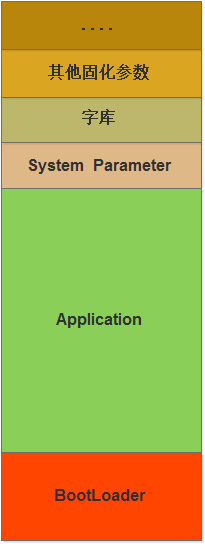
Additionally, in actual projects, it is common to use free sectors of internal flash to save some device parameter information, such as calibration coefficients, device addresses, serial numbers, etc. We can save the parameter information as a bin file and merge it with the firmware using this method, thus writing both parameters and firmware during mass production to improve production efficiency!
Disclaimer:This article’s material is sourced from the internet, and the copyright belongs to the original author. If there are any copyright issues, please contact me for removal.———— END ———— ● Column “Embedded Tools”● Column “Embedded Development”● Column “Keil Tutorials”● Selected Tutorials from Embedded ColumnFollow the public accountReply “Add Group” to join the technical exchange group according to the rules, reply “1024” to see more content.Click “Read the original text” to see more shares.