
About 5300 words, recommended reading time 8 minutes.
This article introduces the significant advances made by large language models in the field of natural language processing.
In recent years, large language models (Large Language Models, LLMs) have made significant progress in the field of natural language processing (Natural Language Processing, NLP). These models can acquire the basic characteristics and semantics of language through pre-training on large-scale text data, achieving breakthrough performance on various NLP tasks. To apply pre-trained LLMs to specific domains or tasks, it is often necessary to fine-tune the model on domain-specific datasets. As the scale and complexity of LLMs continue to grow, the fine-tuning process faces many challenges, such as limitations in computational resources and bottlenecks in training efficiency. Torchtune is a library developed by the PyTorch team specifically for LLM fine-tuning. It aims to simplify the fine-tuning process of LLMs by providing a series of high-level APIs and preset best practices, making it easier for researchers and developers to debug, train, and deploy LLMs. Torchtune is built on the PyTorch ecosystem, leveraging PyTorch’s flexibility and scalability while optimizing and improving for the characteristics of LLM fine-tuning.
Core Design Principles of Torchtune
Torchtune’s design follows four core principles:
- Simplicity and Scalability: Torchtune adopts the native PyTorch design style, providing modular components and interfaces. This allows users to easily modify and extend existing functionalities according to their needs, building customized fine-tuning processes. At the same time, Torchtune also offers a series of out-of-the-box tools and modules, lowering the entry barrier for users.
- Correctness: Fine-tuning LLMs requires a high level of correctness in training data and algorithm implementation. All components and modules in Torchtune have undergone rigorous unit testing and validation to ensure the reliability of their output. Torchtune also provides a series of debugging and analysis tools to help users quickly locate and resolve issues encountered during training.
- Stability: Torchtune is built on stable versions of PyTorch and has been thoroughly tested and optimized for LLM fine-tuning scenarios. Users can run Torchtune stably across various hardware environments without worrying about compatibility and stability issues.
- Accessibility: An important goal of Torchtune is to enable more users to participate in the development and application of LLMs. Therefore, Torchtune provides detailed documentation and tutorials, as well as solutions to common problems. Torchtune also offers a series of pre-trained models and datasets, lowering the entry costs for users.
Main Features of Torchtune
Torchtune provides the following main features to support LLM fine-tuning tasks:
- Modular PyTorch Implementation: Torchtune implements current mainstream LLM architectures, such as Transformer, GPT, BERT, etc. Users can directly use these modules or build their models based on them.
- Integration of Datasets and Evaluation Tools: Torchtune seamlessly integrates with Hugging Face’s Datasets library and EleutherAI’s Eval Harness, providing rich dataset resources and standardized evaluation schemes. Users can conveniently access and use these resources, and can also integrate their datasets and evaluation schemes into Torchtune.
- Efficient Distributed Training: Torchtune supports various parallel training methods, such as data parallelism, model parallelism, and pipeline parallelism. In particular, Torchtune implements Fully Sharded Data Parallel v2 (FSDP2) specifically for LLM fine-tuning, significantly accelerating the training speed of large-scale models and reducing memory usage.
- Configuration File-Based Task Management: Torchtune uses YAML format configuration files to manage the parameters and processes of fine-tuning tasks. Users can flexibly control the training process by modifying configuration files without changing the code. Torchtune also provides a series of preset configuration files and scripts to further simplify task management and execution.
Torchtune is a PyTorch library designed specifically for LLM fine-tuning, aiming to make the development and application of LLMs simpler, more efficient, and reliable. Torchtune offers modular components, advanced APIs, rich data resources, advanced parallel training techniques, and configuration file-based task management. While improving the efficiency of LLM fine-tuning, Torchtune also greatly lowers the entry barriers for users, enabling more researchers and developers to participate in the development and application of LLMs.In the following content, we will introduce some key concepts in Torchtune and demonstrate how to use Torchtune for LLM fine-tuning through examples. We will also explore some advanced topics, such as LoRA and QLoRA, which are parameter-efficient fine-tuning methods.
Key Concepts in Torchtune
Torchtune introduces two key concepts: Configuration (Config) and Recipe. These two concepts abstract the parameters and processes of LLM fine-tuning tasks, allowing users to manage fine-tuning tasks in a more flexible and efficient way.
Configuration (Config)
In Torchtune, configurations exist in the form of YAML files. Each configuration file defines a complete fine-tuning task, including:
- Path and format of the dataset
- Architecture and parameters of the model
- Type and hyperparameters of the optimizer
- Training batch size, learning rate, number of iterations, etc.
- Settings for evaluation and logging
By using configuration files, users can decouple the parameters of fine-tuning tasks from the code implementation. This way, users can quickly experiment with different settings by modifying configuration files without changing the code. At the same time, configuration files also improve the reproducibility and portability of tasks.Below is a simple example of a configuration file:
 dataset:  path: /path/to/dataset  format: json  fields:    - name: text      type: string    - name: label      type: int
 model:  type: transformer  params:    num_layers: 12    hidden_size: 768    num_attention_heads: 12
 optimizer:  type: AdamW  params:    lr: 0.001    weight_decay: 0.01
 train:  batch_size: 32  num_epochs: 10  log_interval: 100
 evaluate:  batch_size: 64  metric:     - accuracy    - f1
Recipe
Recipe is a series of preset fine-tuning processes provided by Torchtune. Each recipe is optimized for specific scenarios and tasks, providing a set of optimized implementations and best practices. Users can directly use these recipes or customize and extend them based on their needs.Torchtune includes several commonly used recipes, such as:
- lora_finetune_single_device: Fine-tuning using LoRA on a single device
- lora_finetune_distributed: Fine-tuning using LoRA in a multi-device distributed environment
- qlora_finetune: Using QLoRA for parameter-efficient fine-tuning
- distill_finetune: Fine-tuning using knowledge distillation techniques
Each recipe defines a complete fine-tuning process, including data processing, model initialization, optimizer selection, training loop, evaluation, and logging. Recipes achieve end-to-end automated fine-tuning by combining various modules and tools provided by Torchtune.Below is an example of fine-tuning using the lora_finetune_single_device recipe:
tune run lora_finetune_single_device \ --config configs/llama2/7B_lora_single_device.yaml \ --train.batch_size 128 \ --optimizer.params.lr 0.0001
In this example, we fine-tune the LLaMA-2-7B model on a single device using the lora_finetune_single_device recipe. We specify the path to the configuration file and override the train.batch_size and optimizer.params.lr parameters in the original configuration through command line arguments.Torchtune’s configuration and recipe mechanism provides a flexible, efficient, and reusable way to manage LLM fine-tuning tasks. By using configuration files and preset recipes, users can quickly start fine-tuning tasks and experiment with different optimization strategies at a very low cost.
Summary
The configuration and recipe in Torchtune are two key abstractions for managing LLM fine-tuning tasks. Configuration exists in the form of YAML files, defining various parameters of fine-tuning tasks; recipes provide a series of preset, optimized end-to-end fine-tuning processes. By flexibly combining configurations and recipes, users can conduct experiments and optimizations for LLM fine-tuning at a very low cost.In the following content, we will demonstrate how to use Torchtune for LLM fine-tuning through a complete example. We will also introduce some advanced fine-tuning techniques, such as LoRA and QLoRA.
Fine-Tuning LLMs with Torchtune
In this section, we will demonstrate how to fine-tune LLMs using Torchtune through a complete example. We will use the lora_finetune_single_device recipe provided by Torchtune to fine-tune the LLaMA-2-7B model on a single GPU device.
Preparation
Before we start, please ensure that you have correctly installed Torchtune and can access the Hugging Face Hub. The Hugging Face Hub hosts many commonly used pre-trained language models, such as LLaMA, GPT, BERT, etc. You need to register for a Hugging Face account and obtain access tokens.
Downloading Pre-Trained Models
First, we need to download a pre-trained language model. In this example, we will use the LLaMA-2-7B model released by Meta, which is an open-source model on Hugging Face Hub. We can use the following command to download this model:
tune download meta-llama/Llama-2-7b-hf \ --output-dir /tmp/Llama-2-7b-hf \ --hf-token <ACCESS TOKEN>
This command will download the LLaMA-2-7B model to the /tmp/Llama-2-7b-hf directory, where <ACCESS TOKEN> needs to be replaced with your own Hugging Face access token. In addition to the model parameters, this command will also download the corresponding tokenizer and some other files, such as the model card and usage license.
Selecting Fine-Tuning Recipes
Torchtune provides several preset fine-tuning recipes suitable for different scenarios and tasks. You can view all available recipes with the following command:
tune ls
In this example, we choose the lora_finetune_single_device recipe. This recipe uses the LoRA (Low-Rank Adaptation) technique to fine-tune LLMs on a single GPU device. LoRA achieves fine-tuning of the model without changing the original model parameters by introducing low-rank adapter parameters. This method can significantly reduce memory consumption and computational overhead during fine-tuning, making it possible to fine-tune large LLMs on a single GPU.
Configuring Fine-Tuning Tasks
Each fine-tuning recipe has a corresponding configuration file that defines various parameters of the fine-tuning task. The default configuration file path for the lora_finetune_single_device recipe is llama2/7B_lora_single_device.yaml. We can either use this configuration file directly or modify it as needed.Torchtune supports two ways to modify configuration files:
By overriding parameters in the configuration file through command line arguments: tune run lora_finetune_single_device \   --config llama2/7B_lora_single_device.yaml \  train.batch_size=128 \  train.num_epochs=5
Copying the configuration file locally and then directly modifying it:   tune cp llama2/7B_lora_single_device.yaml custom_config.yaml
Modifying the custom_config.yaml file, and then running: tune run lora_finetune_single_device \   --config custom_config.yaml
By flexibly using these two methods, we can conveniently control various parameters of the fine-tuning task, such as datasets, batch sizes, learning rates, and training epochs.
Starting Fine-Tuning Tasks
Once the configuration file is prepared, we can start the fine-tuning task. Use the following command to start the lora_finetune_single_device recipe:
tune run lora_finetune_single_device \ --config llama2/7B_lora_single_device.yaml
Torchtune will automatically load the pre-trained model, tokenizer, dataset, etc., and begin the fine-tuning process. During the fine-tuning process, Torchtune will log training losses, evaluation metrics, GPU usage, and other information in real-time, allowing users to monitor training progress and debug the model.
Results Presentation
Below is an example result I made with W&B, showing the performance during training.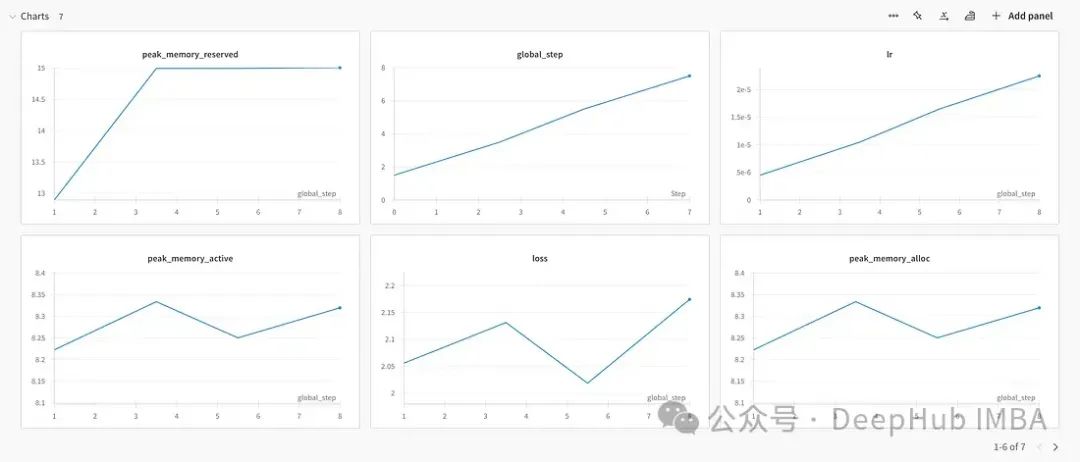 Below is the memory usage.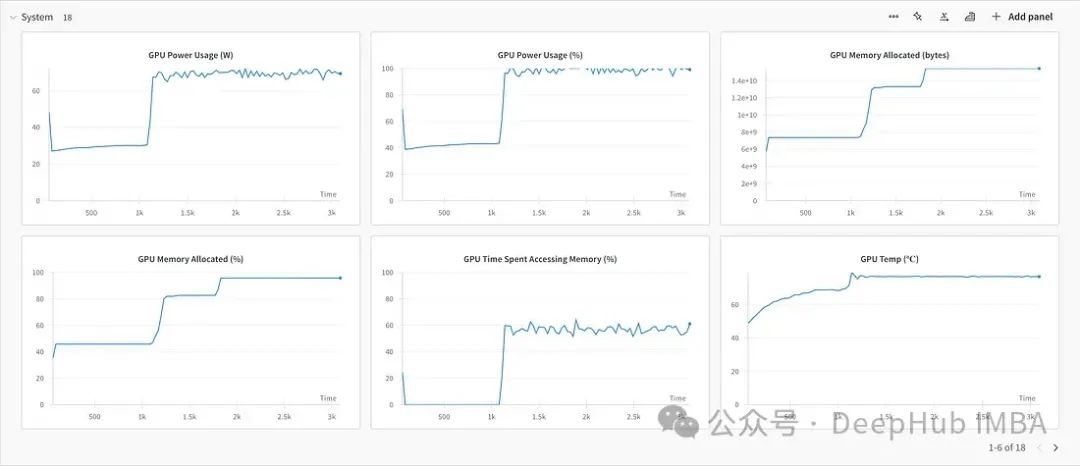
Saving and Using the Fine-Tuned Model
After fine-tuning is complete, we can use the following command to export the fine-tuned model to the specified path:
tune export lora_finetune_single_device \ --output_dir /path/to/output
The exported model can be directly used for inference and serving in downstream tasks. We can also upload the exported model to the Hugging Face Hub for other users to use.
Summary
In this section, we demonstrated how to use Torchtune to fine-tune LLMs through a complete example. We used the lora_finetune_single_device recipe to fine-tune the LLaMA-2-7B model on a single GPU. The entire process included:
- Preparation: Installing Torchtune and registering for a Hugging Face account.
- Downloading the pre-trained model: Downloading the LLaMA-2-7B model from the Hugging Face Hub.
- Selecting a fine-tuning recipe: Choosing the lora_finetune_single_device recipe.
- Configuring the fine-tuning task: Modifying the default configuration file for the lora_finetune_single_device recipe.
- Starting the fine-tuning task: Using the tune run command to start the fine-tuning task.
- Saving and using the fine-tuned model: Using the tune export command to export the fine-tuned model.
As we can see, Torchtune greatly simplifies the fine-tuning process for LLMs, allowing users to complete end-to-end fine-tuning tasks through simple command-line operations. At the same time, Torchtune provides rich logging and visualization tools, making it easy for users to monitor and debug the training process.In the following content, we will detail two parameter-efficient fine-tuning methods: LoRA and QLoRA. We will also discuss how to implement these two methods using Torchtune.
Parameter-Efficient Fine-Tuning Methods: LoRA and QLoRA
In the previous content, we introduced how to fine-tune LLMs using Torchtune. However, as the scale of LLMs continues to grow, traditional fine-tuning methods face increasing challenges. Taking LLaMA-2-7B as an example, this model has 7 billion parameters, and even modern GPU devices struggle to support fine-tuning of all parameters. Therefore, we need to explore some parameter-efficient fine-tuning methods that reduce computational and storage overhead while ensuring fine-tuning effectiveness.
LoRA: Low-Rank Adaptation
LoRA (Low-Rank Adaptation) is a parameter-efficient fine-tuning method proposed by Microsoft Research in 2021. The core idea of LoRA is to introduce a set of low-rank adapter parameters based on the pre-trained model. During the fine-tuning process, we only update these adapter parameters while keeping the pre-trained model parameters unchanged. This allows us to fine-tune the model without increasing its scale.Specifically, for each linear layer in the pre-trained model, LoRA introduces two low-rank matrices A and B, modifying the original linear transformation y = Wx to: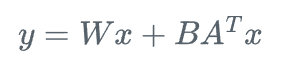 where
where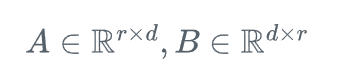 and r is a hyperparameter much smaller than d, known as the LoRA rank. During the fine-tuning process, we only train and update matrices A and B while keeping W unchanged. Since r is much smaller than d, the number of additional parameters introduced by LoRA is also much smaller than the number of parameters in the original model.Below is an example code for implementing LoRA fine-tuning using Torchtune:
import torch  from torchtune.models.llama2 import llama2_7b, lora_llama2_7b  from torchtune.modules.peft.peft_utils import get_adapter_params, set_trainable_params
# Load the pre-trained LLaMA-2-7B modelbase_model = llama2_7b(weights="/path/to/llama2_7b_weights", tokenizer="/path/to/llama2_tokenizer")
# Apply LoRA to the LLaMA-2-7B modellora_model = lora_llama2_7b(      lora_attn_modules=['q_proj', 'v_proj'],      lora_rank=8,      lora_alpha=16)
# Load pre-trained weights into the LoRA model     lora_model.load_state_dict(base_model.state_dict(), strict=False)
# Set only LoRA parameters as trainablelora_params = get_adapter_params(lora_model) set_trainable_params(lora_model, lora_params)
# Use Torchtune's LoRA fine-tuning recipe for trainingtune_command = """  tune run --nnodes 1 --nproc_per_node 2 lora_finetune_distributed --config llama2/7B_lora \  lora_attn_modules=['q_proj', 'k_proj', 'v_proj', 'output_proj'] \  lora_rank=32 lora_alpha=64 output_dir=./lora_experiment_1  """
In this example, we first load the pre-trained LLaMA-2-7B model, then apply LoRA to it. We introduce LoRA adapters on the query and value projection matrices of the attention layer, with an adapter rank of 8. Next, we use the load_state_dict function to load the pre-trained weights into the LoRA model and set only the LoRA parameters as trainable using the set_trainable_params function. Finally, we use Torchtune’s lora_finetune_distributed recipe to fine-tune the LoRA model across multiple GPUs.By introducing LoRA, we can reduce the number of parameters that need to be trained and updated during fine-tuning to about 1% of the original, significantly reducing the computational and storage overhead of fine-tuning. At the same time, research shows that the fine-tuning effect of LoRA is comparable to full parameter fine-tuning, and in some tasks, it may even show slight improvements.
QLoRA: Quantized LoRA
QLoRA (Quantized Low-Rank Adaptation) is an extension of LoRA, proposed in collaboration between the University of Washington and NVIDIA. QLoRA further reduces the storage overhead of the model by quantizing the weights of the pre-trained model based on LoRA.Specifically, QLoRA uses 4-bit NF4 (4-bit Normalized Fixed-Point) format to quantize the weights of the pre-trained model. The NF4 format uses one bit to represent the sign, three bits to represent the mantissa, and has a dynamic range of [-8, 7]. The quantized weights require only 1/8 of the original storage space, but during actual use, they need to be de-quantized to full precision (FP16 or FP32) format.Below is an example code for implementing QLoRA fine-tuning using Torchtune:
import torchfrom torchtune.models.llama2 import qlora_llama2_7bfrom torchtune.trainers import LoRAFinetuneTrainer
# Initialize QLoRA LLaMA-2-7B model  qlora_model = qlora_llama2_7b(lora_attn_modules=["q_proj", "v_proj"])
# Prepare QLoRA fine-tuning Trainertrainer = LoRAFinetuneTrainer(    model=qlora_model,    dataset_path="path_to_dataset",     output_dir="output_dir",    batch_size=2,      max_steps=1000,    logging_steps=100)
# Start fine-tuningtrainer.train()
# Save the fine-tuned modeltrainer.save_model("path_to_saved_model")
This example is very similar to the previous LoRA fine-tuning, with the main differences being:
- We initialize a QLoRA LLaMA-2-7B model using the qlora_llama2_7b function, where the model weights are 4-bit quantized.
- We prepare a Trainer specifically for QLoRA fine-tuning using LoRAFinetuneTrainer, setting parameters such as dataset path, output path, batch size, etc.
- During the fine-tuning process, the weights of the QLoRA model remain quantized, and only the parameters of the LoRA adapters are updated. This further reduces memory consumption during fine-tuning.
- After fine-tuning, we use the save_model function to save the fine-tuned model to the specified path. The saved model contains the quantized pre-trained weights and the parameters of the LoRA adapters. During actual use, we need to de-quantize the weights to full precision format.
By combining LoRA and quantization, QLoRA can reduce the memory consumption during fine-tuning to about 1/8 of the original, making it possible to fine-tune billion-scale LLMs on consumer-grade GPUs. At the same time, research shows that QLoRA fine-tuning is comparable to LoRA fine-tuning, and in some tasks, it may even show slight improvements.
Conclusion
This article introduced how to use PyTorch’s Torchtune library for fine-tuning large language models (LLMs). Torchtune provides a simple, flexible, and efficient set of tools and frameworks that enable researchers and developers to easily debug, train, and deploy LLMs. The article detailed Torchtune’s design principles, core concepts, and main features, and demonstrated how to fine-tune the LLaMA-2-7B model using a complete example. Additionally, the article introduced two parameter-efficient fine-tuning methods: LoRA and QLoRA. These two methods significantly reduce the computational and storage overhead during fine-tuning by introducing low-rank adapters and quantization techniques, opening up new possibilities for LLM applications.Editor: Wang Jing
About Us
Data Party THU, as a data science public account, is backed by the Tsinghua University Big Data Research Center, sharing cutting-edge data science and big data technology innovation research dynamics, continuously disseminating data science knowledge, and striving to build a platform for gathering data talent, creating the strongest group of big data in China.

Sina Weibo: @数据派THU
WeChat Video Number: 数据派THU
Today’s Headlines: 数据派THU