【1】Base Conversion1B=8bit1KB=2(10)B=1024B1MB=2(10)MB=1024MB=2(30)B1TB=2(10)GB=1024GB=2(40)B【2】Compiled Languages
● Compiled languages translate the entire source code into target code at once, generating an executable file.
● After modifying the source code, the entire program needs to be recompiled. Although the execution efficiency is high, the development efficiency is relatively low, and cross-platform compatibility is poor.
Example: You are given an English document, and you translate the entire document before browsing it.
【3】Interpreted Languages
● Interpreted languages translate the source code into intermediate code line by line, executed by an interpreter.
● After modifying the source code, there is no need to recompile the entire program; it can be executed directly.
● The execution efficiency is lower, but the development efficiency is high, and it has strong cross-platform capabilities.
Example: You are given an English document, and you translate each paragraph as you browse through it.
【4】History of Python Language
-
In 1989, Guido began writing the compiler for the Python language.
-
In 1991, the first Python compiler was born.
-
It was implemented in C and could call C language library files.
-
Python 1.0 – January 1994 added lambda, map, filter, and reduce.
-
Python 2.0 – October 16, 2000, introduced a memory management mechanism, forming the basis of the current Python language framework.
-
Python 2.4 – November 30, 2004, the most popular web framework Django was born in the same year.
-
Python 2.5 – September 19, 2006
-
Python 2.6 – October 1, 2008
-
Python 2.7 – July 3, 2010
-
Python 3.0 – December 3, 2008 (observant readers will notice that 3.0 was released in 2008, but 2.7 was released in 2010? This is because 3.0 is not backward compatible with 2.0, and many companies had already developed a large number of programs based on version 2.0, investing significant resources. This led to a refusal to upgrade to 3.0, and the official had no choice but to release a transitional version 2.7. After this, we should develop programs using the 3.0 interpreter, but to facilitate readers maintaining software based on version 2.0, we will specifically point out the differences between the two versions when encountered.)
-
Python 3.1 – June 27, 2009
-
Python 3.2 – February 20, 2011
-
Python 3.3 – September 29, 2012
-
Python 3.4 – March 16, 2014
-
Python 3.5 – September 13, 2015
-
Python 3.6 – December 23, 2016, released version python3.6.0
-
In 2020: Python 2 officially ended support, and users were encouraged to switch to Python 3.
-
After 2020: The Python community continues to promote the adoption of Python 3, with many libraries and frameworks gradually stopping support for Python 2.
-
In 2020: Python 3.8 was released, bringing some new language features and performance improvements.
-
In 2021: Python 3.9 was released, introducing some new syntax and modules.
-
In 2022: Python 3.10 was released, continuing to improve the language’s functionality and performance.
-
In 2023: Python continues to succeed in various fields, becoming one of the preferred languages in data science, artificial intelligence, and web development. The community and ecosystem continue to expand, with new libraries and frameworks emerging.
【5】Types of Python Interpreters
-
CPython Interpreter: Developed in C, it is the most widely used interpreter.
It is the most widely used interpreter.
-
JPython Interpreter: A Python interpreter written in Java, which can directly compile Python code into Java bytecode and execute it.
-
IPython: An interactive interpreter based on CPython, meaning that IPython enhances the interactive experience, but the functionality of executing Python code is exactly the same as CPython.
-
PyPy Interpreter: A Python interpreter implemented in Python by Python developers for better hacking of Python.
-
IronPython: Similar to Jython, but IronPython is a Python interpreter running on the Microsoft .Net platform, which can directly compile Python code into .Net bytecode.
【6】Python Comments
# Single line comment'''This is a multi-line comment'''"""This is also a multi-line comment"""【7】VariablesA variable is a quantity that can change; in a program, a variable acts like a container for storing data.
By using variables, a program can store and modify data as needed during runtime, achieving dynamic states and behaviors.
# A variable definition consists of three parts: variable name assignment symbol variable valuename = "dream" # Assign the value dream to namage = 18# Internal principle: Open a block of memory to store the value dream, # then use name to point to this memory addressname = "dream"name = "hope"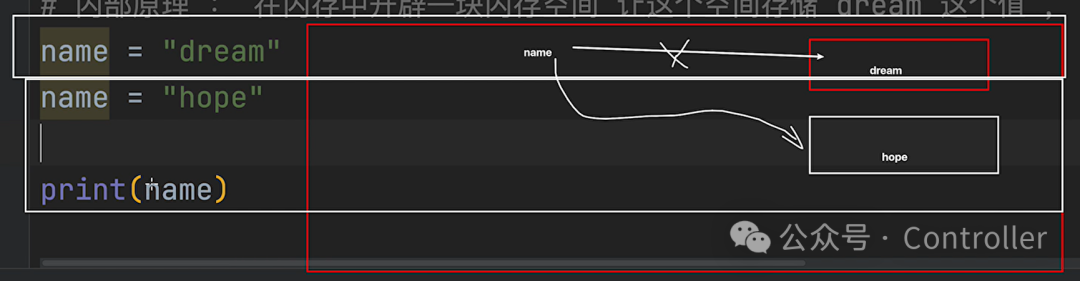
Variable naming conventions:
# (1) Variable names can be: any combination of letters (uppercase and lowercase) + numbers + underscores _user_name = 'dream'_username = "dream"User_name = "dream"USERO1_NAME = "dream"# (2) Numbers cannot be used as the beginning of variable names01_name= "dream" # Incorrect naming method# (3) Keywords cannot be used as the beginning of variable namesif_user = 'dream'Variable naming styles:
# (1) Camel case# Upper Camel Case: The first letter of each word is capitalizedUserName = "dream"# Lower Camel Case: The first letter of the first word is lowercase, and the first letters of other words are capitalizeduserName = "dream"# (2) Lowercase + underscoreuser_name = "dream"