Author | Ma Bin
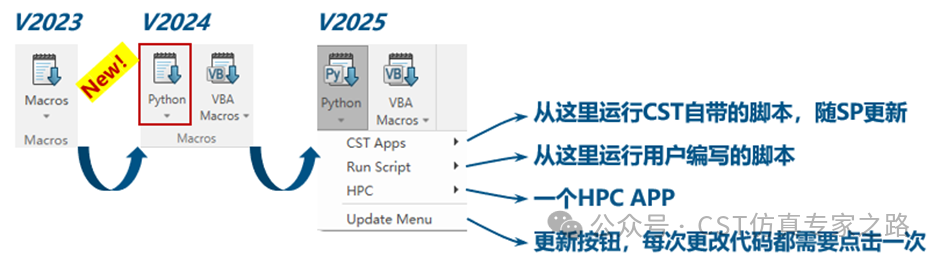
Starting fromCST 2024 version, theCST software has added a Python button next to the VBA Macros button, allowing users to runCST‘s built-in Python scripts or execute their own scripts.
The submenu under this button,CST Apps, contains Python scripts developed and maintained byCST officials, which are continuously updated with each year’s SP (Service Pack) version. The Run Script submenu is user-oriented, making it easy for users to quickly execute their own Python macros. If users modify these scripts or add new script files, they need to click Update Menu to refresh the Run Script menu content, ensuring changes take effect.
Calling Python Scripts
If we have already written a Python script, how can we call it in CST?
When we open the CST interface, we may notice that there is a Python button to the left of the VBA Macros button, but there is no Run Script submenu. This is usually because the necessary script directory is missing or there are no scripts in the directory.
At this point, we can manually create a folder named Scripts in the installation path of CST (Note: The folder name is case-insensitive but must be spelled correctly without missing letters). Then, place our written.py script file into this folder, and return to the CST interface, clicking the Python button and then Update Menu. At this point, the Run Script submenu will appear under the Python button, and we can directly run the script we just added from there.
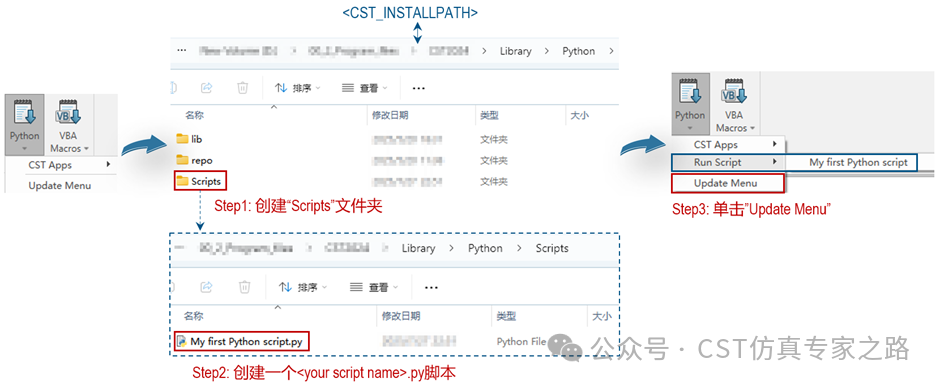
This is a conventional method; although convenient, it has a drawback: every time a new version of CST is installed, all scripts from the previous version need to be manually copied to the corresponding path of the new version.
Python Library Path
To avoid the issue of manually copying scripts, we can set a fixed Library path to centrally store and manage our Python scripts. This way, after installing a new version of CST, we only need to add a Library path to continue reading and using the existing Python scripts. The specific steps for adding are shown in the image below. It is important to note that the path must conform to the structure format of “<…>/Library/Python/Scripts”.
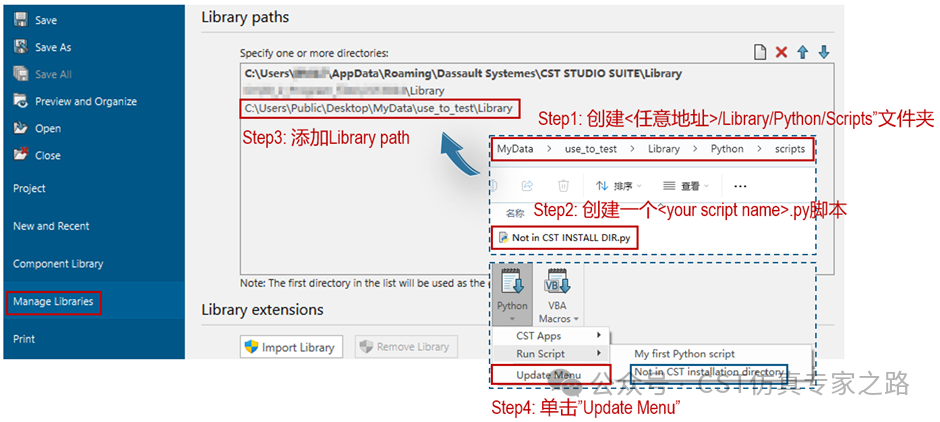
With the above methods, we can successfully call our own Python scripts in CST.
Finally, here is a small Demo where the script reads the variable names of the current CST project and allows users to change the variable values through a GUI. As we can see, it is very convenient to call Python scripts in CST, similar to the previous VBA Macros.
Thank you for reading. If you find this article useful, please like, bookmark, share, or appreciate it, and share it with more friends to understand and follow us..