In today’s Internet of Things (IoT) era, the MQTT (Message Queuing Telemetry Transport) protocol has become one of the mainstream protocols for connecting various devices and systems. For .NET developers, choosing a high-performance, stable, and easy-to-use MQTT library is crucial. Today, we will recommend a high-performance .NET library—MQTTnet.
Introduction to MQTTnet
MQTTnet is an open-source library based on the .NET platform that provides comprehensive support for the MQTT protocol. It features ease of use, high performance, and strong scalability, making it ideal for building real-time, reliable IoT applications.
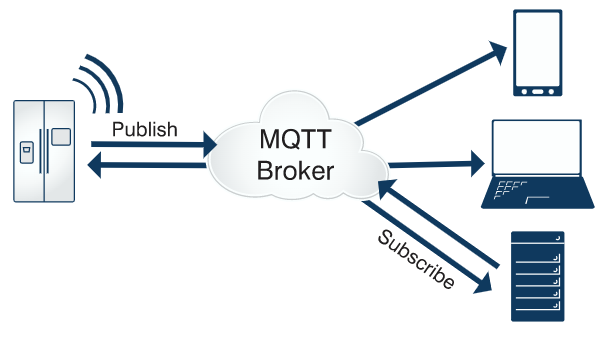
General Features
-
1. Asynchronous support
-
2. TLS support for clients and servers (but not UWP servers)
-
3. Extensible communication channels (e.g., In-Memory, TCP, TCP+TLS, WS)
-
4. Lightweight (only the underlying implementation of MQTT, no overhead)
-
5. Performance optimization (handling ~150,000 messages/second)
-
6. No external dependencies
Client
-
1. Supports communication via TCP (+TLS) or WS (WebSocket)
-
2. Includes ManagedMqttClient, which automatically maintains connections and subscriptions. Additionally, application messages are automatically queued and rearranged for higher QoS levels.
Server Side
-
1. Supports simultaneous connections from clients of different protocol versions
-
2. Can publish its own messages (without looping back to the client)
-
3. Can receive each message (without looping back to the client)
-
4. Extensible client credential validation
-
5. Supports retained messages, including persistence via interface methods (requires custom implementation)
-
6. Supports WebSockets (via ASP.NET Core)
-
7. Custom message interceptors can be added, allowing transformation or extension of each received application message
-
8. Validates subscriptions and denies subscriptions to certain topics based on the requesting client
Features of MQTTnet
High Performance: MQTTnet achieves high-performance MQTT communication through an asynchronous programming model and efficient memory management. It maintains stable performance under various network conditions, meeting the demands of large-scale IoT devices.
Ease of Use: MQTTnet provides a simple and easy-to-use API, allowing developers to easily implement MQTT client and server development. It also supports various MQTT protocol features, such as QoS (Quality of Service), TLS/SSL encryption, etc.
Scalability: MQTTnet adopts a modular design, making it easy for developers to extend based on their needs. You can write custom components to handle messages, implement custom authentication mechanisms, etc.
Community Support: MQTTnet is an open-source project with active community support. Developers can view the project’s source code on GitHub, participate in discussions, and contribute code. Additionally, the community provides rich documentation and examples to help you get started quickly.
How to Use MQTTnet
Install the MQTTnet NuGet Package: Open the solution in Visual Studio, right-click on the project name, select “Manage NuGet Packages,” search for and install MQTTnet.
Configure MQTT Connection Parameters: Set the MQTT broker’s address, port, client ID, and other connection parameters.
Create an MQTT Client: Use the API provided by MQTTnet to create an instance of the MQTT client.
Connect to the MQTT Broker: Call the Connect method of the MQTT client to establish a connection with the MQTT broker.
Publish and Subscribe to Messages: Use the Publish and Subscribe methods of the MQTT client to publish and subscribe to messages.
Disconnect: When the MQTT client is no longer needed, call its Disconnect method to disconnect from the MQTT broker.
Simple Example
Install-Package MQTTnetAfter installation, you can import the relevant namespaces of MQTTnet in your .NET project and start writing code. Below is a simple example demonstrating how to connect to an MQTT server using the MQTTnet client and publish a message:
using MQTTnet;
using MQTTnet.Client;
using MQTTnet.Client.Options;
using System;
using System.Threading.Tasks;

class Program
{
    static async Task Main(string[] args)
    {
        var options = new MqttClientOptionsBuilder()
            .WithTcpServer("localhost", 1883) // Set server address and port
            .WithCleanSession() // Enable new session clean mode
            .Build(); // Create configuration options instance
        var client = new MqttFactory().CreateMqttClient(options); // Create client instance
        try
        {
            await client.ConnectAsync(); // Connect to server
            Console.WriteLine("Connected to MQTT server.");
            var topic = "test/topic"; // Set topic
            var message = "Hello, MQTT!"; // Set message content
            var qos = QosLevel.AtLeastOnce; // Set QoS level
            await client.PublishAsync(topic, message, qos); // Publish message
            Console.WriteLine("Message published: {0}", message);
        }
        catch (MqttException ex)
        {
            Console.WriteLine("Error: {0}", ex.Message);
        }
        finally
        {
            await client.DisconnectAsync(); // Disconnect
        }
    }
}
This example demonstrates how to connect to a locally running MQTT server using the MQTTnet client and publish a message to a specified topic. You can modify the code according to your needs to implement more complex MQTT communication features. For more examples, refer to the official source code.
Source Code Address
https://github.com/dotnet/MQTTnet
Recommended Reading
-
1. A boon for the industrial control industry: A desktop tool developed in C# that aids in more efficient debugging
-
2. An open-source free IoT device communication protocol client developed in C#
-
3. A report project based on OPC data collection developed in C#
-
4. Recommendations for 3 highly-rated WMS systems developed in .Net
-
5. Two star IoT projects developed in C#
-
6. An open-source control library written in C#, a perfect combination of aesthetics and practicality
-
7. Three practical scheduled task system solutions, the third fills a gap in the .NET community
-
8. Recommended C# Modbus library: A tool for easily implementing Modbus communication
-
9. A .NET library for connecting Siemens PLC devices, a blessing for automation
-
10. An open-source communication debugging tool supporting both Modbus and MQTT
Feel free to scan the QR code below to add me on WeChat, and note project keywords to obtain the source code link and join the group for discussion.

Copyright statement: This article is sourced from network materials collected or contributed by netizens, and the copyright belongs to the copyright owner. If there is any infringement, please contact the editor for deletion.