💥💥💞💞Welcome to this blog❤️❤️💥💥
🏆Author’s Advantage: 🌞🌞🌞The blog content aims to be logically clear and coherent for the convenience of readers.
⛳️Motto: A journey of a hundred miles begins with a single step.
💥1 Overview
A face recognition system based on Principal Component Analysis (PCA) is a common face recognition technology that identifies faces in images through dimensionality reduction and feature extraction. PCA is a widely used dimensionality reduction technique that aims to transform high-dimensional data into low-dimensional data while retaining as much of the original data information as possible. In face recognition, PCA can be used to extract the most significant features from face images. First, a large number of face images are collected as training samples, each image must include the face and corresponding labels. The images are preprocessed, such as grayscaling, normalization, and face alignment, to ensure data quality and consistency. PCA technology is then used to extract features from the preprocessed face images, converting high-dimensional face image data into low-dimensional feature vectors. For new face images, they are converted into feature vectors and classified using the trained model to determine which known face category they belong to. PCA is simple and effective, with fast computation speed, and performs well in dimensionality reduction and feature extraction for high-dimensional data, usually achieving high recognition accuracy. The PCA-based face recognition system effectively represents and recognizes face images through dimensionality reduction and feature extraction, with advantages such as simplicity, efficiency, and fast computation speed, and has been widely applied in practical applications.
Abstract
In recent years, face recognition technology has shown a vigorous development trend in fields such as security authentication and biometrics, widely applied in finance, government, security, entertainment, and other industries. Principal Component Analysis (PCA), as a classic data dimensionality reduction technique, can effectively extract the main features of face images, improving the efficiency and accuracy of face recognition. This paper studies a PCA-based face recognition system, detailing the system’s design principles, implementation steps, and experimental result analysis, aiming to provide a reference for the application of PCA in the field of face recognition.
-
Introduction
1.1 Research Background and Significance
With the rapid development of computer vision and machine learning technologies, face recognition technology has become an important means of identity verification and biometrics. Its non-contact, convenience, and accuracy have led to its widespread application in many fields. PCA, as an unsupervised linear dimensionality reduction technique, projects high-dimensional data into a low-dimensional space through orthogonal transformation, retaining the main features of the data, reducing computational complexity, and improving recognition efficiency.
1.2 Current Research Status
The application of PCA in the field of face recognition has a long history, and researchers have continuously optimized algorithms and improved system designs to enhance the accuracy and robustness of face recognition. However, factors such as lighting changes, facial pose variations, and expression changes still pose challenges to face recognition systems. Therefore, researching PCA-based face recognition systems to improve their performance in practical applications is of significant practical importance.
-
PCA Algorithm Principles
2.1 Basic Idea of PCA
The basic idea of PCA is to map the original data to a new coordinate system through linear transformation, maximizing the variance of the data in the new coordinate system. These new coordinate axes are called principal components and are sorted by variance. By retaining the top k principal components, dimensionality reduction can be achieved while preserving the original data features to the greatest extent.
2.2 Steps of the PCA Algorithm
Data Standardization: Zero-mean processing of the original data, i.e., subtracting the mean of each feature from the feature values to eliminate dimensional effects.
Calculate Covariance Matrix: Reflects the linear relationships between features.
Eigenvalue Decomposition: Solving for the eigenvalues and eigenvectors of the covariance matrix.
Select Principal Components: Based on the size of the eigenvalues, select the top k eigenvectors corresponding to the largest eigenvalues to form the projection matrix.
Data Projection: Project the original data into the new low-dimensional space to obtain the reduced data.
-
Design of PCA-Based Face Recognition System
3.1 System Framework
The PCA-based face recognition system mainly includes the following modules: image acquisition and preprocessing, feature extraction (PCA analysis), classifier training and testing, and result evaluation and optimization.
3.2 Image Acquisition and Preprocessing
Image Acquisition: Collect facial images of different individuals as training and testing datasets.
Preprocessing: Includes operations such as grayscaling, size normalization, and denoising to improve image quality for subsequent processing.
3.3 Feature Extraction (PCA Analysis)
Build Sample Library: Convert preprocessed images into vector form to construct a sample library.
Calculate Mean Face: Calculate the mean of all images in the sample library to obtain the mean face.
Centering Processing: Subtract the mean face from each image to obtain the centered images.
Calculate Covariance Matrix: Calculate the covariance matrix based on the centered images.
Eigenvalue Decomposition: Solve for the eigenvalues and eigenvectors of the covariance matrix.
Select Principal Components: Based on the size of the eigenvalues, select the top k eigenvectors corresponding to the largest eigenvalues to form the feature face space.
Project Images: Project the centered images into the feature face space to obtain images represented by principal components.
3.4 Classifier Training and Testing
Train Classifier: Use facial images and corresponding labels from the training dataset to train classifiers, such as Support Vector Machines (SVM), K-Nearest Neighbors (KNN), etc.
Test Classifier: Use facial images and corresponding labels from the testing dataset to test the performance of the classifier, calculating accuracy, recall, and other metrics.
3.5 Result Evaluation and Optimization
Evaluation Metrics: Use metrics such as accuracy, recall, and F1 score to evaluate the performance of the classifier.
Optimization Methods: Based on evaluation results, adjust PCA parameters (such as the number of principal components k), classifier parameters, etc., to improve system performance.
-
Experimental Results and Analysis
4.1 Experimental Environment and Dataset
Experimental Environment: MATLAB or Python programming environment, equipped with necessary image processing and machine learning libraries.
Dataset: Use public face image libraries, such as ORL-Faces, Yale database, etc., containing facial images under different lighting, expressions, and poses.
4.2 Experimental Steps
Data Preprocessing: Perform grayscaling, size normalization, and other preprocessing operations on the images.
Feature Extraction: Use PCA algorithm to extract the main features of the facial images.
Classifier Training and Testing: Train the classifier using the training dataset and test the classifier’s performance using the testing dataset.
Result Evaluation: Calculate accuracy, recall, and other metrics to evaluate the classifier’s performance.
4.3 Experimental Results
The experimental results show that the PCA-based face recognition system achieved high accuracy on public datasets. By adjusting PCA parameters and classifier parameters, the system’s performance can be further improved.
4.4 Analysis of Influencing Factors
Lighting Changes: Lighting changes significantly affect the performance of face recognition systems. Preprocessing operations (such as histogram equalization) can partially eliminate the impact of lighting.
Facial Pose Variations: Changes in facial pose can lead to variations in the positions of facial feature points, affecting recognition accuracy. Training with facial images under multiple poses can improve the system’s robustness.
Expression Changes: Changes in expression can cause movements of facial muscles, altering the shape and position of facial feature points. Training with facial images under multiple expressions can enhance the system’s adaptability.
-
Conclusion and Outlook
5.1 Research Conclusion
This paper studied a PCA-based face recognition system, detailing the system’s design principles, implementation steps, and experimental result analysis. The experimental results indicate that the PCA algorithm can effectively extract the main features of facial images, improving the efficiency and accuracy of face recognition. Additionally, by adjusting PCA parameters and classifier parameters, the system performance can be further optimized.
5.2 Research Outlook
Future research can further explore the following directions:
Combining Other Technologies: Integrating PCA with other feature extraction algorithms (such as LDA, kernel methods, etc.) to improve the system’s recognition accuracy and robustness.
Application of Deep Learning: Exploring the application of deep learning in face recognition, such as Convolutional Neural Networks (CNN), and comparing and analyzing them with PCA algorithms.
Practical Application Scenarios: Applying the PCA-based face recognition system in real-world scenarios, such as smart security and payment verification, to validate its performance in practical applications.
📚2 Running Results
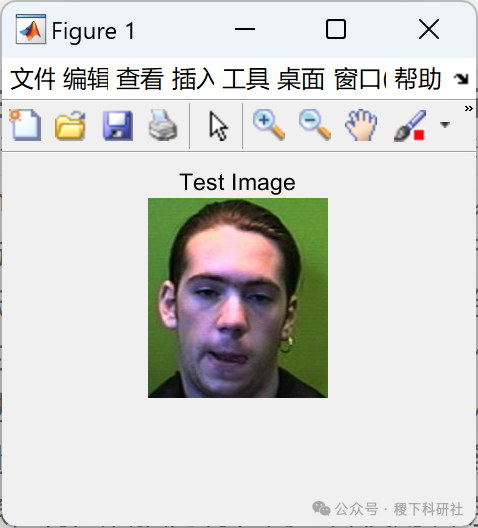

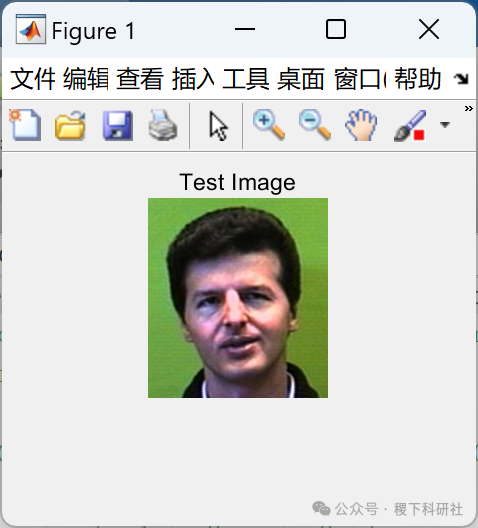

Main function code:
clear allclcclose all% You can customize and fix initial directory pathsTrainDatabasePath = uigetdir(‘D:\Program Files\MATLAB\R2006a\work’, ‘Select training database path’ );TestDatabasePath = uigetdir(‘D:\Program Files\MATLAB\R2006a\work’, ‘Select test database path’);prompt = {‘Enter test image name (a number between 1 to 10):’};dlg_title = ‘Input of PCA-Based Face Recognition System’;num_lines= 1;def = {‘1′};TestImage = inputdlg(prompt,dlg_title,num_lines,def);TestImage = strcat(TestDatabasePath,’\’,char(TestImage),’.jpg’);im = imread(TestImage);T = CreateDatabase(TrainDatabasePath);[m, A, Eigenfaces] = EigenfaceCore(T);OutputName = Recognition(TestImage, m, A, Eigenfaces);SelectedImage = strcat(TrainDatabasePath,’\’,OutputName);SelectedImage = imread(SelectedImage);imshow(im)title(‘Test Image’);figure,imshow(SelectedImage);title(‘Equivalent Image’);str = strcat(‘Matched image is : ‘,OutputName);disp(str)

🎉3 References
Some content in this article is sourced from the internet, and references will be noted or cited. If there are any inaccuracies, please feel free to contact for removal.
[1] Li Fengsen, Wang Jian, Liu Yurong, et al. Application of Face Recognition Technology in Hospital Diagnosis and Treatment Activities [J]. Western Traditional Chinese Medicine, 2024, 37(05): 72-75.
[2] Zhao Shilin, Xu Chengjun, Liu Changrong. Collaborative Sparse Representation Face Recognition Algorithm Based on CNN Features (English) [J/OL]. Journal of Measurement Science and Instrumentation: 1-11 [2024-05-22]. http://kns.cnki.net/kcms/detail/14.1357.th.20240511.1520.002.html.
🌈4 Matlab Code Implementation